
LAST UPDATE: 3/30/2026
Become the ultimate #1 digger with our comprehensive automation suite. Features include a Hit Multiplier, Target Count Changer, and Auto Breaking Codes for efficient training. Auto Win, Auto Get Reward, and Auto Buy Pickaxes/Cloth streamline your progress. Enjoy Unlimited Trophy, Diamonds, and Online Gifts with Auto Rebirth and Auto Hatch. Available as both NO KEY and KEY REQUIRED versions to master the deepest digging adventure.
Game link: Dig Legends

Table of Contents
List of working Dig Legends scripts:
KEYLESS Dig Legends script – (7yd7 Hub)
Script functions:
- Hit Multiplier – Boosts the power of each dig.
- Target Count Changer – Adjusts the number of simultaneous dig targets.
- Auto Breaking Codes – Solves and inputs in-game codes for rewards.
- Auto Train Anvils – Continuously trains at anvils to raise power.
- Auto Win – Instantly wins any dig challenge.
- Auto Get Reward – Collects all pending rewards.
- Auto Buy: Pickaxe, Cloth – Purchases the best pickaxes and clothing.
- Auto Rebirth – Performs rebirths for permanent boosts.
- Auto Hatch Any Eggs – Hatches all egg types in your inventory.
- Unlimited Trophy – Provides infinite trophies.
- Unlimited Diamonds – Grants endless diamonds.
- Online Gifts – Claims all online/time-based gifts.
NO KEY
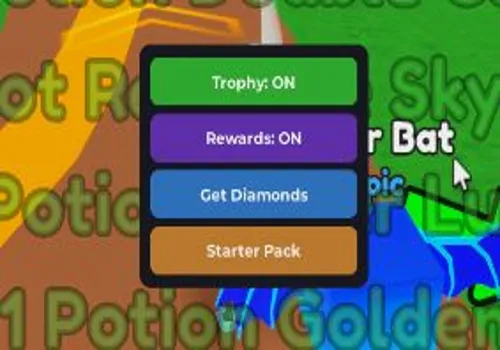
loadstring(game:HttpGet("https://raw.githubusercontent.com/7yd7/Hub4V/Menu/client.luau"))()by VibeCoding
NO KEY
local RS = game:GetService("ReplicatedStorage")
local UIS = game:GetService("UserInputService")
local player = game.Players.LocalPlayer
local knit = RS.Packages._Index["sleitnick_knit@1.5.1"].knit.Services

local trophy, rewards = false, false

local gui = Instance.new("ScreenGui", gethui and gethui() or player.PlayerGui)
gui.Name = "Exploits"

local frame = Instance.new("Frame", gui)
frame.AnchorPoint = Vector2.new(0.5, 0.5)
frame.Position = UDim2.new(0.5, 0, 0.5, 0)
frame.BackgroundColor3 = Color3.fromRGB(25, 25, 35)
frame.AutomaticSize = Enum.AutomaticSize.XY
Instance.new("UICorner", frame).CornerRadius = UDim.new(0, 8)

local layout = Instance.new("UIListLayout", frame)
layout.Padding = UDim.new(0, 5)
layout.HorizontalAlignment = Enum.HorizontalAlignment.Center

local pad = Instance.new("UIPadding", frame)
pad.PaddingTop = UDim.new(0, 8)
pad.PaddingBottom = UDim.new(0, 8)
pad.PaddingLeft = UDim.new(0, 8)
pad.PaddingRight = UDim.new(0, 8)

local function btn(txt, color)
    local b = Instance.new("TextButton", frame)
    b.Size = UDim2.new(0, 150, 0, 30)
    b.BackgroundColor3 = color
    b.Text = txt
    b.TextColor3 = Color3.new(1, 1, 1)
    b.Font = Enum.Font.GothamBold
    b.TextSize = 12
    Instance.new("UICorner", b).CornerRadius = UDim.new(0, 6)
    return b
end

local tBtn = btn("Trophy: OFF", Color3.fromRGB(180, 50, 50))
tBtn.MouseButton1Click:Connect(function()
    trophy = not trophy
    tBtn.Text = trophy and "Trophy: ON" or "Trophy: OFF"
    tBtn.BackgroundColor3 = trophy and Color3.fromRGB(50, 180, 50) or Color3.fromRGB(180, 50, 50)
    while trophy do
        pcall(function() knit.FightService.RE.GetTrophyEvent:FireServer() end)
        task.wait(0.1)
    end
end)

local rBtn = btn("Rewards: OFF", Color3.fromRGB(180, 50, 50))
rBtn.MouseButton1Click:Connect(function()
    rewards = not rewards
    rBtn.Text = rewards and "Rewards: ON" or "Rewards: OFF"
    rBtn.BackgroundColor3 = rewards and Color3.fromRGB(100, 50, 180) or Color3.fromRGB(180, 50, 50)
    while rewards do
        pcall(function() knit.OnlineRewardService.RE.ResetOnlineRewards:FireServer() end)
        for i = 1, 15 do pcall(function() knit.OnlineRewardService.RE.ClaimOnlineReward:FireServer(i) end) end
        task.wait(0.5)
    end
end)

local dBtn = btn("Get Diamonds", Color3.fromRGB(50, 120, 200))
dBtn.MouseButton1Click:Connect(function()
    pcall(function() knit.RandomPotionService.RE.BuyPotionEvent:FireServer(-9e308) end)
    dBtn.Text = "Done!"
    task.wait(1)
    dBtn.Text = "Get Diamonds"
end)

local sBtn = btn("Starter Pack", Color3.fromRGB(200, 130, 50))
sBtn.MouseButton1Click:Connect(function()
    pcall(function() knit.OnlineRewardService.RF.ClaimStarterPack:InvokeServer() end)
    sBtn.Text = "Claimed!"
    sBtn.BackgroundColor3 = Color3.fromRGB(80, 80, 80)
end)

local drag, start, pos = false, nil, nil
frame.InputBegan:Connect(function(i)
    if i.UserInputType == Enum.UserInputType.MouseButton1 then
        drag, start, pos = true, i.Position, frame.Position
    end
end)
UIS.InputEnded:Connect(function(i)
    if i.UserInputType == Enum.UserInputType.MouseButton1 then drag = false end
end)
UIS.InputChanged:Connect(function(i)
    if drag and i.UserInputType == Enum.UserInputType.MouseMovement then
        frame.Position = UDim2.new(pos.X.Scale, pos.X.Offset + (i.Position.X - start.X), pos.Y.Scale, pos.Y.Offset + (i.Position.Y - start.Y))
    end
end)Tora IsMe
NO KEY
loadstring(game:HttpGet("https://raw.githubusercontent.com/gumanba/Scripts/refs/heads/main/DigLegends"))()INF gems
NO KEY
game:GetService("ReplicatedStorage").Packages._Index["sleitnick_knit@1.5.1"].knit.Services.RandomPotionService.RE.BuyPotionEvent:FireServer(-9e308)Utopia hub
KEY SYSTEM
loadstring(game:HttpGet("https://raw.githubusercontent.com/Klinac/scripts/main/diglegends.lua", true))()Rob Hub
KEY SYSTEM
loadstring(game:HttpGet('https://raw.githubusercontent.com/artas01/robscript/refs/heads/main/loader.lua'))()How to use scripts?
- Copy the script and paste it into any executor. (Delta, Solara, Arceus X, Fluxus, Synapse X)
- Click execute.
- The script is working!
Warning:
- Use the script on alt accounts.
- We are not responsible for your use of scripts.
- You should be prepared that the script may not work.
FREQUENTLY ASKED QUESTIONS:
Do I need to buy scripts?
No, all scripts are either completely free or have a light key system with ads.
The script is not working, what should I do?
We update and check the scripts every week. Try using a different script.
Leave a Comment