
LAST UPDATE: 3/31/2026
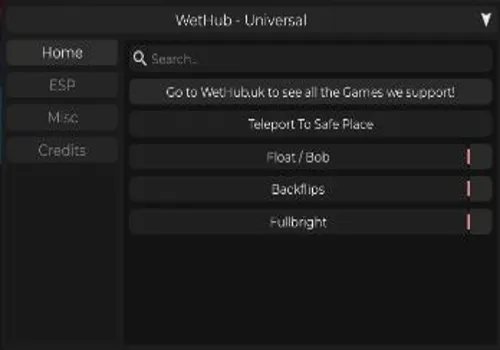
Master the battlefield and combine powerful auras with our advanced combat toolkit. Features include Player ESP for perfect awareness and a Spin Bot for evasive maneuvers. Use Teleport to Safe Place, Float/Bob, and Backflips for superior mobility. Includes NoClip, Fullbright, and Anti AFK. Available as both NO KEY and KEY REQUIRED versions to earn every ability and dominate.
Game link: Aura Battles

Table of Contents
List of working Aura Battles scripts:
KEYLESS Aura Battles script – (By bluecupscripts)
Script functions:
- Teleport to Safe Place – Instantly moves you to a safe zone or area.
- Float/Bob – Makes your character hover or bob in the air.
- Backflips – Performs automatic backflips for evasion or style.
- Fullbright – Removes all darkness and shadows for full visibility.
- Player ESP – Displays enemy positions, health, and auras through walls.
- Anti AFK – Prevents the game from marking you as idle.
- NoClip – Allows movement through walls and terrain.
- Spin Bot – Spins your character rapidly to avoid attacks.
NO KEY
--// GUI Setup
local Players = game:GetService("Players")
local UserInputService = game:GetService("UserInputService")
local player = Players.LocalPlayer

local gui = Instance.new("ScreenGui", player:WaitForChild("PlayerGui"))
gui.Name = "OverlayGUI"
gui.ResetOnSpawn = false

--// Sound
local sound = Instance.new("Sound", gui)
sound.Volume = 1
sound.Looped = false
sound.SoundId = "rbxassetid://113999774854940"

--// UI Panel (Rounded, Shadow)
local panel = Instance.new("Frame", gui)
panel.Size = UDim2.new(0, 360, 0, 480)
panel.Position = UDim2.new(0.5, -180, 0.5, -240)
panel.BackgroundColor3 = Color3.fromRGB(25, 25, 25)

local corner = Instance.new("UICorner", panel)
corner.CornerRadius = UDim.new(0, 12)

local shadow = Instance.new("ImageLabel", panel)
shadow.ZIndex = -1
shadow.AnchorPoint = Vector2.new(0.5, 0.5)
shadow.Position = UDim2.new(0.5, 0, 0.5, 0)
shadow.Size = UDim2.new(1, 40, 1, 40)
shadow.Image = "rbxassetid://6015897843"
shadow.ImageColor3 = Color3.fromRGB(0, 0, 0)
shadow.ImageTransparency = 0.4
shadow.ScaleType = Enum.ScaleType.Slice
shadow.SliceCenter = Rect.new(49, 49, 450, 450)

--// Title Label
local title = Instance.new("TextLabel", panel)
title.Text = "✨ everything script (tailored for this game.)"
title.Size = UDim2.new(1, -20, 0, 40)
title.Position = UDim2.new(0, 10, 0, 10)
title.BackgroundTransparency = 1
title.TextColor3 = Color3.fromRGB(0, 170, 255)
title.TextScaled = true
title.Font = Enum.Font.GothamBold

--// Make Panel Draggable
local dragging = false
local dragStart
local startPos

panel.InputBegan:Connect(function(input)
    if input.UserInputType == Enum.UserInputType.MouseButton1 then
        dragging = true
        dragStart = input.Position
        startPos = panel.Position
    end
end)

panel.InputEnded:Connect(function(input)
    if input.UserInputType == Enum.UserInputType.MouseButton1 then
        dragging = false
    end
end)

UserInputService.InputChanged:Connect(function(input)
    if dragging and input.UserInputType == Enum.UserInputType.MouseMovement then
        local delta = input.Position - dragStart
        panel.Position = UDim2.new(
            startPos.X.Scale,
            startPos.X.Offset + delta.X,
            startPos.Y.Scale,
            startPos.Y.Offset + delta.Y
        )
    end
end)

--// Jumpscare (Teleport + Sound ONLY)
local function jumpscare()
    sound:Play()

    local character = player.Character or player.CharacterAdded:Wait()
    local hrp = character:WaitForChild("HumanoidRootPart")

    hrp.CFrame = hrp.CFrame + Vector3.new(0, 10000000, 0)

    task.delay(2, function()
        sound:Stop()
    end)
end

--// Helper to create modern buttons
local function createButton(text, yPos)
    local btn = Instance.new("TextButton", panel)
    btn.Text = text
    btn.Size = UDim2.new(1, -30, 0, 40)
    btn.Position = UDim2.new(0, 15, 0, yPos)
    btn.BackgroundColor3 = Color3.fromRGB(40, 40, 40)
    btn.TextColor3 = Color3.fromRGB(255, 255, 255)
    btn.Font = Enum.Font.GothamSemibold
    btn.TextScaled = true

    local c = Instance.new("UICorner", btn)
    c.CornerRadius = UDim.new(0, 10)

    btn.MouseButton1Click:Connect(jumpscare)
end

--// Buttons (all trigger jumpscare)
local labels = {
    "🕊️ Flight",
    "🎯 Auto-Aim",
    "👁️ ESP",
    "👻 Invisible",
    "💪 Godmode",
    "🚪 Noclip",
    "🎯 Aimbot",
    "⚡ Speed",
    "🔫 Triggerbot",
    "🛡️ Anti-K"
}

for i, name in ipairs(labels) do
    createButton(name, 60 + (i - 1) * 42)
endWethub
NO KEY
loadstring(game:HttpGet("https://wethub.uk/Script"))()Sentry Hub
KEY SYSTEM
loadstring(game:HttpGet('https://raw.githubusercontent.com/SentryHub1/SentryH/refs/heads/main/main%2028.lua'))()Rob Hub
KEY SYSTEM
loadstring(game:HttpGet('https://raw.githubusercontent.com/artas01/robscript/refs/heads/main/loader.lua'))()How to use scripts?
- Copy the script and paste it into any executor. (Delta, Solara, Arceus X, Fluxus, Synapse X)
- Click execute.
- The script is working!
Warning:
- Use the script on alt accounts.
- We are not responsible for your use of scripts.
- You should be prepared that the script may not work.
FREQUENTLY ASKED QUESTIONS:
Do I need to buy scripts?
No, all scripts are either completely free or have a light key system with ads.
The script is not working, what should I do?
We update and check the scripts every week. Try using a different script.
Leave a Comment