
LAST UPDATE: 3/25/2026
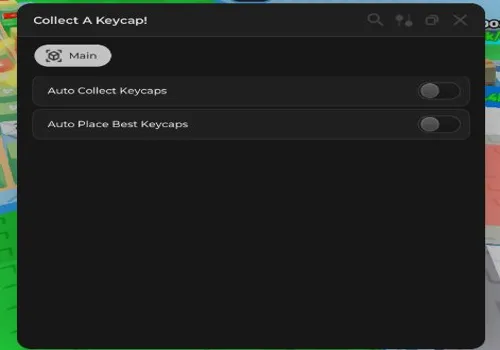
Build your ultimate keycap empire with our complete automation. Features include Auto Collect Keycaps and Cash, plus Auto Upgrades for Luck, Radius, and Walkspeed. Perform Auto Rebirth to maximize your profits endlessly. Available as both NO KEY and KEY REQUIRED versions to craft the most valuable keycaps with ease.
Game link: Collect a Keycap

Table of Contents
List of working Collect a Keycap scripts:
Collect a Keycap script – (KEYLESS) by Demonalt
Script functions:
- Auto Collect Keycaps – Automatically collects all keycaps on the map.
- Auto Upgrades: Luck, Radius, Walkspeed – Automatically purchases upgrades for luck, collection radius, and movement speed.
- Auto Collect Cash from Keycaps – Automatically collects money generated by placed keycaps.
- Auto Rebirth – Automatically performs rebirths for multipliers.
NO KEY
loadstring(game:HttpGet("https://pastefy.app/5uYc3Efe/raw"))()Brick Hub
NO KEY
loadstring(game:HttpGet("https://pastefy.app/4h8ONYQS/raw"))()By Rainyybs & Yo_Ra7 – VERY OP
NO KEY
loadstring(game:HttpGet('https://raw.githubusercontent.com/RainyGH/Keycap/refs/heads/main/CollectAKeycapKeyless'))()By sillydudescripts
NO KEY
loadstring(game:HttpGet("https://raw.githubusercontent.com/sillydudescripts/collect-a-keycap-script/refs/heads/main/main.lua"))()Collect a Keycap script – (Open Source)
NO KEY
local Players = game:GetService("Players")
local RunService = game:GetService("RunService")
local player = Players.LocalPlayer
local character = player.Character or player.CharacterAdded:Wait()
local humanoidRootPart = character:WaitForChild("HumanoidRootPart")

local config = {
    scanOnStart = true,           -- Auto scan on start
    teleportDelay = 0,            -- 0 delay between teleports
    teleportHeight = 2,           -- Minimum height
    showNotifications = true,     -- Quick notifications
    sortByDistance = true,        -- Sort by proximity
    loopTeleport = false          -- No looping
}

-- State
local keycaps = {}
local isTeleporting = false
local scanCompleted = false

local function ultraFastScan()
    keycaps = {}
    scanCompleted = false

    -- Look for keycaps folder
    local keycapsFolder = workspace:FindFirstChild("keycaps")
    if not keycapsFolder then
        warn("❌ 'keycaps' folder not found!")
        return {}
    end

    -- Ultra fast recursive scan
    local function quickScan(folder)
        for _, item in pairs(folder:GetChildren()) do
            if item:IsA("BasePart") then
                table.insert(keycaps, item)
            elseif item:IsA("Folder") or item:IsA("Model") then
                quickScan(item)
            end
        end
    end

    quickScan(keycapsFolder)

    -- Sort by proximity for shortest path
    if config.sortByDistance and #keycaps > 1 then
        local sorted = {}
        local currentPos = humanoidRootPart.Position
        local remaining = {unpack(keycaps)}

        while #remaining > 0 do
            local nearestIndex = 1
            local nearestDist = (currentPos - remaining[1].Position).Magnitude

            for i = 2, #remaining do
                local dist = (currentPos - remaining[i].Position).Magnitude
                if dist < nearestDist then
                    nearestDist = dist
                    nearestIndex = i
                end
            end

            table.insert(sorted, remaining[nearestIndex])
            currentPos = remaining[nearestIndex].Position
            table.remove(remaining, nearestIndex)
        end

        keycaps = sorted
    end

    scanCompleted = true
    return keycaps
end

local function instantTeleport()
    if isTeleporting then return end

    -- Scan if not done yet
    if #keycaps == 0 then
        ultraFastScan()
        if #keycaps == 0 then return end
    end

    isTeleporting = true

    -- Teleport to ALL keycaps almost instantly
    for i, keycap in ipairs(keycaps) do
        if not isTeleporting then break end

        -- DIRECT teleport without delays
        if keycap and keycap:IsA("BasePart") and keycap:IsDescendantOf(workspace) then
            -- Quick position calculation
            local teleportPos = keycap.Position + Vector3.new(0, keycap.Size.Y/2 + config.teleportHeight, 0)

            -- INSTANT teleport
            humanoidRootPart.CFrame = CFrame.new(teleportPos)

            -- Update UI if exists
            if teleportUI then
                teleportUI.Status.Text = "TP: " .. i .. "/" .. #keycaps
            end

            -- ZERO delay (or almost)
            if i < #keycaps then
                task.wait(config.teleportDelay)
            end
        end
    end

    isTeleporting = false

    -- Quick notification
    if config.showNotifications then
        game:GetService("StarterGui"):SetCore("SendNotification", {
            Title = "✅ Complete",
            Text = "Instant teleport finished!",
            Duration = 1,
            Icon = "rbxassetid://4483345998"
        })
    end
end

-- ================================================
-- SIMPLE UI - ONE BUTTON ONLY
-- ================================================

local teleportUI = nil

local function createOneButtonUI()
    local screenGui = Instance.new("ScreenGui")
    screenGui.Name = "UltraFastTeleporter"
    screenGui.Parent = player:WaitForChild("PlayerGui")

    -- Main container
    local mainFrame = Instance.new("Frame")
    mainFrame.Size = UDim2.new(0, 120, 0, 50)
    mainFrame.Position = UDim2.new(0, 10, 0, 10)
    mainFrame.BackgroundColor3 = Color3.fromRGB(20, 20, 30)
    mainFrame.BackgroundTransparency = 0.1

    -- One big button
    local teleportButton = Instance.new("TextButton")
    teleportButton.Size = UDim2.new(0.9, 0, 0.8, 0)
    teleportButton.Position = UDim2.new(0.05, 0, 0.1, 0)
    teleportButton.Text = "⚡ TP ALL"
    teleportButton.BackgroundColor3 = Color3.fromRGB(0, 200, 0)
    teleportButton.TextColor3 = Color3.fromRGB(255, 255, 255)
    teleportButton.Font = Enum.Font.GothamBold
    teleportButton.TextSize = 16

    -- Mini status
    local statusLabel = Instance.new("TextLabel")
    statusLabel.Size = UDim2.new(1, 0, 0, 15)
    statusLabel.Position = UDim2.new(0, 0, 0, -20)
    statusLabel.Text = "Ready"
    statusLabel.TextColor3 = Color3.fromRGB(200, 200, 255)
    statusLabel.BackgroundTransparency = 1
    statusLabel.TextSize = 12
    statusLabel.Name = "Status"

    -- Add to screen
    mainFrame.Parent = screenGui
    teleportButton.Parent = mainFrame
    statusLabel.Parent = screenGui

    -- Button event
    teleportButton.MouseButton1Click:Connect(function()
        if not isTeleporting then
            statusLabel.Text = "Teleporting..."
            instantTeleport()
            statusLabel.Text = "Ready (" .. #keycaps .. " keycaps)"
        end
    end)

    -- Button hover effect
    teleportButton.MouseEnter:Connect(function()
        teleportButton.BackgroundColor3 = Color3.fromRGB(0, 230, 0)
    end)

    teleportButton.MouseLeave:Connect(function()
        teleportButton.BackgroundColor3 = Color3.fromRGB(0, 200, 0)
    end)

    teleportUI = {
        Button = teleportButton,
        Status = statusLabel,
        Frame = mainFrame
    }

    return screenGui
end

-- ================================================
-- KEYBOARD CONTROL - T KEY ONLY
-- ================================================

local UserInputService = game:GetService("UserInputService")
UserInputService.InputBegan:Connect(function(input, gameProcessed)
    if gameProcessed then return end

    -- ONLY T key for everything
    if input.KeyCode == Enum.KeyCode.T then
        if not isTeleporting then
            if teleportUI then
                teleportUI.Status.Text = "Teleporting..."
            end
            instantTeleport()
            if teleportUI then
                teleportUI.Status.Text = "Ready (" .. #keycaps .. " keycaps)"
            end
        end
    end
end)

-- ================================================
-- FAST SCAN
-- ================================================

-- Auto scan on start
task.spawn(function()
    task.wait(1) -- Small delay to ensure everything loaded

    print("🔍 Auto scan started...")
    local found = ultraFastScan()

    if #found > 0 then
        print("✅ " .. #found .. " keycaps found automatically!")

        if teleportUI then
            teleportUI.Status.Text = "Ready (" .. #found .. " keycaps)"
        end

        if config.showNotifications then
            game:GetService("StarterGui"):SetCore("SendNotification", {
                Title = "✅ Scan Complete",
                Text = #found .. " keycaps ready for TP!",
                Duration = 2,
                Icon = "rbxassetid://4483345998"
            })
        end
    else
        print("⚠️ No keycaps found in auto scan")
        if teleportUI then
            teleportUI.Status.Text = "No keycaps found"
        end
    end
end)

-- Create UI
createOneButtonUI()

print("======================================")
print("⚡ ULTRA FAST KEYCAP TELEPORTER ⚡")
print("Loaded successfully!")
print("")
print("📌 HOW TO USE:")
print("1. Click the '⚡ TP ALL' button")
print("2. OR press T key")
print("======================================")

-- Debug function
local function debugInfo()
    print("\n📊 DEBUG INFO:")
    print("Keycaps found: " .. #keycaps)
    print("Scan completed: " .. tostring(scanCompleted))
    print("Teleporting: " .. tostring(isTeleporting))

    if #keycaps > 0 then
        print("\nFirst 5 keycaps:")
        for i = 1, math.min(5, #keycaps) do
            local k = keycaps[i]
            print(i .. ". " .. k.Name .. " | Pos: " ..
                  math.floor(k.Position.X) .. "," ..
                  math.floor(k.Position.Y) .. "," ..
                  math.floor(k.Position.Z))
        end
    end
end

-- Debug shortcut (optional)
UserInputService.InputBegan:Connect(function(input, gameProcessed)
    if gameProcessed then return end
    if input.KeyCode == Enum.KeyCode.P then
        debugInfo()
    end
end)By Belka
KEY SYSTEM
loadstring(game:HttpGet("https://api.junkie-development.de/api/v1/luascripts/public/e124817c0a3fce9c8ce0e082549c3bb1993e61b539268d55d2f4b7b8497ef768/download"))()Rob Hub
KEY SYSTEM
loadstring(game:HttpGet('https://raw.githubusercontent.com/artas01/robscript/refs/heads/main/loader.lua'))()How to use scripts?
- Copy the script and paste it into any executor. (Delta, Solara, Arceus X, Fluxus, Synapse X)
- Click execute.
- The script is working!
Warning:
- Use the script on alt accounts.
- We are not responsible for your use of scripts.
- You should be prepared that the script may not work.
FREQUENTLY ASKED QUESTIONS:
Do I need to buy scripts?
No, all scripts are either completely free or have a light key system with ads.
The script is not working, what should I do?
We update and check the scripts every week. Try using a different script.
Leave a Comment