Find any script for Roblox

Enter the name of the game or script.

Might be interesting:

Idle Potato Game scripts – NO KEY (February 2026)

idle potato game scripts - no key

Script Views: 8

LAST UPDATE: 2/27/2026

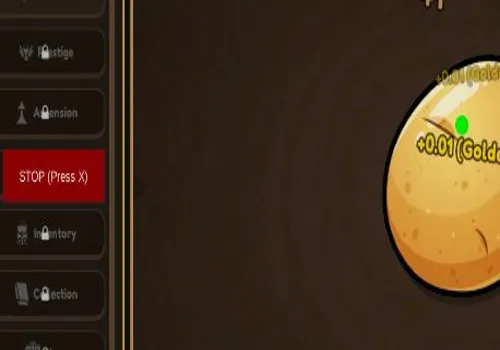
Build your ultimate automated potato empire with our essential tools. Features include an Auto Clicker that clicks the Spawn dot button on the left and moves it to the potato (dot in the upper left corner). Auto Sell automatically dumps potatoes and golden potatoes for cash. Anti AFK ensures non-stop progress. Available as both NO KEY and KEY REQUIRED versions to climb the leaderboards and master the rebirth system.

Game link: Idle Potato Game

Видео

Table of Contents


    List of working Idle Potato Game scripts:

    KEYLESS Idle Potato Game script – by scottylicey


    Script functions:

    • Auto Clicker – Automatically clicks on the Spawn dot and targets the potato for continuous farming.
    • Auto Sell – Sells all regular and golden potatoes for cash.
    • Anti AFK – Prevents the game from marking you as idle.
    NO KEY
    local UserInputService = game:GetService("UserInputService")
    local VIM = game:GetService("VirtualInputManager")
    
    -- 1. Setup UI
    local screenGui = Instance.new("ScreenGui")
    screenGui.Name = "ExploitDot"
    screenGui.Parent = game:GetService("CoreGui") 
    
    local summonBtn = Instance.new("TextButton")
    summonBtn.Size = UDim2.new(0, 120, 0, 40)
    summonBtn.Position = UDim2.new(0, 50, 0.5, 0)
    summonBtn.Text = "Summon Dot"
    summonBtn.BackgroundColor3 = Color3.fromRGB(40, 40, 40)
    summonBtn.TextColor3 = Color3.new(1, 1, 1)
    summonBtn.Parent = screenGui
    
    local dot = Instance.new("Frame")
    dot.Size = UDim2.new(0, 15, 0, 15)
    dot.BackgroundColor3 = Color3.new(1, 0, 0)
    dot.Visible = false
    dot.Active = true
    dot.Parent = screenGui
    
    local corner = Instance.new("UICorner")
    corner.CornerRadius = UDim.new(1, 0)
    corner.Parent = dot
    
    -- Logic Variables
    local clicking = false
    local windowActive = true
    
    -- Update UI State Function
    local function updateUI()
        if clicking then
            summonBtn.Text = "STOP (Press X)"
            summonBtn.BackgroundColor3 = Color3.fromRGB(150, 0, 0)
            dot.BackgroundColor3 = Color3.new(0, 1, 0)
        else
            summonBtn.Text = "START"
            summonBtn.BackgroundColor3 = Color3.fromRGB(40, 40, 40)
            dot.BackgroundColor3 = Color3.new(1, 0, 0)
        end
    end
    
    -- Focus Tracking
    UserInputService.WindowFocusReleased:Connect(function() windowActive = false end)
    UserInputService.WindowFocused:Connect(function() windowActive = true end)
    
    -- 2. Drag Logic
    local function makeDraggable(guiObject)
        local dragging, dragInput, dragStart, startPos
        guiObject.InputBegan:Connect(function(input)
            if input.UserInputType == Enum.UserInputType.MouseButton1 then
                dragging = true
                dragStart = input.Position
                startPos = guiObject.Position
                input.Changed:Connect(function()
                    if input.UserInputState == Enum.UserInputState.End then dragging = false end
                end)
            end
        end)
        UserInputService.InputChanged:Connect(function(input)
            if dragging and input.UserInputType == Enum.UserInputType.MouseMovement then
                local delta = input.Position - dragStart
                guiObject.Position = UDim2.new(startPos.X.Scale, startPos.X.Offset + delta.X, startPos.Y.Scale, startPos.Y.Offset + delta.Y)
            end
        end)
    end
    
    makeDraggable(summonBtn)
    makeDraggable(dot)
    
    -- 3. Toggle Logic (Button and Keybind)
    local function toggleClicking()
        if not dot.Visible then
            dot.Visible = true
            updateUI()
            return
        end
        clicking = not clicking
        updateUI()
    end
    
    summonBtn.MouseButton1Click:Connect(toggleClicking)
    
    -- Emergency Keybind: Press 'X' to Stop/Start
    UserInputService.InputBegan:Connect(function(input, gameProcessed)
        if input.KeyCode == Enum.KeyCode.X then
            toggleClicking()
        end
    end)
    
    -- 4. The Click Loop
    task.spawn(function()
        while true do
            if clicking and windowActive then
                local x = dot.AbsolutePosition.X + (dot.AbsoluteSize.X / 2)
                local y = dot.AbsolutePosition.Y + (dot.AbsoluteSize.Y / 2)
                
                VIM:SendMouseButtonEvent(x, y, 0, true, game, 1) 
                task.wait(0.02) -- Small gap to allow UI to breathe
                VIM:SendMouseButtonEvent(x, y, 0, false, game, 1) 
            end
            task.wait(0.07) -- Slightly slower default to prevent UI freezing
        end
    end)
    Expand

    Luminis Hub

    KEY SYSTEM
    loadstring(game:HttpGet("https://api.luarmor.net/files/v4/loaders/24df4399c3458d81346da5dda02fe1d1.lua"))()

    KOBEH Hub

    KEY SYSTEM
    loadstring(game:HttpGet("https://api.jnkie.com/api/v1/luascripts/public/1e2ae2cb234b5d4f31457b0d09188c0f3ff9243a4cfbb237f90b817d6d9429ba/download"))()
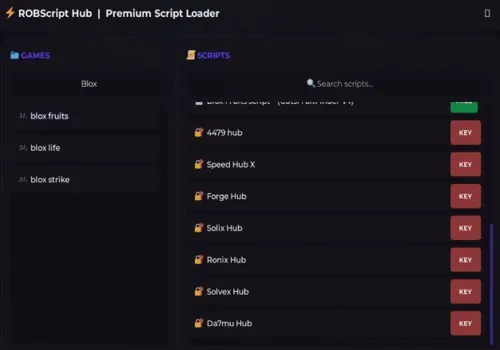
    Rob Hub

    KEY SYSTEM
    loadstring(game:HttpGet('https://raw.githubusercontent.com/artas01/robscript/refs/heads/main/loader.lua'))()

    How to use scripts?

    • Copy the script and paste it into any executor. (Delta, Solara, Arceus X, Fluxus, Synapse X)
    • Click execute.
    • The script is working!

    Warning:

    • Use the script on alt accounts.
    • We are not responsible for your use of scripts.
    • You should be prepared that the script may not work.

    FREQUENTLY ASKED QUESTIONS:

    Do I need to buy scripts?

    No, all scripts are either completely free or have a light key system with ads.

    The script is not working, what should I do?

    We update and check the scripts every week. Try using a different script.


    Leave a Comment

    Your email address will not be published. Required fields are marked *