Find any script for Roblox

Enter the name of the game or script.

Might be interesting:

Zombie RNG scripts – NO KEY (March 2026)

survive wave z scripts - no key

Script Views: 0

LAST UPDATE: 1/12/2026

Survive the relentless undead in Wave Z! This essential script grants you permanent godmode and auto-revives all fallen players, keeping your team in the fight forever. Mow down endless hordes and bosses, roll for the best weapons, and push further than ever to reach the legendary final wave!

Game link: Zombie RNG

Видео

Table of Contents


    List of working Zombie RNG scripts:

    KEYLESS Zombie RNG script


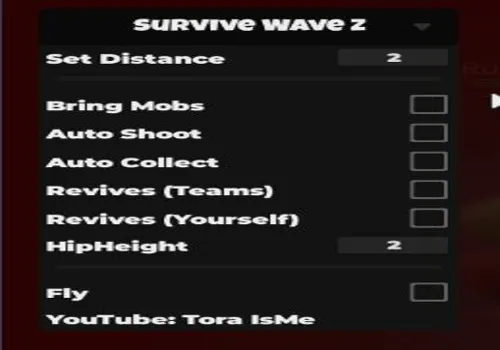
    Script functions:

    • Godmode – Makes you invulnerable to all zombie attacks.
    • Auto Revive Players – Automatically revives any downed teammates.
    NO KEY
    loadstring(game:HttpGet('https://raw.githubusercontent.com/gumanba/Scripts/refs/heads/main/SurviveWaveZ'))()

    l0stveil

    NO KEY
    getgenv().settings = {
        teleport = {
            enabled = true,
            players = true -- teleports to dead players to revive them
        }
    }
    
    game:GetService("RunService").Heartbeat:Connect(function()
        if getgenv().settings.teleport.enabled then
            if game:GetService("Players").LocalPlayer.Character and game:GetService("Players").LocalPlayer.Character.Humanoid.Health <= 0 then
                if game:GetService("Players").LocalPlayer.Character.Head.RevivePrompt then
                    fireproximityprompt(game:GetService("Players").LocalPlayer.Character.Head.RevivePrompt)
                end
            end
            if getgenv().settings.teleport.players then
                for i, v in pairs(game:GetService("Players"):GetPlayers()) do
                    if v ~= game:GetService("Players").LocalPlayer and v.Character and v.Character.Humanoid.Health <= 0 and v.Character.Head.RevivePrompt and game:GetService("Players").LocalPlayer.Character and game:GetService("Players").LocalPlayer.Character.Humanoid.Health > 0 then
                        game:GetService("Players").LocalPlayer.Character.HumanoidRootPart.CFrame = v.Character.HumanoidRootPart.CFrame
                        fireproximityprompt(v.Character.Head.RevivePrompt)
                    end
                end
            end
        end
    end)


    How to use scripts?

    • Copy the script and paste it into any executor. (Delta, Solara, Arceus X, Fluxus, Synapse X)
    • Click execute.
    • The script is working!

    Warning:

    • Use the script on alt accounts.
    • We are not responsible for your use of scripts.
    • You should be prepared that the script may not work.

    FREQUENTLY ASKED QUESTIONS:

    Do I need to buy scripts?

    No, all scripts are either completely free or have a light key system with ads.

    The script is not working, what should I do?

    We update and check the scripts every week. Try using a different script.

    Leave a Comment

    Your email address will not be published. Required fields are marked *