
LAST UPDATE: 3/19/2026
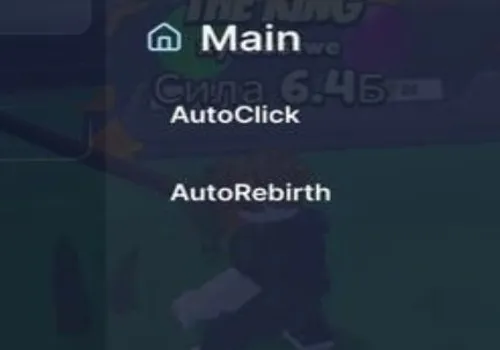
Become the ultimate sword puller! This script automates your training with auto-clicking and auto-rebirthing, maximizing your strength gains around the clock. Collect every sword, win, and pet effortlessly while the anti-AFK feature ensures your progress never stops. Dominate the game with non-stop power!
Game link: Pull a Sword

Table of Contents
List of working Pull a Sword scripts:
KEYLESS Pull a Sword script – (Why Hub)
Script functions:
- Auto Click – Continuously clicks to train and gain strength.
- Auto Rebirth – Automatically rebirths to gain multipliers and reset progress.
- Anti AFK – Prevents being kicked for inactivity.
NO KEY
loadstring(game:HttpGet("https://raw.githubusercontent.com/JustLuaDeveloper/WhyHub/refs/heads/main/Loader.lua"))()Auto Clicker – Open Source
KEY SYSTEM
--[[
	WARNING: Heads up! This script has not been verified by ScriptBlox. Use at your own risk!
]]
local player = game.Players.LocalPlayer
local ReplicatedStorage = game:GetService("ReplicatedStorage")
local RunService = game:GetService("RunService")
local UserInputService = game:GetService("UserInputService")
local VirtualUser = game:GetService("VirtualUser")

-- CONFIGS DE TEMA
local Themes = {Color3.fromRGB(0, 150, 255), Color3.fromRGB(0, 255, 255), Color3.fromRGB(255, 255, 255), Color3.fromRGB(15, 15, 15)}
local themeIdx = 1

local active, clicking, rebirthing, autoE = true, false, false, false
local isMinimized, isFull = false, false
local oldSize, oldPos = UDim2.new(0, 400, 0, 300), UDim2.new(0.5, -200, 0.4, 0)

-- CACHE DE REMOTES
local remotes = { clicks = {}, rebirths = {} }
for _, v in pairs(ReplicatedStorage:GetDescendants()) do
    if v:IsA("RemoteEvent") then
        local n = v.Name:lower()
        if n:find("click") or n:find("train") or n:find("strength") then table.insert(remotes.clicks, v) end
        if n:find("reb") then table.insert(remotes.rebirths, v) end
    end
end

-- UI RAYFIELD (V28 FIX)
local screenGui = Instance.new("ScreenGui", player.PlayerGui); screenGui.Name = "Rayfield_V28"; screenGui.ResetOnSpawn = false
local main = Instance.new("Frame", screenGui); main.Size = oldSize; main.Position = oldPos; main.BackgroundColor3 = Color3.fromRGB(15, 15, 15); main.Active = true; main.Draggable = true; main.ClipsDescendants = true; Instance.new("UICorner", main).CornerRadius = UDim.new(0, 10)
local stroke = Instance.new("UIStroke", main); stroke.Color = Themes[themeIdx]; stroke.Thickness = 2

-- SIDEBAR
local sidebar = Instance.new("Frame", main); sidebar.Size = UDim2.new(0, 100, 1, 0); sidebar.BackgroundColor3 = Color3.fromRGB(20, 20, 20); Instance.new("UICorner", sidebar)
local logo = Instance.new("TextLabel", sidebar); logo.Text = "SWORD\nELITE"; logo.Size = UDim2.new(1, 0, 0, 60); logo.TextColor3 = Themes[themeIdx]; logo.Font = Enum.Font.GothamBold; logo.BackgroundTransparency = 1

-- CONTROLES
local function createCtrl(txt, pos, col)
    local b = Instance.new("TextButton", main); b.Text = txt; b.Size = UDim2.new(0, 25, 0, 25); b.Position = pos; b.BackgroundColor3 = col or Color3.fromRGB(30, 30, 30); b.TextColor3 = Color3.new(1,1,1); Instance.new("UICorner", b); return b
end
local closeBtn = createCtrl("X", UDim2.new(1, -30, 0, 5), Color3.fromRGB(150, 0, 0))
local fullBtn = createCtrl("▢", UDim2.new(1, -60, 0, 5))
local minBtn = createCtrl("-", UDim2.new(1, -90, 0, 5))

-- CONTAINER
local container = Instance.new("ScrollingFrame", main); container.Size = UDim2.new(1, -110, 1, -45); container.Position = UDim2.new(0, 105, 0, 40); container.BackgroundTransparency = 1; container.ScrollBarThickness = 0
local layout = Instance.new("UIListLayout", container); layout.Padding = UDim.new(0, 10); layout.HorizontalAlignment = Enum.HorizontalAlignment.Center

local function createBtn(txt, callback)
    local b = Instance.new("TextButton", container); b.Size = UDim2.new(0.95, 0, 0, 40); b.Text = "  "..txt; b.BackgroundColor3 = Color3.fromRGB(25, 25, 25); b.TextColor3 = Color3.new(1,1,1); b.Font = Enum.Font.GothamMedium; b.TextXAlignment = Enum.TextXAlignment.Left; Instance.new("UICorner", b)
    local s = Instance.new("UIStroke", b); s.Color = Themes[themeIdx]; s.Thickness = 1.2; s.Transparency = 0.8
    b.MouseButton1Click:Connect(function() callback(b, s) end)
    return b, s
end

local bTrain, sTrain = createBtn("AUTO TRAIN (T)", function() clicking = not clicking end)
local bE, sE = createBtn("AUTO PRESS E", function() autoE = not autoE end)
local bReb, sReb = createBtn("AUTO REBIRTH", function() rebirthing = not rebirthing end)
local bColor = createBtn("MUDAR COR", function() themeIdx = (themeIdx % #Themes) + 1; local c = Themes[themeIdx]; stroke.Color = c; logo.TextColor3 = c; sTrain.Color = c; sE.Color = c; sReb.Color = c end)
createBtn("By: nagizaronagi", function() end)

-- LOGICA JANELA
closeBtn.MouseButton1Click:Connect(function() active = false; screenGui:Destroy() end)
fullBtn.MouseButton1Click:Connect(function() isFull = not isFull; main:TweenSizeAndPosition(isFull and UDim2.new(1,0,1,0) or oldSize, isFull and UDim2.new(0,0,0,0) or oldPos, "Out", "Quad", 0.3, true) end)
minBtn.MouseButton1Click:Connect(function() isMinimized = not isMinimized; main:TweenSize(isMinimized and UDim2.new(0, 400, 0, 35) or oldSize, "Out", "Quad", 0.3, true); container.Visible = not isMinimized; sidebar.Visible = not isMinimized end)

-- LOOP AUTO CLICK (FIXED FOR OPEN UI)
RunService.Heartbeat:Connect(function()
    if not active or not clicking then return end
    if sTrain then sTrain.Transparency = 0 end

    -- Manda sinal de clique real para o centro da tela (ignora onde o mouse está para não bugar na UI)
    local viewportSize = workspace.CurrentCamera.ViewportSize
    local center = Vector2.new(viewportSize.X/2, viewportSize.Y/2)

    VirtualUser:Button1Down(center)
    VirtualUser:Button1Up(center)

    -- Ativa espada e Remotes em paralelo
    local t = player.Character and player.Character:FindFirstChildOfClass("Tool")
    if t then t:Activate() end
    for _, ev in ipairs(remotes.clicks) do ev:FireServer() end
end)

-- LOOP E + REBIRTH
task.spawn(function()
    while task.wait(0.1) do
        if not active then break end
        if sE then sE.Transparency = autoE and 0 or 0.8 end
        if sReb then sReb.Transparency = rebirthing and 0 or 0.8 end

        if autoE then
            VirtualUser:TypeKey("e")
            task.wait(0.85)
        end
        if rebirthing then for _, ev in ipairs(remotes.rebirths) do ev:FireServer() end end
    end
end)

UserInputService.InputBegan:Connect(function(i, p) if not p and i.KeyCode == Enum.KeyCode.T then clicking = not clicking end end)
player.Idled:Connect(function() VirtualUser:ClickButton2(Vector2.new(0,0)) end)
Nisulrocks Hub
KEY SYSTEM
loadstring(game:HttpGet("https://raw.githubusercontent.com/Nisulrocks/Pull-a-Sword/refs/heads/main/main"))()Rob Hub
KEY SYSTEM
loadstring(game:HttpGet('https://raw.githubusercontent.com/artas01/robscript/refs/heads/main/loader.lua'))()Wicik hub
KEY SYSTEM
loadstring(game:HttpGet("https://raw.githubusercontent.com/Wic1k/Scripts/refs/heads/main/PaS.txt"))()How to use scripts?
- Copy the script and paste it into any executor. (Delta, Solara, Arceus X, Fluxus, Synapse X)
- Click execute.
- The script is working!
Warning:
- Use the script on alt accounts.
- We are not responsible for your use of scripts.
- You should be prepared that the script may not work.
FREQUENTLY ASKED QUESTIONS:
Do I need to buy scripts?
No, all scripts are either completely free or have a light key system with ads.
The script is not working, what should I do?
We update and check the scripts every week. Try using a different script.
Leave a Comment