
LAST UPDATE: 3/31/2026
Master the chaotic racing game where you build the track with our essential tools. Features include TP to End for instant wins and Autofarm Money for easy unlocks. A Human-Like Delay keeps actions undetectable, while Return to Finish After Checkpoints and Emergency Stop provide perfect control. Anti AFK ensures constant progress. Available as both NO KEY and KEY REQUIRED versions to dominate every race.
Game link: Brace

Table of Contents
List of working Brace scripts:
KEYLESS Brace script – (By GreenVR512)
Script functions:
- TP to End – Teleports your vehicle directly to the finish line.
- Autofarm Money – Automatically completes races to farm currency.
- Human-like Delay – Adds realistic timing delays to actions to mimichuman play.
- Return to Finish – Automatically returns to the finish line after passing checkpoints.
- Emergency Stop – Instantly stops your vehicle to avoid falling or crashing.
- Anti AFK – Prevents the game from marking you as idle.
NO KEY
loadstring(game:HttpGet("https://pastebin.com/raw/wjxT03NG", true))()Auto Farm – Open Source
NO KEY
-- services --
local players = game:GetService("Players")
local workspace = game:GetService("Workspace")
local replicatedStorage = game:GetService("ReplicatedStorage")
local vim = game:GetService("VirtualInputManager")
-- local player
local player = players.LocalPlayer
local mouse = player:GetMouse()
local character = player.Character or player.CharacterAdded:Wait()
local HRP = character:WaitForChild("HumanoidRootPart")
local humanoid = character:FindFirstChildOfClass("Humanoid")
 -- rayfield
 local Rayfield = loadstring(game:HttpGet('https://sirius.menu/rayfield'))()
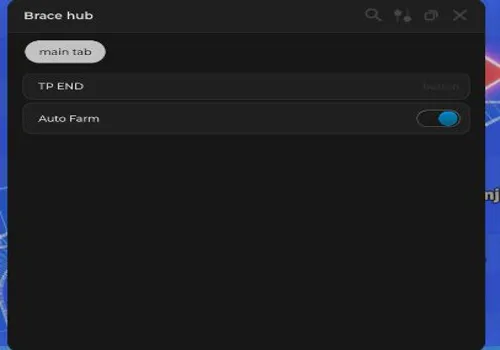
 local Window = Rayfield:CreateWindow({
   Name = "Brace hub",
   Icon = 0,
   LoadingTitle = "Rayfield Interface Suite",
   LoadingSubtitle = "by Sirius",
   Theme = "Default",
   ToggleUIKeybind = "G",
   DisableRayfieldPrompts = false,
   DisableBuildWarnings = false,
   ConfigurationSaving = {
      Enabled = false,
      FolderName = "BraceConfigs",
      FileName = "config"
   },
})

local testTab = Window:CreateTab("main tab")
local vechileFolder = workspace.CurrentVehicles
local trackpartsFolder = workspace.TrackParts
local autoFarmToggle = false

local function getPlayerVechile()
   local playerName = player.Name
   for _,car in pairs(vechileFolder:GetChildren()) do
      if car.Name == playerName then
         return car
      end
   end
end

local function Teleport(tp)
    local vechile = getPlayerVechile()
    if vechile then
       vechile:PivotTo(tp)
    else
       print("Attempted to move vechile when it didnt exist yet")
    end
end

local function isRoundStarted()
    local car = getPlayerVechile()
    if not car then return false end
    if not car.PrimaryPart then return false end
    if car.PrimaryPart.Anchored then return false end
    return true
end

local function getStageByNumber(number : number)
    print("Entered getStageByNumber with number: "..number)
    local result = {}
    for _,stage in pairs(trackpartsFolder:GetChildren()) do
        print("Comparing: "..stage.Name.." With: "..number..".")
        if stage.Name == tostring(number) then
            print("Found Stage")
            table.insert(result,stage)
        end
    end
    return result
end

local function getCheckpoints()
    local checkpoints = {}
    for i,stage in pairs(trackpartsFolder:GetChildren()) do
        for _,stagey in pairs(getStageByNumber(i)) do
            if stagey:FindFirstChild("Trigger") then
                table.insert(checkpoints, stagey.Trigger)
            end
        end
    end
    return checkpoints
end

testTab:CreateButton({
   Name = "TP END",
   Callback = function()
    Teleport(workspace.TrackParts.End.Finish.CFrame)
   end,
})

testTab:CreateToggle({
    Name = "Auto Farm",
    CurrentValue = false,
    flag = "autoFarm",
    Callback = function(Value)
        print("set autofarm to: "..tostring(Value))
        autoFarmToggle = Value
    end,
})

task.spawn(function()
    while true do
        if autoFarmToggle then
            task.wait()
            local started = isRoundStarted()
            if started then
                local checkpoints = getCheckpoints()
                for _,v in pairs(checkpoints) do
                    Teleport(v.CFrame)
                    task.wait(1.5)
                end
                Teleport(workspace.TrackParts.End.Finish.CFrame)
            else
                print("Round Not Started")
            end
        else
            task.wait(1)
        end
    end
end)

-- anti afk

task.spawn(function()
    while task.wait(100) do
        vim:SendKeyEvent(true, Enum.KeyCode.Tilde, false, nil)
        task.wait(0.1)
        vim:SendKeyEvent(false, Enum.KeyCode.Tilde, false, nil)
    end
end)
Noic Hub
KEY SYSTEM
loadstring(game:HttpGet('https://raw.githubusercontent.com/noicyreal/bracehub/refs/heads/main/brace.lua'))()Raxx Scripts
KEY SYSTEM
loadstring(game:HttpGet("https://pastebin.com/raw/CPuPYcxC", true))()Rob Hub
KEY SYSTEM
loadstring(game:HttpGet('https://raw.githubusercontent.com/artas01/robscript/refs/heads/main/loader.lua'))()How to use scripts?
- Copy the script and paste it into any executor. (Delta, Solara, Arceus X, Fluxus, Synapse X)
- Click execute.
- The script is working!
Warning:
- Use the script on alt accounts.
- We are not responsible for your use of scripts.
- You should be prepared that the script may not work.
FREQUENTLY ASKED QUESTIONS:
Do I need to buy scripts?
No, all scripts are either completely free or have a light key system with ads.
The script is not working, what should I do?
We update and check the scripts every week. Try using a different script.
Leave a Comment