LAST UPDATE: 4/1/2026
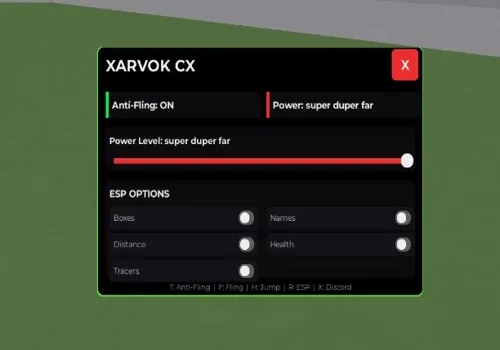
Unleash pure chaos in Fling Things and People! This script grants you super fling power to launch objects and players far across the map. Protect yourself with anti-fling and anti-grab, while using ESP to track everyone. Poison or set the entire arena on fire and move with enhanced speed for total mayhem!
Game link: Fling Things and People

Table of Contents
List of working Fling Things and People scripts:
Fling Things and People script – (Xarvok Hub)
Script functions:
- Anti Fling – Prevents other players from flinging you.
- Super Power and Far Fling – Greatly increases your fling strength and distance.
- ESP players – Shows the location of all players through obstacles.
- Walkspeed modifier – Adjusts your movement speed for faster navigation.
- Jump Power Modifier – Increases your jump height for better mobility.
- Anti Grab – Makes you immune to being grabbed by other players.
- Fire and poison all – Applies fire or poison effects to all players in the server.
NO KEY
loadstring(game:HttpGet("https://gist.githubusercontent.com/lolwsg/f7addd848006471806f31592e0a27336/raw/9f42e2d0db75cf99b46ea10eb3ecdf98876cdbcd/fling", true))()Flades Hub
NO KEY
loadstring(game:HttpGet("https://raw.githubusercontent.com/Artss1/Flades_Hub/refs/heads/main/We%20Are%20Arts.lua"))()Revenge hub
NO KEY
loadstring(game:HttpGet("https://raw.githubusercontent.com/Revenge-Hub-Roblox/Scripts/refs/heads/main/Loader.lua"))()Modified Script to fling
NO KEY
local Workspace = game:GetService("Workspace")
local Debris = game:GetService("Debris")
local GuiService = game:GetService("GuiService")
local strength = 470
local fling = false

-- Create toggle button
local ScreenGui = Instance.new("ScreenGui")
ScreenGui.Parent = game.Players.LocalPlayer.PlayerGui
local ToggleButton = Instance.new("TextButton")
ToggleButton.Size = UDim2.new(0, 110, 0.04, 25)
ToggleButton.Position = UDim2.new(0.5, -60, 0.14, -15) -- Centered
ToggleButton.Text = "Fling: OFF"
ToggleButton.BackgroundColor3 = Color3.fromRGB(255, 0, 0) -- Red when OFF
ToggleButton.Parent = ScreenGui

ToggleButton.MouseButton1Click:Connect(function()
    fling = not fling
    ToggleButton.Text = fling and "Fling: ON" or "Fling: OFF"
    ToggleButton.BackgroundColor3 = fling and Color3.fromRGB(0, 255, 0) or Color3.fromRGB(255, 0, 0) -- Green when ON, Red when OFF
end)

-- Original script
Workspace.ChildAdded:Connect(function(model)
    if model.Name == "GrabParts" then
        local partInfo = model:FindFirstChild("GrabPart")
        if not partInfo then return end
        local weld = partInfo:FindFirstChild("WeldConstraint")
        if not weld or not weld.Part1 then return end
        local part = weld.Part1
        local velocity = Instance.new("BodyVelocity")
        velocity.Parent = part
        model:GetPropertyChangedSignal("Parent"):Connect(function()
            if not model.Parent then
                if fling then
                    velocity.MaxForce = Vector3.new(1e9, 1e9, 1e9)
                    velocity.Velocity = Workspace.CurrentCamera.CFrame.LookVector * strength
                else
                    velocity.MaxForce = Vector3.zero
                end
                Debris:AddItem(velocity, 1)
            end
        end)
    end
end)Brovaky Hub
NO KEY
loadstring(game:HttpGet('https://raw.githubusercontent.com/Brovaky/Friendly/refs/heads/main/Friendly'))()Name Hub
NO KEY
loadstring(game:HttpGet("https://raw.githubusercontent.com/NameHubScript/_/refs/heads/main/f"))()FTAP Hub
NO KEY
loadstring(game:HttpGet("https://raw.githubusercontent.com/Bruhiscrazy/codespaces-blank/refs/heads/main/FTAPadminwatch.lua"))()R Scripter
KEY SYSTEM
loadstring(game:HttpGet("https://raw.githubusercontent.com/example-prog/FLING-THINGS-AND-PEOPLE/refs/heads/main/Flingthingsandpeoplescript"))()Ronix Hub
KEY SYSTEM
loadstring(game:HttpGet("https://api.luarmor.net/files/v3/loaders/fda9babd071d6b536a745774b6bc681c.lua"))()Rob Hub
KEY SYSTEM
loadstring(game:HttpGet('https://raw.githubusercontent.com/artas01/robscript/refs/heads/main/loader.lua'))()How to use scripts?
- Copy the script and paste it into any executor. (Delta, Solara, Arceus X, Fluxus, Synapse X)
- Click execute.
- The script is working!
Warning:
- Use the script on alt accounts.
- We are not responsible for your use of scripts.
- You should be prepared that the script may not work.
FREQUENTLY ASKED QUESTIONS:
Do I need to buy scripts?
No, all scripts are either completely free or have a light key system with ads.
The script is not working, what should I do?
We update and check the scripts every week. Try using a different script.


Leave a Comment