Find any script for Roblox

Enter the name of the game or script.

Might be interesting:

Spear Fishing scripts – NO KEY (March 2026)

spear fishing scripts - no key

Script Views: 0

LAST UPDATE: 1/15/2026

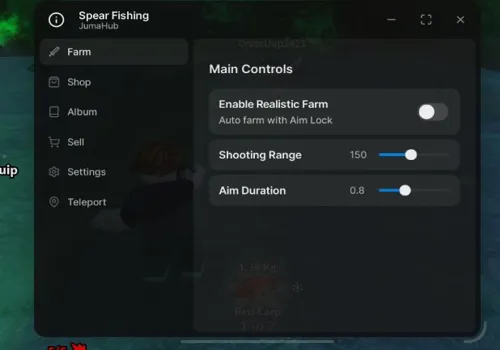
Master the art of the harpoon with our complete automation suite. Features include Autofarm and Auto Sell for maximum profits, plus Auto Collect Album for completion. Skip the Catch Animation and use Auto Last Hit for precision. Instantly Open Shop GUI for all upgrades. Available as both NO KEY and KEY REQUIRED versions for the ultimate fishing experience.

Game link: Spear Fishing

Видео

Table of Contents


    List of working Spear Fishing scripts:

    KEYLESS Spear Fishing script


    Script functions:

    • Autofarm – Automatically harpoons and collects fish.
    • Auto Sell – Sells all caught fish for currency.
    • Auto Collect Album – Automatically fills your fish collection album.
    • Auto Last Hit – Ensures the killing blow on high-value fish.
    • Skip Catch Animation – Removes the fish catching animation for speed.
    • Auto Open Shop GUI: Harpoon, Gun, Bait, Basket – Opens shop menus for all equipment categories.
    NO KEY
    loadstring(game:HttpGet("https://raw.githubusercontent.com/idixof-eng/forkthefish/refs/heads/main/.lua"))()

    Jumal Hub

    NO KEY
    loadstring(game:HttpGet("https://raw.githubusercontent.com/JumaNexus/Spear-Fishing/refs/heads/main/main.lua"))()

    Autofarm Fish – Open Source

    NO KEY
    local player = game:GetService("Players").LocalPlayer
    local UIS = game:GetService("UserInputService")
    local TweenService = game:GetService("TweenService")
    
    local ScreenGui = Instance.new("ScreenGui", player:WaitForChild("PlayerGui"))
    ScreenGui.Name = "AutoFarmGUI"
    ScreenGui.ResetOnSpawn = false
    
    local Button = Instance.new("TextButton", ScreenGui)
    Button.Size = UDim2.new(0, 140, 0, 45)
    Button.Position = UDim2.new(0.05, 0, 0.3, 0)
    Button.Text = "Auto Farm: OFF"
    Button.BackgroundColor3 = Color3.fromRGB(255, 70, 70)
    Button.TextScaled = true
    Button.Active = true
    
    local autoFarm = false
    
    local dragging = false
    local dragStart
    local startPosButton
    
    local function update(input)
        local delta = input.Position - dragStart
        Button.Position = UDim2.new(
            startPosButton.X.Scale,
            startPosButton.X.Offset + delta.X,
            startPosButton.Y.Scale,
            startPosButton.Y.Offset + delta.Y
        )
    end
    
    local function dragBegin(input)
        dragging = true
        dragStart = input.Position
        startPosButton = Button.Position
    end
    
    local function dragEnd(input)
        dragging = false
    end
    
    Button.InputBegan:Connect(function(input)
        if input.UserInputType == Enum.UserInputType.MouseButton1
        or input.UserInputType == Enum.UserInputType.Touch then
            dragBegin(input)
        end
    end)
    Button.InputEnded:Connect(dragEnd)
    
    UIS.InputChanged:Connect(function(input)
        if dragging and (input.UserInputType == Enum.UserInputType.MouseMovement
            or input.UserInputType == Enum.UserInputType.Touch) then
            update(input)
        end
    end)
    
    local function getNearestRoot()
        local nearest
        local minDistance = math.huge
    
        local char = player.Character
        if not char or not char:FindFirstChild("HumanoidRootPart") then return nil end
    
        local hrp = char.HumanoidRootPart
    
        for _, sea in ipairs(workspace.WorldSea:GetChildren()) do
            for _, fish in ipairs(sea:GetChildren()) do
                if fish:FindFirstChild("Model") and fish.Model:FindFirstChild("Root") then
                    local root = fish.Model.Root
                    local dist = (root.Position - hrp.Position).Magnitude
    
                    if dist < minDistance then
                        minDistance = dist
                        nearest = root
                    end
                end
            end
        end
    
        return nearest
    end
    
    local function tweenToRoot(root)
        local char = player.Character
        if not char or not char:FindFirstChild("HumanoidRootPart") then return end
    
        local hrp = char.HumanoidRootPart
        local distance = (root.Position - hrp.Position).Magnitude
    
        local tweenInfo = TweenInfo.new(
            distance / 60,
            Enum.EasingStyle.Linear
        )
    
        local tween = TweenService:Create(hrp, tweenInfo, {
            CFrame = CFrame.new(root.Position)
        })
    
        tween:Play()
        return tween
    end
    
    local function findTool()
        local char = player.Character
        if not char then return nil end
    
        for _, item in ipairs(char:GetChildren()) do
            if item:IsA("Tool") then
                return item
            end
        end
    
        return nil
    end
    
    local function autoCast(root)
        if not root then return end
    
        local tool = findTool()
        if not tool then return end
    
        local args = {
            [1] = "Fire",
            [2] = {
                cameraOrigin = workspace.CurrentCamera.CFrame.Position,
                player = player,
                toolInstance = tool,
                destination = root.Position,
                isCharge = false
            }
        }
    
        game:GetService("ReplicatedStorage").Remotes.FireRE:FireServer(unpack(args))
    end
    
    task.spawn(function()
        while true do
            if autoFarm then
                local root = getNearestRoot()
                if root then
                    tweenToRoot(root)
                    task.wait(0.2)
                    autoCast(root)
                end
            end
            task.wait(0.03)
        end
    end)
    
    Button.MouseButton1Click:Connect(function()
        autoFarm = not autoFarm
        if autoFarm then
            Button.Text = "Auto Farm: ON"
            Button.BackgroundColor3 = Color3.fromRGB(70, 255, 70)
        else
            Button.Text = "Auto Farm: OFF"
            Button.BackgroundColor3 = Color3.fromRGB(255, 70, 70)
        end
    end)

    VibeCoding Hub

    NO KEY
    loadstring(game:HttpGet('https://pastebin.com/raw/SRkLx5hN'))()

    OP!UM Hub

    KEY SYSTEM
    loadstring(game:HttpGet("https://api.luarmor.net/files/v3/loaders/ce8ce4880452e53b2e5f770714dffacf.lua"))()

    Rob Hub

    KEY SYSTEM
    loadstring(game:HttpGet('https://raw.githubusercontent.com/artas01/robscript/refs/heads/main/loader.lua'))()

    How to use scripts?

    • Copy the script and paste it into any executor. (Delta, Solara, Arceus X, Fluxus, Synapse X)
    • Click execute.
    • The script is working!

    Warning:

    • Use the script on alt accounts.
    • We are not responsible for your use of scripts.
    • You should be prepared that the script may not work.

    FREQUENTLY ASKED QUESTIONS:

    Do I need to buy scripts?

    No, all scripts are either completely free or have a light key system with ads.

    The script is not working, what should I do?

    We update and check the scripts every week. Try using a different script.


    Leave a Comment

    Your email address will not be published. Required fields are marked *