
LAST UPDATE: 3/2/2026
Conquer the waves and dominate this simulator PvP battleground with our essential automation. Features include Autofarm for resources, Auto Flags, Auto Chest, and Auto Collect for maximum efficiency. Available as both NO KEY and KEY REQUIRED versions to fish, fight, and rule the tiny ocean.
Game link: Tiny Ocean

Table of Contents
List of working Tiny Ocean scripts:
KEYLESS Tiny Ocean script – by alsk
Script functions:
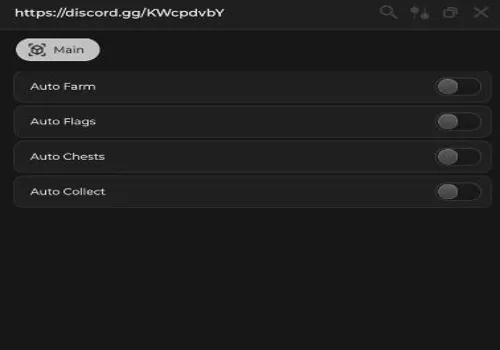
- Autofarm – Automatically farms fish and resources.
- Auto Flags – Captures flags in battleground modes automatically.
- Auto Chest – Opens all chests on the map.
- Auto Collect – Gathers all dropped items and loot.
NO KEY
local players = game:GetService("Players")
local cs = game:GetService("CollectionService")
local rs = game:GetService("ReplicatedStorage")

local plr = players.LocalPlayer
local rem = rs:WaitForChild("Remotes")

local farm = false
local flags = false
local chests = false
local collect = false

local ui = loadstring(game:HttpGet("https://sirius.menu/rayfield"))()

local win = ui:CreateWindow({
	Name = "https://discord.gg/KWcpdvbY",
	LoadingTitle = "https://discord.gg/KWcpdvbY",
	LoadingSubtitle = "loading",
	ConfigurationSaving = { Enabled = false },
	KeySystem = false
})

local main = win:CreateTab("Main", 4483362458)

main:CreateToggle({
	Name = "Auto Farm",
	CurrentValue = false,
	Callback = function(v)
		farm = v
	end
})

main:CreateToggle({
	Name = "Auto Flags",
	CurrentValue = false,
	Callback = function(v)
		flags = v
	end
})

main:CreateToggle({
	Name = "Auto Chests",
	CurrentValue = false,
	Callback = function(v)
		chests = v
	end
})

main:CreateToggle({
	Name = "Auto Collect",
	CurrentValue = false,
	Callback = function(v)
		collect = v
	end
})

local mainFolder = workspace:WaitForChild("Main")
local pickups = mainFolder:WaitForChild("Pickups"):WaitForChild("Active")
local capturePoints = mainFolder:WaitForChild("CapturePoints")
local collectibles = mainFolder:WaitForChild("Collectibles")

local function root()
	local c = plr.Character
	if not c then return end
	return c:FindFirstChild("HumanoidRootPart")
end

rem.CollectiblesTask.OnClientEvent:Connect(function(item, data, cancel)
	if cancel == "Cancel" then return end
	if not collect or not item then return end

	rem.CollectiblesTask:FireServer(item)

	local gui = plr.PlayerGui:FindFirstChild("CollectiblesGUI")
	if gui then
		gui.Enabled = false
	end
end)

task.spawn(function()
	while true do
		local hrp = root()

		if hrp then
			if farm then
				for _, v in ipairs(pickups:GetChildren()) do
					for _, d in ipairs(v:GetDescendants()) do
						if d:IsA("BasePart") then
							firetouchinterest(hrp, d, 0)
							firetouchinterest(hrp, d, 1)
						end
					end
				end
			end

			if flags then
				for _, p in ipairs(capturePoints:GetChildren()) do
					if not flags then break end
					local t = p:FindFirstChild("TouchPart")
					if t then
						hrp.CFrame = t.CFrame
						task.wait(6)
					end
				end
			end

			if collect then
				for _, zone in ipairs(collectibles:GetChildren()) do
					for _, item in ipairs(zone:GetChildren()) do
						if not collect then break end
						if not item:GetAttribute("Active") then continue end

						local m = item:FindFirstChild("Main")
						local a = m and m:FindFirstChild("Attachment")

						if a then
							hrp.CFrame = CFrame.new(a.WorldPosition)
							task.wait(0.3)

							rem.InteractRemote:FireServer(item)

							local t0 = tick()
							while plr:GetAttribute("CollectiblesBusy") and tick() - t0 < 3 do
								task.wait(0.05)
							end
						end
					end
				end
			end

			if chests then
				for _, chest in ipairs(cs:GetTagged("ActiveChest")) do
					if not chests then break end

					local r = chest:FindFirstChild("Root")
					if r then
						hrp.CFrame = r.CFrame * CFrame.new(0, 0, -3)
						task.wait(0.3)

						local att = r:FindFirstChild("Attachment")
						if att then
							local prompt = att:FindFirstChildOfClass("ProximityPrompt")
							if prompt then
								fireproximityprompt(prompt)
								task.wait((chest:GetAttribute("CaptureTime") or 3) + 1)
							end
						end
					end
				end
			end
		end

		task.wait(0.1)
	end
end)
Expand
Rob Hub
KEY SYSTEM
loadstring(game:HttpGet('https://raw.githubusercontent.com/artas01/robscript/refs/heads/main/loader.lua'))()How to use scripts?
- Copy the script and paste it into any executor. (Delta, Solara, Arceus X, Fluxus, Synapse X)
- Click execute.
- The script is working!
Warning:
- Use the script on alt accounts.
- We are not responsible for your use of scripts.
- You should be prepared that the script may not work.
FREQUENTLY ASKED QUESTIONS:
Do I need to buy scripts?
No, all scripts are either completely free or have a light key system with ads.
The script is not working, what should I do?
We update and check the scripts every week. Try using a different script.
Leave a Comment