Apeirophobia scripts are made for players who want extra visibility, movement, and escape tools in the Roblox horror experience Apeirophobia. The game is focused on exploring endless rooms, solving puzzles, avoiding entities, and trying to escape dangerous levels.
This page includes Apeirophobia scripts for 2026, with a focus on no-key options such as Entity ESP, Chams, Auto Escape, Full Bright, No Clip, task tools, and other utility features. The list is kept simple so you can quickly compare the best available scripts without unnecessary sections.
Game link: https://www.roblox.com/games/10277607801/Apeirophobia
Important disclaimer: Using third-party scripts in Roblox violates the Roblox Terms of Service and may lead to account restrictions. This page is provided for informational and educational purposes only. Use scripts only in environments where script testing is allowed.
Keyless Apeirophobia Scripts
Below you can find no-key Apeirophobia scripts for visibility, entity tracking, puzzle assistance, movement tools, and faster level completion. These scripts are useful for players who want quick access without going through key pages or extra unlock steps.
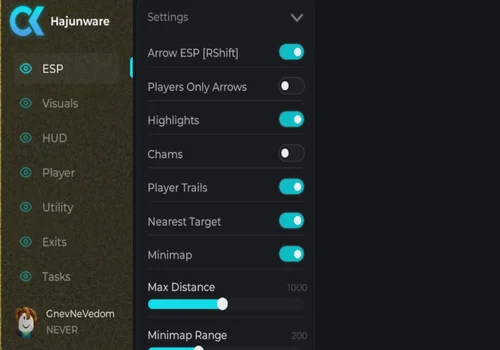
Hajunware 2.0
Drowning in endless rooms, watched from every corner… Apeirophobia doesn’t have to be a nightmare. The All-in-One Script gives you the edge you need to survive, solve puzzles and outrun entities.
- Arrow ESP
- Players Only Arrows
- Highlights
- +18 more
Details
Functions
- Arrow ESP
- Players Only Arrows
- Highlights
- Chams
- Player Trails
- Nearest Target
- Minimap range
- Full Bright
- Ping Display
- Speed lines
- Crosshair on display
- FPS Counter
- Speed modifier
- Jump Power modifier
- No Clip
- Ghost mode
- INF Jump
- Entity alert
- Freeze others
- Exit any level
- Auto Complete tasks
Change history
- – Added to page!
Script code
loadstring(game:HttpGet("https://raw.githubusercontent.com/jeral1/Apreiphobia/refs/heads/main/Aprehobia%20ez"))()
ENTIY CHAMS
- Entity Chams
Details
Functions
- Entity Chams
Change history
- – Added to page!
Script code
local Players = game:GetService("Players")
local RunService = game:GetService("RunService")
local LP = Players.LocalPlayer
local Rayfield = loadstring(game:HttpGet("https://sirius.menu/rayfield"))()

local Window = Rayfield:CreateWindow({
    Name = "Entity Chams",
    LoadingTitle = "Entity Chams",
    LoadingSubtitle = "All Chapters",
    ConfigurationSaving = { Enabled = false },
    Discord = { Enabled = false },
    KeySystem = false
})

local Tab = Window:CreateTab("Chams", 4483362458)
local S = {
    On = true,
    ScanMode = "Auto",
    HostileOnly = false,
    Names = true,
    Distance = true,
    MaxDistance = 3000,
    Fill = Color3.fromRGB(255, 65, 65),
    Outline = Color3.fromRGB(255, 255, 255),
    FillT = 0.45,
    OutlineT = 0,
    Depth = Enum.HighlightDepthMode.AlwaysOnTop
}

local Tracked, Cons, Last = {}, {}, 0
local FolderNames = { "Entities", "Monsters", "NPCs", "Enemies", "Live" }
local NameHints = { "monster", "entity", "enemy", "hostile", "watcher", "critter", "npc" }

local function myRoot()
    local c = LP.Character
    return c and (c:FindFirstChild("HumanoidRootPart") or c:FindFirstChild("Torso") or c:FindFirstChild("UpperTorso"))
end

local function root(m)
    local h = m:FindFirstChildOfClass("Humanoid")
    return (h and h.RootPart) or m:FindFirstChild("HumanoidRootPart") or m.PrimaryPart or m:FindFirstChildWhichIsA("BasePart", true)
end

local function dist(m)
    local a, b = myRoot(), root(m)
    return (a and b) and (a.Position - b.Position).Magnitude or math.huge
end

local function isPlayerChar(m)
    return m == LP.Character or Players:GetPlayerFromCharacter(m) ~= nil
end

local function hasBoolNamed(inst, name)
    local found = inst:FindFirstChild(name, true)
    return found and found:IsA("BoolValue") and found.Value == true
end

local function hostile(m)
    local g = m:FindFirstChild("gVars")
    local b = g and g:FindFirstChild("isHostile")
    if b and b:IsA("BoolValue") then return b.Value == true end
    return hasBoolNamed(m, "isHostile") or hasBoolNamed(m, "Hostile")
end

local function inKnownFolder(m)
    local p = m.Parent
    while p and p ~= workspace do
        for _, n in ipairs(FolderNames) do
            if p.Name == n then return true end
        end
        p = p.Parent
    end
    return false
end

local function nameLooksLikeEntity(m)
    local n = string.lower(m.Name)
    for _, hint in ipairs(NameHints) do
        if string.find(n, hint, 1, true) then return true end
    end
    return false
end

local function valid(m)
    if not (m and m:IsA("Model") and m:IsDescendantOf(workspace)) then return false end
    if isPlayerChar(m) or m:FindFirstAncestorOfClass("Tool") then return false end
    local h = m:FindFirstChildOfClass("Humanoid")
    if not (h and h.Health > 0 and root(m)) then return false end
    if S.ScanMode == "Entities Folder" then return inKnownFolder(m) end
    return inKnownFolder(m) or hostile(m) or nameLooksLikeEntity(m)
end

local function make(m)
    if Tracked[m] then return Tracked[m] end
    local hi = Instance.new("Highlight")
    hi.Name, hi.Adornee, hi.Parent = "_EntityChams", m, m
    local bb = Instance.new("BillboardGui")
    bb.Name, bb.AlwaysOnTop, bb.Size, bb.StudsOffset = "_EntityChamsName", true, UDim2.fromOffset(190, 34), Vector3.new(0, 3, 0)
    local tx = Instance.new("TextLabel")
    tx.Name, tx.BackgroundTransparency, tx.Size, tx.Font = "Label", 1, UDim2.fromScale(1, 1), Enum.Font.GothamSemibold
    tx.TextColor3, tx.TextStrokeTransparency, tx.TextSize, tx.Parent = Color3.new(1, 1, 1), 0.35, 13, bb
    bb.Parent = m
    Tracked[m] = { hi = hi, bb = bb, tx = tx }
    return Tracked[m]
end

local function remove(m)
    local t = Tracked[m]
    if not t then return end
    if t.hi then t.hi:Destroy() end
    if t.bb then t.bb:Destroy() end
    Tracked[m] = nil
end

local function update(m)
    if not valid(m) then return remove(m) end
    local t, d = make(m), dist(m)
    local show = S.On and d <= S.MaxDistance and (not S.HostileOnly or hostile(m))
    t.hi.Enabled, t.hi.FillColor, t.hi.OutlineColor = show, S.Fill, S.Outline
    t.hi.FillTransparency, t.hi.OutlineTransparency, t.hi.DepthMode = S.FillT, S.OutlineT, S.Depth
    t.bb.Enabled, t.bb.Adornee = show and S.Names, root(m)
    t.tx.Text = S.Distance and string.format("%s [%dm]", m.Name, d) or m.Name
end

local function refresh()
    local seen = {}
    for _, d in ipairs(workspace:GetDescendants()) do
        if d:IsA("Humanoid") and d.Parent and d.Parent:IsA("Model") then
            seen[d.Parent] = true
            update(d.Parent)
        end
    end
    for m in pairs(Tracked) do if not seen[m] then remove(m) end end
end

Tab:CreateToggle({ Name = "Entity Chams", CurrentValue = true, Callback = function(v) S.On = v refresh() end })
Tab:CreateDropdown({ Name = "Scan Mode", Options = { "Auto", "Entities Folder" }, CurrentOption = { "Auto" }, Callback = function(o) S.ScanMode = typeof(o) == "table" and o[1] or o refresh() end })
Tab:CreateToggle({ Name = "Hostile Only", CurrentValue = false, Callback = function(v) S.HostileOnly = v refresh() end })
Tab:CreateToggle({ Name = "Show Names", CurrentValue = true, Callback = function(v) S.Names = v refresh() end })
Tab:CreateToggle({ Name = "Show Distance", CurrentValue = true, Callback = function(v) S.Distance = v refresh() end })
Tab:CreateSlider({ Name = "Max Distance", Range = { 100, 10000 }, Increment = 50, CurrentValue = 3000, Callback = function(v) S.MaxDistance = v refresh() end })
Tab:CreateColorPicker({ Name = "Fill Color", Color = S.Fill, Callback = function(v) S.Fill = v refresh() end })
Tab:CreateColorPicker({ Name = "Outline Color", Color = S.Outline, Callback = function(v) S.Outline = v refresh() end })
Tab:CreateDropdown({ Name = "Depth Mode", Options = { "AlwaysOnTop", "Occluded" }, CurrentOption = { "AlwaysOnTop" }, Callback = function(o) o = typeof(o) == "table" and o[1] or o S.Depth = o == "Occluded" and Enum.HighlightDepthMode.Occluded or Enum.HighlightDepthMode.AlwaysOnTop refresh() end })
Tab:CreateButton({ Name = "Refresh", Callback = refresh })
Tab:CreateButton({ Name = "Unload", Callback = function() S.On = false for _, c in ipairs(Cons) do c:Disconnect() end for m in pairs(Tracked) do remove(m) end Rayfield:Destroy() end })

table.insert(Cons, workspace.DescendantAdded:Connect(function(d)
    if d:IsA("Humanoid") and d.Parent and d.Parent:IsA("Model") then task.wait(0.2) update(d.Parent) end
end))
table.insert(Cons, RunService.Heartbeat:Connect(function()
    if os.clock() - Last > 0.35 then Last = os.clock() refresh() end
end))
refresh()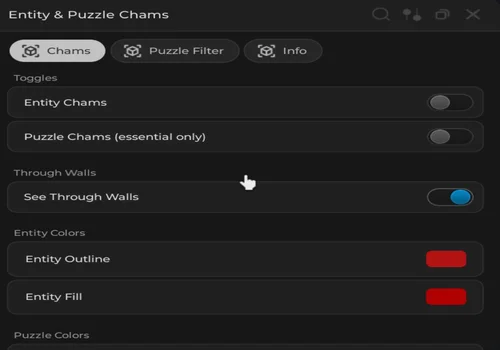
CHAMS v2
- Entity chams
- Puzzle filter
Details
Functions
- Entity chams
- Puzzle filter
Change history
- – Added to page!
Script code
loadstring(game:HttpGet("https://rscripts.net/raw/chams-v2-best_1781804394204_YBJYP7bCkz.txt",true))()Apeirophobia Script Compatibility
The scripts listed on this page are marked with PC and mobile tags, but real compatibility depends on the executor, Roblox version, and the latest game update. If a feature does not work, the script may need an update or the executor may not support the required functions.
Hajunware 2.0, ENTIY CHAMS, and CHAMS v2 are listed with support for executors such as Codex, Arceus X, Delta, and other compatible exploits. Always treat compatibility as a current-status detail, not a permanent guarantee.
Conclusion
Apeirophobia scripts can be useful for players who want better visibility, entity tracking, puzzle support, movement tools, and faster escape options. The strongest no-key script on this page is Hajunware 2.0 because it combines ESP-style features, Chams, utility tools, and level-completion functions in one script.
Before testing any Apeirophobia script, check the access type, executor compatibility, update date, and full function list. Roblox and game updates can break scripts at any time, so a working script today may need an update later.