Looking for a Blade Ball script with Auto Parry or a local Skin Changer? Rise and our OXYO rework are the strongest options from our current tests. Rocket is a simpler alternative, but it missed some parries on default settings. Science CC and Void remain listed with a Not working result because they triggered the anti-cheat during testing.
Tests were on Windows PC with Potassium. Device and executor labels in the cards are listing information; this update does not confirm every listed combination. Features we could not test are identified below.
Training Mode note: some Auto Parry scripts do not work in Training Mode but still deflect the ball in normal matches. Test the main arena before deciding that a script is broken. Training Mode results should be kept separate.
NO KEY / KEYLESS Blade Ball scripts
Rise Blade Ball
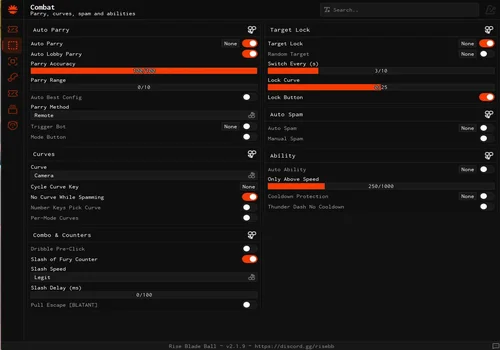
Either the best or very close to it among the Blade Ball scripts I tried. It has a huge menu, and Auto Spam handles parry spam during clashes. Loading took about 1.5–2 minutes in Russia; using a VPN made little difference. Auto Parry continues in the next round after death without restarting the script or toggling it again. Advanced abilities still need a separate test.
- Auto Parry
- Auto Lobby Parry
- Parry Accuracy
- +104 more
Details
Functions
- Auto Parry
- Auto Lobby Parry
- Parry Accuracy
- Parry Range
- Auto Best Config
- Parry Method
- Trigger Mode
- Curve Mode
- Custom Curves
- Camera Curve
- Cycle Curve Key
- No Curve While Spawning
- Number Keys Pick Curve
- Per-Mode Curves
- Dribble Pre-Click
- Slash of Fury Counter
- Slash Speed
- Slash Delay
- Full Escape
- Target Lock
- Random Target
- Target Switch Delay
- Lock Curve
- Lock Button
- Auto Spam
- Manual Spam
- Auto Ability
- Ability Selection
- Only Above Speed
- Cooldown Protection
- Thunder Dash No Cooldown
- Unlock All
- Aura Death On Joining
- Emote While Moving
- Force Emote
- Emote Spam
- Emote On Spawn
- Save Loadout
- Equip Saved Loadout
- Preview Finisher
- Sword Skin
- Explosion Skin
- Emotes Only
- Player Trail
- Rainbow Trail
- Trail Colour
- Trail Lifetime
- Trail Width
- Ability ESP
- Show Cooldown
- Show Player Name
- Visualizer
- Visualizer Colour
- Ball Trail
- Rainbow Ball Trail
- Ball Particles
- Ball Glow
- Ball Start Colour
- Ball End Colour
- Ball Trail Lifetime
- Ball HUD
- Speed Colour
- Show Distance
- Show Peak Speed
- HUD Accent
- FPS + Ping
- Rainbow Ball
- Ball Colour
- Headless
- Korblox Leg
- Device Spoofer
- Screen Layout
- Set Device & Rejoin
- VIP Chat Tag
- VIP Tag
- Walk Speed
- Jump Power
- Infinity Jump
- Skybox
- Time of Day
- FPS Boost
- No Battle Effects
- FPS Cap
- Auto Anti-Lag
- Anti-Lag Threshold
- Custom FFlags
- FFlags Presets
- Region Auto
- Music
- Track Selection
- Fullbright
- No Fog
- Custom Field of View
- Custom Gravity
- Cinematic Shaders
- Depth of Field
- Bloom
- Saturation
- Brightness
- Contrast
- Rain Effect
- Rain Intensity
- Rejoin
- Server Hop
- Reset Character
- Anti AFK
- Auto Execute on Teleport
Script code
loadstring(game:HttpGet("https://raw.githubusercontent.com/joshhhie/rise/refs/heads/main/loader.lua"))()Parry settings and Curve Type options are similar to OXYO, but Rise also includes Target Lock and Auto Ability. I could not properly test Auto Ability because my account only had the basic dash. Treat it as a listed feature, not a confirmed result for every ability.
The Visual section can show the parry range around your character. This helps you understand the distance where Auto Parry starts trying to block. Player Trail and Ball Trail are optional visual extras; I found them more niche than the range display.
For skins, Rise is more convenient than a separate Skin Changer menu: it makes sword and explosion cosmetics available locally through the game inventory. You can select them there. These are local changes, not items added to your account. No anti-cheat trigger was observed while I tested this feature, but the developer warns that using it can still lead to a ban.
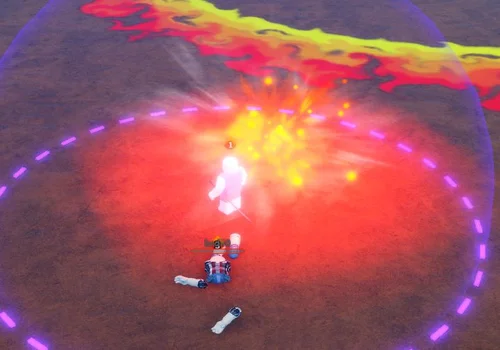
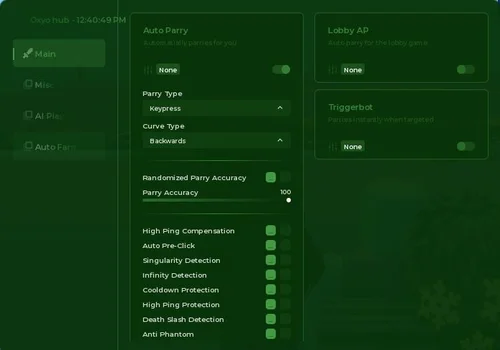
Oxyo Hub
One of the strongest Blade Ball scripts I tried, but the original interface was hard to read. We replaced its UI library with BobloUI. Auto Parry continues in the next round after death without restarting the script or toggling it again. The reworked version remains open source. AI Play triggered the anti-cheat, and Auto Ranked Queue did not work.
- Auto Parry
- Parry Type changer
- Curve Type changer
- +24 more
Details
Functions
- Auto Parry
- Parry Type changer
- Curve Type changer
- Randomized Parry Accuracy
- Parry Accuracy
- High Ping Compensation
- Auto Pre-Click
- Singularity Detection
- Infinity Detection
- Cooldown Protection
- High Ping Protection
- Death Slash Detection
- Anti Phantom
- Lobby AP
- Triggerbot
- AI Play
- Auto Ranked Queue
- Visualizer
- Anti-Lag
- No Render
- Ability ESP
- Sky Settings
- Lighting Settings
- Roblox & Headless
- Music Player
- Ball Info
- Gravity
Script code
loadstring(game:HttpGet("https://raw.githubusercontent.com/bobloscript/scripts/refs/heads/main/BladeBall", true))()The original interface had an acid-green background and white text. With my -7 eyesight, I had to lean toward the monitor just to read it. That is why we rebuilt the interface with BobloUI. The script stays open source; if our UI is not for you, you can replace it.
Keep AI Play disabled: it triggered the anti-cheat in my test. I also do not recommend enabling extra parry detection options such as Infinity Detection and similar toggles in this build, because they may trigger it. This is a limitation from our test, not a claim that every option fails separately.
Curve Type changes the direction used when returning the ball. It is different from Parry Type, which offers Remote and Keypress. I have not confirmed a clear gameplay advantage for either parry method, so I am not recommending one as faster or safer.
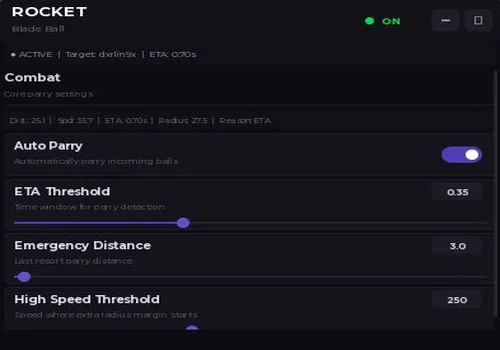
Rocket Auto Parry
A simple open-source alternative for Auto Parry. I left the settings at their defaults, and it sometimes missed the ball. We checked the supplied code and found no explicit feature designed to make you miss. Treat those misses as a limitation of this test, not as intentional human-like behavior.
- Auto Parry
- ETA Threshold
- Emergency Distance
- +1 more
Details
Functions
- Auto Parry
- ETA Threshold
- Emergency Distance
- High Speed Threshold
Script code
local StarterGui=game:GetService("StarterGui")
local RunService=game:GetService("RunService")
local Players=game:GetService("Players")
local UserInputService=game:GetService("UserInputService")
local TweenService=game:GetService("TweenService")
local Player=Players.LocalPlayer
local function LogDebug(step) warn("[AUTO PARRY DEBUG] "..step) end
LogDebug("Script started")
local isMobile=UserInputService.TouchEnabled
local lastClickTime=0
local clickVariance=0.02
local function PressBlockKey()
local now=tick()
local variance=(math.random()*clickVariance*2)-clickVariance
local cooldown=0.01+variance
if now-lastClickTime<cooldown then return end
lastClickTime=now
local success=false
if isMobile then
pcall(function()
local VIM=game:GetService("VirtualInputManager")
if VIM then
VIM:SendKeyEvent(true,Enum.KeyCode.F,false,game)
task.wait(0.01)
VIM:SendKeyEvent(false,Enum.KeyCode.F,false,game)
success=true
end
end)
if not success then
pcall(function()
local blockButton=Player.PlayerGui:FindFirstChild("Hotbar") and Player.PlayerGui.Hotbar:FindFirstChild("Block")
if blockButton then blockButton:Activate() success=true end
end)
end
else
if type(mouse1click)=="function" then
mouse1click()
success=true
elseif type(mouse1press)=="function" and type(mouse1release)=="function" then
mouse1press()
task.wait(0.01)
mouse1release()
success=true
end
end
if not success then warn("[AUTO PARRY] No click method available") end
return success
end
local CONFIG={
PING_COMPENSATION=0.32,
ETA_THRESHOLD=0.35,
PARRY_COOLDOWN=0.02,
BASE_RADIUS=25.0,
MAX_RADIUS=180.0,
RADIUS_SPEED_FACTOR=0.08,
MIN_DOT=0.15,
EMERGENCY_DISTANCE=3.0,
HIGH_SPEED_THRESHOLD=250,
HIGH_SPEED_MARGIN_MULTIPLIER=0.015,
MAX_HIGH_SPEED_MARGIN=40.0,
DEBUG_MODE=false,
}
local DEFAULTS={}
for k,v in pairs(CONFIG) do DEFAULTS[k]=v end
local autoParryEnabled=false
local lastParryTime=0
local lastParryReason="None"
local ballStates={}
local runConnection=nil
local inputConnections={}
local guiInstance=nil
local ballFolderConnection=nil
local ballAddedConnection=nil
local guiUpdateTimer=0
local GUI_UPDATE_INTERVAL=0.053
local currentDangerInfo=nil
local controlHeld=false
local controlBlocked={}
local parriedBalls={}
LogDebug("State initialized")
local function SendNotification(title,text,duration)
pcall(function()
StarterGui:SetCore("SendNotification",{Title=title,Text=text,Duration=duration or 3})
end)
end
local function IsValidBall(Ball)
if not Ball then return false end
if not Ball:IsA("BasePart") then return false end
if not Ball:FindFirstChild("zoomies") then return false end
if Ball:GetAttribute("realBall")==true then return true end
if Ball.Parent and Ball.Parent.Name=="TrainingBalls" then return true end
return false
end
local validBallsCache={}
local cacheValidTime=0
local CACHE_DURATION=0.02
local function GetValidBalls()
local now=os.clock()
if now-cacheValidTime<CACHE_DURATION then return validBallsCache end
local result={}
local folder=workspace:FindFirstChild("Balls")
if folder then
for _,Ball in ipairs(folder:GetChildren()) do
if IsValidBall(Ball) then result[#result+1]=Ball end
end
end
local trainingFolder=workspace:FindFirstChild("TrainingBalls")
if trainingFolder then
for _,Ball in ipairs(trainingFolder:GetChildren()) do
if IsValidBall(Ball) then result[#result+1]=Ball end
end
end
validBallsCache=result
cacheValidTime=now
return result
end
local targetConnections={}
local function CleanupTargetConnection(Ball)
if targetConnections[Ball] then
targetConnections[Ball]:Disconnect()
targetConnections[Ball]=nil
end
end
local function WatchBallTarget(Ball)
CleanupTargetConnection(Ball)
if not Ball then return end
targetConnections[Ball]=Ball:GetAttributeChangedSignal("target"):Connect(function()
if Ball:GetAttribute("target")~=Player.Name then
ballStates[Ball]=nil
controlBlocked[Ball]=nil
parriedBalls[Ball]=nil
CleanupTargetConnection(Ball)
end
end)
end
local function OnBallAdded(Ball)
task.wait(0.01)
if IsValidBall(Ball) then
WatchBallTarget(Ball)
cacheValidTime=0
end
end
local function SetupBallEvents()
if ballAddedConnection then
ballAddedConnection:Disconnect()
ballAddedConnection=nil
end
if ballFolderConnection then
ballFolderConnection:Disconnect()
ballFolderConnection=nil
end
local folder=workspace:FindFirstChild("Balls")
if folder then
for _,Ball in ipairs(folder:GetChildren()) do
if IsValidBall(Ball) then WatchBallTarget(Ball) end
end
ballAddedConnection=folder.ChildAdded:Connect(OnBallAdded)
end
ballFolderConnection=workspace.ChildAdded:Connect(function(c)
if c.Name=="Balls" then SetupBallEvents() end
end)
end
LogDebug("Ball functions defined")
local dangerInfoCache={
ball=nil,
distance=0,
speed=0,
direction=nil,
dot=0,
closing=0,
eta=math.huge,
target="",
rawETA=math.huge,
}
local function AnalyzeBalls(HRP)
if not HRP then return nil end
local balls=GetValidBalls()
if #balls==0 then return nil end
local playerPos=HRP.Position
local playerVel=HRP.AssemblyLinearVelocity
local best=nil
local bestETA=math.huge
local bestRawETA=math.huge
for _,Ball in ipairs(balls) do
local target=Ball:GetAttribute("target") or ""
if target~=Player.Name then continue end
local v=Ball.AssemblyLinearVelocity
local speed=v.Magnitude
if speed<0.1 then continue end
local toPlayer=playerPos-Ball.Position
local dist=toPlayer.Magnitude
if dist<0.1 then continue end
local toPlayerUnit=toPlayer.Unit
local vUnit=v.Unit
local dot=vUnit:Dot(toPlayerUnit)
if dot<CONFIG.MIN_DOT then continue end
local relV=v-playerVel
local closing=relV:Dot(toPlayerUnit)
if closing<=0 then continue end
local rawETA=dist/closing
if rawETA>=bestETA then continue end
best=Ball
bestETA=rawETA
bestRawETA=rawETA
end
if not best then return nil end
local v=best.AssemblyLinearVelocity
local speed=v.Magnitude
local toPlayer=playerPos-best.Position
local dist=toPlayer.Magnitude
local toPlayerUnit=toPlayer.Unit
local dot=v.Unit:Dot(toPlayerUnit)
local relV=v-playerVel
local closing=relV:Dot(toPlayerUnit)
local rawETA=dist/closing
local pf=math.min(1,dist/25)
local ping=CONFIG.PING_COMPENSATION*(0.3+0.7*pf)
ping=math.min(ping,CONFIG.PING_COMPENSATION)
local compETA=math.max(rawETA-ping,0.02)
dangerInfoCache.ball=best
dangerInfoCache.distance=dist
dangerInfoCache.speed=speed
dangerInfoCache.direction=vUnit or v.Unit
dangerInfoCache.dot=dot
dangerInfoCache.closing=closing
dangerInfoCache.eta=compETA
dangerInfoCache.rawETA=rawETA
dangerInfoCache.target=best:GetAttribute("target") or ""
return dangerInfoCache
end
LogDebug("Analysis functions defined")
local function ProcessControlSystem()
if not controlHeld then
for ball,_ in pairs(controlBlocked) do
controlBlocked[ball]=nil
end
return
end
local balls=GetValidBalls()
if #balls==0 then
for ball,_ in pairs(controlBlocked) do
controlBlocked[ball]=nil
end
return
end
for _,Ball in ipairs(balls) do
if not IsValidBall(Ball) then continue end
local target=Ball:GetAttribute("target") or ""
local isTargetingPlayer=(target==Player.Name)
if isTargetingPlayer then
local state=controlBlocked[Ball]
if state~="TRIGGERED" then
controlBlocked[Ball]="TRIGGERED"
PressBlockKey()
lastParryReason="CONTROL_INSTANT"
end
else
controlBlocked[Ball]=nil
end
end
for Ball,_ in pairs(controlBlocked) do
if not Ball or not IsValidBall(Ball) then
controlBlocked[Ball]=nil
end
end
end
local lastDistance=0
local lastSpeed=0
local lastETA=math.huge
local lastCompETA=math.huge
local lastDot=0
local lastTarget=""
local lastEffectiveRadius=0
local etaHistory={}
local function ProcessAutoParry(HRP)
local info=AnalyzeBalls(HRP)
if not info then
for ball,state in pairs(ballStates) do
if not IsValidBall(ball) or (ball:GetAttribute("target") or "")~=Player.Name then
ballStates[ball]=nil
parriedBalls[ball]=nil
CleanupTargetConnection(ball)
end
end
return
end
local Ball=info.ball
local dist=info.distance
local speed=info.speed
local dot=info.dot
local closing=info.closing
local rawETA=info.rawETA
local compETA=info.eta
local targetAttr=info.target
lastDistance=dist
lastSpeed=speed
lastETA=rawETA
lastCompETA=compETA
lastDot=dot
lastTarget=targetAttr
-- Проверяем что этот мяч уже отбит
if parriedBalls[Ball] then
return
end
local baseRadius=CONFIG.BASE_RADIUS+(speed*CONFIG.RADIUS_SPEED_FACTOR)
local highSpeedMargin=0
if speed>CONFIG.HIGH_SPEED_THRESHOLD then
local excessSpeed=speed-CONFIG.HIGH_SPEED_THRESHOLD
local speedFactor=math.min(excessSpeed/300,1)
highSpeedMargin=speedFactor*speed*CONFIG.HIGH_SPEED_MARGIN_MULTIPLIER
highSpeedMargin=math.min(highSpeedMargin,CONFIG.MAX_HIGH_SPEED_MARGIN)
end
local effectiveRadius=math.clamp(baseRadius+highSpeedMargin,CONFIG.BASE_RADIUS,CONFIG.MAX_RADIUS+CONFIG.MAX_HIGH_SPEED_MARGIN)
lastEffectiveRadius=effectiveRadius
if not ballStates[Ball] then
ballStates[Ball]={
state="IDLE",
triggerTime=0,
lastETA=rawETA,
etaHistory={},
}
end
local state=ballStates[Ball]
if state.state=="PASSED" and dist>effectiveRadius*0.5 then
state.state="IDLE"
state.triggerTime=0
end
if state.state=="TRIGGERED" and dist>effectiveRadius*2 then
state.state="PASSED"
end
if rawETA<math.huge then
if not state.etaHistory then state.etaHistory={} end
table.insert(state.etaHistory,rawETA)
if #state.etaHistory>5 then
table.remove(state.etaHistory,1)
end
end
local etaStable=true
if #state.etaHistory>=3 then
local prev1=state.etaHistory[#state.etaHistory-2]
local prev2=state.etaHistory[#state.etaHistory-1]
local current=state.etaHistory[#state.etaHistory]
if current<prev2 and prev2<prev1 then
etaStable=true
end
if math.abs(current-prev2)>prev2*0.5 then
etaStable=false
end
end
local now=os.clock()
local cooldown=(now-lastParryTime)>=CONFIG.PARRY_COOLDOWN
if state.state~="IDLE" or not cooldown then return end
if dot<-0.15 then
state.state="PASSED"
return
end
local shouldParry=false
if compETA<=CONFIG.ETA_THRESHOLD and etaStable then
shouldParry=true
lastParryReason="ETA"
end
if not shouldParry and compETA<=CONFIG.ETA_THRESHOLD*1.5 then
local fp=Ball.Position+(Ball.AssemblyLinearVelocity*CONFIG.PING_COMPENSATION)
local fd=(HRP.Position-fp).Magnitude
if dist<=effectiveRadius and fd<=effectiveRadius then
shouldParry=true
lastParryReason="RADIUS"
end
end
if not shouldParry and dist<=CONFIG.EMERGENCY_DISTANCE and closing>0 then
shouldParry=true
lastParryReason="EMERGENCY"
end
if shouldParry then
state.state="TRIGGERED"
state.triggerTime=now
lastParryTime=now
PressBlockKey()
parriedBalls[Ball]=true
if guiInstance and guiInstance.UpdateStatus then
guiInstance.UpdateStatus()
end
end
end
local function ProcessParry()
local char=Player.Character
local HRP=char and char:FindFirstChild("HumanoidRootPart")
if not HRP then return end
ProcessControlSystem()
if autoParryEnabled and not controlHeld then
ProcessAutoParry(HRP)
end
end
LogDebug("Core logic defined")
local Cleanup
local Init
local function GetViewportSize()
local camera=workspace.CurrentCamera
if not camera then return Vector2.new(800,600) end
return camera.ViewportSize
end
local function MakeDraggable(frame,anchor,clickCallback)
if not anchor then anchor=Vector2.new(0.5,0.5) end
local dragging=false
local dragMoved=false
local dragStart=nil
local startPosition=nil
local DRAG_THRESHOLD=10
local function OnInputBegan(input)
if input.UserInputType==Enum.UserInputType.MouseButton1 or
input.UserInputType==Enum.UserInputType.Touch then
dragging=true
dragMoved=false
dragStart=input.Position
startPosition=frame.Position
end
end
local function OnInputChanged(input)
if not dragging then return end
if input.UserInputType~=Enum.UserInputType.MouseMovement and
input.UserInputType~=Enum.UserInputType.Touch then return end
local delta=input.Position-dragStart
if delta.Magnitude>=DRAG_THRESHOLD then dragMoved=true end
if dragMoved then
local viewport=GetViewportSize()
local absSize=frame.AbsoluteSize
if absSize.X>0 and absSize.Y>0 then
local halfW=absSize.X*anchor.X
local halfH=absSize.Y*anchor.Y
local newX=startPosition.X.Offset+delta.X
local newY=startPosition.Y.Offset+delta.Y
local minX=halfW
local maxX=viewport.X-(absSize.X-halfW)
local minY=halfH
local maxY=viewport.Y-(absSize.Y-halfH)
if maxX<minX then maxX=minX end
if maxY<minY then maxY=minY end
frame.Position=UDim2.fromOffset(
math.clamp(newX,minX,maxX),
math.clamp(newY,minY,maxY)
)
end
end
end
local function OnInputEnded(input)
if not dragging then return end
if input.UserInputType==Enum.UserInputType.MouseButton1 or
input.UserInputType==Enum.UserInputType.Touch then
local wasMoved=dragMoved
dragging=false
if not wasMoved and clickCallback then
clickCallback()
end
end
end
frame.InputBegan:Connect(OnInputBegan)
UserInputService.InputChanged:Connect(OnInputChanged)
UserInputService.InputEnded:Connect(OnInputEnded)
end
local function CreateGUI()
if guiInstance then
guiInstance:Destroy()
guiInstance=nil
end
local Gui=Instance.new("ScreenGui")
Gui.Name="RocketHub"
Gui.ResetOnSpawn=false
Gui.IgnoreGuiInset=true
Gui.Parent=Player:WaitForChild("PlayerGui")
local viewport=GetViewportSize()
local guiWidth=math.min(400,viewport.X-24)
local guiHeight=math.min(350,viewport.Y-24)
local isMinimized=false
local minimizedButton=nil
local Main=Instance.new("Frame")
Main.Size=UDim2.new(0,guiWidth,0,guiHeight)
Main.Position=UDim2.new(0.5,-guiWidth/2,0.5,-guiHeight/2)
Main.BackgroundColor3=Color3.fromRGB(13,13,17)
Main.BorderSizePixel=0
Main.Visible=true
Main.ClipsDescendants=true
Main.Parent=Gui
Main.AnchorPoint=Vector2.new(0.5,0.5)
local MainCorner=Instance.new("UICorner")
MainCorner.CornerRadius=UDim.new(0,12)
MainCorner.Parent=Main
local MainStroke=Instance.new("UIStroke")
MainStroke.Color=Color3.fromRGB(35,35,45)
MainStroke.Thickness=1
MainStroke.Transparency=0.4
MainStroke.Parent=Main
local Header=Instance.new("Frame")
Header.Size=UDim2.new(1,0,0,44)
Header.BackgroundColor3=Color3.fromRGB(18,18,24)
Header.BorderSizePixel=0
Header.Parent=Main
local HeaderCorner=Instance.new("UICorner")
HeaderCorner.CornerRadius=UDim.new(0,12)
HeaderCorner.Parent=Header
local Title=Instance.new("TextLabel")
Title.Size=UDim2.new(0,80,0,18)
Title.Position=UDim2.fromOffset(12,3)
Title.BackgroundTransparency=1
Title.Text="ROCKET"
Title.TextColor3=Color3.fromRGB(255,255,255)
Title.TextSize=15
Title.Font=Enum.Font.GothamBold
Title.TextXAlignment=Enum.TextXAlignment.Left
Title.Parent=Header
local Subtitle=Instance.new("TextLabel")
Subtitle.Size=UDim2.new(0,80,0,12)
Subtitle.Position=UDim2.fromOffset(12,23)
Subtitle.BackgroundTransparency=1
Subtitle.Text="Blade Ball"
Subtitle.TextColor3=Color3.fromRGB(120,120,135)
Subtitle.TextSize=9
Subtitle.Font=Enum.Font.Gotham
Subtitle.TextXAlignment=Enum.TextXAlignment.Left
Subtitle.Parent=Header
local StatusContainer=Instance.new("Frame")
StatusContainer.Size=UDim2.new(0,100,1,0)
StatusContainer.Position=UDim2.new(1,-110,0,0)
StatusContainer.BackgroundTransparency=1
StatusContainer.Parent=Header
local StatusDot=Instance.new("Frame")
StatusDot.Size=UDim2.fromOffset(7,7)
StatusDot.Position=UDim2.new(0,0,0.5,-3.5)
StatusDot.BackgroundColor3=Color3.fromRGB(255,60,60)
StatusDot.BorderSizePixel=0
StatusDot.Parent=StatusContainer
local StatusDotCorner=Instance.new("UICorner")
StatusDotCorner.CornerRadius=UDim.new(1,0)
StatusDotCorner.Parent=StatusDot
local StatusLabel=Instance.new("TextLabel")
StatusLabel.Size=UDim2.new(1,-16,1,0)
StatusLabel.Position=UDim2.fromOffset(13,0)
StatusLabel.BackgroundTransparency=1
StatusLabel.Text="OFF"
StatusLabel.TextColor3=Color3.fromRGB(170,170,185)
StatusLabel.TextSize=10
StatusLabel.Font=Enum.Font.GothamBold
StatusLabel.TextXAlignment=Enum.TextXAlignment.Left
StatusLabel.Parent=StatusContainer
local MinBtn=Instance.new("TextButton")
MinBtn.Size=UDim2.fromOffset(22,22)
MinBtn.Position=UDim2.new(1,-58,0.5,-11)
MinBtn.BackgroundColor3=Color3.fromRGB(30,30,38)
MinBtn.Text="−"
MinBtn.TextColor3=Color3.fromRGB(150,150,165)
MinBtn.TextSize=16
MinBtn.Font=Enum.Font.GothamBold
MinBtn.BorderSizePixel=0
MinBtn.AutoButtonColor=false
MinBtn.Parent=Header
local MinBtnCorner=Instance.new("UICorner")
MinBtnCorner.CornerRadius=UDim.new(0,5)
MinBtnCorner.Parent=MinBtn
MinBtn.MouseEnter:Connect(function()
TweenService:Create(MinBtn,TweenInfo.new(0.15),{BackgroundColor3=Color3.fromRGB(45,45,55)}):Play()
end)
MinBtn.MouseLeave:Connect(function()
TweenService:Create(MinBtn,TweenInfo.new(0.15),{BackgroundColor3=Color3.fromRGB(30,30,38)}):Play()
end)
local CloseBtn=Instance.new("TextButton")
CloseBtn.Size=UDim2.fromOffset(22,22)
CloseBtn.Position=UDim2.new(1,-32,0.5,-11)
CloseBtn.BackgroundColor3=Color3.fromRGB(30,30,38)
CloseBtn.Text="✕"
CloseBtn.TextColor3=Color3.fromRGB(150,150,165)
CloseBtn.TextSize=12
CloseBtn.Font=Enum.Font.GothamBold
CloseBtn.BorderSizePixel=0
CloseBtn.AutoButtonColor=false
CloseBtn.Parent=Header
local CloseCorner=Instance.new("UICorner")
CloseCorner.CornerRadius=UDim.new(0,5)
CloseCorner.Parent=CloseBtn
CloseBtn.MouseEnter:Connect(function()
TweenService:Create(CloseBtn,TweenInfo.new(0.15),{BackgroundColor3=Color3.fromRGB(45,45,55)}):Play()
end)
CloseBtn.MouseLeave:Connect(function()
TweenService:Create(CloseBtn,TweenInfo.new(0.15),{BackgroundColor3=Color3.fromRGB(30,30,38)}):Play()
end)
local Content=Instance.new("Frame")
Content.Size=UDim2.new(1,0,1,-44)
Content.Position=UDim2.fromOffset(0,44)
Content.BackgroundTransparency=1
Content.Parent=Main
local combatPanel=Instance.new("ScrollingFrame")
combatPanel.Size=UDim2.new(1,-12,1,-48)
combatPanel.Position=UDim2.fromOffset(6,4)
combatPanel.BackgroundTransparency=1
combatPanel.BorderSizePixel=0
combatPanel.ScrollBarThickness=3
combatPanel.ScrollBarImageColor3=Color3.fromRGB(60,60,75)
combatPanel.Visible=true
combatPanel.AutomaticCanvasSize=Enum.AutomaticSize.Y
combatPanel.CanvasSize=UDim2.new(0,0,0,0)
combatPanel.Parent=Content
local combatList=Instance.new("UIListLayout")
combatList.Padding=UDim.new(0,5)
combatList.VerticalAlignment=Enum.VerticalAlignment.Top
combatList.SortOrder=Enum.SortOrder.LayoutOrder
combatList.Parent=combatPanel
local panelPadding=Instance.new("UIPadding")
panelPadding.PaddingTop=UDim.new(0,0)
panelPadding.PaddingBottom=UDim.new(0,5)
panelPadding.Parent=combatPanel
local function CreateSectionHeader(parent,title,desc)
local container=Instance.new("Frame")
container.Size=UDim2.new(1,0,0,30)
container.BackgroundTransparency=1
container.LayoutOrder=0
container.Parent=parent
local titleLabel=Instance.new("TextLabel")
titleLabel.Size=UDim2.new(1,0,0,16)
titleLabel.BackgroundTransparency=1
titleLabel.Text=title
titleLabel.TextColor3=Color3.fromRGB(210,210,225)
titleLabel.TextSize=12
titleLabel.Font=Enum.Font.GothamBold
titleLabel.TextXAlignment=Enum.TextXAlignment.Left
titleLabel.Parent=container
local descLabel=Instance.new("TextLabel")
descLabel.Size=UDim2.new(1,0,0,12)
descLabel.Position=UDim2.new(0,0,0,18)
descLabel.BackgroundTransparency=1
descLabel.Text=desc
descLabel.TextColor3=Color3.fromRGB(100,100,115)
descLabel.TextSize=8
descLabel.Font=Enum.Font.Gotham
descLabel.TextXAlignment=Enum.TextXAlignment.Left
descLabel.Parent=container
return container
end
local function CreateDivider(parent)
local div=Instance.new("Frame")
div.Size=UDim2.new(1,0,0,1)
div.BackgroundColor3=Color3.fromRGB(30,30,40)
div.BorderSizePixel=0
div.Parent=parent
return div
end
local function MakeToggle(parent,title,desc,getter,setter)
local Card=Instance.new("Frame")
Card.Size=UDim2.new(1,0,0,40)
Card.BackgroundColor3=Color3.fromRGB(20,20,28)
Card.BorderSizePixel=0
Card.LayoutOrder=1
Card.Parent=parent
local CardCorner=Instance.new("UICorner")
CardCorner.CornerRadius=UDim.new(0,6)
CardCorner.Parent=Card
local CardStroke=Instance.new("UIStroke")
CardStroke.Color=Color3.fromRGB(30,30,40)
CardStroke.Thickness=1
CardStroke.Parent=Card
local TitleLabel=Instance.new("TextLabel")
TitleLabel.Size=UDim2.new(1,-70,0,14)
TitleLabel.Position=UDim2.fromOffset(8,3)
TitleLabel.BackgroundTransparency=1
TitleLabel.Text=title
TitleLabel.TextColor3=Color3.fromRGB(220,220,235)
TitleLabel.TextSize=11
TitleLabel.Font=Enum.Font.GothamBold
TitleLabel.TextXAlignment=Enum.TextXAlignment.Left
TitleLabel.Parent=Card
local DescLabel=Instance.new("TextLabel")
DescLabel.Size=UDim2.new(1,-70,0,12)
DescLabel.Position=UDim2.fromOffset(8,20)
DescLabel.BackgroundTransparency=1
DescLabel.Text=desc
DescLabel.TextColor3=Color3.fromRGB(100,100,115)
DescLabel.TextSize=8
DescLabel.Font=Enum.Font.Gotham
DescLabel.TextXAlignment=Enum.TextXAlignment.Left
DescLabel.Parent=Card
local Track=Instance.new("Frame")
Track.Size=UDim2.fromOffset(32,16)
Track.Position=UDim2.new(1,-44,0.5,-8)
Track.BackgroundColor3=Color3.fromRGB(40,40,52)
Track.BorderSizePixel=0
Track.Parent=Card
local TrackCorner=Instance.new("UICorner")
TrackCorner.CornerRadius=UDim.new(1,0)
TrackCorner.Parent=Track
local Knob=Instance.new("TextButton")
Knob.Size=UDim2.fromOffset(10,10)
Knob.Position=UDim2.fromOffset(3,3)
Knob.BackgroundColor3=Color3.fromRGB(180,180,195)
Knob.BorderSizePixel=0
Knob.Text=""
Knob.AutoButtonColor=false
Knob.Parent=Track
local KnobCorner=Instance.new("UICorner")
KnobCorner.CornerRadius=UDim.new(1,0)
KnobCorner.Parent=Knob
local function Update()
local enabled=getter()
local targetPos=enabled and UDim2.fromOffset(19,3) or UDim2.fromOffset(3,3)
local trackColor=enabled and Color3.fromRGB(80,60,180) or Color3.fromRGB(40,40,52)
local knobColor=enabled and Color3.fromRGB(255,255,255) or Color3.fromRGB(180,180,195)
TweenService:Create(Knob,TweenInfo.new(0.2),{Position=targetPos,BackgroundColor3=knobColor}):Play()
TweenService:Create(Track,TweenInfo.new(0.2),{BackgroundColor3=trackColor}):Play()
end
local function OnClick()
setter(not getter())
Update()
if guiInstance and guiInstance.UpdateStatus then guiInstance.UpdateStatus() end
end
Track.InputBegan:Connect(function(input)
if input.UserInputType==Enum.UserInputType.MouseButton1 then OnClick() end
end)
Knob.MouseButton1Click:Connect(OnClick)
Card.InputBegan:Connect(function(input)
if input.UserInputType==Enum.UserInputType.MouseButton1 then OnClick() end
end)
Card.MouseEnter:Connect(function()
TweenService:Create(Card,TweenInfo.new(0.12),{BackgroundColor3=Color3.fromRGB(25,25,35)}):Play()
end)
Card.MouseLeave:Connect(function()
TweenService:Create(Card,TweenInfo.new(0.12),{BackgroundColor3=Color3.fromRGB(20,20,28)}):Play()
end)
Update()
return {Update=Update,Card=Card}
end
local function MakeSlider(parent,title,desc,min,max,default,getter,setter,format)
format=format or "%.2f"
local Card=Instance.new("Frame")
Card.Size=UDim2.new(1,0,0,48)
Card.BackgroundColor3=Color3.fromRGB(20,20,28)
Card.BorderSizePixel=0
Card.LayoutOrder=1
Card.Parent=parent
local CardCorner=Instance.new("UICorner")
CardCorner.CornerRadius=UDim.new(0,6)
CardCorner.Parent=Card
local CardStroke=Instance.new("UIStroke")
CardStroke.Color=Color3.fromRGB(30,30,40)
CardStroke.Thickness=1
CardStroke.Parent=Card
local TitleLabel=Instance.new("TextLabel")
TitleLabel.Size=UDim2.new(0.7,-60,0,14)
TitleLabel.Position=UDim2.fromOffset(8,3)
TitleLabel.BackgroundTransparency=1
TitleLabel.Text=title
TitleLabel.TextColor3=Color3.fromRGB(220,220,235)
TitleLabel.TextSize=11
TitleLabel.Font=Enum.Font.GothamBold
TitleLabel.TextXAlignment=Enum.TextXAlignment.Left
TitleLabel.Parent=Card
local ValueBox=Instance.new("Frame")
ValueBox.Size=UDim2.fromOffset(40,18)
ValueBox.Position=UDim2.new(1,-52,0,2)
ValueBox.BackgroundColor3=Color3.fromRGB(28,28,38)
ValueBox.BorderSizePixel=0
ValueBox.Parent=Card
local ValueCorner=Instance.new("UICorner")
ValueCorner.CornerRadius=UDim.new(0,4)
ValueCorner.Parent=ValueBox
local ValueLabel=Instance.new("TextLabel")
ValueLabel.Size=UDim2.new(1,0,1,0)
ValueLabel.BackgroundTransparency=1
ValueLabel.Text=string.format(format,default)
ValueLabel.TextColor3=Color3.fromRGB(200,200,215)
ValueLabel.TextSize=9
ValueLabel.Font=Enum.Font.GothamBold
ValueLabel.TextXAlignment=Enum.TextXAlignment.Center
ValueLabel.Parent=ValueBox
local DescLabel=Instance.new("TextLabel")
DescLabel.Size=UDim2.new(1,-70,0,12)
DescLabel.Position=UDim2.fromOffset(8,20)
DescLabel.BackgroundTransparency=1 DescLabel.Text=desc
DescLabel.TextColor3=Color3.fromRGB(100,100,115)
DescLabel.TextSize=8
DescLabel.Font=Enum.Font.Gotham
DescLabel.TextXAlignment=Enum.TextXAlignment.Left
DescLabel.Parent=Card
local TrackContainer=Instance.new("Frame")
TrackContainer.Size=UDim2.new(1,-16,0,16)
TrackContainer.Position=UDim2.fromOffset(8,34)
TrackContainer.BackgroundTransparency=1
TrackContainer.Parent=Card
local Track=Instance.new("Frame")
Track.Size=UDim2.new(1,0,0,2)
Track.Position=UDim2.new(0,0,0.5,-1)
Track.BackgroundColor3=Color3.fromRGB(35,35,45)
Track.BorderSizePixel=0
Track.Parent=TrackContainer
local TrackCorner=Instance.new("UICorner")
TrackCorner.CornerRadius=UDim.new(1,0)
TrackCorner.Parent=Track
local Fill=Instance.new("Frame")
Fill.BackgroundColor3=Color3.fromRGB(80,60,180)
Fill.BorderSizePixel=0
Fill.Parent=Track
local FillCorner=Instance.new("UICorner")
FillCorner.CornerRadius=UDim.new(1,0)
FillCorner.Parent=Fill
local Knob=Instance.new("TextButton")
Knob.Size=UDim2.fromOffset(10,10)
Knob.Position=UDim2.new(0,-5,0.5,-5)
Knob.BackgroundColor3=Color3.fromRGB(100,80,200)
Knob.BorderSizePixel=0
Knob.Text=""
Knob.AutoButtonColor=false
Knob.Parent=TrackContainer
local KnobCorner=Instance.new("UICorner")
KnobCorner.CornerRadius=UDim.new(1,0)
KnobCorner.Parent=Knob
local function setValue(x)
local trackAbsPos,trackAbsSize=Track.AbsolutePosition,Track.AbsoluteSize
if trackAbsSize.X<=0 then return end
local percent=math.clamp((x-trackAbsPos.X)/trackAbsSize.X,0,1)
local val=min+(max-min)*percent
val=math.round(val*1000)/1000
Fill.Size=UDim2.new(percent,0,1,0)
ValueLabel.Text=string.format(format,val)
Knob.Position=UDim2.new(percent,-5,0.5,-5)
setter(val)
end
local sliderConnections={}
local function StartDrag(input)
if input.UserInputType==Enum.UserInputType.MouseButton1 or
input.UserInputType==Enum.UserInputType.Touch then
setValue(input.Position.X)
local conn,endConn
conn=UserInputService.InputChanged:Connect(function(move)
if move.UserInputType==Enum.UserInputType.MouseMovement or
move.UserInputType==Enum.UserInputType.Touch then
setValue(move.Position.X)
end
end)
endConn=UserInputService.InputEnded:Connect(function(endInput)
if endInput.UserInputType==Enum.UserInputType.MouseButton1 or
endInput.UserInputType==Enum.UserInputType.Touch then
if conn then conn:Disconnect() end
if endConn then endConn:Disconnect() end
end
end)
table.insert(sliderConnections,conn)
table.insert(sliderConnections,endConn)
end
end
Track.InputBegan:Connect(StartDrag)
Knob.InputBegan:Connect(StartDrag)
TrackContainer.InputBegan:Connect(StartDrag)
local initPercent=(default-min)/(max-min)
Fill.Size=UDim2.new(initPercent,0,1,0)
Knob.Position=UDim2.new(initPercent,-5,0.5,-5)
local function updateSliderDisplay()
local val=getter()
local percent=(val-min)/(max-min)
Fill.Size=UDim2.new(percent,0,1,0)
ValueLabel.Text=string.format(format,val)
Knob.Position=UDim2.new(percent,-5,0.5,-5)
end
Card.MouseEnter:Connect(function()
TweenService:Create(Card,TweenInfo.new(0.12),{BackgroundColor3=Color3.fromRGB(25,25,35)}):Play()
end)
Card.MouseLeave:Connect(function()
TweenService:Create(Card,TweenInfo.new(0.12),{BackgroundColor3=Color3.fromRGB(20,20,28)}):Play()
end)
return {Update=updateSliderDisplay,Cleanup=function()
for _,conn in ipairs(sliderConnections) do
if conn then conn:Disconnect() end
end
sliderConnections={}
end}
end
CreateSectionHeader(combatPanel,"Combat","Core parry settings")
CreateDivider(combatPanel)
local autoToggle=MakeToggle(combatPanel,
"Auto Parry",
"Automatically parry incoming balls",
function() return autoParryEnabled end,
function(v) autoParryEnabled=v end
)
local etaSlider=MakeSlider(combatPanel,
"ETA Threshold",
"Time window for parry detection",
0.10,0.80,CONFIG.ETA_THRESHOLD,
function() return CONFIG.ETA_THRESHOLD end,
function(v) CONFIG.ETA_THRESHOLD=v end
)
local emergencySlider=MakeSlider(combatPanel,
"Emergency Distance",
"Last resort parry distance",
1.0,100.0,CONFIG.EMERGENCY_DISTANCE,
function() return CONFIG.EMERGENCY_DISTANCE end,
function(v) CONFIG.EMERGENCY_DISTANCE=v end,
"%.1f"
)
local highSpeedSlider=MakeSlider(combatPanel,
"High Speed Threshold",
"Speed where extra radius margin starts",
100,500,CONFIG.HIGH_SPEED_THRESHOLD,
function() return CONFIG.HIGH_SPEED_THRESHOLD end,
function(v) CONFIG.HIGH_SPEED_THRESHOLD=v end,
"%.0f"
)
local StatusBar=Instance.new("Frame")
StatusBar.Size=UDim2.new(1,-12,0,22)
StatusBar.Position=UDim2.fromOffset(6,0)
StatusBar.BackgroundColor3=Color3.fromRGB(16,16,22)
StatusBar.BorderSizePixel=0
StatusBar.Parent=Content
local StatusBarCorner=Instance.new("UICorner")
StatusBarCorner.CornerRadius=UDim.new(0,5)
StatusBarCorner.Parent=StatusBar
local StatusInfo=Instance.new("TextLabel")
StatusInfo.Size=UDim2.new(1,-10,1,0)
StatusInfo.Position=UDim2.fromOffset(5,0)
StatusInfo.BackgroundTransparency=1
StatusInfo.Text="● READY | Target: None | ETA: --"
StatusInfo.TextColor3=Color3.fromRGB(160,160,175)
StatusInfo.TextSize=8
StatusInfo.Font=Enum.Font.Gotham
StatusInfo.TextXAlignment=Enum.TextXAlignment.Left
StatusInfo.Parent=StatusBar
local InfoBar=Instance.new("Frame")
InfoBar.Size=UDim2.new(1,0,0,18)
InfoBar.Position=UDim2.new(0,0,1,-18)
InfoBar.BackgroundColor3=Color3.fromRGB(16,16,22)
InfoBar.BorderSizePixel=0
InfoBar.Parent=combatPanel
local InfoBarCorner=Instance.new("UICorner")
InfoBarCorner.CornerRadius=UDim.new(0,0,5,5)
InfoBarCorner.Parent=InfoBar
local InfoText=Instance.new("TextLabel")
InfoText.Size=UDim2.new(1,-10,1,0)
InfoText.Position=UDim2.fromOffset(5,0)
InfoText.BackgroundTransparency=1
InfoText.Text="Dist: 0.0 | Spd: 0.0 | ETA: -- | Radius: 0.0 | Reason: None"
InfoText.TextColor3=Color3.fromRGB(120,120,135)
InfoText.TextSize=7
InfoText.Font=Enum.Font.Gotham
InfoText.TextXAlignment=Enum.TextXAlignment.Left
InfoText.Parent=InfoBar
combatPanel.Position=UDim2.new(0,6,0,26)
combatPanel.Size=UDim2.new(1,-12,1,-50)
local function UpdateMinimizedButton()
if not isMinimized then
if minimizedButton then
minimizedButton:Destroy()
minimizedButton=nil
end
return
end
if not minimizedButton then
local btnSize=50
local view=GetViewportSize()
minimizedButton=Instance.new("TextButton")
minimizedButton.Size=UDim2.new(0,btnSize,0,btnSize)
minimizedButton.Position=UDim2.new(0.5,-btnSize/2,0.5,-btnSize/2)
minimizedButton.AnchorPoint=Vector2.new(0.5,0.5)
minimizedButton.BackgroundColor3=Color3.fromRGB(80,60,180)
minimizedButton.BackgroundTransparency=0.1
minimizedButton.BorderSizePixel=0
minimizedButton.Text="⚡"
minimizedButton.TextColor3=Color3.fromRGB(255,255,255)
minimizedButton.TextSize=20
minimizedButton.Font=Enum.Font.GothamBold
minimizedButton.Parent=Gui
local btnCorner=Instance.new("UICorner")
btnCorner.CornerRadius=UDim.new(1,0)
btnCorner.Parent=minimizedButton
local btnStroke=Instance.new("UIStroke")
btnStroke.Color=Color3.fromRGB(80,60,180)
btnStroke.Thickness=2
btnStroke.Transparency=0.5
btnStroke.Parent=minimizedButton
local function RestoreGUI()
if guiInstance then
isMinimized=false
Main.Visible=true
if minimizedButton then
minimizedButton:Destroy()
minimizedButton=nil
end
if guiInstance.UpdateStatus then guiInstance.UpdateStatus() end
end
end
MakeDraggable(minimizedButton,Vector2.new(0.5,0.5),RestoreGUI)
minimizedButton.MouseButton1Click:Connect(RestoreGUI)
if autoParryEnabled or controlHeld then
minimizedButton.BackgroundColor3=Color3.fromRGB(0,220,80)
minimizedButton.BackgroundTransparency=0
minimizedButton.Text="⚡"
end
end
end
local function OpenGUI()
if isMinimized then
isMinimized=false
Main.Visible=true
if minimizedButton then
minimizedButton:Destroy()
minimizedButton=nil
end
if guiInstance and guiInstance.UpdateStatus then guiInstance.UpdateStatus() end
return
end
Main.Visible=true
Main.BackgroundTransparency=1
Main.Size=UDim2.new(0,guiWidth,0,guiHeight-20)
TweenService:Create(Main,TweenInfo.new(0.2,Enum.EasingStyle.Quad,Enum.EasingDirection.Out),{
BackgroundTransparency=0,
Size=UDim2.new(0,guiWidth,0,guiHeight)
}):Play()
end
local function CloseGUI()
TweenService:Create(Main,TweenInfo.new(0.15,Enum.EasingStyle.Quad,Enum.EasingDirection.In),{
BackgroundTransparency=1,
Size=UDim2.new(0,guiWidth,0,guiHeight-20)
}):Play()
task.wait(0.15)
Main.Visible=false
end
local function MinimizeGUI()
isMinimized=true
Main.Visible=false
UpdateMinimizedButton()
end
MakeDraggable(Main,Vector2.new(0.5,0.5))
MinBtn.MouseButton1Click:Connect(MinimizeGUI)
CloseBtn.MouseButton1Click:Connect(CloseGUI)
local function UpdateStatus()
local isControlActive=controlHeld
if isMinimized and minimizedButton then
if isControlActive then
minimizedButton.BackgroundColor3=Color3.fromRGB(255,200,0)
minimizedButton.BackgroundTransparency=0
minimizedButton.Text="⚡"
elseif autoParryEnabled then
minimizedButton.BackgroundColor3=Color3.fromRGB(0,220,80)
minimizedButton.BackgroundTransparency=0
minimizedButton.Text="⚡"
else
minimizedButton.BackgroundColor3=Color3.fromRGB(80,60,180)
minimizedButton.BackgroundTransparency=0.1
minimizedButton.Text="⏸"
end
end
if isControlActive then
StatusDot.BackgroundColor3=Color3.fromRGB(255,200,0)
StatusLabel.Text="CTRL"
StatusLabel.TextColor3=Color3.fromRGB(255,200,0)
elseif autoParryEnabled then
StatusDot.BackgroundColor3=Color3.fromRGB(0,220,80)
StatusLabel.Text="ON"
StatusLabel.TextColor3=Color3.fromRGB(0,220,80)
else
StatusDot.BackgroundColor3=Color3.fromRGB(255,60,60)
StatusLabel.Text="OFF"
StatusLabel.TextColor3=Color3.fromRGB(170,170,185)
end
local target=lastTarget~="" and lastTarget or "None"
local eta=lastETA~=math.huge and string.format("%.2fs",lastETA) or "--"
local statusText=isControlActive and "CTRL OVERRIDE" or (autoParryEnabled and "ACTIVE" or "READY")
StatusInfo.Text=string.format("● %s | Target: %s | ETA: %s",statusText,target,eta)
InfoText.Text=string.format(
"Dist: %.1f | Spd: %.1f | ETA: %s | Radius: %.1f | Reason: %s",
lastDistance,lastSpeed,eta,lastEffectiveRadius,lastParryReason
)
end
guiInstance={
Gui=Gui,
Main=Main,
Open=OpenGUI,
Close=CloseGUI,
Minimize=MinimizeGUI,
UpdateStatus=UpdateStatus,
IsMinimized=function() return isMinimized end,
Destroy=function()
if minimizedButton then
minimizedButton:Destroy()
minimizedButton=nil
end
Gui:Destroy()
guiInstance=nil
end,
Sliders={
eta=etaSlider,
emergency=emergencySlider,
highSpeed=highSpeedSlider,
},
Toggles={
auto=autoToggle,
}
}
OpenGUI()
UpdateStatus()
return guiInstance
end
local function CreateTBButton()
local oldBtn=Player.PlayerGui:FindFirstChild("TBButton")
if oldBtn then oldBtn:Destroy() end
local ScreenGui=Instance.new("ScreenGui")
ScreenGui.Name="TBButton"
ScreenGui.ResetOnSpawn=false
ScreenGui.IgnoreGuiInset=true
ScreenGui.Parent=Player:WaitForChild("PlayerGui")
local viewport=GetViewportSize()
local btnSize=math.min(60,viewport.X*0.1)
btnSize=math.max(44,btnSize)
local defaultX=viewport.X/2
local defaultY=viewport.Y-btnSize-20
local Button=Instance.new("TextButton")
Button.Size=UDim2.new(0,btnSize,0,btnSize)
Button.Position=UDim2.fromOffset(defaultX,defaultY)
Button.AnchorPoint=Vector2.new(0.5,0.5)
Button.BackgroundColor3=Color3.fromRGB(80,60,180)
Button.BackgroundTransparency=0.15
Button.BorderSizePixel=0
Button.Text="TB"
Button.TextColor3=Color3.fromRGB(255,255,255)
Button.TextSize=math.max(14,btnSize*0.3)
Button.Font=Enum.Font.GothamBold
Button.Parent=ScreenGui
local ButtonCorner=Instance.new("UICorner")
ButtonCorner.CornerRadius=UDim.new(1,0)
ButtonCorner.Parent=Button
local Glow=Instance.new("Frame")
Glow.Size=UDim2.new(1.2,0,1.2,0)
Glow.Position=UDim2.new(-0.1,0,-0.1,0)
Glow.BackgroundColor3=Color3.fromRGB(80,60,180)
Glow.BackgroundTransparency=0.6
Glow.BorderSizePixel=0
Glow.ZIndex=-2
Glow.Parent=Button
local GlowCorner=Instance.new("UICorner")
GlowCorner.CornerRadius=UDim.new(1,0)
GlowCorner.Parent=Glow
local StateLabel=Instance.new("TextLabel")
StateLabel.Size=UDim2.new(1,0,0,12)
StateLabel.Position=UDim2.new(0,0,1,2)
StateLabel.BackgroundTransparency=1
StateLabel.Text="OFF"
StateLabel.TextColor3=Color3.fromRGB(200,200,200)
StateLabel.TextSize=math.max(8,btnSize*0.16)
StateLabel.Font=Enum.Font.Gotham
StateLabel.TextXAlignment=Enum.TextXAlignment.Center
StateLabel.TextYAlignment=Enum.TextYAlignment.Top
StateLabel.Parent=Button
local isTBActive=false
local function OnTBPress()
local newState=not isTBActive
isTBActive=newState
controlHeld=newState
if newState then
Button.BackgroundColor3=Color3.fromRGB(255,200,0)
Button.BackgroundTransparency=0
Glow.BackgroundColor3=Color3.fromRGB(255,200,0)
StateLabel.Text="ON"
StateLabel.TextColor3=Color3.fromRGB(255,200,0)
TweenService:Create(Button,TweenInfo.new(0.15),{Size=UDim2.new(0,btnSize+6,0,btnSize+6)}):Play()
SendNotification("TB","Turbo Block ON ⚡",1)
else
Button.BackgroundColor3=Color3.fromRGB(80,60,180)
Button.BackgroundTransparency=0.15
Glow.BackgroundColor3=Color3.fromRGB(80,60,180)
StateLabel.Text="OFF"
StateLabel.TextColor3=Color3.fromRGB(200,200,200)
TweenService:Create(Button,TweenInfo.new(0.15),{Size=UDim2.new(0,btnSize,0,btnSize)}):Play()
SendNotification("TB","Turbo Block OFF",1)
for ball,_ in pairs(controlBlocked) do
controlBlocked[ball]=nil
end
end
if guiInstance and guiInstance.UpdateStatus then
guiInstance.UpdateStatus()
end
end
MakeDraggable(Button,Vector2.new(0.5,0.5),OnTBPress)
Button.MouseEnter:Connect(function()
if not isTBActive then
TweenService:Create(Button,TweenInfo.new(0.1),{BackgroundTransparency=0.05,Size=UDim2.new(0,btnSize+4,0,btnSize+4)}):Play()
end
end)
Button.MouseLeave:Connect(function()
if not isTBActive then
TweenService:Create(Button,TweenInfo.new(0.1),{BackgroundTransparency=0.15,Size=UDim2.new(0,btnSize,0,btnSize)}):Play()
end
end)
return {
Button=Button,
ScreenGui=ScreenGui,
IsActive=function() return isTBActive end,
Destroy=function() ScreenGui:Destroy() end
}
end
local function ToggleAutoParry()
autoParryEnabled=not autoParryEnabled
if guiInstance and guiInstance.UpdateStatus then guiInstance.UpdateStatus() end
SendNotification("Auto Parry",autoParryEnabled and "ON" or "OFF",2)
end
local function SetupInputHandlers()
local handler=UserInputService.InputBegan:Connect(function(input,gp)
if gp then return end
if input.KeyCode==Enum.KeyCode.K then ToggleAutoParry() end
if input.KeyCode==Enum.KeyCode.Insert then
if guiInstance then
if guiInstance.IsMinimized() then
guiInstance.Open()
else
if guiInstance.Main.Visible then
guiInstance.Minimize()
else
guiInstance.Open()
end
end
end
end
if input.KeyCode==Enum.KeyCode.LeftControl then
controlHeld=true
if guiInstance and guiInstance.UpdateStatus then guiInstance.UpdateStatus() end
end
end)
local handlerEnd=UserInputService.InputEnded:Connect(function(input,gp)
if gp then return end
if input.KeyCode==Enum.KeyCode.LeftControl then
controlHeld=false
for ball,_ in pairs(controlBlocked) do
controlBlocked[ball]=nil
end
if guiInstance and guiInstance.UpdateStatus then guiInstance.UpdateStatus() end
end
end)
return handler,handlerEnd
end
local function UpdateGUI()
guiUpdateTimer=guiUpdateTimer+0.016
if guiUpdateTimer>=GUI_UPDATE_INTERVAL and guiInstance then
guiUpdateTimer=0
guiInstance.UpdateStatus()
end
end
local tbButton=nil
function Cleanup()
if runConnection then
runConnection:Disconnect()
runConnection=nil
end
for _,conn in ipairs(inputConnections) do
if conn then conn:Disconnect() end
end
inputConnections={}
for Ball,_ in pairs(targetConnections) do
CleanupTargetConnection(Ball)
end
for k,_ in pairs(ballStates) do
ballStates[k]=nil
end
for k,_ in pairs(controlBlocked) do
controlBlocked[k]=nil
end
for k,_ in pairs(parriedBalls) do
parriedBalls[k]=nil
end
controlHeld=false
if tbButton then
tbButton:Destroy()
tbButton=nil
end
if guiInstance then
guiInstance:Destroy()
guiInstance=nil
end
if ballAddedConnection then
ballAddedConnection:Disconnect()
ballAddedConnection=nil
end
if ballFolderConnection then
ballFolderConnection:Disconnect()
ballFolderConnection=nil
end
guiUpdateTimer=0
validBallsCache={}
cacheValidTime=0
end
function Init()
local success,err=pcall(function()
Cleanup()
SetupBallEvents()
runConnection=RunService.PreSimulation:Connect(function()
ProcessParry()
UpdateGUI()
end)
local inputHandler,inputHandlerEnd=SetupInputHandlers()
table.insert(inputConnections,inputHandler)
table.insert(inputConnections,inputHandlerEnd)
guiInstance=CreateGUI()
tbButton=CreateTBButton()
SendNotification("Auto Parry v5.4","K — Toggle | L-CTRL — Override | TB — Turbo Block",4)
end)
if not success then
warn("[AUTO PARRY] Init failed: "..tostring(err))
SendNotification("Init Error","Script initialization failed. Check console.",5)
end
end
Init()What the settings mean: ETA Threshold changes the remaining travel-time estimate used to trigger a parry. Emergency Distance is a very-close-range fallback. High Speed Threshold sets when the code starts adding extra range for a fast ball. These are timing controls, not a guarantee that every shot will be blocked.
When Rocket misses a hit, the player dies and waits in the lobby as a spectator. Once the player returns to the arena in the next round, it tries to parry again. A miss did not leave it permanently inactive. The exact reason for the missed hits is still unconfirmed.
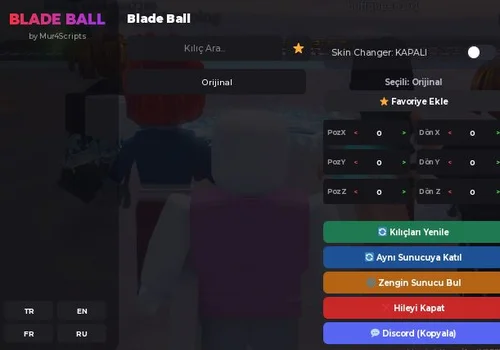
Blade SkinChanger for Blade Ball
It does exactly what a local Skin Changer should: replaces the appearance of your weapon. It worked in my test. The interface is available in Turkish, English, Russian and French. Pick this if you only want cosmetic changes without using a large hub.
- Blade SkinChanger
Details
Functions
- Blade SkinChanger
Script code
loadstring(game:HttpGet("https://gist.githubusercontent.com/Mur4exe/3f324715641be103e3ee2a8317765e13/raw/c2caa4a2a4bded88b363b671fcb080bd0db771bd/Blade_ball_modern_ui_v2.lua"))()Scripts that failed our test
These two scripts remain visible for reference. Neither receives a recommendation from this test.
Auto Parry open source
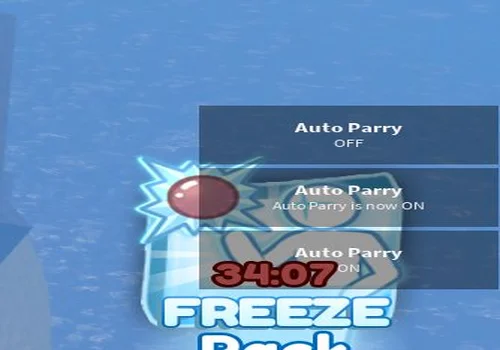
Press the English K key to toggle Auto Parry. A notification in the bottom-right corner confirms whether it is enabled or disabled. In my test, hitting the ball triggered the anti-cheat, so I could not recommend it for normal matches.
- Auto Parry with keybind (K)
Details
Functions
- Auto Parry with keybind (K)
Script code
local starterGUI = game:GetService("StarterGui")
local player = game.Players.LocalPlayer
local RunService = game:GetService("RunService")
local Players = game:GetService("Players")
local Player = Players.LocalPlayer

local autoParryEnabled = false
local Cooldown = tick()
local IsParried = false
local Connection = nil

local function SendNotification(title, text, duration)
    starterGUI:SetCore("SendNotification", {
        Title = title,
        Text = text,
        Duration = duration or 3
    })
end

local function GetBall()
    for _, Ball in ipairs(workspace.Balls:GetChildren()) do
        if Ball:GetAttribute("realBall") then
            return Ball
        end
    end
end

local function ResetConnection()
    if Connection then
        Connection:Disconnect()
        Connection = nil
    end
end

local function ToggleAutoParry()
    autoParryEnabled = not autoParryEnabled
    local status = autoParryEnabled and "ON" or "OFF"
    SendNotification("Auto Parry", "Auto Parry is now " .. status, 2)
end

game:GetService("UserInputService").InputBegan:Connect(function(input, gameProcessed)
    if gameProcessed then return end
    if input.KeyCode == Enum.KeyCode.K then
        ToggleAutoParry()
    end
end)

workspace.Balls.ChildAdded:Connect(function()
    local Ball = GetBall()
    if not Ball then return end
    ResetConnection()
    Connection = Ball:GetAttributeChangedSignal("target"):Connect(function()
        IsParried = false
    end)
end)

RunService.PreSimulation:Connect(function()
    if not autoParryEnabled then return end

    local Ball = GetBall()
    local HRP = Player.Character and Player.Character:FindFirstChild("HumanoidRootPart")

    if not Ball or not HRP then
        return
    end

    local Speed = Ball.zoomies.VectorVelocity.Magnitude
    local Distance = (HRP.Position - Ball.Position).Magnitude

    if Ball:GetAttribute("target") == Player.Name and not IsParried and Distance / Speed <= 0.55 then
        local blockButton = Player.PlayerGui.Hotbar.Block

        for _, connection in pairs(getconnections(blockButton.Activated)) do
            connection:Fire()
        end
        for _, connection in pairs(getconnections(blockButton.MouseButton1Click)) do
            connection:Fire()
        end
        for _, connection in pairs(getconnections(blockButton.MouseButton1Down)) do
            connection:Fire()
        end

        IsParried = true
        Cooldown = tick()

        if (tick() - Cooldown) >= 1 then
            IsParried = false
        end
    end
end)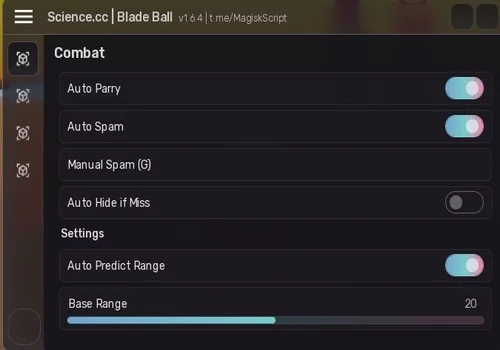
Science CC
The anti-cheat prevented me from completing a useful test. It stays listed for reference, with a Not working result. Its functions were not verified in this update.
Details
Script code
loadstring(game:HttpGet("https://raw.githubusercontent.com/Weirol/science.cc/refs/heads/main/Blade%20Ball"))()Update notes — October 6, 2026
Added Rise, Rocket and Void test notes. Confirmed that Rise and OXYO continue after death without restarting, and that Rocket tries to parry again in the next round after a miss. Recorded Rise loading at about 1.5–2 minutes in Russia. Updated OXYO to our open-source BobloUI rework and documented its AI Play and Ranked Queue limitations. Confirmed Mur4Scripts as a working local weapon Skin Changer with four interface languages.
Removed the mislabeled Kncrypt entry that used a Valera loader and triggered anti-cheat, the separate Kncrypt entry, non-working Panic / Eclipse v8, the old Auto Parry entry and the previous KEY SYSTEM listings. Science CC remains only as a failed-test reference.
![Скрипт Игра в Слова [🇷🇺] 2026 – (Автоподбор Слов)](https://robscript.com/wp-content/uploads/2026/10/ИграВСлова1-500x315.webp)