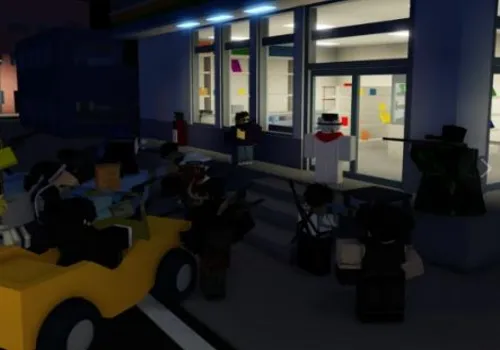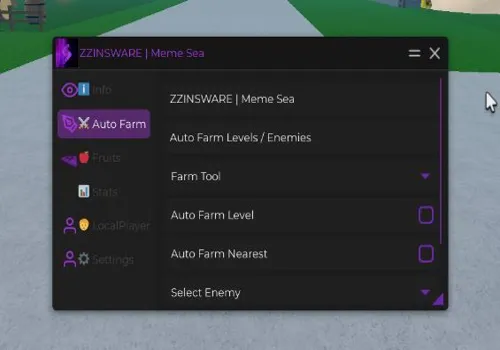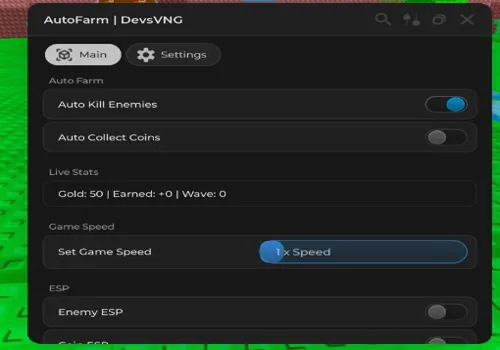
Brainrot Royale does not always require scripts for normal gameplay, but some users still search for utility tools such as auto kill brainrots, auto collect coins, enemy ESP, coin ESP, freeze brainrots, and speed boost. This page keeps those scripts in one place for reference.
Because demand for this game is limited, scripts may be outdated, patched, or updated less often than scripts for active Roblox games.
Game link: Brainrot Royale

Available Brainrot Royale Scripts
Brainrot Royale script – (by ArthurBrenno)
Script functions:
- Auto Kill Enemies – Instantly defeats all brainrots that spawn.
- Auto Collect Coins – Gathers all currency dropped by enemies automatically.
- Walkspeed Modifier – Increases movement speed for faster base navigation.
- Enemy ESP – Highlights brainrots through walls and terrain.
- Coin ESP – Shows the location of all coins on the map.
- Freeze Brainrots – Stops all brainrots from moving or attacking.
NO KEY
loadstring(game:HttpGet("https://pastebin.com/raw/MAMZZAPN"))()Insta Kill
NO KEY
--// Brainrot Killer GUI v3
--// Made by Carterjam28YT
-- code starts here :D
local ScreenGui = Instance.new("ScreenGui")
ScreenGui.Name = "BaseKillerGUI"
ScreenGui.ResetOnSpawn = false
ScreenGui.Parent = game:GetService("CoreGui")
local Frame = Instance.new("Frame")
Frame.Size = UDim2.new(0, 300, 0, 150)
Frame.Position = UDim2.new(0.02, 0, 0.7, 0)
Frame.BackgroundColor3 = Color3.fromRGB(20, 20, 20)
Frame.BorderSizePixel = 0
Frame.BackgroundTransparency = 0.05
Frame.Active = true
Frame.Draggable = true
Frame.Parent = ScreenGui
local UICorner = Instance.new("UICorner", Frame)
UICorner.CornerRadius = UDim.new(0, 10)
local Title = Instance.new("TextLabel")
Title.Size = UDim2.new(1, 0, 0, 35)
Title.BackgroundTransparency = 1
Title.Text = "⚔️ Brainrot Killer GUI" -- name you can change if wanted
Title.TextColor3 = Color3.fromRGB(255, 255, 255)
Title.TextSize = 22
Title.Font = Enum.Font.GothamBold
Title.Parent = Frame
-- button stuf
local ToggleBtn = Instance.new("TextButton")
ToggleBtn.Size = UDim2.new(0.9, 0, 0, 45)
ToggleBtn.Position = UDim2.new(0.05, 0, 0.4, 0)
ToggleBtn.BackgroundColor3 = Color3.fromRGB(40, 40, 40)
ToggleBtn.TextColor3 = Color3.fromRGB(0, 255, 0)
ToggleBtn.Text = "Start"
ToggleBtn.TextSize = 20
ToggleBtn.Font = Enum.Font.GothamSemibold
ToggleBtn.Parent = Frame
local BtnCorner = Instance.new("UICorner", ToggleBtn)
BtnCorner.CornerRadius = UDim.new(0, 8)
local Credit = Instance.new("TextLabel")
Credit.Size = UDim2.new(1, 0, 0, 25)
Credit.Position = UDim2.new(0, 0, 0.83, 0)
Credit.BackgroundTransparency = 1
Credit.Text = "Made by Carterj28YT" --pls do not remove
Credit.TextColor3 = Color3.fromRGB(170, 170, 170)
Credit.TextSize = 16
Credit.Font = Enum.Font.GothamMedium
Credit.Parent = Frame
-- brain numing way to make a logic system
_G.a = false
local running = false
local function loopScript()
	running = true
	while _G.a and task.wait(0.1) do
		for i, item in workspace.Bases[tostring(game.Players.LocalPlayer:GetAttribute("Base"))].Enemies:GetDescendants() do
			if item.ClassName == "Humanoid" then
				task.spawn(function()
					item.Health = 0
				end)
			end
		end
		for i, item in workspace:GetChildren() do
			if item.Name == "CashTemp" then
				task.spawn(function()
					item.CFrame = game.Players.LocalPlayer.Character.HumanoidRootPart.CFrame
				end)
			end
		end
	end
	running = false
end
ToggleBtn.MouseButton1Click:Connect(function()
	_G.a = not _G.a
	if _G.a then
		ToggleBtn.Text = "Stop"
		ToggleBtn.BackgroundColor3 = Color3.fromRGB(0, 255, 0)
		if not running then
			task.spawn(loopScript)
		end
	else
		ToggleBtn.Text = "Start"
		ToggleBtn.BackgroundColor3 = Color3.fromRGB(0, 255, 0)
	end
end)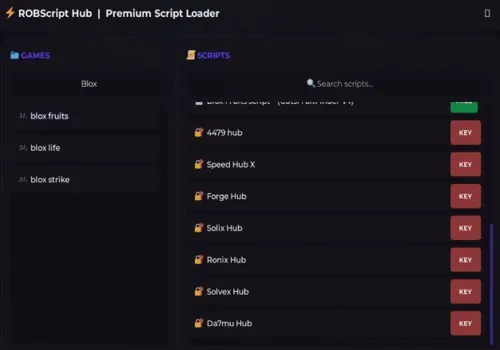
Robscript hub
Script
Show script
loadstring(game:HttpGet('https://raw.githubusercontent.com/artas01/robscript/refs/heads/main/loader.lua'))()
Copies
2443
Void Hub
KEY SYSTEM
loadstring(game:HttpGet("https://raw.githubusercontent.com/coldena/voidhuba/refs/heads/main/voidhubload",true))()Hokalaza hub
KEY SYSTEM
loadstring(game:HttpGet("https://raw.githubusercontent.com/hehehe9028/HOKA/refs/heads/main/Brainrot%20royale"))()Senpai Hub
KEY SYSTEM
loadstring(game:HttpGet("https://raw.githubusercontent.com/Senpai1997/Scripts/refs/heads/main/SenpaiHubBrainrotRoyaleAutoKillAll.lua"))()Alternative hub
KEY SYSTEM
loadstring(game:HttpGet('https://raw.githubusercontent.com/A1ternative-hub/script/refs/heads/main/tu'))()Airflow hub
KEY SYSTEM
loadstring(game:HttpGet("https://airflowscript.com/loader"))()EZ Hub
KEY SYSTEM
loadstring(game:HttpGet("https://api.junkie-development.de/api/v1/luascripts/public/8e08cda5c530a6529a71a14b94a33734eccc870e9f28220410eb21d719f66da9/download"))()How to use scripts?
- Copy the script and paste it into any executor. (Delta, Solara, Arceus X, Fluxus, Synapse X)
- Click execute.
- The script is working!
Warning:
- Use the script on alt accounts.
- We are not responsible for your use of scripts.
- You should be prepared that the script may not work.
FREQUENTLY ASKED QUESTIONS:
Do I need to buy scripts?
No, all scripts are either completely free or have a light key system with ads.
The script is not working, what should I do?
We update and check the scripts every week. Try using a different script.