In This World Scripts — (NO KEY) World Rule HUD & Assists

Published Updated 0 views
  • 1 script
  • 1 NO KEY
  • 0 KEY SYSTEM
  • 1 mobile

Browse 1 In This World script in this collection. 1 offers NO KEY access. 1 lists mobile support.

Reviewed by RobScript Team

In This World World tab showing StormCity’s rule, 11 of 11 players alive, and a round time of 02:12

In This World is a round-based collection of tiny worlds: every round hands you a new rule — a giant statue, a tsunami, a chain to your partner — and one mistake ends it. Our keyless hub copies the round rule straight from the game into one window, adds the assist for that rule and was checked on PC and mobile on 21 November 2026 (game version 793). Game: In This World.

KEYLESS In This World script
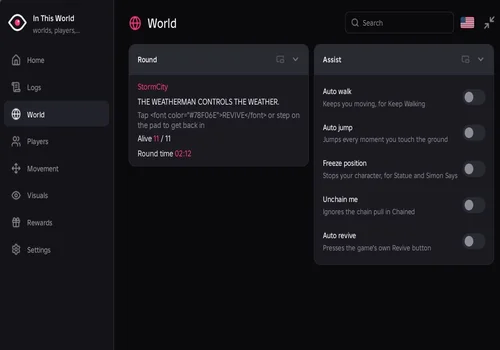
Robscript Team Hub World tab in In This World showing StormCity, its rule, alive count and round time
Robscript Team Hub script preview

Robscript Team Hub

Developer
Robscript Team
Created
Created
Working
NO KEY PC MOBILE OPEN SOURCE

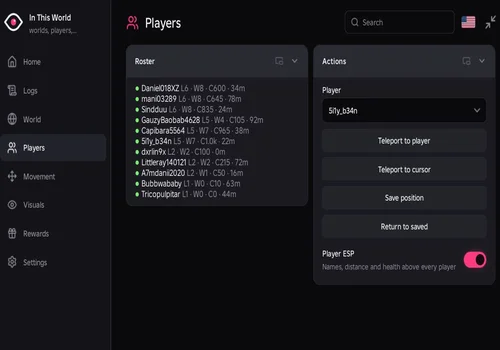
Our keyless hub for In This World. In our check, the World tab showed StormCity and its rule from the game’s own intro text, Player ESP marked all 17 other players, and Speed, Fly, Auto walk, Auto jump, Freeze, Noclip, Anti fall and the visual settings worked. We played about 30 minutes of rounds with Speed and Fly without a kick, and the hub also worked on mobile with Delta.

  • Current World and Round Rule
  • Alive Count and Round Timer
  • Auto Walk
  • +20 more
Limitation: Auto revive spends your Revives. Not checked yet: Auto claim rewards and Unchain me in a real Chained round. Auto revive and Auto claim need an executor with firesignal; Unchain me needs hookmetamethod.
Copies 0 GitHub
Details

Robscript Team Hub functions

  • Current World and Round Rule
  • Alive Count and Round Timer
  • Auto Walk
  • Auto Jump
  • Freeze Position
  • Unchain Me (Chained)
  • Auto Revive
  • Player Roster: Level, Wins, Credits, Distance
  • Player ESP
  • Teleport to Player or Cursor
  • Save and Return to Position
  • Speed and Jump Power
  • Infinite Jump
  • Fly
  • Noclip
  • Anti Fall
  • Fullbright and No Fog
  • Hide Screen Effects
  • Field of View
  • Auto Claim Rewards
  • Credits, Wins, Streak and Level Readout
  • Configs and Themes
  • English and Russian UI
Access
NO KEY
Tags
PC MOBILE OPEN SOURCE
Languages
English Russian
Compatibility
Potassium Delta

Change history

  • – Added. RobScript check on PC with Potassium: hub v1.0 loaded; World tab, Player ESP, Speed and Fly worked. About 30 minutes of rounds with Speed and Fly, no kick. Worked on mobile with Delta, including Auto walk, Auto jump, Freeze, Noclip, Anti fall and Visuals. Auto revive spends Revives.
Script code
loadstring(game:HttpGet("https://raw.githubusercontent.com/bobloscript/robscript/refs/heads/main/InThisWorld"))()
Robscript Team Hub screenshots
Players tab with a roster of player levels, wins, credits and distances, and Player ESP turned on
Robscript Team Hub: player roster, teleports and Player ESP.
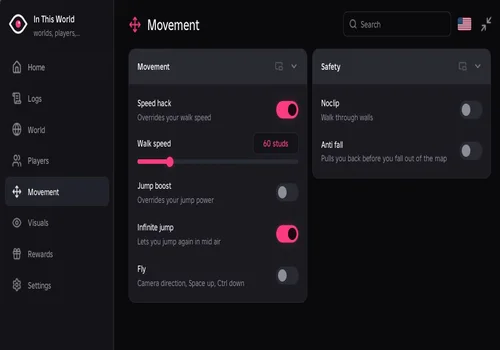
Movement tab with Speed hack at 60 studs, Infinite jump, Fly, Noclip and Anti fall
Robscript Team Hub: movement and safety toggles.
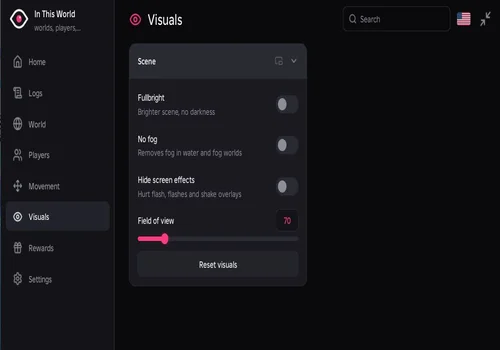
Visuals tab with Fullbright, No fog, Hide screen effects and a field of view slider
Robscript Team Hub: visual settings.

What We Checked on November 21, 2026

PC with Potassium and mobile with Delta, game version 793. No kick in our session is not a promise: a ban is always possible.

FeatureResult
Hub v1.0 start
Worked: the window opened, no errors in the console
World and rule
Worked: showed StormCity and “EVERYONE IS AFRAID OF A GIANT STATUE.”
Alive count
Worked: 17 of 17 players
Player ESP
Worked: name, HP and distance tag plus highlight on all 17 other players
Speed hack
Worked: set to 80, then 60 with the slider; turning it off restored normal speed
Fly
Worked: turned on and off cleanly
About 30 minutes of rounds with Speed and Fly
No kick
Mobile (Delta)
Worked
Auto walk, Auto jump, Freeze, Noclip, Anti fall, Visuals
Worked
Auto revive
Works, but spends your Revives
Auto claim rewards
Not checked yet
Unchain me
Not checked in a live Chained round yet

Which Toggle Helps in Which World

Each round brings a new world with its own rule. These World tab assists are made for specific worlds. Auto walk, Freeze position, Auto jump and No fog worked in our check; Unchain me has not been checked in a live Chained round yet.

Keep Walking: Auto walk
The ground disappears behind you. Auto walk keeps you moving in the direction your camera faces, so point the camera along the path.
Statue and Simon Says: Freeze position
Freeze stops your character completely. Turn it off when the round ends: while it is on, you cannot walk and Speed hack does nothing.
Chained: Unchain me
Your game sends the chain pull to the server. Unchain me blocks those messages, which should stop the chain from dragging you. It needs an executor with hookmetamethod.
Jump worlds: Auto jump
Auto jump jumps every time you land, for rounds like Jump Rope where you must keep jumping.
Deep Water and fog worlds: No fog
No fog removes the game’s fog, so you can see further in water and fog worlds.

How to Use the In This World Script

We checked the hub in In This World by In This Group… on Roblox. There is more than one In This World experience; the hub was not tested in other versions.

  1. Join In This World and wait in the lobby until the map loads.
  2. Open your executor and make sure it has injected.
  3. Copy the code from the card above, paste it into the executor and run it.
  4. When the round starts, open the World tab to see the world and its rule, then turn on the assist that fits.
  5. Press RightControl to hide or show the window. Settings → Unload removes the hub.
Using scripts breaks Roblox’s Terms of Use, and any account can be banned, even though we were not kicked. Wins, XP and Credits are stored on the game’s server, so the hub only reads them and cannot add them.

Frequently Asked Questions

Can this script give me Wins, XP or Credits?
No. The game keeps them on its server. The hub only shows them and helps you survive rounds; any script that promises free Credits is lying.
Does Auto revive cost anything?
Yes. It presses the game’s Revive button, and that spends your Revives. Leave it off if you want to keep them.
Does it work on mobile?
Yes. It worked on mobile with Delta in our check.
My character will not move. What happened?
Freeze position is probably still on from a Statue or Simon Says round. Turn it off in the World tab.
Unchain me does nothing. Why?
It only matters in the Chained world, and it needs an executor with hookmetamethod. Open the Logs tab: if your executor lacks it, the hub says so there.

More Roblox scripts. Our universal hub covers 300+ places in one loader, the executor status page shows which clients have the functions this hub needs (firesignal, hookmetamethod), and you can request a game if yours is missing.