Star Fishing Scripts 2026 — (NO KEY) Auto Fishing

Published Updated 1.8K views
  • 1 script
  • 1 NO KEY
  • 0 KEY SYSTEM
  • 1 mobile

Browse 1 Star Fishing script in this collection. 1 offers NO KEY access. 1 lists mobile support.

Low activity archive
Game status: Low activity Update frequency: Rare

This game currently has low activity on Roblox. This page is kept as a script archive for players who still search for scripts. Some scripts or functions may be outdated, and updates may be less frequent than for scripts for active Roblox games.

Reviewed by RobScript Team

star fishing scripts - no key

We built this hub for Star Fishing. Choose what happens when your bag fills: pause, sell selected stars or keep fishing beyond the displayed cap. Turn your character toward the fishing spot before starting. The hub does not aim your casts for you.

Tested: PC (Potassium), Mobile (Delta)

Keyless Script
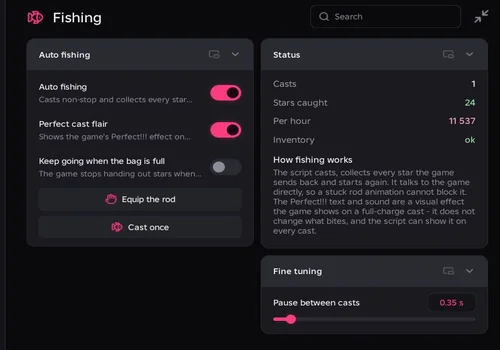
Robscript Team’s Star Fishing Hub interface
Star Fishing script preview

Star Fishing

Developer
Robscript Team
Updated
Updated
Working
NO KEY PC MOBILE OPEN SOURCE

Auto Fishing, collecting beyond the displayed inventory cap and filtered sales worked in our check. Automatic sales returned the character to the fishing spot afterward.

  • Auto Fishing
  • Keep Fishing Beyond the Displayed Inventory Cap
  • Rarity and Star-Type Sale Filters
  • +15 more
Limitation: Sell When the Bag Is Full is on by default and ignores Dry Run. Choose your sale settings before enabling Auto Fishing. Face the fishing spot yourself.
Copies 47 GitHub
Details

Star Fishing functions

  • Auto Fishing
  • Keep Fishing Beyond the Displayed Inventory Cap
  • Rarity and Star-Type Sale Filters
  • Equip the Rod
  • Single Cast
  • Pause Between Casts
  • Auto Sell at Full Bag: Ignores Dry Run
  • Never Sell Favourites
  • Dry-Run Manual Sales
  • Preview Selected Stars and Their Value
  • Sell at the Star Merchant
  • Return to Fishing Position After Auto Sale
  • Automatic Rod-State Recovery
  • Perfect Cast Flair: Visual Effect Only
  • Casts, Stars Caught and Hourly Estimate
  • Inventory, Selected Stars and Cash Status
  • Saved Configs, Autoload and Share Codes
  • Theme and Interface Settings
Access
NO KEY
Tags
PC MOBILE OPEN SOURCE
Languages
English
Compatibility
Delta Arceus X Codex Other
Script code
loadstring(game:HttpGet("https://raw.githubusercontent.com/bobloscript/robscript/refs/heads/main/StarFishing", true))()

How to Use Star Fishing Hub

Auto Fishing starts off in a fresh setup. If the loader will not run, check executor status.

  1. Join Star Fishing and stand at a fishing spot. Turn your character toward the area where you want to cast.
  2. Copy the loader from the card and run it in your executor. Press Equip the Rod, then Cast Once, and check the casting direction.
  3. Choose your full-bag mode before enabling Auto Fishing: pause, auto sell or keep collecting. Use the settings in the table below.
  4. Before selling, choose Rarities to Sell and Star Types to Sell. Keep Never Sell Favourites on and use Preview the Selection. An empty filter list allows every value in that list.
  5. Dry Run Only applies to manual Sell Now actions. Turn it off when you are ready for a manual sale. Full-bag Auto Sell ignores Dry Run; disable Sell When the Bag Is Full if you want manual-only sales.
  6. Enable Auto Fishing after checking your settings. Turn it off to stop the fishing loop. RightControl only hides or shows the window.
Using scripts can violate Roblox’s Terms of Use and may lead to account penalties.

Fishing Beyond the Inventory Cap

Choose whether a full bag should pause fishing, trigger a sale or allow more catches. Sell When the Bag Is Full takes priority if both switches are on.

Full-Bag ModeSell When the Bag Is FullKeep Going When the Bag Is FullWhat Happens
Pause at capacity
Off
Off
Wait for you to make space.
Sell and return (default)
On
Off
Sell matching stars at the merchant, return and continue if space was freed.
Keep collecting beyond capacity
Off
On
Continue casting while the full-inventory warning may remain visible.
Auto Sell takes priority
On
On
Try to sell first. The overflow option does not take over.
If your filters or favourites leave no stars to sell, the bag stays full and the loop keeps trying to sell. Change the filters, make space yourself or turn full-bag selling off and enable overflow.
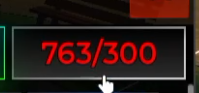
Inventory counter showing 763/300 stars
Star Fishing: our inventory reached 763 stars while the displayed capacity remained 300.
Star Fishing Hub catching stars while the game displays Inventory Full
Star Fishing: catches continue while the game displays Inventory Full.

Fishing Controls

Auto Fishing and Cast Timing
Auto Fishing runs the cast-and-collect loop. Pause Between Casts adds a delay before the next cast; its default is 0.35 seconds. Equip the Rod puts your rod in hand. Cast Once runs one cast without starting the loop.
Face the Fishing Spot Yourself
The hub uses the direction your character is facing. In our test, this sometimes caused attempts to fish from the ground. Stop Auto Fishing, turn toward the fishing area and try Cast Once. Check the direction again after moving or returning from the merchant.
Perfect Cast Flair Is Visual Only
Adds the game’s Perfect!!! text and sound after a successful cast. This switch does not boost luck or change which stars you catch.
Read the Session Counters
Casts and Stars Caught track the current run. Per Hour estimates a rate from the catch count and elapsed session time. Inventory reports the game’s full-bag state, so it can still say Full while overflow is working.

Selling With Rarity and Star-Type Filters

Sales go through the Star Merchant rather than the backpack’s gamepass-locked controls. Automatic sales remember your fishing position and teleport you back afterward.

Choose What Can Be Sold
A star must match both Rarities to Sell and Star Types to Sell when both lists contain selections. An empty list allows every value in that list. Preview the Selection shows the number and value of matching stars before a manual sale.
Keep Never Sell Favourites On
Leave this on when using selective sale filters. The merchant sells in bulk, so the hub temporarily marks stars outside your selection as favourites, then removes only the marks it added. Existing favourites stay protected. This filtering protection depends on Never Sell Favourites being enabled.
Manual Sales and Dry Run
Dry Run Only is on by default. While it is on, Sell Now previews the selected stars instead of selling them. Turn it off when the preview matches what you want to sell, then press Sell Now.
Automatic Sales Are Real Sales
Sell When the Bag Is Full is on by default. During Auto Fishing, it sells eligible stars when the bag fills, even if Dry Run Only is on. Turn it off for manual-only sales or to use overflow mode.

Recorded Checks

These are samples from our checks and development notes, not fixed rates for every fishing session.

CheckRecorded Result
Inventory overflow
763 stars with a displayed capacity of 300
Short fishing sample
5 casts and 120 stars in 30 seconds
Large sale with favourites kept
714 stars sold for $46,246; all 43 favourites kept
Filtered sale
2 stars sold for $500; favourites left untouched
Automatic full-bag sale
135 stars sold for $36,260

Saved Setups and Restarting

Save and Restore Your Setup
Configs saves switches and filters under a name, supports autoload and provides share codes. Settings use the StarFishingHub folder. Autoload can restore saved switches, so check the full-bag selling and overflow settings when loading a setup.
Window and Restarting
RightControl hides or shows the window. Theme settings let you change colours and interface scale. Running the loader again stops the older background loop. The interface library downloads at startup, so it needs a connection to open.

Troubleshooting

SymptomWhat to Check
The rod casts toward the ground
Stop Auto Fishing, face the fishing spot yourself and try Cast Once.
Rod Is Not in Hand
Press Equip the Rod, then try Cast Once.
Inventory Full, but overflow does not start
Turn Sell When the Bag Is Full off and Keep Going When the Bag Is Full on.
Auto Sell keeps trying, but the bag stays full
Your filters or favourites may leave nothing to sell. Change the selection, make space or switch to overflow mode.
Stars are sold while Dry Run is on
Full-bag Auto Sell ignores Dry Run. Disable Sell When the Bag Is Full for manual-only sales.
Sell Now does not sell anything
Check Dry Run Only, both sale filters and whether the remaining stars are favourites.
The merchant has nothing to buy
Stand next to the Star Merchant and try Sell Now again.
Nothing Is Biting at All keeps repeating
Check the casting direction and try Cast Once. The hub attempts rod-state recovery automatically; rejoin if the problem continues.
The rod animation looks stuck
Check whether the inventory and catch counters are increasing, and read Logs. The loop does not rely on the normal rod animation.
The window does not appear
Check the connection and run the loader again.