This page collects Apocalypse Rising 2 scripts for Roblox, including no-key combat hubs, ESP tools, silent aim menus, teleport utilities, and key-system options. The goal is to help users compare each script by access type, supported devices, executor compatibility, core functions, and update status.
Apocalypse Rising 2 is an open-world survival shooter where player awareness, loot tracking, movement control, and weapon handling can strongly affect gameplay. Because scripts can stop working after Roblox, executor, or game updates, every entry should be checked by access type, compatibility labels, and last update date before use.
Game link: Apocalypse Rising 2 on Roblox
Keyless Apocalypse Rising 2 scripts
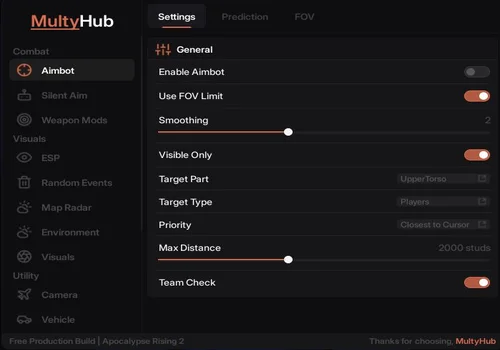
Multy Hub – Best script
- 1. Combat
- Aimbot
- Settings / General
- +198 more
Details
Functions
- 1. Combat
- Aimbot
- Settings / General
- Enable Aimbot
- Use FOV Limit
- Smoothing
- Visible Only
- Target Part
- Target Type
- Priority
- Max Distance
- Team Check
- Prediction
- Movement Prediction
- Bullet Drop Compensation
- Auto Detect Velocity
- Fallback Velocity
- FOV
- Show FOV Circle
- Follow Gun Barrel
- FOV Radius
- Smoothness
- Outline:
- Enabled
- Color & Opacity
- Thickness
- Fill
- Silent Aim
- Enable Silent Aim
- Hit Chance
- FOV Follows Gun Barrel
- FOV Color and Opacity
- Targeting
- Filter
- Bullet Mods / Bullet Manipulation
- Adjust Origin
- Max Offset
- Max Forward
- Max Walls
- Window Aware
- Wallbang Synergy
- Obstruction Fallback
- Weapon Mods
- Weapons
- No Recoil
- Instant Reload
- Auto Reload
- Unlock Fire Modes
- Bullet Mods
- Hitbox Expander
- Hitbox Size
- Wallbang
- Wallbang Origin Assist
- Origin Assist Max
- No Bullet Spread
- Melee
- Enable Melee Aura
- Range
- Target Filter
- 2. Visuals
- ESP
- General
- Enable ESP
- ESP Toggle Key
- Category Toggles
- Players
- Players Toggle Key
- Zombies
- Zombies Toggle Key
- Boss Only
- Vehicles
- Vehicles Toggle Key
- Corpses
- Corpses Toggle Key
- Players Display
- Player Color
- Fill Transparency
- Outline Transparency
- Text Opacity
- Weapon Info
- Look Direction
- Squad Display
- Show Squad Members
- Squad Color
- Zombie Display
- Zombie Color
- Corpse Display
- Corpse Color
- Random Events
- Enable Random Events ESP
- Events Toggle Key
- Notify on Spawn
- Display
- Names
- Distance
- Text Color
- Event Filter
- Search Events
- Select All
- Deselect All
- Individual Event Toggles
- Event Counter: 54/54
- Visible event names
- ATV Crashsite Renegade
- Bank Truck Robbery
- Beached Aluminum Boat
- C-123 Provider Military
- C-123 Provider Military Dry
- Camp Soviet Bandit
- Camper RV Event
- Map Radar
- Enable Map Radar
- Map Radar Toggle Key
- Show Names
- Use Username
- Show Held Items
- Marker Size
- Entity Toggles
- Player Markers
- Player Pin Color
- Zombie Markers
- Zombie Pin Color
- Boss Pin Color
- Visible tabs
- Events
- Environment
- Lighting
- Fullbright
- Override Time of Day
- Time of Day
- Override Brightness
- Brightness
- Override Ambient
- Ambient Color
- Override Outdoor Ambient
- Outdoor Ambient Color
- Atmosphere
- Override Atmosphere Color
- Atmosphere Color
- Override Atmosphere Decay
- Atmosphere Decay
- Effects
- No Fog
- No Clouds
- No Atmosphere
- No Sandstorm
- No Color Correction
- No SunRays
- World
- Visuals
- Tracers / Bullet Tracers
- Rainbow
- Color
- Width
- Fade Time
- Texture
- Custom Texture ID
- Preset
- Texture Mode
- Texture Scale
- Hit Feedback / Hit Log
- Max Entries
- Font Size
- Headshot Color
- Body Color
- Show Invalidated
- Confirm Window
- Invalidated Color
- Crosshair / Custom Crosshair
- Center Dot
- Outline
- Size
- Gap
- Dot Size
- Tracers
- Hit Feedback
- Crosshair
- Character
- Weapon
- 3. Utility
- Camera
- Freecam
- Toggle Freecam
- Speed
- Sprint Speed
- Freecam Visuals
- Spectate
- Controls
- Movement
- Noclip
- Noclip Key
- WalkSpeed
- Toggle
- Walk on Water
- Player Fly
- Toggle Key
- Fly Speed
- Fly Mode
- No Fall Damage
- Perks
- Zoom
Change history
- – Added to page!
Script code
loadstring(game:HttpGet("https://raw.githubusercontent.com/multyplyy/multyHubLoader/main/loader.luau"))()
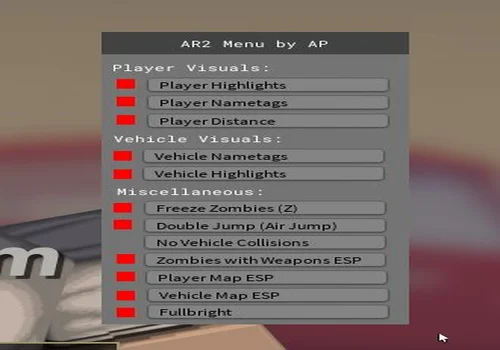
AR2 Mod Menu by AP
- Player Visual: Player highlights, player nametags, player distance
- Venicle visuals: Venicle nametags, venicle highlights
- Miscellaneous: Freeze Zombie, Double Jump (Air Jump), No Venicle Collisions, Zombies and weapons ESP, Player MAP ESP, Venicle Map ESP, Full bright
Details
Functions
- Player Visual: Player highlights, player nametags, player distance
- Venicle visuals: Venicle nametags, venicle highlights
- Miscellaneous: Freeze Zombie, Double Jump (Air Jump), No Venicle Collisions, Zombies and weapons ESP, Player MAP ESP, Venicle Map ESP, Full bright
Change history
- – Added to page!
Script code
loadstring(game:HttpGet("https://pastebin.com/raw/B2NP4x8w"))()
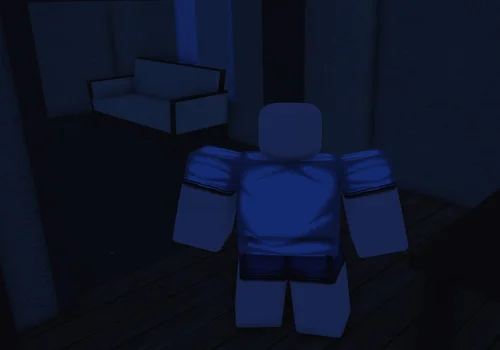
Teleport to any player
- Teleport to any player
Details
Functions
- Teleport to any player
Change history
- – Added to page!
Script code
local Players = game:GetService("Players")
local UserInputService = game:GetService("UserInputService")
local TweenService = game:GetService("TweenService")

local localPlayer = Players.LocalPlayer

-- Создаем интерфейс
local screenGui = Instance.new("ScreenGui")
screenGui.Name = "TeleportScriptUI"
screenGui.Parent = localPlayer:WaitForChild("PlayerGui")
screenGui.ResetOnSpawn = false
screenGui.ZIndexBehavior = Enum.ZIndexBehavior.Sibling

-- Общий контейнер: двигаем его, чтобы тень двигалась вместе с окном
local holder = Instance.new("Frame")
holder.Name = "Holder"
holder.Size = UDim2.new(0, 390, 0, 360)
holder.Position = UDim2.new(0.5, -195, 0.5, -180)
holder.BackgroundTransparency = 1
holder.Parent = screenGui

-- Тень
local shadow = Instance.new("ImageLabel")
shadow.Name = "Shadow"
shadow.Size = UDim2.new(1, 42, 1, 42)
shadow.Position = UDim2.new(0, -21, 0, -16)
shadow.BackgroundTransparency = 1
shadow.Image = "rbxassetid://1316044570"
shadow.ImageColor3 = Color3.fromRGB(0, 0, 0)
shadow.ImageTransparency = 0.38
shadow.ScaleType = Enum.ScaleType.Slice
shadow.SliceCenter = Rect.new(10, 10, 118, 118)
shadow.ZIndex = 0
shadow.Parent = holder

local mainFrame = Instance.new("Frame")
mainFrame.Name = "MainFrame"
mainFrame.Size = UDim2.new(1, 0, 1, 0)
mainFrame.Position = UDim2.new(0, 0, 0, 0)
mainFrame.BackgroundColor3 = Color3.fromRGB(18, 20, 28)
mainFrame.BorderSizePixel = 0
mainFrame.ClipsDescendants = false
mainFrame.ZIndex = 1
mainFrame.Parent = holder

local mainCorner = Instance.new("UICorner")
mainCorner.CornerRadius = UDim.new(0, 18)
mainCorner.Parent = mainFrame

local mainStroke = Instance.new("UIStroke")
mainStroke.Color = Color3.fromRGB(76, 91, 120)
mainStroke.Thickness = 1
mainStroke.Transparency = 0.35
mainStroke.Parent = mainFrame

local mainGradient = Instance.new("UIGradient")
mainGradient.Rotation = 90
mainGradient.Color = ColorSequence.new({
    ColorSequenceKeypoint.new(0, Color3.fromRGB(29, 33, 46)),
    ColorSequenceKeypoint.new(1, Color3.fromRGB(15, 17, 24))
})
mainGradient.Parent = mainFrame

-- Верхняя панель для drag
local titleBar = Instance.new("Frame")
titleBar.Name = "TitleBar"
titleBar.Size = UDim2.new(1, 0, 0, 62)
titleBar.Position = UDim2.new(0, 0, 0, 0)
titleBar.BackgroundColor3 = Color3.fromRGB(30, 35, 51)
titleBar.BorderSizePixel = 0
titleBar.ZIndex = 2
titleBar.Parent = mainFrame

local titleCorner = Instance.new("UICorner")
titleCorner.CornerRadius = UDim.new(0, 18)
titleCorner.Parent = titleBar

local titleGradient = Instance.new("UIGradient")
titleGradient.Rotation = 0
titleGradient.Color = ColorSequence.new({
    ColorSequenceKeypoint.new(0, Color3.fromRGB(45, 55, 84)),
    ColorSequenceKeypoint.new(1, Color3.fromRGB(23, 27, 41))
})
titleGradient.Parent = titleBar

-- Маска, чтобы нижние углы titleBar не были круглыми визуально
local titleMask = Instance.new("Frame")
titleMask.Name = "TitleMask"
titleMask.Size = UDim2.new(1, 0, 0, 18)
titleMask.Position = UDim2.new(0, 0, 1, -18)
titleMask.BackgroundColor3 = Color3.fromRGB(23, 27, 41)
titleMask.BorderSizePixel = 0
titleMask.ZIndex = 2
titleMask.Parent = titleBar

local iconBadge = Instance.new("TextLabel")
iconBadge.Name = "IconBadge"
iconBadge.Size = UDim2.new(0, 38, 0, 38)
iconBadge.Position = UDim2.new(0, 16, 0, 12)
iconBadge.BackgroundColor3 = Color3.fromRGB(67, 132, 255)
iconBadge.Text = "↯"
iconBadge.TextColor3 = Color3.fromRGB(255, 255, 255)
iconBadge.TextSize = 22
iconBadge.Font = Enum.Font.GothamBold
iconBadge.ZIndex = 3
iconBadge.Parent = titleBar

local iconCorner = Instance.new("UICorner")
iconCorner.CornerRadius = UDim.new(0, 12)
iconCorner.Parent = iconBadge

local iconGradient = Instance.new("UIGradient")
iconGradient.Rotation = 45
iconGradient.Color = ColorSequence.new({
    ColorSequenceKeypoint.new(0, Color3.fromRGB(83, 163, 255)),
    ColorSequenceKeypoint.new(1, Color3.fromRGB(104, 79, 255))
})
iconGradient.Parent = iconBadge

local titleLabel = Instance.new("TextLabel")
titleLabel.Name = "TitleLabel"
titleLabel.Size = UDim2.new(1, -110, 0, 24)
titleLabel.Position = UDim2.new(0, 64, 0, 12)
titleLabel.Text = "Teleport Script"
titleLabel.TextColor3 = Color3.fromRGB(255, 255, 255)
titleLabel.TextXAlignment = Enum.TextXAlignment.Left
titleLabel.TextSize = 18
titleLabel.Font = Enum.Font.GothamBold
titleLabel.BackgroundTransparency = 1
titleLabel.ZIndex = 3
titleLabel.Parent = titleBar

local subtitleLabel = Instance.new("TextLabel")
subtitleLabel.Name = "SubtitleLabel"
subtitleLabel.Size = UDim2.new(1, -110, 0, 18)
subtitleLabel.Position = UDim2.new(0, 64, 0, 35)
subtitleLabel.Text = "Выбор игрока и дистанции"
subtitleLabel.TextColor3 = Color3.fromRGB(170, 180, 205)
subtitleLabel.TextXAlignment = Enum.TextXAlignment.Left
subtitleLabel.TextSize = 12
subtitleLabel.Font = Enum.Font.Gotham
subtitleLabel.BackgroundTransparency = 1
subtitleLabel.ZIndex = 3
subtitleLabel.Parent = titleBar

local closeButton = Instance.new("TextButton")
closeButton.Name = "CloseButton"
closeButton.Size = UDim2.new(0, 34, 0, 34)
closeButton.Position = UDim2.new(1, -48, 0, 14)
closeButton.BackgroundColor3 = Color3.fromRGB(255, 82, 105)
closeButton.BackgroundTransparency = 0.12
closeButton.BorderSizePixel = 0
closeButton.Text = "×"
closeButton.TextColor3 = Color3.fromRGB(255, 255, 255)
closeButton.TextSize = 22
closeButton.Font = Enum.Font.GothamBold
closeButton.ZIndex = 3
closeButton.Parent = titleBar

local closeCorner = Instance.new("UICorner")
closeCorner.CornerRadius = UDim.new(0, 10)
closeCorner.Parent = closeButton

-- Контент
local content = Instance.new("Frame")
content.Name = "Content"
content.Size = UDim2.new(1, -40, 1, -92)
content.Position = UDim2.new(0, 20, 0, 78)
content.BackgroundTransparency = 1
content.ZIndex = 2
content.Parent = mainFrame

local function addCorner(instance, radius)
    local corner = Instance.new("UICorner")
    corner.CornerRadius = UDim.new(0, radius or 10)
    corner.Parent = instance
    return corner
end

local function addStroke(instance, color, transparency, thickness)
    local stroke = Instance.new("UIStroke")
    stroke.Color = color or Color3.fromRGB(80, 95, 125)
    stroke.Transparency = transparency or 0.45
    stroke.Thickness = thickness or 1
    stroke.Parent = instance
    return stroke
end

local function makeLabel(text, y)
    local label = Instance.new("TextLabel")
    label.Size = UDim2.new(1, 0, 0, 18)
    label.Position = UDim2.new(0, 0, 0, y)
    label.BackgroundTransparency = 1
    label.Text = text
    label.TextColor3 = Color3.fromRGB(185, 194, 214)
    label.TextSize = 13
    label.Font = Enum.Font.GothamMedium
    label.TextXAlignment = Enum.TextXAlignment.Left
    label.ZIndex = 3
    label.Parent = content
    return label
end

local function styleTextBox(textBox)
    textBox.BackgroundColor3 = Color3.fromRGB(31, 36, 52)
    textBox.BackgroundTransparency = 0
    textBox.BorderSizePixel = 0
    textBox.TextColor3 = Color3.fromRGB(245, 248, 255)
    textBox.PlaceholderColor3 = Color3.fromRGB(130, 140, 165)
    textBox.TextSize = 14
    textBox.Font = Enum.Font.Gotham
    textBox.ClearTextOnFocus = false
    textBox.ZIndex = 3
    addCorner(textBox, 12)
    local stroke = addStroke(textBox, Color3.fromRGB(74, 88, 120), 0.45, 1)

    textBox.Focused:Connect(function()
        TweenService:Create(stroke, TweenInfo.new(0.15), {
            Transparency = 0.05,
            Color = Color3.fromRGB(93, 158, 255)
        }):Play()
    end)

    textBox.FocusLost:Connect(function()
        TweenService:Create(stroke, TweenInfo.new(0.15), {
            Transparency = 0.45,
            Color = Color3.fromRGB(74, 88, 120)
        }):Play()
    end)

    return stroke
end

local function styleButton(button, defaultColor, hoverColor)
    button.BorderSizePixel = 0
    button.TextColor3 = Color3.fromRGB(255, 255, 255)
    button.Font = Enum.Font.GothamBold
    button.AutoButtonColor = false
    button.ZIndex = 3
    addCorner(button, 12)

    button.MouseEnter:Connect(function()
        TweenService:Create(button, TweenInfo.new(0.15), {
            BackgroundColor3 = hoverColor,
            BackgroundTransparency = 0
        }):Play()
    end)

    button.MouseLeave:Connect(function()
        TweenService:Create(button, TweenInfo.new(0.15), {
            BackgroundColor3 = defaultColor,
            BackgroundTransparency = 0
        }):Play()
    end)
end

-- Поле выбора игрока
makeLabel("Игрок", 0)

local targetInput = Instance.new("TextBox")
targetInput.Name = "TargetInput"
targetInput.Size = UDim2.new(1, -48, 0, 42)
targetInput.Position = UDim2.new(0, 0, 0, 24)
targetInput.PlaceholderText = "Введите ник или выберите из списка"
targetInput.Text = ""
targetInput.TextXAlignment = Enum.TextXAlignment.Left
targetInput.Parent = content
styleTextBox(targetInput)

local targetPadding = Instance.new("UIPadding")
targetPadding.PaddingLeft = UDim.new(0, 14)
targetPadding.PaddingRight = UDim.new(0, 10)
targetPadding.Parent = targetInput

local dropdownButton = Instance.new("TextButton")
dropdownButton.Name = "DropdownButton"
dropdownButton.Size = UDim2.new(0, 42, 0, 42)
dropdownButton.Position = UDim2.new(1, -42, 0, 24)
dropdownButton.BackgroundColor3 = Color3.fromRGB(48, 58, 84)
dropdownButton.Text = "⌄"
dropdownButton.TextColor3 = Color3.fromRGB(230, 235, 255)
dropdownButton.TextSize = 22
dropdownButton.Font = Enum.Font.GothamBold
dropdownButton.Parent = content
styleButton(dropdownButton, Color3.fromRGB(48, 58, 84), Color3.fromRGB(63, 76, 110))

-- Выпадающий список игроков
local playerListFrame = Instance.new("ScrollingFrame")
playerListFrame.Name = "PlayerListFrame"
playerListFrame.Size = UDim2.new(1, 0, 0, 136)
playerListFrame.Position = UDim2.new(0, 0, 0, 72)
playerListFrame.BackgroundColor3 = Color3.fromRGB(24, 28, 40)
playerListFrame.BorderSizePixel = 0
playerListFrame.ScrollBarThickness = 4
playerListFrame.ScrollBarImageColor3 = Color3.fromRGB(93, 158, 255)
playerListFrame.CanvasSize = UDim2.new(0, 0, 0, 0)
playerListFrame.Visible = false
playerListFrame.ZIndex = 20
playerListFrame.Parent = content
addCorner(playerListFrame, 12)
addStroke(playerListFrame, Color3.fromRGB(74, 88, 120), 0.3, 1)

local listPadding = Instance.new("UIPadding")
listPadding.PaddingTop = UDim.new(0, 8)
listPadding.PaddingBottom = UDim.new(0, 8)
listPadding.PaddingLeft = UDim.new(0, 8)
listPadding.PaddingRight = UDim.new(0, 8)
listPadding.Parent = playerListFrame

local playerListLayout = Instance.new("UIListLayout")
playerListLayout.Padding = UDim.new(0, 6)
playerListLayout.SortOrder = Enum.SortOrder.LayoutOrder
playerListLayout.Parent = playerListFrame

playerListLayout:GetPropertyChangedSignal("AbsoluteContentSize"):Connect(function()
    playerListFrame.CanvasSize = UDim2.new(0, 0, 0, playerListLayout.AbsoluteContentSize.Y + 16)
end)

-- Дистанция
makeLabel("Дистанция позади цели", 86)

local distanceInput = Instance.new("TextBox")
distanceInput.Name = "DistanceInput"
distanceInput.Size = UDim2.new(1, 0, 0, 42)
distanceInput.Position = UDim2.new(0, 0, 0, 110)
distanceInput.PlaceholderText = "Например: 10"
distanceInput.Text = "10"
distanceInput.TextXAlignment = Enum.TextXAlignment.Left
distanceInput.Parent = content
styleTextBox(distanceInput)

local distancePadding = Instance.new("UIPadding")
distancePadding.PaddingLeft = UDim.new(0, 14)
distancePadding.PaddingRight = UDim.new(0, 10)
distancePadding.Parent = distanceInput

-- Статус
local statusLabel = Instance.new("TextLabel")
statusLabel.Name = "StatusLabel"
statusLabel.Size = UDim2.new(1, 0, 0, 24)
statusLabel.Position = UDim2.new(0, 0, 0, 162)
statusLabel.BackgroundTransparency = 1
statusLabel.Text = "Готово к запуску"
statusLabel.TextColor3 = Color3.fromRGB(140, 152, 178)
statusLabel.TextSize = 13
statusLabel.Font = Enum.Font.Gotham
statusLabel.TextXAlignment = Enum.TextXAlignment.Left
statusLabel.ZIndex = 3
statusLabel.Parent = content

-- Кнопка запуска
local startButton = Instance.new("TextButton")
startButton.Name = "StartButton"
startButton.Size = UDim2.new(1, 0, 0, 48)
startButton.Position = UDim2.new(0, 0, 1, -58)
startButton.BackgroundColor3 = Color3.fromRGB(55, 132, 255)
startButton.Text = "Запустить"
startButton.TextSize = 16
startButton.Parent = content
styleButton(startButton, Color3.fromRGB(55, 132, 255), Color3.fromRGB(78, 151, 255))

local startGradient = Instance.new("UIGradient")
startGradient.Rotation = 0
startGradient.Color = ColorSequence.new({
    ColorSequenceKeypoint.new(0, Color3.fromRGB(66, 157, 255)),
    ColorSequenceKeypoint.new(1, Color3.fromRGB(96, 80, 255))
})
startGradient.Parent = startButton

local startStroke = addStroke(startButton, Color3.fromRGB(160, 195, 255), 0.55, 1)

-- Маленький декоративный индикатор
local accentLine = Instance.new("Frame")
accentLine.Name = "AccentLine"
accentLine.Size = UDim2.new(0, 64, 0, 3)
accentLine.Position = UDim2.new(0, 20, 0, 68)
accentLine.BackgroundColor3 = Color3.fromRGB(75, 145, 255)
accentLine.BorderSizePixel = 0
accentLine.ZIndex = 3
accentLine.Parent = mainFrame
addCorner(accentLine, 99)

local accentGradient = Instance.new("UIGradient")
accentGradient.Color = ColorSequence.new({
    ColorSequenceKeypoint.new(0, Color3.fromRGB(75, 180, 255)),
    ColorSequenceKeypoint.new(1, Color3.fromRGB(136, 91, 255))
})
accentGradient.Parent = accentLine

-- Уведомления в интерфейсе
local function setStatus(text, color)
    statusLabel.Text = text
    statusLabel.TextColor3 = color or Color3.fromRGB(140, 152, 178)
end

-- Draggable-логика: работает мышью и на touch-устройствах
local function makeDraggable(guiObject, dragHandle)
    local dragging = false
    local dragInput = nil
    local dragStart = nil
    local startPos = nil

    local function update(input)
        local delta = input.Position - dragStart
        guiObject.Position = UDim2.new(
            startPos.X.Scale,
            startPos.X.Offset + delta.X,
            startPos.Y.Scale,
            startPos.Y.Offset + delta.Y
        )
    end

    dragHandle.InputBegan:Connect(function(input)
        if input.UserInputType == Enum.UserInputType.MouseButton1 or input.UserInputType == Enum.UserInputType.Touch then
            dragging = true
            dragStart = input.Position
            startPos = guiObject.Position

            input.Changed:Connect(function()
                if input.UserInputState == Enum.UserInputState.End then
                    dragging = false
                end
            end)
        end
    end)

    dragHandle.InputChanged:Connect(function(input)
        if input.UserInputType == Enum.UserInputType.MouseMovement or input.UserInputType == Enum.UserInputType.Touch then
            dragInput = input
        end
    end)

    UserInputService.InputChanged:Connect(function(input)
        if dragging and input == dragInput then
            update(input)
        end
    end)
end

makeDraggable(holder, titleBar)

-- Функция обновления списка игроков
local function clearPlayerList()
    for _, child in ipairs(playerListFrame:GetChildren()) do
        if child:IsA("TextButton") or child:IsA("TextLabel") then
            child:Destroy()
        end
    end
end

local function updatePlayerList()
    clearPlayerList()

    local playerCount = 0

    for _, player in ipairs(Players:GetPlayers()) do
        if player ~= localPlayer then
            playerCount += 1

            local playerButton = Instance.new("TextButton")
            playerButton.Name = "Player_" .. player.Name
            playerButton.Size = UDim2.new(1, 0, 0, 34)
            playerButton.BackgroundColor3 = Color3.fromRGB(34, 40, 57)
            playerButton.BorderSizePixel = 0
            playerButton.Text = "  " .. player.Name
            playerButton.TextColor3 = Color3.fromRGB(235, 240, 255)
            playerButton.TextSize = 14
            playerButton.Font = Enum.Font.GothamMedium
            playerButton.TextXAlignment = Enum.TextXAlignment.Left
            playerButton.AutoButtonColor = false
            playerButton.ZIndex = 21
            playerButton.Parent = playerListFrame
            addCorner(playerButton, 10)

            playerButton.MouseEnter:Connect(function()
                TweenService:Create(playerButton, TweenInfo.new(0.12), {
                    BackgroundColor3 = Color3.fromRGB(48, 58, 84)
                }):Play()
            end)

            playerButton.MouseLeave:Connect(function()
                TweenService:Create(playerButton, TweenInfo.new(0.12), {
                    BackgroundColor3 = Color3.fromRGB(34, 40, 57)
                }):Play()
            end)

            playerButton.MouseButton1Click:Connect(function()
                targetInput.Text = player.Name
                playerListFrame.Visible = false
                setStatus("Выбран игрок: " .. player.Name, Color3.fromRGB(150, 220, 170))
            end)
        end
    end

    if playerCount == 0 then
        local emptyLabel = Instance.new("TextLabel")
        emptyLabel.Size = UDim2.new(1, 0, 0, 36)
        emptyLabel.BackgroundTransparency = 1
        emptyLabel.Text = "Других игроков нет"
        emptyLabel.TextColor3 = Color3.fromRGB(140, 152, 178)
        emptyLabel.TextSize = 14
        emptyLabel.Font = Enum.Font.Gotham
        emptyLabel.ZIndex = 21
        emptyLabel.Parent = playerListFrame
    end
end

-- Открытие / закрытие списка
local dropdownOpen = false
local function setDropdown(open)
    dropdownOpen = open
    playerListFrame.Visible = open
    dropdownButton.Text = open and "⌃" or "⌄"

    if open then
        updatePlayerList()
    end
end

dropdownButton.MouseButton1Click:Connect(function()
    setDropdown(not dropdownOpen)
end)

Players.PlayerAdded:Connect(updatePlayerList)
Players.PlayerRemoving:Connect(updatePlayerList)

-- Основная функция телепортации
local function startTeleport(targetName, behindOffset)
    local player = Players.LocalPlayer

    local targetPlayer = Players:FindFirstChild(targetName)
    if not targetPlayer then
        setStatus("Игрок не найден", Color3.fromRGB(255, 110, 125))
        return
    end

    if targetPlayer == player then
        setStatus("Нельзя выбрать себя", Color3.fromRGB(255, 110, 125))
        return
    end

    if not player.Character or not targetPlayer.Character then
        setStatus("Персонаж не найден", Color3.fromRGB(255, 110, 125))
        return
    end

    startButton.Text = "Телепортация..."
    startButton.Active = false
    startButton.AutoButtonColor = false
    setStatus("Выполняется телепортация...", Color3.fromRGB(255, 200, 120))

    TweenService:Create(startButton, TweenInfo.new(0.15), {
        BackgroundColor3 = Color3.fromRGB(255, 157, 66)
    }):Play()
    startStroke.Transparency = 0.25

    local stableTime = 0
    local lastTeleportPos = nil

    while true do
        targetPlayer = Players:FindFirstChild(targetName)
        if not targetPlayer or not player.Character or not targetPlayer.Character then
            setStatus("Цель потеряна", Color3.fromRGB(255, 110, 125))
            break
        end

        local myRoot = player.Character:FindFirstChild("HumanoidRootPart")
        local targetRoot = targetPlayer.Character:FindFirstChild("HumanoidRootPart")
        if not myRoot or not targetRoot then
            setStatus("HumanoidRootPart не найден", Color3.fromRGB(255, 110, 125))
            break
        end

        if lastTeleportPos then
            local myRootPos = myRoot.Position
            local teleportCheck = math.abs(myRootPos.X - lastTeleportPos.X) >= 100
                or math.abs(myRootPos.Y - lastTeleportPos.Y) >= 100
                or math.abs(myRootPos.Z - lastTeleportPos.Z) >= 100

            if teleportCheck then
                stableTime = 0
            else
                stableTime += 0.09
                if stableTime >= 1.0 then
                    setStatus("Стабилизация достигнута", Color3.fromRGB(150, 220, 170))
                    break
                end
            end
        end

        myRoot.CFrame = targetRoot.CFrame * CFrame.new(0, 0, behindOffset)
        lastTeleportPos = myRoot.Position
        task.wait(0.09)
    end

    startButton.Text = "Запустить"
    startButton.Active = true
    TweenService:Create(startButton, TweenInfo.new(0.15), {
        BackgroundColor3 = Color3.fromRGB(55, 132, 255)
    }):Play()
    startStroke.Transparency = 0.55
end

-- Обработчик кнопки запуска
startButton.MouseButton1Click:Connect(function()
    local targetName = targetInput.Text:gsub("^%s+", ""):gsub("%s+$", "")
    if targetName == "" then
        setStatus("Введите ник игрока", Color3.fromRGB(255, 110, 125))
        return
    end

    local distance = tonumber(distanceInput.Text)
    if not distance then
        distance = 10
        distanceInput.Text = "10"
    end

    setDropdown(false)
    startTeleport(targetName, distance)
end)

-- Закрытие окна
closeButton.MouseButton1Click:Connect(function()
    screenGui:Destroy()
end)

closeButton.MouseEnter:Connect(function()
    TweenService:Create(closeButton, TweenInfo.new(0.12), {
        BackgroundColor3 = Color3.fromRGB(255, 104, 124)
    }):Play()
end)

closeButton.MouseLeave:Connect(function()
    TweenService:Create(closeButton, TweenInfo.new(0.12), {
        BackgroundColor3 = Color3.fromRGB(255, 82, 105)
    }):Play()
end)

-- Закрытие GUI при нажатии Escape
UserInputService.InputBegan:Connect(function(input, gameProcessed)
    if gameProcessed then
        return
    end

    if input.KeyCode == Enum.KeyCode.Escape then
        screenGui:Destroy()
    end
end)

-- Обновляем список при старте
task.wait(0.1)
updatePlayerList()
Apocalypse Rising 2 scripts with key system
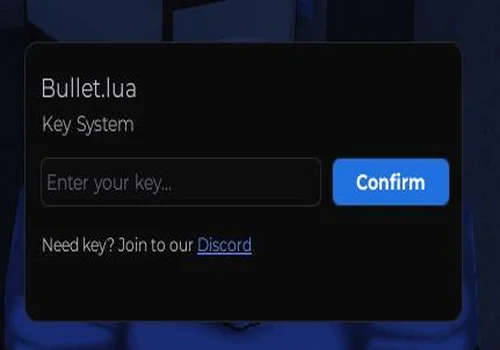
Bullet LUA
- Silent Aim
- Gun Mods
- ESP
- +2 more
Details
Functions
- Silent Aim
- Gun Mods
- ESP
- Venicle fly
- INF Fuel
Change history
- – Added to page!
Script code
-- discord : https://discord.gg/PHfJDUqrPs
loadstring(game:HttpGet("https://raw.githubusercontent.com/NightFallScript/Unicore/refs/heads/main/ApocalypseRising2.luau"))()How to choose the best Apocalypse Rising 2 script
For most users, the best Apocalypse Rising 2 script on this page is Multy Hub because it is both keyless and feature-rich. It includes combat tools, aimbot, silent aim, ESP, map radar, weapon modifications, movement options, freecam, lighting controls, and other utility features without requiring a key system. Lighter no-key scripts may still be useful for simple visual or teleport tools, while key-system options are better treated as secondary alternatives.
For combat-focused use, prioritize scripts with aimbot, silent aim, FOV settings, target filters, no recoil, and hit chance controls. For survival and looting, prioritize ESP, map radar, vehicle visuals, event tracking, fullbright, and utility movement features.
Compatibility and executor notes
Executor compatibility can change after Roblox updates, executor patches, or Apocalypse Rising 2 game changes. A script marked as compatible may still stop working if the loader source is removed, the game patches a function, or the executor changes how it handles Roblox APIs.
Use compatibility labels as a quick reference only. Before using any script, check the access type, device tags, update date, and source status listed inside the script card.
For more Roblox tools and related pages, you can also check Roblox scripts and Roblox executor status.
Page changelog
June 27, 2026
- Added Multy Hub as the main no-key Apocalypse Rising 2 script option.
- Added AR2 Mod Menu by AP with player visuals, vehicle visuals, zombie tools, and map ESP features.
- Added Teleport to any player as a simple no-key utility script.
- Added Bullet LUA to the key-system section with silent aim, gun mods, ESP, vehicle fly, and infinite fuel.
- Updated widget text, FAQ, safety notes, and compatibility explanations for Apocalypse Rising 2.
Conclusion
For most users, Multy Hub is the strongest starting point on this page because it is listed as no-key and includes a broad set of combat, ESP, weapon, movement, and utility features. AR2 Mod Menu by AP is better for lighter visual and map tools, while Teleport to any player is a focused utility option. Bullet LUA belongs in the key-system section for users who want silent aim, gun mods, ESP, vehicle fly, and infinite fuel features.
Before using any Apocalypse Rising 2 script, check the access label, compatibility tags, update date, and source status. Scripts for this game can stop working after Roblox updates, executor changes, game patches, or removed loader files.