Looking for an Evomon script no key or a clean keyless setup? Start with the NO KEY options if you want the fastest copy-and-run route for Auto Farm, Auto Battle, Auto Catch, dungeons, chests, hatching, quests, rewards, shiny/prismatic hunting, and basic progression. Key-system hubs are listed lower for players who need heavier tools like teleport, tower automation, ESP, island travel, dungeon farming, or full progression helpers. Before using scripts, I recommend checking the roblox executor status.
Updated July 5, 2026: Added new NO KEY Evomon scripts, including Skull Hub, Idiot Hub, Cyraa Hub, and Polluted Hub. These new hubs add stronger autofarm, Auto Catch, dungeon, chest, hatch, quest, reward, shiny/prismatic protection, Anti AFK, and reconnect tools.
Evomon is a Roblox monster-catching RPG inspired by Pokémon-style progression: you catch, train, evolve, hatch, battle, hunt rare Shiny/Sparkle/Prismatic variants, build a stronger team, clear bosses, and farm dungeons. Roblox Scripts are useful because the game has many repeated loops: wild encounters, auto battle, auto catch, chest routes, EXP farming, talent rerolls, tower runs, and evolution material grinding.
Play the game here: Evomon on Roblox
Evomon script no key / keyless
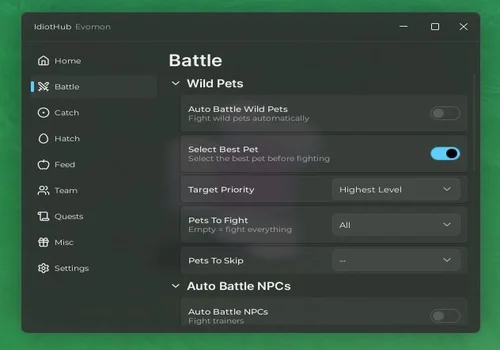
Idiot Hub
- Auto Battle Wild Pets with target priority
- Auto Battle NPCs
- Auto Battle Elites with filters
- +8 more
Details
Functions
- Auto Battle Wild Pets with target priority
- Auto Battle NPCs
- Auto Battle Elites with filters
- Auto Battle Dungeons
- Chest Challenge
- Auto Catch pets with types and balls filter
- Auto Hatch eggs
- Auto Feed Pets
- Auto Equip and delete specific pets
- Auto Complete quests
- Auto Claim all rewards
Change history
- – Added to page!
Script code
loadstring(game:HttpGet("https://raw.githubusercontent.com/IdiotHub/Scripts/main/Loader"))()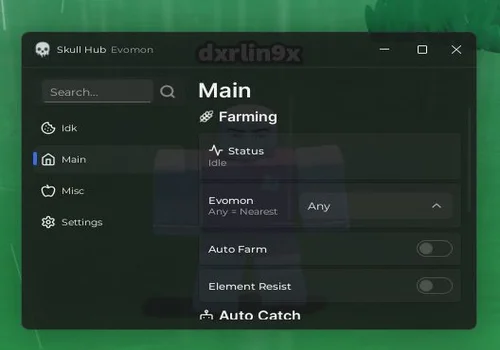
Skull Hub
- Autofarm pets, NPCs
- Auto Heal
- Auto Attack
- +10 more
Details
Functions
- Autofarm pets, NPCs
- Auto Heal
- Auto Attack
- Level filter
- Auto Catch
- Auto Release pets (keep shiny, keep prismatic)
- Auto Collect Chest
- Remove FOG
- Anti Lag
- Auto Claim daily rewards
- Auto Claim Battle Pass Rewards
- Anti AFK
- Auto Reconnect
Change history
- – Added to page!
Script code
loadstring(game:HttpGet("https://hungquan99.site/v1/script/6b4c37bd-7fdc-4094-877a-fee2eda3515a"))()
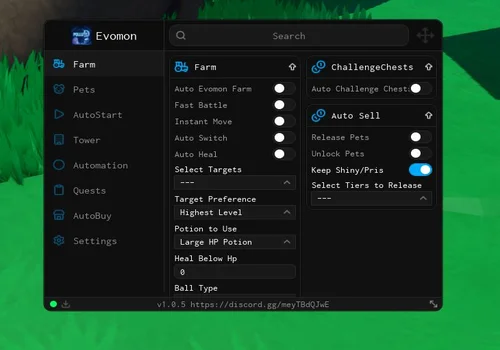
Polluted Hub
- Auto Evomon farm
- Fast Battle
- Instant Move
- +13 more
Details
Functions
- Auto Evomon farm
- Fast Battle
- Instant Move
- Auto Switch
- Auto Heal
- Auto Challenge chests
- Release pets
- Unlock Pets
- Keep Shiny and Prismatic
- Auto feed pets
- Auto Use eggs and hatch
- Auto Start battle
- Auto Open chests
- Claim new pets and season pass
- Claim Quests
- Auto Buy items
Change history
- – Added to page!
Script code
loadstring(game:HttpGet("https://api.luarmor.net/files/v4/loaders/349171199feeb2b561597b018bf12e5d.lua"))()
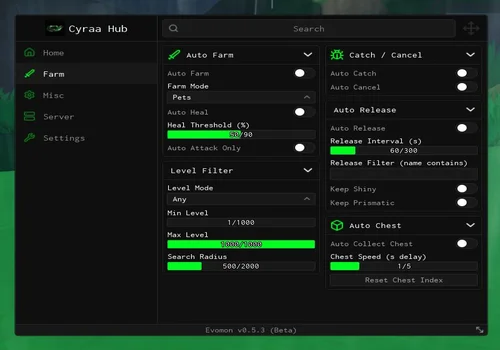
Cyraa Hub
- Autofarm
- Auto Catch
- Auto Release
Details
Functions
- Autofarm
- Auto Catch
- Auto Release
Change history
- – Added to page!
Script code
loadstring(game:HttpGet("https://raw.githubusercontent.com/LynX99-9/komtolmmek2script/refs/heads/main/CyraaHub.lua", true))()
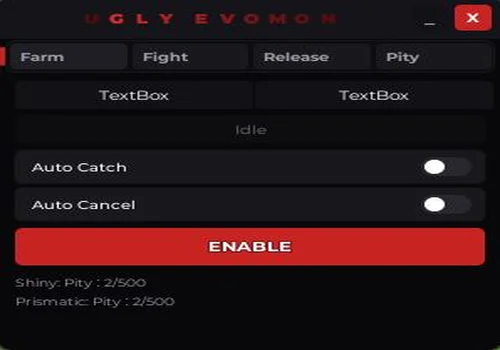
Ugly Evomon
- Auto Catch
- Auto Cancel
- Auto Fight
- +4 more
Details
Functions
- Auto Catch
- Auto Cancel
- Auto Fight
- Auto Use Skills
- Auto Release evomon
- Auto Lock Shiny and Prismatic
- Stop pity before shiny or prismatic
Change history
- – Added to page!
Script code
loadstring(game:HttpGet("https://raw.githubusercontent.com/kyami-lua/sxlnxcy/refs/heads/main/evomon"))()
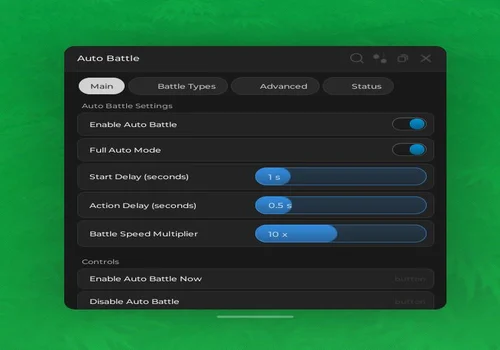
Auto Battle + Max Battle Speed
- Auto Battle
- Battle speed modifier
- Enable battle types: wild encounters, trainer battles, npc battles, boss battles, dungeon encounters, pvp battles
- +1 more
Details
Functions
- Auto Battle
- Battle speed modifier
- Enable battle types: wild encounters, trainer battles, npc battles, boss battles, dungeon encounters, pvp battles
- Advanced Options: Auto Select skill, Auto Switch pet, Auto Catch (wild)
Change history
- – Added to page!
Script code
-- AutoBattle Script with Rayfield UI
local Players = game:GetService("Players")
local ReplicatedStorage = game:GetService("ReplicatedStorage")
local LocalPlayer = Players.LocalPlayer

-- ============================================================
-- CONFIGURATION
-- ============================================================

local Config = {
    Enabled = true,
    StartDelay = 1.0,
    FullAuto = true,
    WildEncounters = true,
    TrainerBattles = true,
    NpcBattles = true,
    BossBattles = false,
    DungeonEncounters = true,
    PvP = false,
    AutoSelectSkill = false,
    AutoSwitch = true,
    AutoCatch = false,
    ActionDelay = 0.5,
    BattleSpeedMult = 10,
}

local isActive = false
local currentBattleType = nil

-- ============================================================
-- GET REMOTES
-- ============================================================

local Remote = ReplicatedStorage:FindFirstChild("Remote")
if not Remote then return end

local BattleRemote = Remote:FindFirstChild("Battle")
if not BattleRemote then return end

local ReqAutoBattle = BattleRemote:FindFirstChild("ReqAutoBattle")
local ReqOperateBattle = BattleRemote:FindFirstChild("ReqOperateBattle")

-- ============================================================
-- GET BINDABLES
-- ============================================================

local Bindable = ReplicatedStorage:FindFirstChild("Bindable")
local BattleBindable = Bindable and Bindable:FindFirstChild("Battle")
local ClientBattleStart = BattleBindable and BattleBindable:FindFirstChild("ClientBattleStart")

-- ============================================================
-- GET SERVICES
-- ============================================================

local Script = ReplicatedStorage:FindFirstChild("Script")
local BattleScript = Script and Script:FindFirstChild("Battle")
local BattleService = nil

if BattleScript then
    pcall(function()
        BattleService = require(BattleScript:WaitForChild("BattleService", 10))
    end)
end

-- ============================================================
-- UTILITY FUNCTIONS
-- ============================================================

local function isBattleTypeEnabled(battleType)
    if battleType == 1 then return Config.WildEncounters
    elseif battleType == 4 then return Config.TrainerBattles
    elseif battleType == 3 then return Config.BossBattles
    elseif battleType == 6 then return Config.DungeonEncounters
    elseif battleType == 5 then return Config.PvP
    end
    return true
end

local function getBattleType()
    if not BattleService then return nil end
    local battle = BattleService.getCurrentBattle()
    if battle and type(battle) == "table" then
        return battle.type
    end
    return nil
end

local function enableAutoBattle()
    if not ReqAutoBattle then return false end

    local success, result = pcall(function()
        return ReqAutoBattle:InvokeServer(Config.FullAuto)
    end)

    if success then
        isActive = true
        return true
    end
    return false
end

local function disableAutoBattle()
    if not ReqAutoBattle then return end
    pcall(function()
        ReqAutoBattle:InvokeServer(false)
    end)
    isActive = false
end

-- ============================================================
-- BATTLE MONITOR
-- ============================================================

local function onBattleStart()
    if not Config.Enabled then return end

    local battleType = getBattleType()
    currentBattleType = battleType

    if not isBattleTypeEnabled(battleType) then return end

    task.delay(Config.StartDelay, function()
        enableAutoBattle()
    end)
end

local function onBattleEnd()
    isActive = false
    currentBattleType = nil
end

if ClientBattleStart then
    ClientBattleStart.Event:Connect(onBattleStart)
end

if BattleRemote:FindFirstChild("ResSettleBattle") then
    BattleRemote.ResSettleBattle.OnClientEvent:Connect(function()
        task.wait(0.5)
        onBattleEnd()
    end)
end

-- ============================================================
-- AUTO-ACTION LOOP
-- ============================================================

task.spawn(function()
    while true do
        task.wait(Config.ActionDelay)

        if not isActive or not Config.Enabled then continue end

        if not Config.FullAuto and ReqOperateBattle then
            pcall(function()
                local actionData = {
                    actionType = 1,
                    skillId = 0,
                    targetCampId = 2,
                    targetPos = 1,
                }
                ReqOperateBattle:InvokeServer(actionData)
            end)
        end
    end
end)

-- ============================================================
-- BATTLE SPEED HACK
-- ============================================================

task.spawn(function()
    local ScriptFolder = ReplicatedStorage:FindFirstChild("Script", 15)
    if not ScriptFolder then return end

    local BattleChoreo = ScriptFolder:FindFirstChild("BattleChoreo", 15)
    if not BattleChoreo then return end

    local Basic = BattleChoreo:FindFirstChild("Basic", 15)
    if not Basic then return end

    local ChoreoConstModule = Basic:FindFirstChild("BattleChoreoConst", 15)
    if not ChoreoConstModule then return end

    local success, CC = pcall(require, ChoreoConstModule)

    if success and type(CC) == "table" then
        local mult = Config.BattleSpeedMult

        if type(CC.DefaultActionWaitTime) == "number" then
            CC.DefaultActionWaitTime = CC.DefaultActionWaitTime / mult
        end
        if type(CC.SettleNodeWaitTime) == "number" then
            CC.SettleNodeWaitTime = CC.SettleNodeWaitTime / mult
        end
        if type(CC.StartBattleBeforeChoreographyDelayTime) == "number" then
            CC.StartBattleBeforeChoreographyDelayTime = CC.StartBattleBeforeChoreographyDelayTime / mult
        end

        if type(CC.ActionWaitTimeByType) == "table" then
            for k, v in pairs(CC.ActionWaitTimeByType) do
                if type(v) == "number" then
                    CC.ActionWaitTimeByType[k] = v / mult
                end
            end
        end
    end

    -- SkillPerformanceCfg
    local Pet = ScriptFolder:FindFirstChild("Pet", 15)
    if not Pet then return end

    local Cfg = Pet:FindFirstChild("Cfg", 15)
    if not Cfg then return end

    local SkillCfgModule = Cfg:FindFirstChild("SkillPerformanceCfg", 15)
    if not SkillCfgModule then return end

    local success2, SC = pcall(require, SkillCfgModule)

    if success2 and type(SC) == "table" then
        local mult = Config.BattleSpeedMult

        for skillId, data in pairs(SC) do
            if type(data) == "table" and type(data.finishWaitTime) == "number" then
                data.finishWaitTime = math.max(50, math.floor(data.finishWaitTime / mult))
            end
        end
    end
end)

-- ============================================================
-- RAYFIELD UI
-- ============================================================

local Rayfield = loadstring(game:HttpGet("https://sirius.menu/rayfield"))()

local Window = Rayfield:CreateWindow({
    Name = "Auto Battle",
    Icon = 0,
    LoadingTitle = "Loading...",
    LoadingSubtitle = "by Script",
    ConfigurationSaving = {
       Enabled = true,
       FolderName = "AutoBattleConfig",
       FileName = "Settings"
    },
    Discord = {
       Enabled = false
    },
    KeySystem = false
})

-- Main Tab
local MainTab = Window:CreateTab("Main", 0)

local MainSection = MainTab:CreateSection("Auto Battle Settings")

MainTab:CreateToggle({
    Name = "Enable Auto Battle",
    CurrentValue = Config.Enabled,
    Flag = "AutoBattleEnabled",
    Callback = function(Value)
        Config.Enabled = Value
        if not Value and isActive then
            disableAutoBattle()
        end
    end,
})

MainTab:CreateToggle({
    Name = "Full Auto Mode",
    CurrentValue = Config.FullAuto,
    Flag = "FullAutoMode",
    Callback = function(Value)
        Config.FullAuto = Value
        if isActive then
            enableAutoBattle()
        end
    end,
})

MainTab:CreateSlider({
    Name = "Start Delay (seconds)",
    Range = {0, 5},
    Increment = 0.1,
    Suffix = "s",
    CurrentValue = Config.StartDelay,
    Flag = "StartDelay",
    Callback = function(Value)
        Config.StartDelay = Value
    end,
})

MainTab:CreateSlider({
    Name = "Action Delay (seconds)",
    Range = {0.1, 2},
    Increment = 0.1,
    Suffix = "s",
    CurrentValue = Config.ActionDelay,
    Flag = "ActionDelay",
    Callback = function(Value)
        Config.ActionDelay = Value
    end,
})

MainTab:CreateSlider({
    Name = "Battle Speed Multiplier",
    Range = {1, 20},
    Increment = 1,
    Suffix = "x",
    CurrentValue = Config.BattleSpeedMult,
    Flag = "BattleSpeed",
    Callback = function(Value)
        Config.BattleSpeedMult = Value
    end,
})

-- Battle Types Tab
local BattleTab = Window:CreateTab("Battle Types", 1)

local BattleSection = BattleTab:CreateSection("Enable Battle Types")

BattleTab:CreateToggle({
    Name = "Wild Encounters",
    CurrentValue = Config.WildEncounters,
    Flag = "WildEncounters",
    Callback = function(Value)
        Config.WildEncounters = Value
    end,
})

BattleTab:CreateToggle({
    Name = "Trainer Battles",
    CurrentValue = Config.TrainerBattles,
    Flag = "TrainerBattles",
    Callback = function(Value)
        Config.TrainerBattles = Value
    end,
})

BattleTab:CreateToggle({
    Name = "NPC Battles",
    CurrentValue = Config.NpcBattles,
    Flag = "NpcBattles",
    Callback = function(Value)
        Config.NpcBattles = Value
    end,
})

BattleTab:CreateToggle({
    Name = "Boss Battles",
    CurrentValue = Config.BossBattles,
    Flag = "BossBattles",
    Callback = function(Value)
        Config.BossBattles = Value
    end,
})

BattleTab:CreateToggle({
    Name = "Dungeon Encounters",
    CurrentValue = Config.DungeonEncounters,
    Flag = "DungeonEncounters",
    Callback = function(Value)
        Config.DungeonEncounters = Value
    end,
})

BattleTab:CreateToggle({
    Name = "PvP Battles",
    CurrentValue = Config.PvP,
    Flag = "PvP",
    Callback = function(Value)
        Config.PvP = Value
    end,
})

-- Advanced Tab
local AdvancedTab = Window:CreateTab("Advanced", 2)

local AdvancedSection = AdvancedTab:CreateSection("Advanced Options")

AdvancedTab:CreateToggle({
    Name = "Auto Select Skill",
    CurrentValue = Config.AutoSelectSkill,
    Flag = "AutoSelectSkill",
    Callback = function(Value)
        Config.AutoSelectSkill = Value
    end,
})

AdvancedTab:CreateToggle({
    Name = "Auto Switch Pet",
    CurrentValue = Config.AutoSwitch,
    Flag = "AutoSwitch",
    Callback = function(Value)
        Config.AutoSwitch = Value
    end,
})

AdvancedTab:CreateToggle({
    Name = "Auto Catch (Wild)",
    CurrentValue = Config.AutoCatch,
    Flag = "AutoCatch",
    Callback = function(Value)
        Config.AutoCatch = Value
    end,
})

-- Status Tab
local StatusTab = Window:CreateTab("Status", 3)

local StatusSection = StatusTab:CreateSection("Current Status")

StatusTab:CreateLabel("Auto Battle Status:")
StatusTab:CreateLabel("• Enabled: " .. tostring(Config.Enabled))

StatusTab:CreateLabel("Current Battle Status:")
local StatusLabel = StatusTab:CreateLabel("• Not in battle")

-- Update status
task.spawn(function()
    while true do
        task.wait(1)
        local status = isActive and "Active" or "Inactive"
        local battleType = currentBattleType or "None"
        StatusLabel:Set("• Status: " .. status .. " | Battle Type: " .. tostring(battleType))
    end
end)

-- Buttons
local ButtonSection = MainTab:CreateSection("Controls")

MainTab:CreateButton({
    Name = "Enable Auto Battle Now",
    Callback = function()
        Config.Enabled = true
        enableAutoBattle()
    end,
})

MainTab:CreateButton({
    Name = "Disable Auto Battle",
    Callback = function()
        Config.Enabled = false
        disableAutoBattle()
    end,
})

MainTab:CreateButton({
    Name = "Refresh Battle Detection",
    Callback = function()
        local battleType = getBattleType()
        if battleType then
            currentBattleType = battleType
        end
    end,
})

print("Auto Battle UI Loaded Successfully!")Evomon scripts with key system
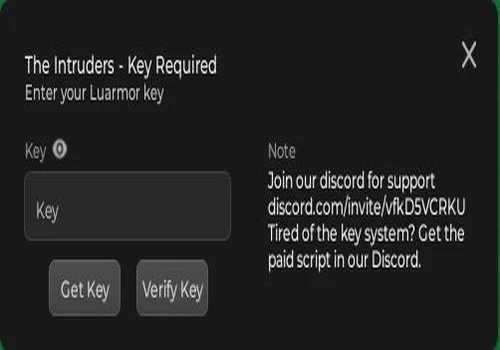
The Intruders
- Teleport to any island
- Pick target to battle
- Teleport to wild pet
- +13 more
Details
Functions
- Teleport to any island
- Pick target to battle
- Teleport to wild pet
- Auto battle
- Auto Catch
- Auto Receive tasks and complete them
- Autofarm dungeons
- Auto Tower
- Auto Hatch
- Auto Evolve
- Auto Talent Reroll
- Auto Enhance gear
- Auto Claim chests
- ESP
- Full Bright
- Anti AFK
Change history
- – Added to page!
Script code
loadstring(game:HttpGet"https://raw.githubusercontent.com/lifaiossama/errors/main/Intruders.html")()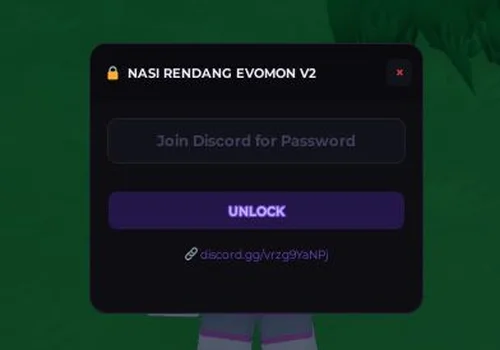
Nasi Rendang Evomon v2
- Auto catch by walking and keep natural play
- Auto Leave
- Auto Chest farm
- +4 more
Details
Functions
- Auto catch by walking and keep natural play
- Auto Leave
- Auto Chest farm
- Auto Catch shiny and prismatic
- Overlay Pity
- Player ESP
- Player Teleport
Change history
- – Added to page!
Script code
loadstring(game:HttpGet("https://raw.githubusercontent.com/JualNasiRendang/nasirendang-evomon/refs/heads/main/nasirendang-evomon.lua"))()
Which Evomon script should you use first?
If you came here for a direct evomon script keyless setup, start with the NO KEY scripts at the top of the page. Idiot Hub is the best first pick if you want one hub for wild pet battles, NPCs, elites, dungeons, catching filters, hatching, quests, and rewards. Skull Hub is better if you want safer farming with Auto Heal, Auto Release, shiny/prismatic keep, chests, Anti AFK, and Auto Reconnect.
If you mainly want faster battles and simple testing, Auto Battle + Max Battle Speed is still useful because it focuses on battle speed, battle type toggles, and a configurable UI. If you want a broader evomon script autofarm hub with a key system, check The Intruders for teleport, dungeons, tower, hatch, evolve, talent reroll, chest claiming, ESP, full bright, and anti-AFK.
Conclusion
For most players, the best starting point after the July 5 update is one of the newer NO KEY hubs. Use Idiot Hub if you want the strongest all-in-one keyless setup, Skull Hub if you want safer farming with shiny/prismatic protection and reconnect tools, or Polluted Hub if you want fast battle, instant movement, eggs, quests, and reward claiming. Use The Intruders only if you are fine with a key-system hub and want extra tools like teleport, tower, dungeons, ESP, hatch, evolve, and talent reroll.