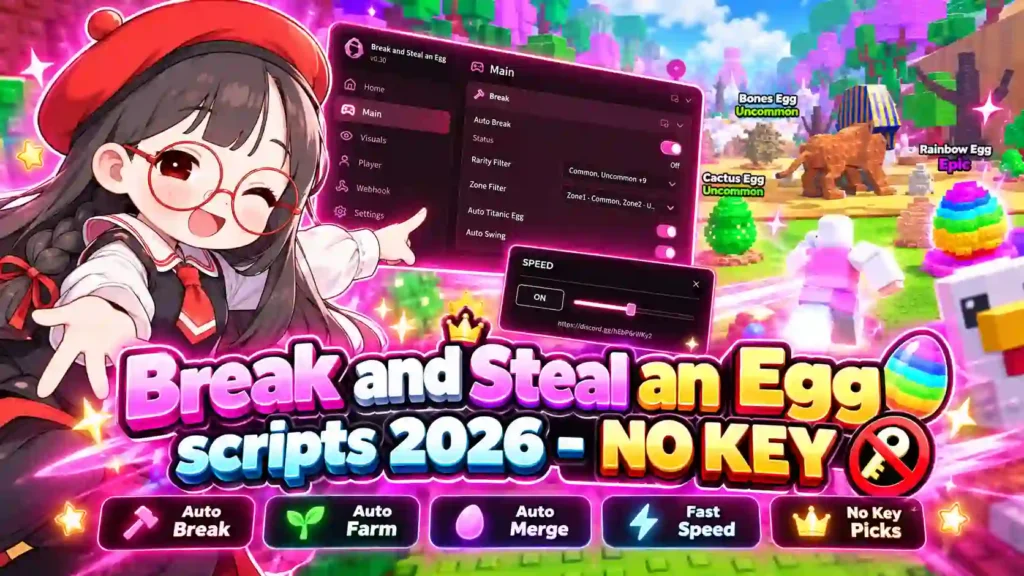
Start with Ajjans for long farming sessions: its task priorities and rotations worked well, and we found its menu convenient. Auto Merge combines animals of the same species. CloutHub offers more controls, but its roughly 30-second startup caused heavy game lag.
Latest test notes: Friday, October 23, 2026 · PC with Windows and Potassium. The mobile interfaces also worked in our checks. The notes below distinguish working features, specific failures and Lumin’s repeat-loading problem.
In Break and Steal an Egg by ILGames x Eggs, you break map eggs and collect the animals they release. Auto Steal handles animals; Auto Break handles the eggs. Merge combines animals of the same species into eggs for your base, where placing and hatching are separate jobs. The other game has its own Steal an Egg scripts page.
Compare scripts · Main hubs · Small tools · Loading issues and discontinued scripts · Setup
Compare Scripts
Keyless / NO KEY Break and Steal an Egg scripts
AjjansHub
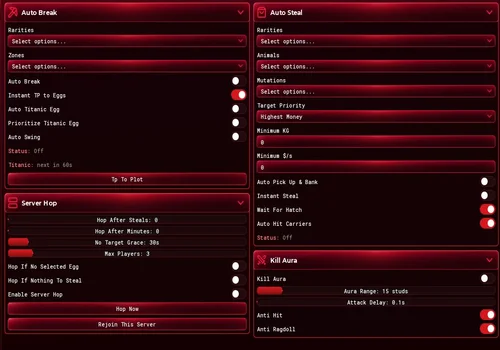
Our pick for long farming sessions. The clear interface, adjustable task priorities and rotations made it easy to keep the selected jobs running in our check.
- Auto Break Eggs
- Egg Rarity and Zone Filters
- Instant Teleport to Eggs
- +45 more
Details
AjjansHub functions
- Auto Break Eggs
- Egg Rarity and Zone Filters
- Instant Teleport to Eggs
- Auto Swing Pickaxe
- Titanic Egg Automation and Priority
- Auto Pick Up and Bank Animals
- Instant Steal
- Wait For Hatch Setting
- Animal, Rarity and Mutation Filters
- Target Priority
- Minimum Weight and Cash per Second
- Auto Hit Players Carrying Animals
- Kill Aura with Range and Attack Delay
- Anti Hit and Anti Ragdoll
- Auto Place Eggs at the Base
- Auto Hatch Placed Eggs
- Auto Equip Best Animals
- Auto Merge Animals of the Same Species
- Merge Mode, Weight and Income Filters
- Auto Sell Animals and Eggs
- Sell by Animal, Rarity and Income
- Adjustable Task Priority
- Auto Upgrade Pen and Treadmill
- Auto Train on the Treadmill
- Auto Claim Index Rewards
- Auto Buy Trails and Pickaxes
- Auto Claim and Equip Best Bat
- Halloween Event Automation
- Anti Hit From Pumpkin Guards
- Bank Animals at Halloween
- Auto Buy Selected Potions
- Auto Buy, Place and Hatch Halloween Eggs
- Server Hop After Steals or a Time Limit
- Server Hop When No Selected Eggs or Animals Remain
- No-Target Grace and Maximum Players
- Rejoin Current Server
- Egg and Guard ESP with Filters
- Hatch Preview
- WalkSpeed and Infinite Jump
- Freecam and Freecam Speed
- Instant Interact
- Anti AFK and No Gameplay Paused
- Auto Reconnect
- FPS Boost and Disable 3D Rendering
- Menu Toggle Key and Steal Panel
- Hide Game UI or Notifications
- Saved Configs, Autoload and Auto Save
- Discord Alerts for Steals, Merges, Upgrades and Full Inventory
Change history
- – Farming, priorities, protection, Events and Auto Merge worked. Corrected the earlier merge report: only animals of the same species can be combined.
Script code
loadstring(game:HttpGet("https://api.luarmor.net/files/v4/loaders/359e97f8618e9008afe5f496184ebb7c.lua"))()Auto Break moved between map eggs using tween travel and broke the eggs in the selected zones and rarities. Auto Steal collected the released animals, and its filters worked. Normal pickup used a timed proximity interaction; Instant Steal collected immediately. Halloween Farm teleports to the breakable candy objects that spawn around the event map, destroys them and collects the drops. It follows the same break-and-collect pattern as regular Auto Break.
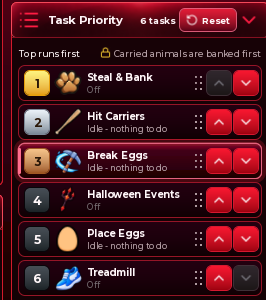
The task-priority system and rotations are the main reasons we would leave this hub running. Reorder jobs with the arrows: the top task runs first, while carried animals are banked first. The list includes Steal & Bank, Hit Carriers, Break Eggs, Halloween Events, Place Eggs and Treadmill. This lets you choose which job should take precedence.
Kill Aura, Anti Hit and Anti Ragdoll worked. The Events section also worked in the tested build, including the listed Halloween automation. Auto Merge worked when the animals were the same species. Different species cannot be merged. Manual server changing worked; the automatic server-hop triggers were not checked separately.
CloutHub
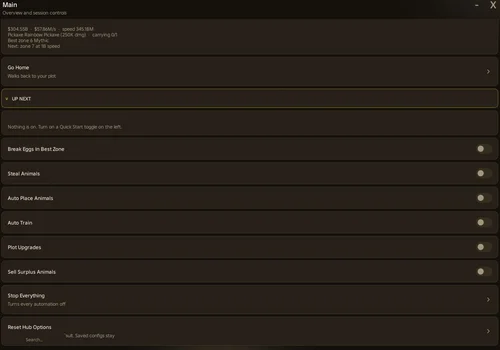
The broadest set of controls in this comparison, with working farming, training rotation, event tools and animal protection. Startup caused about 30 seconds of heavy game lag in our check.
- Auto Break Eggs in a Selected or Best Zone
- Egg Type and Priority Filters
- Prioritize Titanic Eggs
- +38 more
Details
CloutHub functions
- Auto Break Eggs in a Selected or Best Zone
- Egg Type and Priority Filters
- Prioritize Titanic Eggs
- Skip Eggs Over a Selected Limit
- Adjustable Hit Speed
- Skip Eggs Other Players Are Hitting
- Pick Up Animals From Eggs You Break
- Auto Steal Animals
- Only Take Animals Better Than Your Weakest
- Animal Rarity, Income, Weight and Distance Filters
- Auto Place Best Animals
- Auto Train on the Treadmill
- Alternate Farming and Speed Training
- Minutes per Farming and Training Phase
- Movement Method and Speed Settings
- Noclip While Travelling
- Notify on Position Reset
- Guard Speed Margin and Distance Filters
- Skip a Zone After Being Caught
- Ignore Guards Option
- Auto Sell Surplus Animals
- Auto Sell by Rarity and Weight
- Keep Mutated Animals
- Never Sell Selected Rarities
- Control Use of Placed Animals by Machines
- Auto Place and Hatch Eggs
- Auto Merge Animals
- Auto Fuse Into Celestial Eggs
- Auto Fight the Hell Boss
- Buy Demon Shop Potions and Eggs
- Buy Pickaxes and Trails by Payback
- Auto Upgrade Plot, Treadmill and Satchel
- Auto Claim Index and Other Rewards
- Auto Friend and Join a Friend's Server
- Zone and Home Travel
- Recover From Under the Map
- Egg, Animal and Guard ESP
- ESP Distance and Label Settings
- Anti AFK
- Keep Running After Teleport
- Stop All Tasks and Reset Options
Change history
- – Farm/train rotation, event controls and animal protection worked. Loading caused about 30 seconds of heavy lag.
Script code
loadstring(game:HttpGet("https://raw.githubusercontent.com/ClouthubOnTop/Loader/main/main.lua"))()
CloutHub had the broadest set of controls in our comparison. The cost was startup: loading took around 30 seconds with heavy lag across the game. For a quick session, that delay would make us consider another hub. Once it loaded, the checked jobs worked.
Training has two useful modes. Auto Train uses the treadmill when no matching eggs or animals are available on the map. You can also use the Farm tab to alternate jobs by time. The default rotation is 10 minutes farming, then 5 minutes training; both durations can be changed. The timed switches worked.
Best Zone appeared to follow our pickaxe strength; we did not establish its exact selection formula. A guard can knock a carried animal onto the ground. It stays where the player was knocked down until its remaining despawn timer expires. That timer pauses while the animal is being carried. Protection for mutated animals worked during selling and machine use. We did not check the exact purchase order chosen by By Payback.
Hell Boss, Demon Shop and Fuse Machine
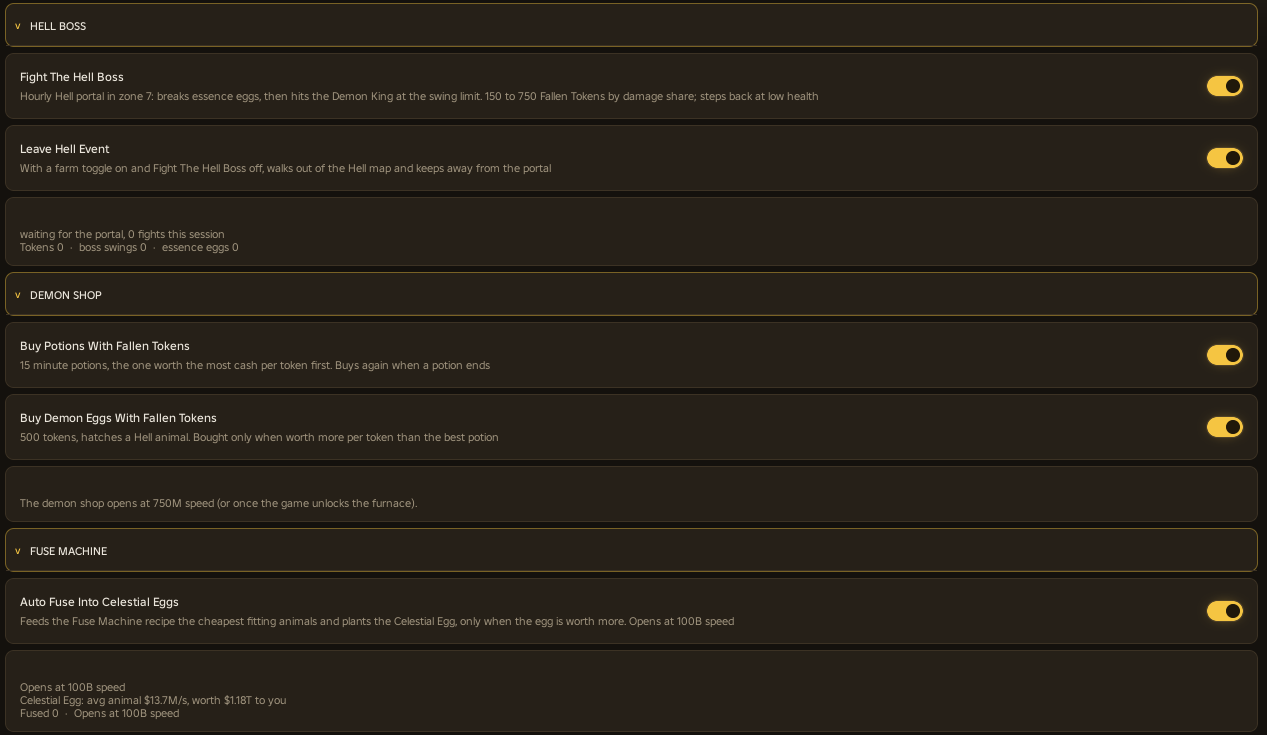
The event and machine controls shown below worked in our check. Fight The Hell Boss handles the Hell event route: breaking essence eggs, attacking the Demon King during its attack window and stepping back at low health. Leave Hell Event exits when boss fighting is off and a farming job is enabled.
Demon Shop can spend Fallen Tokens on potions and Demon Eggs. The potion control selects value per token and buys again when a potion ends. The egg control compares its value with the potion option. Auto Fuse Into Celestial Eggs selects the cheapest fitting animals and places the resulting egg when the value check allows it.
Mario Hub
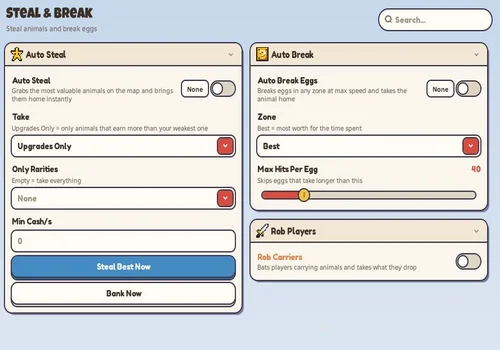
We liked the colorful Mario-inspired interface. The regular farming route, placement, upgrades and utility controls worked, but a full base could leave the character standing still with an animal in hand.
- Kaitun (All in One)
- Auto Steal Animals
- Take Upgrades Only or Everything
- +29 more
Details
Mario Hub functions
- Kaitun (All in One)
- Auto Steal Animals
- Take Upgrades Only or Everything
- Animal Rarity Filter
- Minimum Cash per Second
- Steal Best Animal Once
- Bank Carried Animals Now
- Auto Break Eggs
- Selected or Best Zone
- Maximum Hits per Egg
- Rob Animals From Players Carrying Them
- Bat Aura
- Targeted Bat Attacks
- Auto Place Best Animals
- Place Best Animals Now
- Auto Sell Backpack Animals
- Never Sell Selected Rarities
- Sell Backpack Animals Now
- Auto Place and Hatch Merge Eggs
- Auto Buy Pickaxes
- Auto Upgrade Base
- Auto Buy and Equip Trails
- Auto Upgrade Treadmill
- Cash Reserve for Purchases
- Auto Claim Rewards
- WalkSpeed
- Infinite Jump
- Noclip
- Zone, Base and Player Teleports
- Animal, Egg and Player ESP
- Minimum ESP Rarity
- Saved Configs and Autoload
Change history
- – Regular farming and support tools worked. Kaitun triggered anti-cheat; Rob Carriers failed; a full base could leave the character standing still holding an animal.
Script code
loadstring(game:HttpGet("https://raw.githubusercontent.com/xDTaraZz/Roblox-Scripts/refs/heads/main/loader.lua"))()
The colorful Mario-inspired interface stood out to us. For a regular farming route, Auto Steal and Auto Break Eggs worked together. Auto Steal collected animals already released on the map; it did not break eggs. Auto Break supplied that part of the loop, and the hub delivered and placed the animals.
Upgrades Only correctly selected improvements for the base. Auto Place Best, upgrades, Index reward collection, egg hatching, selling and Never Sell worked. When all base slots were occupied, the character could stand at the base still holding the collected animal. We have not established an automatic recovery for that situation. We did not see the hub sit idle while valid targets were available.
Kaitun (All in One) ran, but triggered anti-cheat in our session. Ordinary Auto Steal did not trigger it in the checked run. Start with the individual farming switches and observe their route before adding more jobs. Rob Carriers did not work. The separate Bat controls, player targeting and Bat Aura did work.
WalkSpeed, Infinite Jump, Noclip and teleports worked. Animal ESP and its filters worked, as did the egg and player display controls. The source defaults for a fresh setup are Take: Upgrades Only and Max Hits Per Egg: 40; a saved autoload setup may restore different values. Set Never Sell before enabling automatic selling.
Small Tools
Speed + Anti Knockback
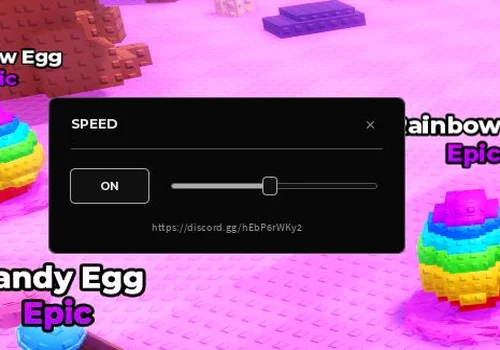
Speed and Anti Knockback worked again in the latest check. It remains our simple option for moving faster while collecting animals manually.
- Adjustable Movement Speed (16–400)
- Movement Refresh While Running
- Anti Knockback Against Bat Hits
Details
Speed + Anti Knockback functions
- Adjustable Movement Speed (16–400)
- Movement Refresh While Running
- Anti Knockback Against Bat Hits
Change history
- – Added to page!
- – Speed and Anti Knockback worked again.
Script code
local SPEED = 200
local REFRESH_INTERVAL = 0.1

local Players = game:GetService("Players")
local RunService = game:GetService("RunService")
local ReplicatedStorage = game:GetService("ReplicatedStorage")
local player = Players.LocalPlayer
assert(player, "Run this script on the client")
assert(game.PlaceId == 114326934417838, "Wrong game")

local modules = player:WaitForChild("PlayerScripts"):WaitForChild("Client"):WaitForChild("Modules")
local controllers = modules.Parent:WaitForChild("Controllers")
local movementLock = require(modules:WaitForChild("MovementLock"))
local slowMode = require(controllers:WaitForChild("SlowModeController"))
local movementRemote = ReplicatedStorage:WaitForChild("SlowModeRemote", 10)
assert(movementRemote and movementRemote:IsA("RemoteEvent"), "Movement remote unavailable")

local environment = getgenv()
local previous = environment.EggSpeedController
if previous and type(previous.Destroy) == "function" then
    previous:Destroy()
end

local previousGui = environment.EggSpeedGui
if previousGui and type(previousGui.Destroy) == "function" then
    previousGui:Destroy()
end

local antiKnockback

local function startAntiKnockback()
    local Players = game:GetService("Players")
    local ReplicatedStorage = game:GetService("ReplicatedStorage")
    local RunService = game:GetService("RunService")
    local player = Players.LocalPlayer
    assert(player, "Run this script on the client")
    assert(game.PlaceId == 114326934417838, "Wrong game")
    assert(type(getconnections) == "function", "getconnections is unavailable")
    assert(type(getfenv) == "function", "getfenv is unavailable")

    local remote = ReplicatedStorage:WaitForChild("CatchFlingRemote", 10)
    assert(remote and remote:IsA("RemoteEvent"), "CatchFlingRemote is unavailable")

    local environment = getgenv()
    local previous = environment.EggAntiKnockbackController
    if previous and type(previous.Destroy) == "function" then
        previous:Destroy()
    end

    local controller = { Enabled = false, BlockedFlings = 0 }
    local intercepted = {}
    local connections = {}
    local destroyed = false
    local suppressUntil = 0
    local lastScan = 0

    local function stopKnockback()
        local character = player.Character
        local humanoid = character and character:FindFirstChildOfClass("Humanoid")
        if not humanoid or humanoid.Health <= 0 then
            return
        end
        for _, part in ipairs(character:GetChildren()) do
            if part:IsA("BasePart") and not part.Anchored then
                part.AssemblyLinearVelocity = Vector3.zero
                part.AssemblyAngularVelocity = Vector3.zero
            end
        end
    end

    local function restoreListeners()
        for _, entry in ipairs(intercepted) do
            entry.Replacement:Disconnect()
            pcall(function()
                entry.Original:Enable()
            end)
        end
        table.clear(intercepted)
    end

    local function isFlingListener(listener)
        local ok, matches = pcall(function()
            if not listener.Enabled or type(listener.Function) ~= "function" then
                return false
            end
            local owner = getfenv(listener.Function).script
            return typeof(owner) == "Instance" and owner.Name == "CatchFlingController"
        end)
        return ok and matches
    end

    local function interceptListeners()
        for _, listener in ipairs(getconnections(remote.OnClientEvent)) do
            if isFlingListener(listener) then
                local original = listener.Function
                local replacement = remote.OnClientEvent:Connect(function(action, ...)
                    if destroyed or not controller.Enabled then
                        return
                    end
                    if action == "fling" then
                        controller.BlockedFlings = controller.BlockedFlings + 1
                        suppressUntil = os.clock() + 0.35
                        stopKnockback()
                        return
                    end
                    if action == "release" then
                        suppressUntil = 0
                    end
                    original(action, ...)
                end)
                local ok, err = pcall(function()
                    listener:Disable()
                end)
                if not ok then
                    replacement:Disconnect()
                    error(err)
                end
                table.insert(intercepted, {
                    Original = listener,
                    Callback = original,
                    Replacement = replacement,
                })
            end
        end
    end

    function controller:SetEnabled(enabled)
        if destroyed then
            return
        end
        enabled = enabled == true
        if self.Enabled == enabled then
            return
        end
        suppressUntil = 0
        if not enabled then
            self.Enabled = false
            restoreListeners()
            return
        end
        local ok, err = pcall(interceptListeners)
        if not ok or #intercepted == 0 then
            restoreListeners()
            error(err or "CatchFlingController listener not found; wait for the game to load")
        end
        self.Enabled = true
        lastScan = os.clock()
        local character = player.Character
        local humanoid = character and character:FindFirstChildOfClass("Humanoid")
        if humanoid and humanoid.Health > 0
            and humanoid:GetState() == Enum.HumanoidStateType.Physics then
            for _, entry in ipairs(intercepted) do
                pcall(entry.Callback, "release")
            end
            stopKnockback()
        end
    end

    function controller:Destroy()
        if destroyed then
            return
        end
        destroyed = true
        self.Enabled = false
        suppressUntil = 0
        for _, connection in ipairs(connections) do
            connection:Disconnect()
        end
        restoreListeners()
        if environment.EggAntiKnockbackController == self then
            environment.EggAntiKnockbackController = nil
        end
    end

    local function step()
        if controller.Enabled and os.clock() < suppressUntil then
            stopKnockback()
        end
    end

    controller:SetEnabled(true)
    table.insert(connections, RunService.PreSimulation:Connect(step))
    table.insert(connections, RunService.PostSimulation:Connect(step))
    table.insert(connections, player.CharacterAdded:Connect(function()
        suppressUntil = 0
    end))
    table.insert(connections, RunService.Heartbeat:Connect(function()
        if not controller.Enabled or os.clock() - lastScan < 1 then
            return
        end
        lastScan = os.clock()
        local ok, err = pcall(interceptListeners)
        if not ok then
            warn("Anti-knockback listener update failed: " .. tostring(err))
        end
    end))

    environment.EggAntiKnockbackController = controller
    return controller
end

local controller = { Speed = SPEED, Enabled = false }
local originalMode = slowMode.IsOn()
local currentMode = originalMode
local refreshing = false
local lastRefresh = -math.huge
local connection
local lastRoot
local destroyed = false
local raycastParams = RaycastParams.new()
raycastParams.FilterType = Enum.RaycastFilterType.Exclude
raycastParams.IgnoreWater = true

environment.EggSpeedController = controller

local function restoreMode()
    if refreshing then
        refreshing = false
        currentMode = originalMode
        movementRemote:FireServer(originalMode)
        lastRefresh = -math.huge
    end
end

function controller:SetSpeed(value)
    assert(type(value) == "number" and value > 0 and value < math.huge,
        "Speed must be a positive finite number")
    self.Speed = value
end

local function stopVelocity()
    if lastRoot and lastRoot.Parent and not lastRoot.Anchored then
        local velocity = lastRoot.AssemblyLinearVelocity
        lastRoot.AssemblyLinearVelocity = Vector3.new(0, velocity.Y, 0)
    end
    lastRoot = nil
end

function controller:SetEnabled(value)
    if destroyed then
        return
    end
    self.Enabled = value == true
    if not self.Enabled then
        restoreMode()
        stopVelocity()
    end
end

function controller:Destroy()
    if destroyed then
        return
    end
    destroyed = true
    if connection then
        connection:Disconnect()
    end
    restoreMode()
    stopVelocity()
    if environment.EggSpeedController == self then
        environment.EggSpeedController = nil
    end
end

connection = RunService.PreSimulation:Connect(function()
    if not controller.Enabled then
        return
    end
    local character = player.Character
    local humanoid = character and character:FindFirstChildOfClass("Humanoid")
    local root = humanoid and humanoid.RootPart
    if not root or humanoid.Health <= 0 or root.Anchored
        or humanoid.Sit or humanoid.PlatformStand or movementLock.IsLocked()
        or humanoid:GetState() == Enum.HumanoidStateType.Physics then
        restoreMode()
        return
    end
    local speed = controller.Speed
    if type(speed) ~= "number" or speed <= 0 or speed >= math.huge or speed ~= speed then
        restoreMode()
        return
    end
    local direction = humanoid.MoveDirection
    if direction.Magnitude > 0.01 then
        local now = os.clock()
        if now - lastRefresh >= REFRESH_INTERVAL then
            refreshing = true
            currentMode = not currentMode
            movementRemote:FireServer(currentMode)
            lastRefresh = now
        end
    else
        restoreMode()
    end
    local floorVelocity = Vector3.zero
    if humanoid.FloorMaterial ~= Enum.Material.Air then
        raycastParams.FilterDescendantsInstances = { character }
        local distance = humanoid.HipHeight + root.Size.Y * 0.5 + 2
        local floor = workspace:Raycast(root.Position, Vector3.new(0, -distance, 0), raycastParams)
        if floor and floor.Instance:IsA("BasePart") then
            floorVelocity = floor.Instance:GetVelocityAtPosition(floor.Position)
        end
    end
    local velocity = root.AssemblyLinearVelocity
    root.AssemblyLinearVelocity = Vector3.new(
        direction.X * speed + floorVelocity.X,
        velocity.Y,
        direction.Z * speed + floorVelocity.Z
    )
    lastRoot = root
end)


local UserInputService = game:GetService("UserInputService")
local MIN_SPEED, MAX_SPEED = 16, 400
local connections = {}
local guiDestroyed = false
local guiController = {}

local function connect(signal, callback)
    local listener = signal:Connect(callback)
    table.insert(connections, listener)
    return listener
end

local function create(className, properties, parent)
    local instance = Instance.new(className)
    for key, value in pairs(properties) do
        instance[key] = value
    end
    instance.Parent = parent
    return instance
end

local function corner(parent, radius)
    create("UICorner", { CornerRadius = UDim.new(0, radius) }, parent)
end

local colors = {
    Panel = Color3.fromRGB(8, 8, 8),
    Surface = Color3.fromRGB(16, 16, 16),
    Border = Color3.fromRGB(80, 80, 80),
    Text = Color3.fromRGB(235, 235, 235),
    Muted = Color3.fromRGB(145, 145, 145),
    Accent = Color3.fromRGB(170, 170, 170),
}

local screen = create("ScreenGui", {
    Name = "EggSpeedGui",
    ResetOnSpawn = false,
    ZIndexBehavior = Enum.ZIndexBehavior.Sibling,
    DisplayOrder = 100,
}, player:WaitForChild("PlayerGui"))

local panel = create("Frame", {
    Name = "Panel",
    Size = UDim2.fromOffset(330, 148),
    AnchorPoint = Vector2.new(0.5, 0.5),
    Position = UDim2.fromScale(0.5, 0.5),
    BackgroundColor3 = colors.Panel,
    BorderSizePixel = 0,
    Active = true,
}, screen)
corner(panel, 6)
create("UIStroke", { Color = colors.Border, Thickness = 1 }, panel)

local header = create("Frame", {
    Name = "DragHeader",
    Size = UDim2.new(1, -54, 0, 48),
    BackgroundTransparency = 1,
    Active = true,
}, panel)
create("TextLabel", {
    Size = UDim2.new(1, -20, 1, 0),
    Position = UDim2.fromOffset(20, 0),
    BackgroundTransparency = 1,
    Text = "SPEED",
    Font = Enum.Font.GothamBold,
    TextSize = 14,
    TextColor3 = colors.Text,
    TextXAlignment = Enum.TextXAlignment.Left,
}, header)

local close = create("TextButton", {
    Name = "Close",
    Size = UDim2.fromOffset(24, 24),
    Position = UDim2.new(1, -44, 0, 12),
    BackgroundTransparency = 1,
    Text = "×",
    Font = Enum.Font.Gotham,
    TextSize = 22,
    TextColor3 = colors.Muted,
    AutoButtonColor = false,
}, panel)

create("Frame", {
    Size = UDim2.new(1, -40, 0, 1),
    Position = UDim2.fromOffset(20, 48),
    BackgroundColor3 = colors.Border,
    BorderSizePixel = 0,
}, panel)

local controlRow = create("Frame", {
    Name = "ControlRow",
    Size = UDim2.new(1, -40, 0, 32),
    Position = UDim2.fromOffset(20, 68),
    BackgroundTransparency = 1,
}, panel)
create("UIListLayout", {
    FillDirection = Enum.FillDirection.Horizontal,
    VerticalAlignment = Enum.VerticalAlignment.Center,
    SortOrder = Enum.SortOrder.LayoutOrder,
    Padding = UDim.new(0, 16),
}, controlRow)

local slider = create("TextButton", {
    Name = "Slider",
    LayoutOrder = 2,
    Size = UDim2.new(1, -88, 0, 32),
    BackgroundTransparency = 1,
    Text = "",
    AutoButtonColor = false,
}, controlRow)
local track = create("Frame", {
    AnchorPoint = Vector2.new(0, 0.5),
    Size = UDim2.new(1, -12, 0, 4),
    Position = UDim2.new(0, 6, 0.5, 0),
    BackgroundColor3 = colors.Surface,
    BorderSizePixel = 0,
    Active = false,
}, slider)
corner(track, 2)
create("UIStroke", { Color = colors.Border, Thickness = 1 }, track)
local fill = create("Frame", {
    Size = UDim2.fromScale(0, 1),
    BackgroundColor3 = colors.Accent,
    BorderSizePixel = 0,
}, track)
corner(fill, 2)
local thumb = create("Frame", {
    AnchorPoint = Vector2.new(0.5, 0.5),
    Size = UDim2.fromOffset(12, 16),
    Position = UDim2.fromScale(0, 0.5),
    BackgroundColor3 = colors.Surface,
    BorderSizePixel = 0,
    ZIndex = 2,
}, track)
corner(thumb, 3)
create("UIStroke", { Color = colors.Accent, Thickness = 1 }, thumb)

local toggle = create("TextButton", {
    Name = "Toggle",
    LayoutOrder = 1,
    Size = UDim2.fromOffset(72, 32),
    BackgroundColor3 = colors.Surface,
    BorderSizePixel = 0,
    Text = "OFF",
    Font = Enum.Font.GothamBold,
    TextSize = 12,
    TextColor3 = colors.Muted,
    AutoButtonColor = true,
}, controlRow)
corner(toggle, 4)
local toggleStroke = create("UIStroke", {
    Color = colors.Border,
    Thickness = 1,
    ApplyStrokeMode = Enum.ApplyStrokeMode.Border,
}, toggle)

create("TextLabel", {
    Name = "DiscordLink",
    AnchorPoint = Vector2.new(0.5, 1),
    Size = UDim2.new(1, -40, 0, 18),
    Position = UDim2.new(0.5, 0, 1, -16),
    BackgroundTransparency = 1,
    Text = "https://discord.gg/hEbP6rWKy2",
    Font = Enum.Font.Gotham,
    TextSize = 12,
    TextColor3 = colors.Muted,
    TextXAlignment = Enum.TextXAlignment.Center,
}, panel)

local function updateSlider(value)
    value = math.clamp(math.floor(value + 0.5), MIN_SPEED, MAX_SPEED)
    controller:SetSpeed(value)
    local fraction = (value - MIN_SPEED) / (MAX_SPEED - MIN_SPEED)
    fill.Size = UDim2.fromScale(fraction, 1)
    thumb.Position = UDim2.fromScale(fraction, 0.5)
end

local function setEnabled(enabled)
    controller:SetEnabled(enabled)
    toggle.Text = controller.Enabled and "ON" or "OFF"
    toggle.BackgroundColor3 = colors.Surface
    toggle.TextColor3 = controller.Enabled and colors.Text or colors.Muted
    toggleStroke.Color = controller.Enabled and colors.Accent or colors.Border
end

function guiController:Destroy()
    if guiDestroyed then
        return
    end
    guiDestroyed = true
    for _, listener in ipairs(connections) do
        listener:Disconnect()
    end
    controller:Destroy()
    if antiKnockback then
        antiKnockback:Destroy()
    end
    screen:Destroy()
    if environment.EggSpeedGui == self then
        environment.EggSpeedGui = nil
    end
end

environment.EggSpeedGui = guiController
connect(close.Activated, function()
    guiController:Destroy()
end)
connect(screen.Destroying, function()
    guiController:Destroy()
end)
connect(toggle.Activated, function()
    setEnabled(not controller.Enabled)
end)

local sliderInput
local draggingSlider = false
local draggingPanel = false
local panelInput
local dragStart
local panelStart

local function sliderAt(position)
    if track.AbsoluteSize.X > 0 then
        local fraction = math.clamp(
            (position.X - track.AbsolutePosition.X) / track.AbsoluteSize.X, 0, 1
        )
        updateSlider(MIN_SPEED + fraction * (MAX_SPEED - MIN_SPEED))
    end
end

connect(slider.InputBegan, function(input)
    if input.UserInputType == Enum.UserInputType.MouseButton1
        or input.UserInputType == Enum.UserInputType.Touch then
        draggingSlider = true
        sliderInput = input
        sliderAt(input.Position)
    end
end)
connect(header.InputBegan, function(input)
    if input.UserInputType == Enum.UserInputType.MouseButton1
        or input.UserInputType == Enum.UserInputType.Touch then
        draggingPanel = true
        panelInput = input
        dragStart = input.Position
        panelStart = panel.Position
    end
end)
connect(UserInputService.InputChanged, function(input)
    local mouseMoved = input.UserInputType == Enum.UserInputType.MouseMovement
    if draggingSlider and (input == sliderInput
        or (sliderInput.UserInputType == Enum.UserInputType.MouseButton1 and mouseMoved)) then
        sliderAt(input.Position)
    end
    if draggingPanel and (input == panelInput
        or (panelInput.UserInputType == Enum.UserInputType.MouseButton1 and mouseMoved)) then
        local delta = input.Position - dragStart
        local viewport = screen.AbsoluteSize
        local size = panel.AbsoluteSize
        local x = panelStart.X.Scale * viewport.X + panelStart.X.Offset + delta.X
        local y = panelStart.Y.Scale * viewport.Y + panelStart.Y.Offset + delta.Y
        x = math.clamp(x, size.X * 0.5, math.max(size.X * 0.5, viewport.X - size.X * 0.5))
        y = math.clamp(y, size.Y * 0.5, math.max(size.Y * 0.5, viewport.Y - size.Y * 0.5))
        panel.Position = UDim2.fromOffset(x, y)
    end
end)
connect(UserInputService.InputEnded, function(input)
    if input == sliderInput then
        draggingSlider = false
        sliderInput = nil
    end
    if input == panelInput then
        draggingPanel = false
        panelInput = nil
    end
end)

updateSlider(SPEED)
setEnabled(false)
local ok, result = pcall(startAntiKnockback)
if not ok then
    guiController:Destroy()
    error(result, 0)
end
antiKnockback = result
guiController.AntiKnockback = antiKnockback
return guiControllerThe latest check confirmed both functions working. In our earlier October 9 test on PC/Potassium and Samsung S25/Delta, speed also kept working while carrying an animal without position resets, and other players’ bat hits did not knock us back.
In the supplied code, SPEED starts OFF at 200, with a slider from 16 to 400. Anti Knockback starts automatically. Drag the header to move the window. Pressing × stops both controllers and removes the window; it is not just a hide button.
Pickaxe Damage Multiplier
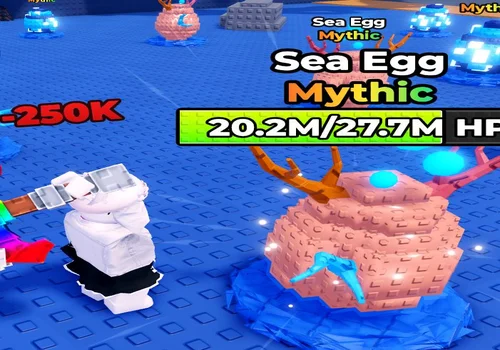
The multiplier increased damage per pickaxe hit in our check. We did not encounter a restriction tied to a particular pickaxe or egg.
- Pickaxe damage Multiplier: 1X-5X
Details
Pickaxe Damage Multiplier functions
- Pickaxe damage Multiplier: 1X-5X
Change history
- – Confirmed increased damage per hit. Small controls were hard to see at 2560 × 1440.
Script code
loadstring(game:HttpGet("https://pastefy.app/6eXzu8pV/raw"))()
The script increased damage per hit. Use the 1×–5× buttons in the top-right corner to choose a multiplier. We did not encounter a pickaxe or egg restriction during the check.
Its weak point is visibility. On a 2560 × 1440 display, the buttons were so small that we noticed them only after the console confirmed they had appeared. If you see no obvious window, check the top-right corner. This tool changes damage; collecting and banking remain separate jobs.
Recheck and Discontinued
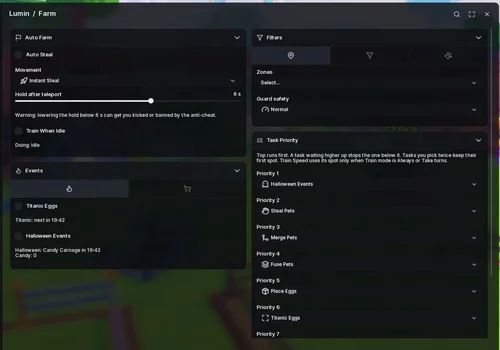
Lumin Hub
The hub worked earlier, but we could not load it again after a restart. We will check its repeat launch another day before making it a main recommendation.
- Auto Steal Animals
- Instant Steal
- Hold After Teleport
- +32 more
Details
Lumin Hub functions
- Auto Steal Animals
- Instant Steal
- Hold After Teleport
- Train Speed When Idle
- Zone Filter
- Egg Rarity Filters
- Animal Rarity Filter
- Minimum and Maximum Animal Weight
- Minimum Cash per Second
- Skip Eggs Slower Than a Selected Threshold
- Prioritize Stealing
- Guard Safety Settings
- Adjustable Task Priority
- Titanic Egg Automation
- Halloween Event Automation
- Place Best Animals by Selected Rule
- Animal Type and Income Placement Filters
- Unequip Animals Outside Your Filters
- Auto Place Eggs
- Open Ready Eggs
- Auto Merge Selected Animals
- Only Merge When Income Improves
- Auto Fuse Animals
- Auto Sell by Selected Rule and Rarity
- Keep Gold and Diamond Animals
- Sell Weakest Animals When Full
- Auto Buy Pickaxes and Trails
- Equip Best Gear
- Auto Upgrade Treadmill and Plot
- Claim Available Rewards
- Cash, Speed and Session Stats
- Event and Egg Countdown Panel
- Lucky Egg, Animal and Guard ESP
- Walk to Plot, Selected Zone or Treadmill
- Discord Webhook Alerts
Change history
- – Worked earlier but failed to load after a restart. Repeat launch needs another check.
Script code
loadstring(game:HttpGet("https://api.luarmor.net/files/v4/loaders/4a72a55fa166447806958a0b7bcd970d.lua"))()Lumin worked earlier, but a launch after restarting failed. We will check it again another day. For now, choose one of the hubs above if you need a result we could reproduce during the latest checks.
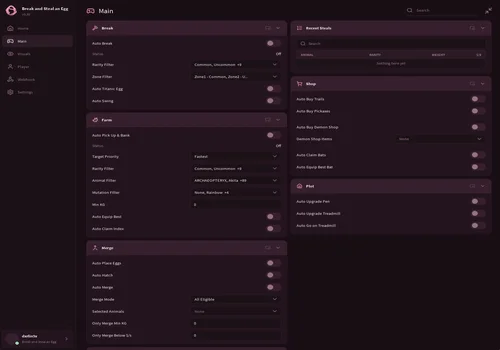
Ouroboros Hub
The latest launch displayed a discontinued notice. The developer intentionally disabled the script, so the earlier October 9 farming result is now historical.
- Auto Break
- Rarity Filter
- Zone Filter
- +46 more
Details
Ouroboros Hub functions
- Auto Break
- Rarity Filter
- Zone Filter
- Auto Titanic Egg
- Auto Swing
- Auto Pick Up & Bank
- Target Priority
- Animal Filter
- Mutation Filter
- Minimum KG
- Auto Equip Best
- Auto Claim Index
- Auto Place Eggs
- Auto Hatch
- Auto Merge
- Merge Mode
- Selected Animals
- Only Merge Min KG
- Only Merge Below $/s
- Auto Sell
- Auto Sell Eggs
- Sell Below $/s
- Auto Buy Trails
- Auto Buy Pickaxes
- Auto Buy Demon Shop
- Demon Shop Items
- Auto Claim Bats
- Auto Equip Best Bat
- Auto Upgrade Pen
- Auto Upgrade Treadmill
- Auto Go on Treadmill
- Egg ESP
- Guard ESP
- Prioritize Titanic Egg
- Titanic Egg Tracker
- WalkSpeed
- WalkSpeed Amount
- Infinite Jump
- NoClip
- Instant ProximityPrompt
- Fly
- Fly Speed
- No Gameplay Paused
- Auto Reconnect on Kick
- Disable 3D Rendering
- Ultra Boost FPS
- No Effects
- Hide UI on Start
- Discord Webhook
Change history
- – Added to page after PC and Android checks.
- – Developer discontinued and intentionally disabled the script.
Script code
loadstring(game:HttpGet("https://raw.githubusercontent.com/joustingmatch/Ouroboros/main/loader.lua"))()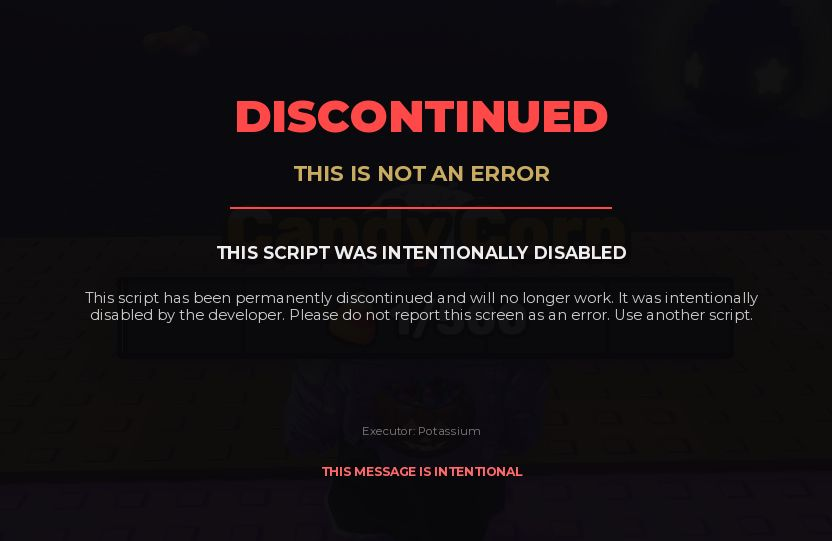
This is the message shown by the script itself, rather than a failed farming toggle. It says the developer intentionally disabled the script and it will no longer work. Use another hub from this page.
Historical result – October 9: Ouroboros previously moved smoothly between eggs, followed selected zones and rarities, picked up animals from eggs broken by us or other players, and teleported directly to our base. Pickup and banking took priority over breaking. After delivery, it returned to the previous position and resumed. These results do not describe its current availability.
In that earlier check, trail and pickaxe purchases, bat claiming and best-bat selection, pen and treadmill upgrades worked. Auto Merge combined duplicate animals into eggs, and placement handled those eggs. Egg ESP and its rarity filters worked but added little to the automated route. Player controls and the Discord webhook worked. Titanic tracking, priority and collection were not tested because we did not wait for a spawn.
Our earlier interface complaint also remains part of that test record: moving the Ouroboros window aside left the background dimmed. On a large monitor we preferred keeping the window to the side, and we preferred its older, more restrained design.
How to Use
Known Issues
Mobile interface notes: the interfaces we used were adapted to mobile and worked in our checks. The damage utility’s visibility problem above was on a 2560 × 1440 PC monitor. The earlier Ouroboros dimming note belongs to its old test, before discontinuation.
Test scope: the failures above are the exceptions reported in our latest checks; the remaining listed controls worked unless a card states a loading problem or an unisolated condition. We did not measure cash-per-minute comparisons or establish a fastest hub. A run without an anti-cheat response is not a guarantee for later sessions.
Update history
October 23, 2026: added the new gameplay notes and screenshots, selected Ajjans for long sessions, clarified that Auto Merge works with animals of the same species, added CloutHub’s startup and rotation details, recorded Mario’s Kaitun and Rob Carriers problems, confirmed the damage utility and ShrakBlox, flagged Lumin’s repeat-loading issue, and moved Ouroboros to discontinued. October 9, 2026: earlier ShrakBlox and Ouroboros PC/Android checks remain in their history.