Make cleaning more efficient in Carpet Cleaning Simulator with simple scripts that automate job selection and completion. Features like selecting the best job and instantly finishing it to get money help speed up earnings and reduce repetitive tasks while keeping the relaxing gameplay flow.
Game link: Carpet Cleaning Simulator
List of working Carpet Cleaning Simulator scripts:

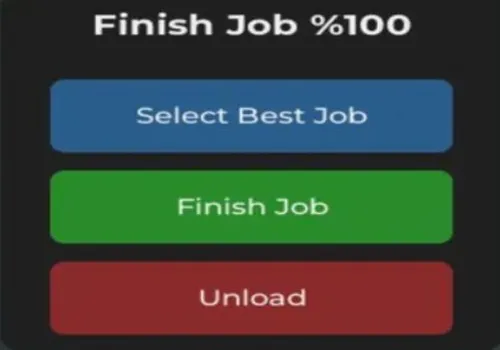
Finish Job 100%
Script
Show script
-- GUI Oluşturma
local ScreenGui = Instance.new("ScreenGui")
local MainFrame = Instance.new("Frame")
local Title = Instance.new("TextLabel")
local SelectButton = Instance.new("TextButton") -- Yeni Buton
local FinishButton = Instance.new("TextButton")
local UnloadButton = Instance.new("TextButton")

-- Ayarlar
ScreenGui.Name = "JobControlGUI"
ScreenGui.Parent = game:GetService("Players").LocalPlayer:WaitForChild("PlayerGui")
ScreenGui.ResetOnSpawn = false

MainFrame.Name = "MainFrame"
MainFrame.Parent = ScreenGui
MainFrame.BackgroundColor3 = Color3.fromRGB(35, 35, 35)
MainFrame.Position = UDim2.new(0.5, -100, 0.5, -100)
MainFrame.Size = UDim2.new(0, 200, 0, 200) -- Boyutu biraz artırdım
MainFrame.Active = true
MainFrame.Draggable = true

local MainCorner = Instance.new("UICorner", MainFrame)
MainCorner.CornerRadius = UDim.new(0, 10)

-- Başlık
Title.Name = "Title"
Title.Parent = MainFrame
Title.BackgroundTransparency = 1
Title.Size = UDim2.new(1, 0, 0, 40)
Title.Font = Enum.Font.GothamBold
Title.Text = "Finish Job %100"
Title.TextColor3 = Color3.fromRGB(255, 255, 255)
Title.TextSize = 18

-- 1. Select Job Button (Mavi Buton - Yeni eklenen)
SelectButton.Name = "SelectButton"
SelectButton.Parent = MainFrame
SelectButton.BackgroundColor3 = Color3.fromRGB(45, 100, 150)
SelectButton.Position = UDim2.new(0.1, 0, 0.25, 0)
SelectButton.Size = UDim2.new(0.8, 0, 0.2, 0)
SelectButton.Font = Enum.Font.GothamSemibold
SelectButton.Text = "Select Job"
SelectButton.TextColor3 = Color3.fromRGB(255, 255, 255)
SelectButton.TextSize = 14
Instance.new("UICorner", SelectButton).CornerRadius = UDim.new(0, 6)

-- 2. Finish Job Button (Yeşil Buton)
FinishButton.Name = "FinishButton"
FinishButton.Parent = MainFrame
FinishButton.BackgroundColor3 = Color3.fromRGB(45, 150, 45)
FinishButton.Position = UDim2.new(0.1, 0, 0.5, 0)
FinishButton.Size = UDim2.new(0.8, 0, 0.2, 0)
FinishButton.Font = Enum.Font.GothamSemibold
FinishButton.Text = "Finish Job"
FinishButton.TextColor3 = Color3.fromRGB(255, 255, 255)
FinishButton.TextSize = 14
Instance.new("UICorner", FinishButton).CornerRadius = UDim.new(0, 6)

-- 3. Unload Button (Kırmızı Buton)
UnloadButton.Name = "UnloadButton"
UnloadButton.Parent = MainFrame
UnloadButton.BackgroundColor3 = Color3.fromRGB(150, 45, 45)
UnloadButton.Position = UDim2.new(0.1, 0, 0.75, 0)
UnloadButton.Size = UDim2.new(0.8, 0, 0.2, 0)
UnloadButton.Font = Enum.Font.GothamSemibold
UnloadButton.Text = "Unload"
UnloadButton.TextColor3 = Color3.fromRGB(255, 255, 255)
UnloadButton.TextSize = 14
Instance.new("UICorner", UnloadButton).CornerRadius = UDim.new(0, 6)

-- FONKSİYONLAR

-- Select Job Fonksiyonu
SelectButton.MouseButton1Click:Connect(function()
    local args = {
        "Hanger",
        "Perfect"
    }
    local remote = game:GetService("ReplicatedStorage"):WaitForChild("Remotes"):WaitForChild("SelectJob", 5)
    if remote then
        remote:FireServer(unpack(args))
        SelectButton.Text = "Job Selected!"
        task.wait(1)
        SelectButton.Text = "Select Best Job"
    end
end)

-- Finish Job Fonksiyonu
FinishButton.MouseButton1Click:Connect(function()
    local args = {
        1,
        25599583
    }
    local remote = game:GetService("ReplicatedStorage"):WaitForChild("Remotes"):WaitForChild("RequestJobComplete", 5)
    if remote then
        remote:FireServer(unpack(args))
        FinishButton.Text = "Job Completed!"
        task.wait(1)
        FinishButton.Text = "Finish Job"
    end
end)

-- Unload Fonksiyonu
UnloadButton.MouseButton1Click:Connect(function()
    ScreenGui:Destroy()
end)
Copies
43
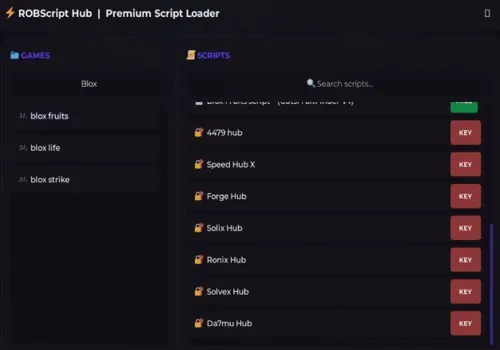
Robscript hub
Script
Show script
loadstring(game:HttpGet('https://raw.githubusercontent.com/artas01/robscript/refs/heads/main/loader.lua'))()
Copies
3092
How to use scripts?
- Copy the script and paste it into any executor. (Delta, Solara, Arceus X, Fluxus, Synapse X)
- Click execute.
- The script is working!
Warning:
- Use the script on alt accounts.
- We are not responsible for your use of scripts.
- You should be prepared that the script may not work.
FREQUENTLY ASKED QUESTIONS:
Do I need to buy scripts?
No, all scripts are either completely free or have a light key system with ads.
The script is not working, what should I do?
We update and check the scripts every week. Try using a different script.