This page collects available Draw & Donate scripts with features such as image-to-canvas drawing, URL image import, JSON drawing support, and automated canvas rendering. These tools are kept for users who still need script options for Draw & Donate, even if the game is no longer a high-priority update target.
Some scripts may still work, but they are checked less frequently than scripts for active games. Image import or canvas rendering features may stop working after Roblox, executor, or game updates.
Game link: Draw & Donate

Available Draw & Donate Scripts
Draw & Donate script – (Image to Roblox)
Script functions:
- How it works:
- Go to the converter site: https://0o4o.github.io/image-converter
- Upload any image.
- Press Convert Image
- The site will convert it into JSON data.
- Copy the JSON data.
- Execute the script and claim a canvas.
- Keep the drawing screen open.
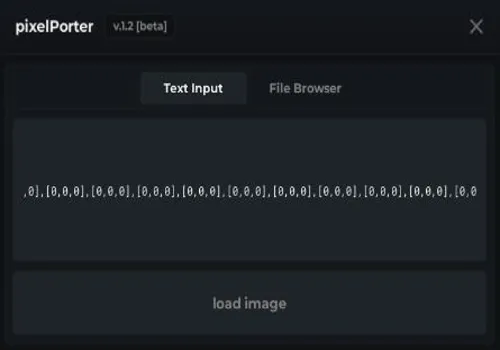
- Paste the JSON data into the textbox.
- Press “Load Image” and watch your image appear inside Roblox!
- functions: Image to Roblox from JSON or url
NO KEY
loadstring(game:HttpGet("https://raw.githubusercontent.com/0o4o/image-converter/refs/heads/main/pixelporter"))()7r6ik
KEY SYSTEM
loadstring(game:HttpGet("https://api.junkie-development.de/api/v1/luascripts/public/eb46b9dafc8cd9bfae487791b4810720fa372387d9f6663beae48af9af924b57/download"))()How to use scripts?
- Copy the script and paste it into any executor. (Delta, Solara, Arceus X, Fluxus, Synapse X)
- Click execute.
- The script is working!
Warning:
- Use the script on alt accounts.
- We are not responsible for your use of scripts.
- You should be prepared that the script may not work.
FREQUENTLY ASKED QUESTIONS:
Do I need to buy scripts?
No, all scripts are either completely free or have a light key system with ads.
The script is not working, what should I do?
We update and check the scripts every week. Try using a different script.