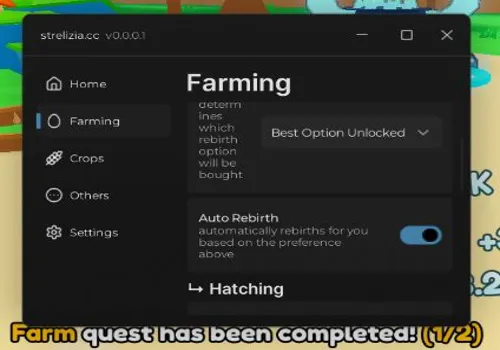
Become the ultimate champion in Rebirth Champions! This all-in-one scripts automates everything: auto-clicking, rebirthing, hatching eggs, and completing quests. Farm dungeons, collect all rewards, and craft pets effortlessly. With massive damage boosts and no cooldowns, dominate the leaderboards and unlock every world with ease!
Game link: Rebirth Champions: Ultimate

List of working Rebirth Champions: Ultimate scripts:
Rebirth Champions: Ultimate script – (WrapGate hub)
Script functions:
- Auto Click – Generates clicks for you to accumulate currency.
- Auto Rebirth – Performs rebirths to boost your click multiplier.
- Auto Buy Upgrades – Purchases all available upgrades to enhance your efficiency.
- Auto Hatch eggs – Opens eggs continuously to unlock new pets.
- Auto Cut Trees – Chops down trees to gather wood resources.
- NO CD Axe Cutting – Removes the cooldown from your axe for rapid gathering.
- Auto Upgrade Axe – Improves your axe level whenever possible.
- Craft pets – Combines pets to create higher-tier companions.
- Auto Complete map Quest – Finishes quests to unlock new worlds and rewards.
- Critical tap (1000x Damage) – Ensures every tap deals massively increased damage.
- Auto Pick Powerups in dungeon – Collects all power-ups during dungeon runs.
- Auto farm dungeons – Repeatedly completes dungeons for loot and experience.
- Auto Craft building – Constructs and upgrades buildings in your base.
- Auto Collect chests and orbs – Gathers all nearby chests, orbs, and resources.
- Auto Claim Achievements & Playtime & Daily & Prestige & Index & All Chests & Supply Drops – Claims every available reward across all game systems.
NO KEY
loadstring(game:HttpGet("https://raw.githubusercontent.com/Amazonek123/ScriptManager/refs/heads/main/RCU.lua"))()Auto Mine (Equip pickaxe and enter the mine)
NO KEY
-- AUTO-MINE () – korzysta z OreController gry

if not game:IsLoaded() then game.Loaded:Wait() end

local Players = game:GetService("Players")
local RS = game:GetService("ReplicatedStorage")
local CS = game:GetService("CollectionService")
local RunService = game:GetService("RunService")
local LP = Players.LocalPlayer

-- Knit + kontroler
local Knit = require(RS:WaitForChild("Packages"):WaitForChild("Knit"))
pcall(function() Knit.Start() end) -- jeśli gra już wystartowała, pcall niczemu nie szkodzi

local OreController
repeat
    task.wait(0.05)
    pcall(function() OreController = Knit.GetController("OreController") end)
until OreController

-- podpinamy handler MoveToFinished (żeby po dojściu zaczęło kopać)
pcall(function() OreController:moveToFinished() end)

-- helpers
local function hrp()
    local ch = LP.Character or LP.CharacterAdded:Wait()
    return ch:WaitForChild("HumanoidRootPart", 5)
end

local function isModelOre(m)
    if not m or not m:IsA("Model") or not m.PrimaryPart then return false end
    if CS:HasTag(m, "Ore") or CS:HasTag(m, "AfkOre") then return true end
    -- fallback na przypadek bez tagów: rudy z atrybutami roomId/id
    if m:GetAttribute("roomId") ~= nil and m:GetAttribute("id") ~= nil then return true end
    return false
end

local function nearestOre()
    local root = hrp()
    if not root then return nil end

    local best, bestDist

    local function consider(m)
        if not isModelOre(m) then return end
        local d = (m.PrimaryPart.Position - root.Position).Magnitude
        if not bestDist or d < bestDist then
            best, bestDist = m, d
        end
    end

    -- preferuj „zwykłe” Ore
    for _, m in ipairs(CS:GetTagged("Ore")) do consider(m) end
    if not best then
        for _, m in ipairs(CS:GetTagged("AfkOre")) do consider(m) end
    end
    -- fallback: gdy tagi nie działają
    if not best then
        local debris = workspace:FindFirstChild("Debris")
        if debris then
            for _, m in ipairs(debris:GetChildren()) do consider(m) end
        end
    end

    return best
end

local function canMine(target)
    -- jeżeli gra ma limiter „za słoki kilof”, uszanujemy go
    local ok, res = pcall(function() return OreController:isStrongEnough(target) end)
    if ok then return res ~= false end
    return true
end

local function mineOne(target)
    if not target or not target.Parent then return end
    if not canMine(target) then return end

    -- zacznij podejście i kopanie
    OreController:moveToOre(target)
    OreController:updateOreHealth()

    -- czekaj aż przestanie kopać tę rudę (rozpadnie się / zmieni cel)
    local t0 = os.clock()
    while target.Parent and (OreController._currentOre == target or OreController._selectedOre == target) do
        task.wait(0.1)
        if os.clock() - t0 > 12 then
            -- time-out zabezpieczający (np. ruda poza zasięgiem)
            pcall(function() OreController:cancelAutoDamageOre() end)
            break
        end
    end
end

-- główna pętla
while true do
    local target = nearestOre()
    if target then
        mineOne(target)
        task.wait(0.1)
    else
        task.wait(0.5) -- brak rud w zasięgu – chwilę poczekaj
    end
endAuto Fish
NO KEY
-- 🧠 Usługi
local Players = game:GetService('Players')
local VirtualInputManager = game:GetService('VirtualInputManager')
local LocalPlayer = Players.LocalPlayer

-- 📍 Pozycja kliknięcia (dostosuj!)
local clickX = 500
local clickY = 500

-- ⚙️ Parametry łowienia
local clickSpeed = 0.05 -- odstęp między kliknięciami
local clickDuration = 5 -- czas trwania klikania
local delayBetweenCasts = 1 -- czas między kolejnymi cyklami

-- 🔁 Kontrola pętli
local autoFishing = false

-- 🎮 GUI Setup
local ScreenGui = Instance.new('ScreenGui')
ScreenGui.Name = 'AutoFishingGui'
ScreenGui.ResetOnSpawn = false
ScreenGui.Parent = LocalPlayer:WaitForChild('PlayerGui')

local ToggleButton = Instance.new('TextButton')
ToggleButton.Size = UDim2.new(0, 200, 0, 50)
ToggleButton.Position = UDim2.new(0, 20, 0, 100)
ToggleButton.Text = '▶️ Start Auto-Fishing'
ToggleButton.BackgroundColor3 = Color3.fromRGB(0, 170, 255)
ToggleButton.TextColor3 = Color3.fromRGB(255, 255, 255)
ToggleButton.Font = Enum.Font.SourceSansBold
ToggleButton.TextSize = 20
ToggleButton.Parent = ScreenGui

-- 👆 Funkcja kliknięcia
ToggleButton.MouseButton1Click:Connect(function()
    autoFishing = not autoFishing
    if autoFishing then
        ToggleButton.Text = '⏹ Stop Auto-Fishing'
        ToggleButton.BackgroundColor3 = Color3.fromRGB(255, 85, 85)

        -- 🔄 Główna pętla
        while autoFishing do
            -- 1. Zarzucenie wędki
            VirtualInputManager:SendMouseButtonEvent(
                clickX,
                clickY,
                0,
                true,
                game,
                0
            )
            VirtualInputManager:SendMouseButtonEvent(
                clickX,
                clickY,
                0,
                false,
                game,
                0
            )

            -- 2. Spam klików
            local startTime = tick()
            while tick() - startTime < clickDuration and autoFishing do
                VirtualInputManager:SendMouseButtonEvent(
                    clickX,
                    clickY,
                    0,
                    true,
                    game,
                    0
                )
                VirtualInputManager:SendMouseButtonEvent(
                    clickX,
                    clickY,
                    0,
                    false,
                    game,
                    0
                )
                task.wait(clickSpeed)
            end

            -- 3. Przerwa
            task.wait(delayBetweenCasts)
        end
    else
        ToggleButton.Text = '▶️ Start Auto-Fishing'
        ToggleButton.BackgroundColor3 = Color3.fromRGB(0, 170, 255)
    end
end)mjcontegazxc
NO KEY
loadstring(game:HttpGet("https://gist.githubusercontent.com/gerelyncontiga-dot/8aeaa393df72f52f2353f7a53452ee5f/raw/166c5434fc7b909610cab22dd596914db6d8c6cb/Gist%20ultimate%20champion.lua"))()Gandalf Hub
KEY SYSTEM
loadstring(game:HttpGet('https://raw.githubusercontent.com/Gandalf312/RCU-/refs/heads/main/Loader'))()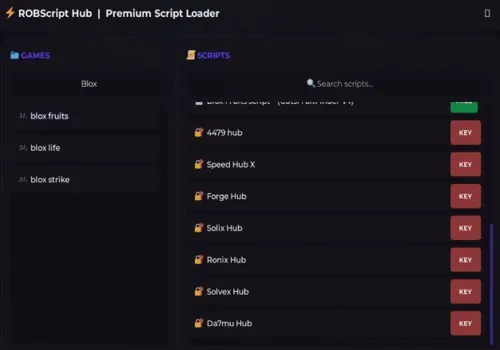
Robscript hub
Script
Show script
loadstring(game:HttpGet('https://raw.githubusercontent.com/artas01/robscript/refs/heads/main/loader.lua'))()
Copies
1440
DuckyScripts
KEY SYSTEM
loadstring(game:HttpGet("https://raw.githubusercontent.com/bigbeanscripts/RCU./refs/heads/main/DuckyScriptz"))()AshLabs
KEY SYSTEM
loadstring(game:HttpGet("https://ashlabs.me/api/game?name=Rebirth-Champion.lua", true))()Ketty Hub
KEY SYSTEM
loadstring(game:HttpGet("https://raw.githubusercontent.com/KettyDev/KettyHub/refs/heads/main/KeySystem"))()Rebel Hub
KEY SYSTEM
loadstring(game:HttpGet("https://api.luarmor.net/files/v3/loaders/86de6d175e585ef6c1c7f4bdebfc57cc.lua"))()badscripthub
KEY SYSTEM
loadstring(game:HttpGet("https://api.luarmor.net/files/v3/loaders/d949084ea062c1893d5d0d849c974baf.lua"))()Devil Hub
KEY SYSTEM
loadstring(game:HttpGet("https://raw.githubusercontent.com/DEVIL-Script/DEVIL-Hub/main/DEVIL-Hub-Main", true))()The Intruders hub
KEY SYSTEM
loadstring(game:HttpGet"https://raw.githubusercontent.com/lifaiossama/errors/main/Intruders.html")()How to use scripts?
- Copy the script and paste it into any executor. (Delta, Solara, Arceus X, Fluxus, Synapse X)
- Click execute.
- The script is working!
Warning:
- Use the script on alt accounts.
- We are not responsible for your use of scripts.
- You should be prepared that the script may not work.
FREQUENTLY ASKED QUESTIONS:
Do I need to buy scripts?
No, all scripts are either completely free or have a light key system with ads.
The script is not working, what should I do?
We update and check the scripts every week. Try using a different script.