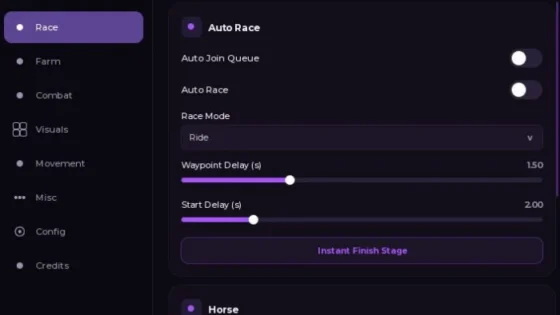
Tested: October 28, 2026, on PC with Potassium. Both scripts are made for PC and mobile executors; our test run was on PC.
Only two scripts made the cut this time. Both caught a fish about every 15–20 seconds in our test, so speed isn’t the difference, features are. Want plain auto fishing and nothing else? Start with Nexus Hub v4. Want fishing plus selling, totems, crab cages and teleports? Take UB Hub. Both work without a key.
NO KEY Scripts
Both scripts work without a key. Nexus Hub v4 is the simple one, UB Hub does a lot more.
Nexus Hub v4
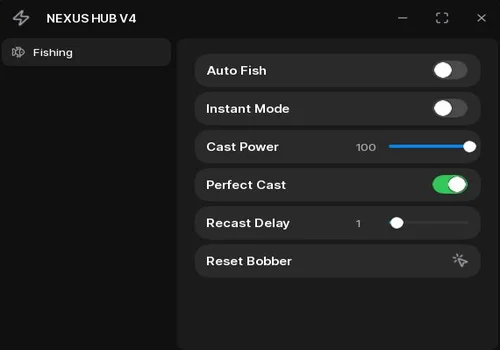
Open-source auto fishing. In our test it cast the rod, shook the lure, reeled the fish in and started again on its own, about one fish every 15–20 seconds. Instant Mode skips the last minigame where you keep the bar on the fish.
- Fishing: Auto Fish, Instant Mode, Cast Power, Perfect Cast, Recast Delay, Reset Bobber
Details
Nexus Hub v4 functions
- Fishing: Auto Fish, Instant Mode, Cast Power, Perfect Cast, Recast Delay, Reset Bobber
Change history
- – Added Nexus Hub v4.
Script code
local Players    = game:GetService("Players")
local RS         = game:GetService("ReplicatedStorage")
local RunService = game:GetService("RunService")
pcall(setthreadidentity, 8)
local LocalPlayer = Players.LocalPlayer
local HUB_NAME = "NEXUS HUB V4"
local Config = {
    Enabled      = false,
    Instant      = false,
    Power        = 100,
    PerfectCast  = true,
    Delay        = 1,
}
local LoopThread = nil
local function getUIContainer()
    local ok, hui = pcall(function() return gethui and gethui() end)
    if ok and hui then return hui end
    local ok2, cg = pcall(function() return game:GetService("CoreGui").RobloxGui end)
    if ok2 and cg then return cg end
    return LocalPlayer.PlayerGui
end
local Net            = require(RS:WaitForChild("packages"):WaitForChild("Net"))
local ReelController = require(RS:WaitForChild("client")
    :WaitForChild("legacyControllers"):WaitForChild("ReelController"))
local CastRemote   = Net:RemoteFunction("FishingRod/Cast")
local ResetRemote  = Net:RemoteEvent("FishingRod/Reset")
local ShakeRemote  = Net:RemoteEvent("LureShake/Shake")
local ShakeStartRF = Net:RemoteFunction("LureShake/Start")
local ShakeArgs = nil
do
    local ok, orig = pcall(getcallbackvalue, ShakeStartRF, "OnClientInvoke")
    if ok and orig then
        pcall(function()
            ShakeStartRF.OnClientInvoke = function(args)
                ShakeArgs = args
                return orig(args)
            end
        end)
    end
end
local function isRod(tool)
    return tool and tool:IsA("Tool") and tool:FindFirstChild("events") ~= nil
end
local function getEquippedRod()
    local char = LocalPlayer.Character
    if not char then return nil end
    local tool = char:FindFirstChildOfClass("Tool")
    return isRod(tool) and tool or nil
end
local function getAnyRod()
    local rod = getEquippedRod()
    if rod then return rod end
    local bp = LocalPlayer:FindFirstChildOfClass("Backpack")
    if not bp then return nil end
    for _, t in ipairs(bp:GetChildren()) do
        if isRod(t) then
            local hum = LocalPlayer.Character and LocalPlayer.Character:FindFirstChildOfClass("Humanoid")
            if hum then
                hum:EquipTool(t)
                local t0 = os.clock()
                while os.clock() - t0 < 2 do
                    rod = getEquippedRod()
                    if rod then return rod end
                    task.wait(0.05)
                end
            end
        end
    end
    return nil
end
RunService.RenderStepped:Connect(function()
    local reel = ReelController.ActiveReel
    if reel and Config.Enabled then
        reel.frozenUntil = math.max(reel.frozenUntil, tick() + 0.25)
        reel.barPosition = reel.fishPosition
        reel.onbar = true
    end
end)
local function solveReel(reel)
    if not reel then return end
    if Config.Instant then
        local t0 = os.clock()
        while not reel.ready and os.clock() - t0 < 15 do task.wait(0.05) end
        if ReelController.ActiveReel == reel then
            pcall(function() reel:EndMinigame(true) end)
        end
    else
        local t0 = os.clock()
        while ReelController.ActiveReel == reel and os.clock() - t0 < 180 do
            task.wait(0.1)
        end
    end
end
local function autofishLoop()
    while Config.Enabled do
        local rod = getAnyRod()
        if not rod then
            task.wait(2)
            continue
        end
        if rod:FindFirstChild("bobber") or (rod.values and rod.values.casted.Value) then
            pcall(function() ResetRemote:FireServer() end)
            task.wait(0.3)
        end
        local ok, res = pcall(function()
            return CastRemote:InvokeServer(
                math.clamp(Config.Power, 0, 100),
                Config.PerfectCast
            )
        end)
        if ok and res == true then
            local t0 = os.clock()
            while Config.Enabled do
                if ReelController.ActiveReel then break end
                if os.clock() - t0 > 150 then break end
                if not getEquippedRod() then break end
                if ShakeArgs then
                    local args = ShakeArgs
                    ShakeArgs = nil
                    local rng = Random.new(args.seed)
                    local scale = args.ShakeScale or 1
                    local cooldown = 0.25 / scale
                    local acc = args.initialTimer
                    local needed = 0
                    while acc > 0 and needed < 60 do
                        acc -= rng:NextNumber(0.5, 1.5)
                        needed += 1
                    end
                    task.wait(math.random(35, 60) / 100)
                    for i = 1, needed do
                        if not Config.Enabled then break end
                        pcall(function() ShakeRemote:FireServer() end)
                        task.wait(cooldown + math.random(30, 80) / 1000)
                    end
                elseif LocalPlayer.PlayerGui:FindFirstChild("shakeui") then
                    pcall(function() ShakeRemote:FireServer() end)
                    task.wait(0.3)
                else
                    task.wait(0.1)
                end
            end
            solveReel(ReelController.ActiveReel)
            task.wait(Config.Delay + math.random() * 0.5)
        else
            task.wait(2)
        end
    end
end
local function setEnabled(state)
    Config.Enabled = state
    if state then
        if not LoopThread or coroutine.status(LoopThread) == "dead" then
            LoopThread = task.spawn(autofishLoop)
        end
    end
end
local oldUI = getUIContainer():FindFirstChild("WindUI")
if oldUI then pcall(function() oldUI:Destroy() end) end
local WindUI = loadstring(game:HttpGet(
    "https://raw.githubusercontent.com/Footagesus/WindUI/main/dist/main.lua"
))()
local Window = WindUI:CreateWindow({
    Title  = HUB_NAME,
    Icon   = "zap",
    Theme  = "Dark",
    ToggleKey = Enum.KeyCode.RightShift,
    OpenButton = {
        Title = HUB_NAME,
        Enabled = true,
        Draggable = true,
        OnlyMobile = false,
        CornerRadius = UDim.new(1, 0),
        Color = ColorSequence.new(
            Color3.fromHex("#7c3aed"),
            Color3.fromHex("#06b6d4")
        ),
    },
})
local FishingTab = Window:Tab({ Title = "Fishing", Icon = "fish" })
FishingTab:Toggle({
    Title = "Auto Fish",
    Value = false,
    Callback = setEnabled,
})
FishingTab:Toggle({
    Title = "Instant Mode",
    Value = false,
    Callback = function(v) Config.Instant = v end,
})
FishingTab:Slider({
    Title = "Cast Power",
    Step  = 1,
    Value = { Min = 10, Max = 100, Default = 100 },
    Callback = function(v) Config.Power = v end,
})
FishingTab:Toggle({
    Title = "Perfect Cast",
    Value = true,
    Callback = function(v) Config.PerfectCast = v end,
})
FishingTab:Slider({
    Title = "Recast Delay",
    Step  = 0.5,
    Value = { Min = 0, Max = 10, Default = 1 },
    Callback = function(v) Config.Delay = v end,
})
FishingTab:Button({
    Title = "Reset Bobber",
    Callback = function()
        pcall(function() ResetRemote:FireServer() end)
    end,
})The best part: Fisch has an anti-cheat that catches a lot of scripts, and Nexus didn’t trigger it. Don’t be fooled by the jerky animations. It looks like the script is trying and failing, but the fish really are getting caught.
UB Hub
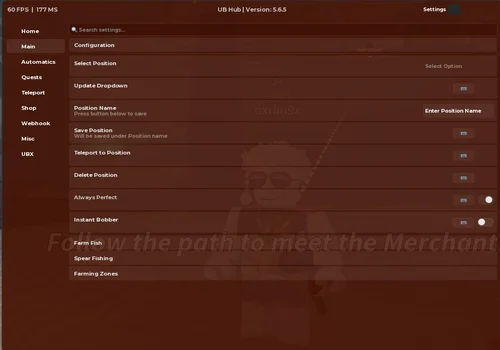
A big hub that does the whole fishing minigame for you and a lot more, about one fish every 15–20 seconds in our test. Saved positions, spear fishing, farm zones, remote selling, totems, crab cages, treasure maps, teleports and shop auto-buy all worked.
- Character: Disable Temperature, Disable Oxygen, Freeze Position, Full Bright
- Water: Walk on Water
- Identity: Hide Identity
- +16 more
Details
UB Hub functions
- Character: Disable Temperature, Disable Oxygen, Freeze Position, Full Bright
- Water: Walk on Water
- Identity: Hide Identity
- Performance: Disable Fog, Boost FPS
- Server: Time Before Hop (hr.min:s/mins), Select Desired Fish, Auto Hop until Desired Fish
- Configuration: Select Position, Update Dropdown, Position Name, Save Position, Teleport to Position, Delete Position, Always Perfect, Instant Bobber
- Farm Fish: Auto Shake, Auto Cast, Auto Perfect Cast, Auto Reel, Auto Equip Rod
- Spear Fishing: Select Rarities, Auto Spear Fish
- Farming Zones: Select Zone, Auto Farm Zones
- Selling: Auto Sell All, Auto Sell Holding
- Totems: Select Totem (Day), Auto Use Totem (Day), Select Totem (Night), Auto Use Totem (Night), Select Totems to use, Auto Use Totems
- Crate: Select Crates, Auto Open Crates
- Crab Cage: Auto Buy Crab Cage, Quantity, Buy, Select Crab Cage, Auto Claim Crab Cage, Auto Equip Crab Cage, Auto Place Crab Cage
- Aquarium: Auto Claim Aquarium
- Treasure Map: Auto Complete Treasure Map
- Appraise: Select Fish, Select Target Mutations, Auto Appraise
- Teleport: Select Location, Teleport to Location, Select NPC, Teleport to Selected NPC, Refresh NPC, Select Zone, Teleport to Selected Zone
- Shop: Select Totem, Auto Buy Totem, Quantity, Buy, Select Crates, Auto Buy Crates, Select Rod, Buy Rods, Auto Buy Luck, Auto Buy Power
- Webhook Config: Webhook URL, User ID to ping, Send Test Notification, Select Fish, Select Rarity, Select Mutation, Delay Before Send, Webhook When Caught Fish, Webhook Appraise Found Mutation, Webhook Divine Secret
Change history
- – Added UB Hub.
Script code
loadstring(game:HttpGet("https://raw.githubusercontent.com/TeamUBHub/UBLoader/refs/heads/main/Loader.lua"))() Don’t panic if the window opens empty. It’s still loading. For us the tabs showed up after about 15–20 seconds. UB is updated often, and we tested the latest build as of October 28, 2026 (Version 5.6.5).
Selling is really handy here: Auto Sell All and Auto Sell Holding (the fish in your hand) sell remotely, without teleporting you, so the farm keeps going. The downside: there are no filters, so you can’t tell it to keep every huge fish for your collection. Good news though: a fish we had favorited didn’t get sold, so favorite anything you want to keep before you turn selling on.
Teleports, saved positions, spear fishing, totems, crab cages (it buys and places them for you) and shop auto-buy all worked. Treasure Map works too, but you need to have a map first. And our favorite: Walk on Water lets you walk on water like Jesus.