Pick a script by what you want it to do: play for you, show hints while you move yourself, solve puzzles or load a position. Every card below says what worked in our check and the main limit to know before you copy it. We did not measure playing strength, so the order is not an Elo ranking.
Recorded checks: PC with Windows and Potassium; mobile with a Samsung phone and Delta. All nine scripts were also run on the phone, where start, stop, hide and show worked. Page updated: Sunday, October 25, 2026.
Quick pick by task:
- Let a script play your current game: PuckAFK. It made fast moves without lag in our check.
- See hints while you move yourself: ACAS or Chess ESP. Both show the best move and weaker options.
- Solve puzzles and go to the next one: Arsenic with Auto Next Puzzle.
- Start the next match without clicking: Arsenic with Auto Queue.
- Auto play vs bots and players, a text hint or one move: RobScript Team.
- Study a position or load FEN: Diablo. Open the game’s analysis page first.
Compare Scripts
KEYLESS / NO KEY Scripts
PuckAFK – Auto Play and Live Analysis
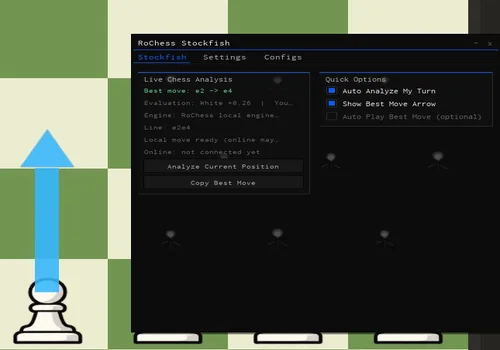
Our first pick for auto play. In our check it made fast moves without lag and finished games. It can analyze with a local engine, Stockfish Online or Lichess, and the panel shows which source is used.
- Best Move: shows the move for the current position, with evaluation and line.
- Engine Status: shows the analysis source in use and whether online analysis is connected.
- Auto Analyze My Turn: analyzes the position when it is your move.
- +4 more
Details
PuckAFK – Auto Play and Live Analysis functions
- Best Move: shows the move for the current position, with evaluation and line.
- Engine Status: shows the analysis source in use and whether online analysis is connected.
- Auto Analyze My Turn: analyzes the position when it is your move.
- Best Move Arrow: draws the suggested move on the board.
- Auto Play Best Move: plays the suggested move for you; off by default.
- Analyze Current Position: runs analysis when you press it.
- Copy Best Move: copies the move text.
Change history
- – Added with notes from our check: local, Stockfish Online and Lichess analysis worked; Auto Play finished games and kept playing in an already started new game. Checked on Windows with Potassium and on a Samsung phone with Delta.
Script code
loadstring(game:HttpGet("https://puckafk.site/loader.lua"))()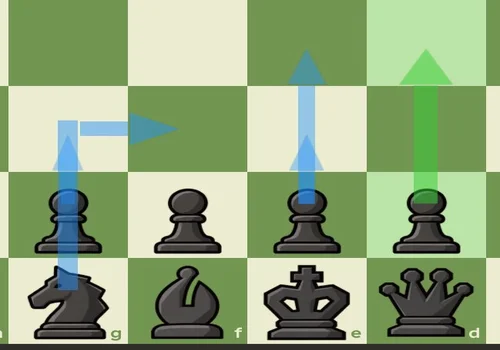
ACAS Move Suggestor – Best and Alternative Moves
A strong pick for hints when you move yourself. It adds an ACAS tab styled like the game menu. A green arrow shows the best move and extra arrows show weaker options, so you can choose between them. Maia and Stockfish both gave hints in our check.
- Move Suggestions: shows moves from Maia or Stockfish; arrows update after your opponent moves.
- Target Elo (Maia): sets the Maia model level from 600 to 2600 on the Lichess scale; it is not your RoChess rating.
- Candidate Arrows: shows 1 to 10 move options, with the best one in green.
- +8 more
Details
ACAS Move Suggestor – Best and Alternative Moves functions
- Move Suggestions: shows moves from Maia or Stockfish; arrows update after your opponent moves.
- Target Elo (Maia): sets the Maia model level from 600 to 2600 on the Lichess scale; it is not your RoChess rating.
- Candidate Arrows: shows 1 to 10 move options, with the best one in green.
- Stockfish Depth and Time: limit how deep and how long Stockfish searches.
- Only on My Turn: shows hints only when it is your move.
- Forced Premove: makes forced moves for you as a premove.
- API Fallback: uses a backup analysis source.
- Free Reviews: lets you use game reviews.
- Board Display: highlighted squares, ghost piece, opponent reply, arrow opacity and width.
- Show on Demand: shows moves only when you press H.
- Display Delay: waits before showing moves.
Change history
- – Added with notes from our check: Maia and Stockfish hints, updating arrows, Forced Premove and Free Reviews worked. Checked on Windows with Potassium and on a Samsung phone with Delta.
Script code
loadstring(game:HttpGet("https://raw.githubusercontent.com/ifyouseethisyouarehomosexual/GayboObfuscatedStuff/refs/heads/main/RoChess%20ACAS"))()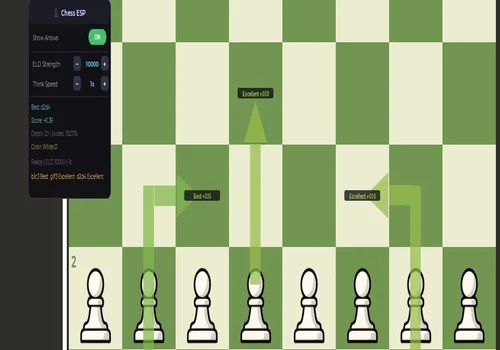
Chess ESP – Best Move and Two Alternatives
Another good pick for hints. It shows the best move and two more options on the board. In our check the arrows were up to date after every move, playing as white and as black.
- Move Arrows: shows the best move and two weaker options on the board.
- Move Labels: marks moves as best, bad, blunder and similar.
- ELO Strength: changes which moves are suggested.
- +2 more
Details
Chess ESP – Best Move and Two Alternatives functions
- Move Arrows: shows the best move and two weaker options on the board.
- Move Labels: marks moves as best, bad, blunder and similar.
- ELO Strength: changes which moves are suggested.
- Think Speed: changes how long the engine thinks.
- Analysis Info: best move, score, depth, nodes, your color and ready status.
Change history
- – Added with notes from our check: the best move and two extra options stayed current for both sides; no hints for the wrong side or an old position. Checked on Windows with Potassium and on a Samsung phone with Delta.
Script code
loadstring(game:HttpGet("https://pastebin.com/raw/1g6kfv0W"))()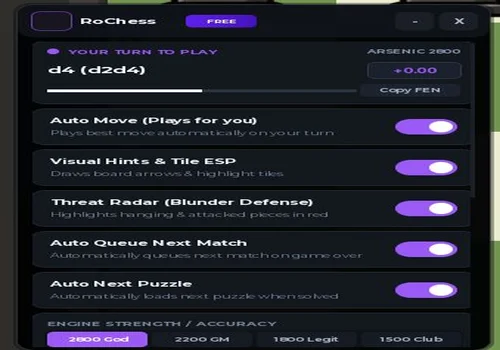
Arsenic – Auto Move, Auto Queue and Puzzles
Our pick for puzzles and for playing match after match. In our check it started without a key, Auto Move played games, Auto Queue started the next match by itself and Auto Next Puzzle moved on to the next puzzle.
- Auto Move: plays moves for you.
- Auto Queue Next Match: starts the next match after a game ends.
- Auto Next Puzzle: opens the next puzzle after one is solved.
- +10 more
Details
Arsenic – Auto Move, Auto Queue and Puzzles functions
- Auto Move: plays moves for you.
- Auto Queue Next Match: starts the next match after a game ends.
- Auto Next Puzzle: opens the next puzzle after one is solved.
- Visual Hints and Tile ESP: shows the suggested move on the board.
- Threat Radar: blunder defense option.
- Play Best Move Now: plays one move right away.
- Engine Strength: presets from 1500 Club to 2800 God.
- Move Speed: Instant, Fast (0.5s) or Human (Safe).
- Opening Book: Auto, Sicilian, Italian, d4 Gambit or Caro-Kann.
- Stealth Panic: hides the window at once with F8.
- Copy FEN: copies the current position.
- Discord Match Logger: sends match logs to a Discord webhook you paste.
- Accent Color: changes the menu color.
Change history
- – Added with notes from our check: started without a key; Auto Move, Auto Queue and Auto Next Puzzle worked, and it started the next game by itself. Checked on Windows with Potassium and on a Samsung phone with Delta.
Script code
loadstring(game:HttpGet("https://api.jnkie.com/api/v1/luascripts/public/d1c9e01bb9267910db3aacb917d174095e758ec050424403fa28b49012ebfe4a/download"))()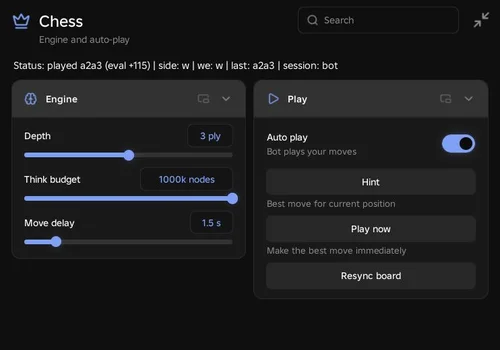
RobScript Team – RoChess Auto Play
Our own script with its own chess engine, not Stockfish. In our check Auto Play finished two games against bots and two against players. Hint and Play Now also worked.
- Auto Play: plays your moves until the game ends; off by default.
- Hint: shows the best move and score in a notification.
- Play Now: plays one best move right away.
- +4 more
Details
RobScript Team – RoChess Auto Play functions
- Auto Play: plays your moves until the game ends; off by default.
- Hint: shows the best move and score in a notification.
- Play Now: plays one best move right away.
- Resync Board: reads the board again.
- Depth: sets how many half-moves the engine looks ahead, from 1 to 5.
- Think Budget: limits how much the engine calculates for each move.
- Move Delay: sets the wait between move attempts.
Change history
- – Added with notes from our check: Auto Play finished two games against bots and two against players; Hint and Play Now worked; no freezes. Checked on Windows with Potassium and on a Samsung phone with Delta.
Script code
loadstring(game:HttpGet("https://raw.githubusercontent.com/bobloscript/robscript/refs/heads/main/RoChess", true))()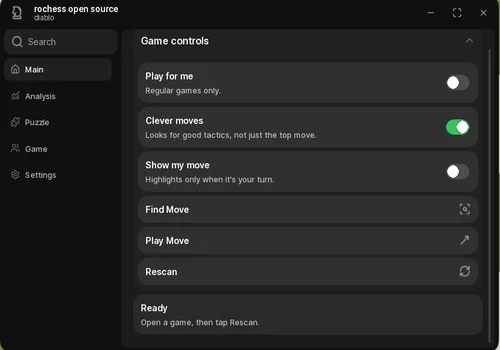
Diablo – Puzzles, Study and FEN
Our pick for study and loading positions. In our check Play for me, several puzzles in a row with Auto Next, Load FEN and study worked. For study, open the game's analysis page first.
- Play for Me: plays your moves in the current game.
- Clever Moves: may choose another good move instead of always the top engine move.
- Show My Move and Find Move: show the suggested move for your side.
- +9 more
Details
Diablo – Puzzles, Study and FEN functions
- Play for Me: plays your moves in the current game.
- Clever Moves: may choose another good move instead of always the top engine move.
- Show My Move and Find Move: show the suggested move for your side.
- Play Move: plays one suggested move.
- Solve Puzzles: solves the open puzzle.
- Auto Next and Next Puzzle: move on to the next puzzle.
- Load FEN and Copy FEN: load or copy a position.
- Study Board: step through moves, flip the board, undo, reset or start a new study.
- Move History: copies the move list or opens the analysis board.
- Copy Best Move: copies the move text.
- Rescan: looks for the game board again.
- Refresh Game Info: updates player info.
Change history
- – Added with notes from our check: Play for me, several puzzles in a row with Auto Next, Load FEN and study on the analysis page worked; no controller error came up. Checked on Windows with Potassium and on a Samsung phone with Delta.
Script code
loadstring(game:HttpGet("https://pastebin.com/raw/dR03aM8e"))()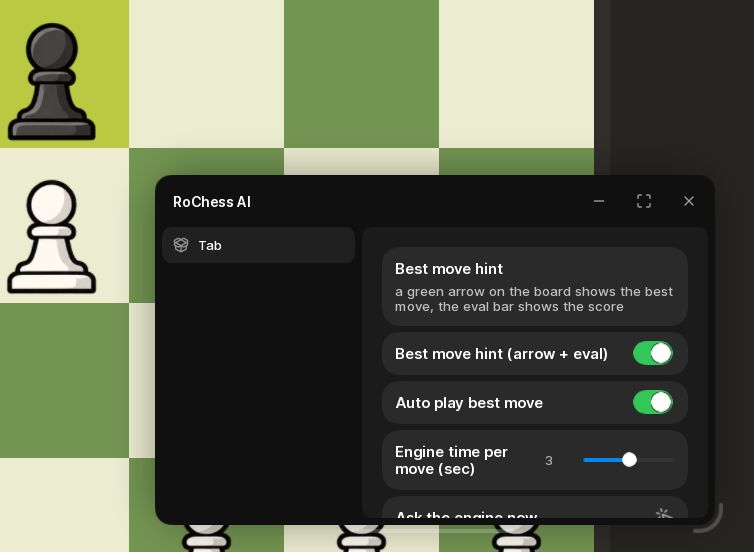
RoChess AI – Hints and Auto Play
A simple one-tab option. In our check the hint arrow updated, Auto Play made moves and the game finished.
- Best Move Hint: shows an arrow and evaluation for the best move.
- Auto Play Best Move: plays the suggested move for you.
- Engine Time per Move: sets thinking time in seconds.
Details
RoChess AI – Hints and Auto Play functions
- Best Move Hint: shows an arrow and evaluation for the best move.
- Auto Play Best Move: plays the suggested move for you.
- Engine Time per Move: sets thinking time in seconds.
Change history
- – Added with notes from our check: hints updated, Auto Play made moves and finished the game; no clear change from Engine Time. Checked on Windows with Potassium and on a Samsung phone with Delta.
Script code
loadstring(game:HttpGet("https://gist.githubusercontent.com/SmyakMyamyak/cb292fea51a92967e2d501855aebce02/raw/c2db8ad96d02f3832852d1847e28accf044ca8e3/gistfile1.txt"))()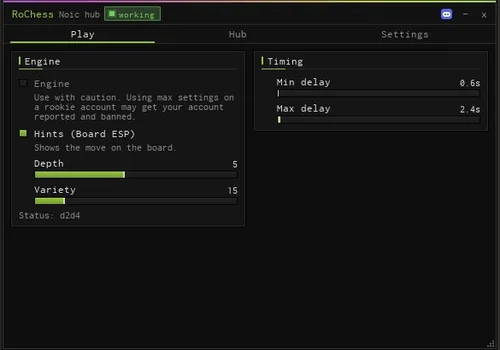
Noic Hub – Board Hints
A hints-only option. In our check it started without a key, showed fresh move hints on the board for several moves in a row and did not crash.
- Board Hints (ESP): shows the suggested move on the board.
- Engine: turns on the engine.
- Depth: sets how deep the engine searches.
- +2 more
Details
Noic Hub – Board Hints functions
- Board Hints (ESP): shows the suggested move on the board.
- Engine: turns on the engine.
- Depth: sets how deep the engine searches.
- Variety: changes how varied the suggestions are.
- Min and Max Delay: set the delay range.
Change history
- – Added with notes from our check: started without a key; board hints stayed current for several moves; no crashes or freezes; no automatic moves with Engine on. Checked on Windows with Potassium and on a Samsung phone with Delta.
Script code
loadstring(game:HttpGet("https://raw.githubusercontent.com/noicyreal/bracehub/refs/heads/main/rochess.luau"))()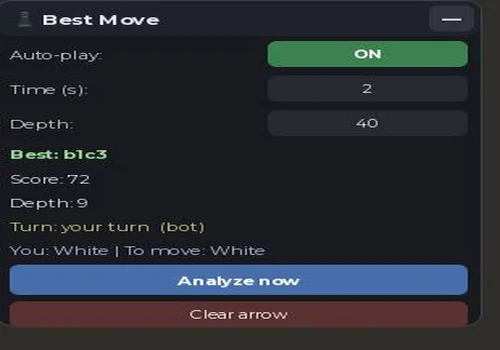
Best Move GUI – Open Source Auto Play
A full open-source script in the card, with no loader link. In our check Auto-play made moves until the game ended, and the ON/OFF switch stopped it.
- Auto-play: plays your moves; ON when the script starts.
- Time (s): time budget for the search; some moves can take longer.
- Depth: maximum search depth; the depth reached can be lower.
- +3 more
Details
Best Move GUI – Open Source Auto Play functions
- Auto-play: plays your moves; ON when the script starts.
- Time (s): time budget for the search; some moves can take longer.
- Depth: maximum search depth; the depth reached can be lower.
- Analyze Now: finds the best move for the current position.
- Best Move Arrow: draws the move on the board; Clear Arrow removes it.
- Status: best move, score, depth reached, turn and your color.
Change history
- – Added with notes from our check: Auto-play played until the game ended and the switch stopped it; some moves took 10-20 seconds with Time set to 2. Checked on Windows with Potassium and on a Samsung phone with Delta.
Script code
if _G.__BestMoveGUIRunning then
    warn("[BestMoveGUI] already running")
    return
end
_G.__BestMoveGUIRunning = true

local Players = game:GetService("Players")
local ReplicatedStorage = game:GetService("ReplicatedStorage")
local UserInputService = game:GetService("UserInputService")
local RunService = game:GetService("RunService")

local AUTO_PLAY      = true
_G.__BestMoveAutoPlay = AUTO_PLAY
local TIME_BUDGET    = 2.0
local MAX_DEPTH      = 40
local USE_VORTEX     = true
local HINT_COLOR     = Color3.fromRGB(150, 190, 70)

-- =====  =====
local ChessFolder = ReplicatedStorage:WaitForChild("Chess")
local ClientFolder = ReplicatedStorage:WaitForChild("ChessClient")
local Engine = require(ChessFolder:WaitForChild("Engine"))
local Bot    = require(ChessFolder:WaitForChild("Bot"))
local VortexBot = nil
pcall(function() VortexBot = require(ChessFolder:WaitForChild("VortexBot")) end)
local App    = require(ClientFolder:WaitForChild("App"))

local PROMO_MAP = { q = 5, r = 4, b = 3, n = 2 }
local LocalPlayer = Players.LocalPlayer

local oldGui = LocalPlayer:FindFirstChild("PlayerGui") and LocalPlayer.PlayerGui:FindFirstChild("BestMoveGUI")
if oldGui then oldGui:Destroy() end

local PlayerGui = LocalPlayer:WaitForChild("PlayerGui")
local ScreenGui = Instance.new("ScreenGui")
ScreenGui.Name = "BestMoveGUI"
ScreenGui.ResetOnSpawn = false
ScreenGui.ZIndexBehavior = Enum.ZIndexBehavior.Sibling
ScreenGui.Parent = PlayerGui

local Main = Instance.new("Frame")
Main.Name = "Main"
Main.Size = UDim2.new(0, 300, 0, 300)
Main.Position = UDim2.new(1, -320, 0, 20)
Main.BackgroundColor3 = Color3.fromRGB(24, 26, 32)
Main.BorderSizePixel = 0
Main.Parent = ScreenGui

local corner = Instance.new("UICorner"); corner.CornerRadius = UDim.new(0, 10); corner.Parent = Main
local stroke = Instance.new("UIStroke"); stroke.Color = Color3.fromRGB(60, 64, 72); stroke.Thickness = 1; stroke.Parent = Main

local TitleBar = Instance.new("Frame")
TitleBar.Name = "TitleBar"
TitleBar.Size = UDim2.new(1, 0, 0, 32)
TitleBar.BackgroundColor3 = Color3.fromRGB(32, 34, 42)
TitleBar.BorderSizePixel = 0
TitleBar.Parent = Main
local titleCorner = Instance.new("UICorner"); titleCorner.CornerRadius = UDim.new(0, 10); titleCorner.Parent = TitleBar

local Title = Instance.new("TextLabel")
Title.Size = UDim2.new(1, -40, 1, 0)
Title.Position = UDim2.new(0, 10, 0, 0)
Title.BackgroundTransparency = 1
Title.Text = "♟ Best Move"
Title.TextColor3 = Color3.fromRGB(230, 230, 240)
Title.Font = Enum.Font.GothamBold
Title.TextSize = 15
Title.TextXAlignment = Enum.TextXAlignment.Left
Title.Parent = TitleBar

local MinBtn = Instance.new("TextButton")
MinBtn.Size = UDim2.new(0, 28, 0, 24)
MinBtn.Position = UDim2.new(1, -32, 0, 4)
MinBtn.BackgroundColor3 = Color3.fromRGB(50, 52, 60)
MinBtn.Text = "—"
MinBtn.TextColor3 = Color3.fromRGB(230,230,240)
MinBtn.Font = Enum.Font.GothamBold
MinBtn.TextSize = 14
MinBtn.BorderSizePixel = 0
MinBtn.Parent = TitleBar
local minCorner = Instance.new("UICorner"); minCorner.CornerRadius = UDim.new(0,6); minCorner.Parent = MinBtn

--
local Content = Instance.new("Frame")
Content.Name = "Content"
Content.Size = UDim2.new(1, -16, 1, -40)
Content.Position = UDim2.new(0, 8, 0, 36)
Content.BackgroundTransparency = 1
Content.Parent = Main

local layout = Instance.new("UIListLayout")
layout.Padding = UDim.new(0, 6)
layout.SortOrder = Enum.SortOrder.LayoutOrder
layout.Parent = Content

local function makeLabel(text, size, color, bold)
    local l = Instance.new("TextLabel")
    l.Size = UDim2.new(1, 0, 0, size or 18)
    l.BackgroundTransparency = 1
    l.Text = text
    l.TextColor3 = color or Color3.fromRGB(220,220,230)
    l.Font = bold and Enum.Font.GothamBold or Enum.Font.Gotham
    l.TextSize = 13
    l.TextXAlignment = Enum.TextXAlignment.Left
    l.TextWrapped = true
    l.Parent = Content
    return l
end

local function makeRow(labelText)
    local row = Instance.new("Frame")
    row.Name = "Row"
    row.Size = UDim2.new(1, 0, 0, 26)
    row.BackgroundTransparency = 1
    row.Parent = Content
    local lbl = Instance.new("TextLabel")
    lbl.Size = UDim2.new(0.55, 0, 1, 0)
    lbl.BackgroundTransparency = 1
    lbl.Text = labelText
    lbl.TextColor3 = Color3.fromRGB(200,200,210)
    lbl.Font = Enum.Font.Gotham
    lbl.TextSize = 13
    lbl.TextXAlignment = Enum.TextXAlignment.Left
    lbl.Parent = row
    return row, lbl
end

--
local rowAP = makeRow("Auto-play:")
local AutoPlayBtn = Instance.new("TextButton")
AutoPlayBtn.Name = "AutoPlayBtn"
AutoPlayBtn.Size = UDim2.new(0.45, -4, 1, -2)
AutoPlayBtn.Position = UDim2.new(0.55, 4, 0, 1)
AutoPlayBtn.BackgroundColor3 = AUTO_PLAY and Color3.fromRGB(60, 130, 80) or Color3.fromRGB(130, 60, 60)
AutoPlayBtn.Text = AUTO_PLAY and "ON" or "OFF"
AutoPlayBtn.TextColor3 = Color3.fromRGB(255,255,255)
AutoPlayBtn.Font = Enum.Font.GothamBold
AutoPlayBtn.TextSize = 12
AutoPlayBtn.BorderSizePixel = 0
AutoPlayBtn.Parent = rowAP
local apc = Instance.new("UICorner"); apc.CornerRadius = UDim.new(0,6); apc.Parent = AutoPlayBtn

--
local rowT = makeRow("Time (s):")
local TimeBox = Instance.new("TextBox")
TimeBox.Size = UDim2.new(0.45, -4, 1, -2)
TimeBox.Position = UDim2.new(0.55, 4, 0, 1)
TimeBox.BackgroundColor3 = Color3.fromRGB(40, 42, 50)
TimeBox.Text = tostring(TIME_BUDGET)
TimeBox.TextColor3 = Color3.fromRGB(230,230,240)
TimeBox.Font = Enum.Font.Gotham
TimeBox.TextSize = 12
TimeBox.BorderSizePixel = 0
TimeBox.Parent = rowT
local tc = Instance.new("UICorner"); tc.CornerRadius = UDim.new(0,6); tc.Parent = TimeBox

--
local rowD = makeRow("Depth:")
local DepthBox = Instance.new("TextBox")
DepthBox.Size = UDim2.new(0.45, -4, 1, -2)
DepthBox.Position = UDim2.new(0.55, 4, 0, 1)
DepthBox.BackgroundColor3 = Color3.fromRGB(40, 42, 50)
DepthBox.Text = tostring(MAX_DEPTH)
DepthBox.TextColor3 = Color3.fromRGB(230,230,240)
DepthBox.Font = Enum.Font.Gotham
DepthBox.TextSize = 12
DepthBox.BorderSizePixel = 0
DepthBox.Parent = rowD
local dc = Instance.new("UICorner"); dc.CornerRadius = UDim.new(0,6); dc.Parent = DepthBox

--
local StatusBest = makeLabel("Best: --", 18, Color3.fromRGB(150, 220, 150), true)
local StatusScore = makeLabel("Score: --", 16)
local StatusDepth = makeLabel("Depth: --", 16)
local StatusTurn = makeLabel("Turn: --", 16, Color3.fromRGB(200, 200, 120))
local StatusColor = makeLabel("You: --", 16, Color3.fromRGB(180, 180, 220))

--
local AnalyzeBtn = Instance.new("TextButton")
AnalyzeBtn.Name = "AnalyzeBtn"
AnalyzeBtn.Size = UDim2.new(1, 0, 0, 28)
AnalyzeBtn.BackgroundColor3 = Color3.fromRGB(70, 110, 170)
AnalyzeBtn.Text = "Analyze now"
AnalyzeBtn.TextColor3 = Color3.fromRGB(255,255,255)
AnalyzeBtn.Font = Enum.Font.GothamBold
AnalyzeBtn.TextSize = 13
AnalyzeBtn.BorderSizePixel = 0
AnalyzeBtn.Parent = Content
local abc = Instance.new("UICorner"); abc.CornerRadius = UDim.new(0,6); abc.Parent = AnalyzeBtn

--
local ClearBtn = Instance.new("TextButton")
ClearBtn.Size = UDim2.new(1, 0, 0, 24)
ClearBtn.BackgroundColor3 = Color3.fromRGB(90, 50, 50)
ClearBtn.Text = "Clear arrow"
ClearBtn.TextColor3 = Color3.fromRGB(255,255,255)
ClearBtn.Font = Enum.Font.Gotham
ClearBtn.TextSize = 12
ClearBtn.BorderSizePixel = 0
ClearBtn.Parent = Content
local cbc = Instance.new("UICorner"); cbc.CornerRadius = UDim.new(0,6); cbc.Parent = ClearBtn

--
local dragging = false
local dragStart, startPos
TitleBar.InputBegan:Connect(function(input)
    if input.UserInputType == Enum.UserInputType.MouseButton1 or input.UserInputType == Enum.UserInputType.Touch then
        dragging = true
        dragStart = input.Position
        startPos = Main.Position
    end
end)
UserInputService.InputChanged:Connect(function(input)
    if dragging and (input.UserInputType == Enum.UserInputType.MouseMovement or input.UserInputType == Enum.UserInputType.Touch) then
        local delta = input.Position - dragStart
        Main.Position = UDim2.new(startPos.X.Scale, startPos.X.Offset + delta.X, startPos.Y.Scale, startPos.Y.Offset + delta.Y)
    end
end)
UserInputService.InputEnded:Connect(function(input)
    if input.UserInputType == Enum.UserInputType.MouseButton1 or input.UserInputType == Enum.UserInputType.Touch then
        dragging = false
    end
end)

--
local PROMO_MAP2 = { q = 5, r = 4, b = 3, n = 2 }
local busy = false
local forceAnalyze = false

local function clearArrow()
    pcall(function()
        if App.board then App.board:setArrow("hint", nil) end
    end)
end

local function drawArrow(uci)
    if not (uci and #uci >= 4) then return end
    local from = Engine.algToIndex64(string.sub(uci, 1, 2))
    local to   = Engine.algToIndex64(string.sub(uci, 3, 4))
    if not from or not to then return end
    pcall(function()
        App.board:setArrow("hint", from, to, HINT_COLOR, 0.15)
    end)
end

local function playMove(uci)
    if _G.__BestMoveAutoPlay ~= true then return end
    if not (uci and #uci >= 4) then return end
    local from = Engine.algToIndex64(string.sub(uci, 1, 2))
    local to   = Engine.algToIndex64(string.sub(uci, 3, 4))
    local promoChar = string.sub(uci, 5, 5)
    local promo = PROMO_MAP2[promoChar] or 0
    if not from or not to then return end
    local ok, err = pcall(function()
        App.onBoardMove(from, to, promo, false)
    end)
    if not ok then
        warn("[BestMove] onBoardMove failed: " .. tostring(err))
    end
end

local function shouldAct(session, force)
    if not session then return false end
    if session.over then return false end
    if session.kind == "idle" or session.kind == "analysis" then return false end
    if session.viewPly ~= #session.ucis then return false end
    if force then return true end
    local ok, myTurn = pcall(function() return session:isMyTurn() end)
    if not ok or not myTurn then return false end
    return true
end

local function readSettings()
    local t = tonumber(TimeBox.Text)
    if t and t > 0 then TIME_BUDGET = t end
    local d = tonumber(DepthBox.Text)
    if d and d > 0 then MAX_DEPTH = math.floor(d) end
end

local function getBestMove(session)
    --
    local okBook, book = pcall(function() return Bot.bookMove(session.ucis) end)
    if okBook and type(book) == "string" and #book >= 4 then
        return book, nil, "book"
    end
    --
    if USE_VORTEX and VortexBot then
        local okV, resV = pcall(function()
            return VortexBot.reviewGame(session.startFen, session.ucis)
        end)
        if okV and type(resV) == "table" and type(resV.best) == "string" and #resV.best >= 4 then
            return resV.best, resV.score, resV.depth or "Vortex"
        end
    end
    --
    local r = Bot.analyse(session.startFen, table.clone(session.ucis), TIME_BUDGET, MAX_DEPTH)
    if type(r) == "table" and type(r.best) == "string" then
        return r.best, r.score, r.depth
    end
    return nil
end

local function runAnalysis(force)
    if busy then return end
    local session = App.session
    if not shouldAct(session, force) then
        StatusTurn.Text = "Turn: not your turn / idle"
        return
    end
    busy = true
    StatusTurn.Text = "Turn: thinking..."
    task.spawn(function()
        local captured = session
        local capturedCount = #session.ucis
        local resultBest
        local resultScore
        local resultDepth
        local ok, err = pcall(function()
            local b, s, d = getBestMove(captured)
            resultBest, resultScore, resultDepth = b, s, d
        end)
        busy = false
        readSettings()

        if not ok or not resultBest then
            if not ok then warn("[BestMove] analyse error: " .. tostring(err)) end
            StatusTurn.Text = "Turn: error"
            return
        end
        if App.session ~= captured then return end
        if #App.session.ucis ~= capturedCount then return end

        StatusBest.Text = "Best: " .. resultBest
        StatusScore.Text = "Score: " .. tostring(resultScore)
        StatusDepth.Text = "Depth: " .. tostring(resultDepth)
        StatusTurn.Text = "Turn: " .. (captured:isMyTurn() and "your turn" or "opponent")
        StatusColor.Text = "You: " .. (captured.myColor == 1 and "White" or "Black") .. " | To move: " .. (captured.engine.side == 1 and "White" or "Black")

        drawArrow(resultBest)

        if _G.__BestMoveAutoPlay == true and captured:isMyTurn() then
            playMove(resultBest)
        end
    end)
end

--
AutoPlayBtn.MouseButton1Click:Connect(function()
    AUTO_PLAY = not AUTO_PLAY
    _G.__BestMoveAutoPlay = AUTO_PLAY
    AutoPlayBtn.Text = AUTO_PLAY and "ON" or "OFF"
    AutoPlayBtn.BackgroundColor3 = AUTO_PLAY and Color3.fromRGB(60,130,80) or Color3.fromRGB(130,60,60)
    print("[BestMove] AutoPlay = " .. tostring(AUTO_PLAY))
end)

AnalyzeBtn.MouseButton1Click:Connect(function()
    forceAnalyze = true
    runAnalysis(true)
end)

ClearBtn.MouseButton1Click:Connect(function()
    clearArrow()
end)

local minimized = false
MinBtn.MouseButton1Click:Connect(function()
    minimized = not minimized
    Content.Visible = not minimized
    Main.Size = minimized and UDim2.new(0, 300, 0, 32) or UDim2.new(0, 300, 0, 300)
    MinBtn.Text = minimized and "+" or "—"
end)

TimeBox.FocusLost:Connect(function()
    readSettings()
end)
DepthBox.FocusLost:Connect(function()
    readSettings()
end)

--
task.spawn(function()
    while true do
        task.wait(0.25)
        local session = App.session
        if session and not session.over then
            StatusTurn.Text = "Turn: " .. (session:isMyTurn() and "your turn" or "opponent") .. "  (" .. session.kind .. ")"
            StatusColor.Text = "You: " .. (session.myColor == 1 and "White" or "Black") .. " | To move: " .. (session.engine.side == 1 and "White" or "Black")
        else
            StatusTurn.Text = "Turn: idle / game over"
            StatusColor.Text = "You: --"
        end

        if forceAnalyze then
            forceAnalyze = false
        end

        if _G.__BestMoveAutoPlay == true and session and not session.over and session.viewPly == #session.ucis and session:isMyTurn() and not busy then
            runAnalysis(false)
        end
    end
end)How to Use
Troubleshooting
Update — October 25, 2026: added notes from our check for all nine scripts, a quick pick by task, a comparison table, setup steps and fixes for common problems.