Symphony Orchestra Simulator Script NO KEY — Auto Play

Published Updated 62 views
  • 1 script
  • 1 NO KEY
  • 0 KEY SYSTEM
  • 1 mobile

Browse 1 Symphony Orchestra Simulator script in this collection. 1 offers NO KEY access. 1 lists mobile support.

Reviewed by RobScript Team

Symphony Orchestra Simulator hub Auto Play tab with auto play, timing offset, natural timing and jitter, and a live panel for phase, song, accuracy and combo

Symphony Orchestra Simulator is a rhythm game for 35 players: 16 instruments in four sections, 85 songs, four difficulties, and your part is four lanes of notes that have to land on time. Our keyless hub plays that part note by note and handles the lobby around it: it joins the orchestra, takes a free instrument and votes for the next song. We ran it on 23 November 2026 and a full 123-second song came out perfect, note for note. Game: Symphony Orchestra Simulator by merpug01.

KEYLESS Symphony Orchestra Simulator script
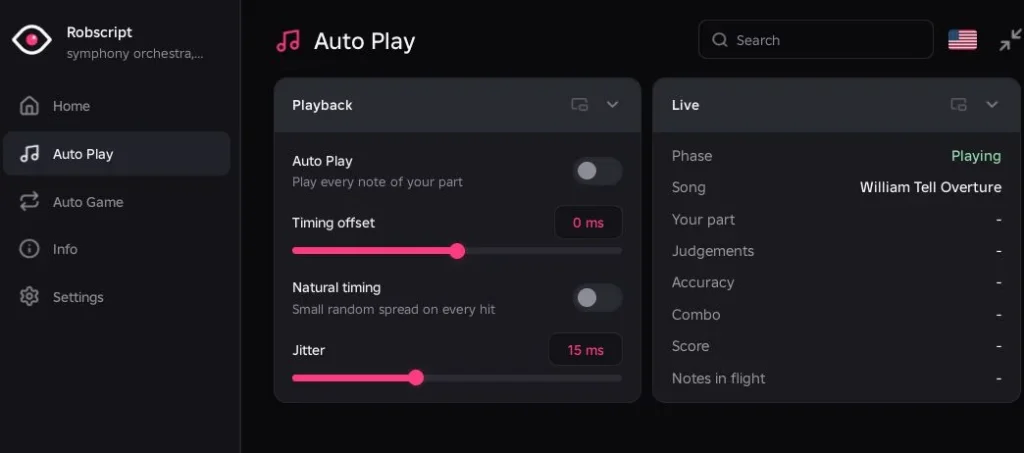
Symphony Orchestra Simulator hub Auto Play tab with auto play, timing offset, natural timing and jitter, and a live panel for phase, song, accuracy and combo
Robscript Team Hub script preview

Robscript Team Hub

Developer
Robscript Team
Created
Created
Working
NO KEY PC MOBILE Full sUNC

Auto Play hits every note of your part through the game's own hit function, with a timing offset for audio lag and optional natural timing so hits are not all on the same millisecond. Auto Game joins the orchestra, takes a free instrument, votes by strategy and can force the difficulty, where Ultra pays double coins. The Live panel reads the round as it happens: phase, song, part, judgments, accuracy, combo, score and notes in flight.

  • Auto Play tab: Auto Play, Timing offset (plus or minus 100 ms), Natural timing, Jitter 0 to 40 ms; Live panel with phase, song, your part, judgments, accuracy, combo, score and notes in flight
  • Auto Game tab: Auto Join, Preferred part (16 instruments or Any), Auto Vote, Vote strategy (best grade gap, unplayed, random), Difficulty (Keep, Easy, Normal, Extreme, Ultra), Force everything on, activity log
  • Session panel: songs played, coins earned, level and XP, title, rank
  • +2 more
Limitation: It plays too perfectly: the score sheet comes out clean every round, which is not how a human plays, and a results board reading 100% accuracy is a script at first glance. A mode that adds mistakes is the obvious next step and is not in this build.
Copies 0 GitHub
Details

Robscript Team Hub functions

  • Auto Play tab: Auto Play, Timing offset (plus or minus 100 ms), Natural timing, Jitter 0 to 40 ms; Live panel with phase, song, your part, judgments, accuracy, combo, score and notes in flight
  • Auto Game tab: Auto Join, Preferred part (16 instruments or Any), Auto Vote, Vote strategy (best grade gap, unplayed, random), Difficulty (Keep, Easy, Normal, Extreme, Ultra), Force everything on, activity log
  • Session panel: songs played, coins earned, level and XP, title, rank
  • Home, Info, Settings tabs: configs, themes, Enable everything, Unload
  • API: getgenv().RobScriptTS with Window, Runtime, Resolve and Destroy
Access
NO KEY
Tags
PC MOBILE
Languages
English
Compatibility
Potassium

Change history

  • – Added. Jupiter on Cello over 123 seconds: 85 Perfect, 0 Good, 0 Miss, 100% accuracy, score 103,350. Coins 149 to 179, level 2 to 3, grade S. A full lobby cycle ran unattended without errors.
Script code
loadstring(game:HttpGet("https://raw.githubusercontent.com/bobloscript/robscript/refs/heads/main/SymphonyOrchestraSimulator", true))()
Symphony Orchestra Simulator hub screenshots
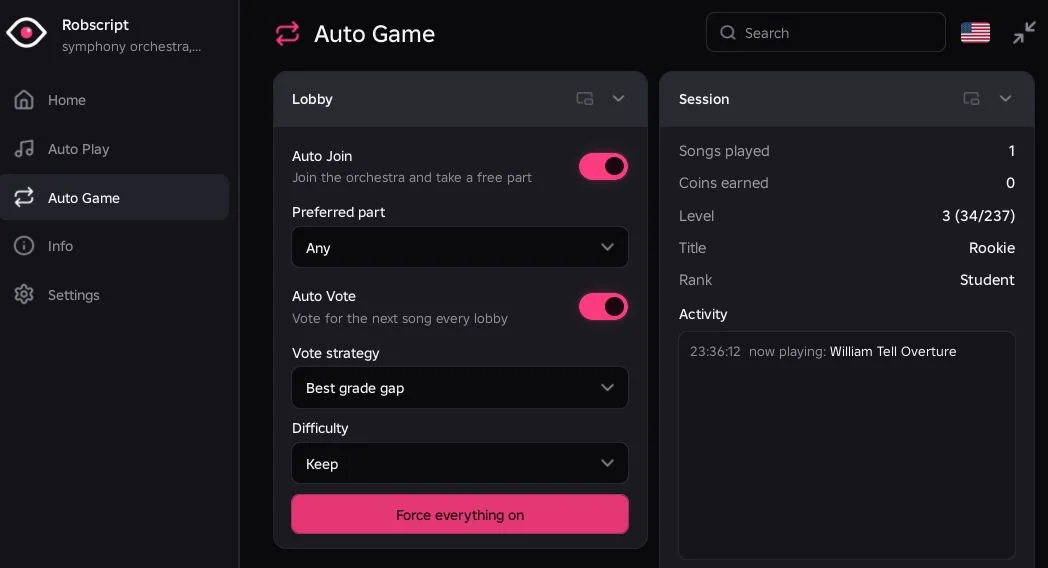
Auto Game tab with auto join, preferred part, auto vote, best grade gap strategy, difficulty and the session panel
Auto Game tab: the lobby handled without you, plus the session readout.

Auto Play in Symphony Orchestra Simulator

What the Autoplay Did in One Session

One client (Potassium), PlaceVersion 895, 24 players in the hall. Judgments, accuracy and score are the game’s own counters, read from the hub’s Live panel.

CheckResult
Starting mid-song
54 notes in a row Perfect after auto play was switched on during a song
Full song, Jupiter on Cello, 123 seconds
85 Perfect, 0 Good, 0 Miss, accuracy 100%, max combo 85, score 103,350, 85 hits, 0 skipped
Song reward
Coins 149 to 179, level 2 to 3, XP 212 to 317, and an S on the best-grades board
Round change
The next song was picked up after Results without touching anything
Auto vote
Picked the song with the worst grade on the board and sent the vote
Auto part
Cello taken again after the round changed
Auto join with no part
Took a free Viola and the round started
Full unattended cycle
Lobby, vote, Playing on Viola, 20 notes, 0 Good, 0 Miss, 0 skipped, no errors
Holds
No missed notes in any round, holds included

Why it never misses. The hub does not press D F K J and it does not hook the game. The client already ships an autoplay block, written by the developer and closed behind a Studio check, which calls the game’s own hit function for every note whose time has come; the hub finds that same function in the live client by structure, the one closure whose upvalue is the game’s own Config table, of which this build has exactly one, and calls it on the frame a note is due. The game scores hits locally, allows 50 ms for Perfect and 120 ms for Good, and only marks a note as missed about 240 ms late, so a call inside the Good window never reaches the miss line.

Our take on this hub

A clean sheet is the point and also the only problem: on a results board it looks less like a strong player and more like a machine, and nobody hits every note of four lanes for two minutes without one slip. Adding mistakes so a session looks human is the obvious next step; this build does not have it, so the hub is a way to bank grades and coins, not something that will pass as a person. Everything else it does without being asked twice: the lobby cycle above ran end to end on its own.

How to Use the Orchestra Script

  1. Join Symphony Orchestra Simulator and sit in the lobby.
  2. Run the line from the card. The Robscript window opens and RightControl hides it.
  3. In Auto Game switch Auto Join and Auto Vote on, then pick a part or leave it at Any.
  4. In Auto Play switch Auto Play on. If hits feel early or late, move Timing offset 10 to 20 ms at a time.
  5. Leave Difficulty at Keep, or pick Ultra if you want double coins.
Scripts break Roblox’s Terms of Use and an account can be banned for using them. The hub calls the game’s own hit function, so nothing is pressed and the client behaves as it would for a player who never misses.

When the Autoplay Does Not Play

SymptomCauseFix
Nothing happens in the lobby
The hub only plays while the round is in the Playing phase
Leave it running: Auto Join takes a part and Auto Vote starts the round
Notes are counted as Miss
The audio offset of your client does not match the chart
Move Timing offset away from 0 in 10 to 20 ms steps until judgments appear
The Live panel stays empty
The client builds the note charts when the song starts
Wait for the first notes in flight: the panel fills on its own
Memory climbs over a long session
40 minutes with a few hub restarts held about 3.5 GB
Run the hub once per session and reload the game between long farms
A loaded config looks on but nothing runs
Airflow in this build does not fire the item callback when a value comes from a config
The hub re-reads every toggle every 0.75 s; click the toggle once if the state still looks off

Orchestra Script FAQ

Is this Symphony Orchestra Simulator script free?
Yes, and it is keyless: the line on the card is the whole hub, with the live panel and the lobby automation.
Does it press keys or emulate input?
No. It calls the game’s own hit function, so no key is pressed and nothing is emulated. That is also why it works with any instrument: the part is data, not a key layout.
Does it play all 85 songs?
It reads the chart for your part and the round’s difficulty, so the same loop covers every song. Jupiter, Für Elise, Deck the Halls, William Tell and Stars and Stripes were played in our session.
Will it always show 100%?
In every round we ran it did: zero Good and zero Miss, with the combo rising note for note.
Can I get banned for using it?
A ban is always possible when you script. A perfect score with no misses is easy to spot in a lobby, so keep it off an account you care about.

More Roblox scripts. Our universal hub covers 300+ places in one loader, the executor status page shows which clients are working today, and you can request a game if yours is missing.