The Company scripts collected on this page focus on role control, office tools, teleports, and corporate automation features for Roblox. The main options here are keyless scripts, including a full automation hub and a role sniper script that can instantly reclaim or take available roles when another player leaves. This page is made for users who are specifically searching for The Company scripts with NO KEY access, Role Sniper functions, office layout tools, mobile support, and executor compatibility details.
The Company is a Roblox corporate roleplay game where players build their reputation inside a growing company. The gameplay is based around choosing departments and roles, attending meetings, making deals, customizing offices, earning promotions, building influence, and moving toward executive leadership. Because roles, offices, departments, and company decisions are central to the game, scripts for The Company usually focus on role sniping, teleporting between important areas, office layout management, proposal handling, and automation for staff or CEO tasks.
Link to game: https://www.roblox.com/games/76842920359834/The-Company
Keyless The Company scripts
The scripts below are listed as NO KEY, so they do not rely on a separate key system in the listing. The first script is a larger automation hub with role sniper, teleport, shop, office layout, dashboard, proposal, and CEO/staff tools. The second script is more focused on role sniping, which is useful when a player wants to quickly take an available role after someone leaves the server.
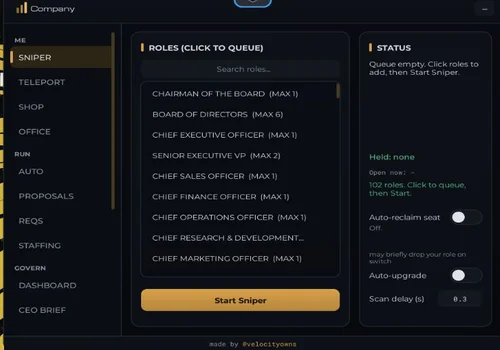
Full Automation hub
The Full Automation hub is best for players testing CEO, staff, and department workflows because it covers more than simple movement or role claiming. It can help process proposals, assign tasks, review dashboard data, manage office layouts, route branch decisions, and move quickly between important business areas. For players trying to climb the corporate ladder, these tools are mainly useful for reducing repetitive clicking and keeping rank progression moving faster.
- Sniper roles: auto reclaim seat, auto upgrade roles if u can
- Teleports: Find premium offices, 1f / lobby, executive floor, coffee shop, pizza shop, board room, banquet room, badge office, new york branch, metro, saler (floor), Marketing (floor), Research & dev (floor), Operations (floor), Legal (floor), HR (floor), Finance (floor)
- Shop: Claim all consumables
- +4 more
Details
Functions
- Sniper roles: auto reclaim seat, auto upgrade roles if u can
- Teleports: Find premium offices, 1f / lobby, executive floor, coffee shop, pizza shop, board room, banquet room, badge office, new york branch, metro, saler (floor), Marketing (floor), Research & dev (floor), Operations (floor), Legal (floor), HR (floor), Finance (floor)
- Shop: Claim all consumables
- Office layout: snapshot your office and restore it later, or stand in another office to copy the items YOU OWN. "Buy Missing" buys the rest with in-game cash (asks first), never robux.
- Auto: Automated proposal handling for staff and CEO. Automated task assignment for staff and CEO. Optimal operation mode (based on earned‑surplus budget and quality gate). Smart branch routing: prioritize the weakest city (CEO decision). Test logging: record decisions without triggering actions.
- Auto Create Proposals (Author)
- Dashboard, ceo brief, board, chiefs, analytics information
Change history
- – Added to page!
Script code
loadstring(game:HttpGet("https://raw.githubusercontent.com/d6wdjt6s7w-ux/the-company/main/company-obfuscated%20(2).lua"))()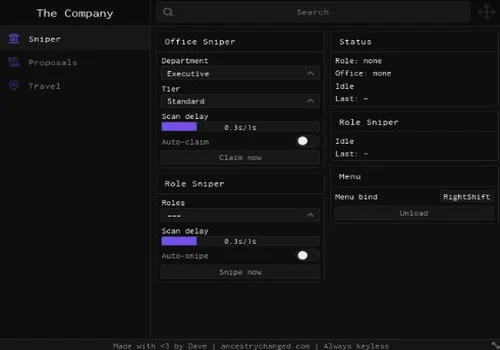
Office and Role Sniper
A focused keyless Role Sniper script for The Company. It is designed to instantly take a role when another player leaves the game, making it useful for players who mainly need office and role control instead of a full automation hub.
- Role sniper, Office sniper, Instant role taking
Details
Functions
- Role sniper, Office sniper, Instant role taking
Change history
- – Added to page!
Script code
loadstring(game:HttpGet("https://ancestrychanged.com/scripts/thecompany.lua"))()Office and Role Sniper is the more focused script on this page. Instead of covering many business automation tools, it is centered on taking available roles quickly. This makes it a better fit for users searching specifically for The Company Role Sniper, role claiming, office control, and simple keyless access without a larger feature-heavy hub.
How to Bypass Executor Crashes on Mobile and PC
If your Delta, Codex, Arceus X, or other executor crashes while loading the Full Automation hub, first lower your Roblox graphics settings to 1 and wait until The Company fully loads before executing the script. This can reduce rendering lag from offices, department floors, UI elements, and player activity. On mobile, also close background apps and avoid running the script immediately after joining a busy public server.
Conclusion
This The Company scripts page is built around keyless role control and corporate automation. The Full Automation hub is better for users who need a large toolset with teleports, office layout features, proposal handling, task automation, and CEO/staff tools. Office and Role Sniper is better for users who only need fast role taking when a seat or role becomes available. Before using any script, check the source, review executor compatibility, and remember that scripts can become unstable after Roblox, executor, or game updates.