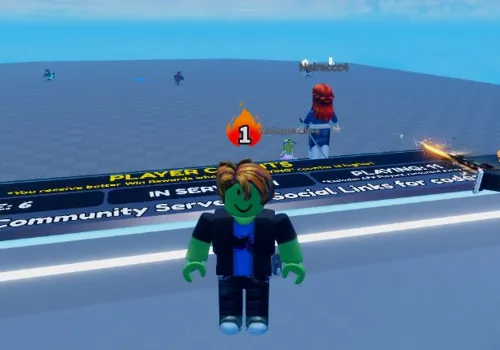
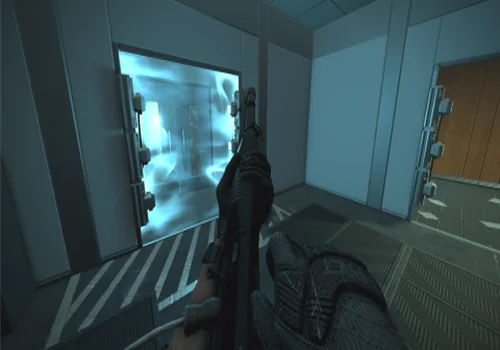
TTK Testing is a Roblox shooter experience focused on weapon behavior, fire rate, recoil control, and time-to-kill performance. Players use different guns to test how quickly weapons can eliminate opponents, which makes accuracy, recoil stability, and consistent damage output especially important.
This page covers a keyless TTK Testing Gun Mods script by Depso. The script is designed to modify weapon behavior with features such as No Recoil, Rapid Fire, automatic fire mode, and extended ammo values, making it useful for testing how weapons perform when their shooting limits are pushed further than normal.
The current script is listed as open source and supports PC and mobile executors, including Arceus X, Codex, and other compatible Roblox script clients. Use it only in environments where script testing is allowed and avoid using third-party tools in ways that violate game rules or platform terms.
Game link: TTK Testing on Roblox
| Executor | Platform | Status | Key Requirement |
|---|---|---|---|
| Codex | Android / iOS / PC | 🟢 Working | No Key |
| Arceus X | Android / iOS | 🟢 Working | No Key |
| Delta | Android / PC | 🟢 Working | No Key |
| Fluxus | PC | 🟡 Testing | No Key |
Keyless scripts
Gun Mods
An open source script that allows your weapon to fire without recoil.
- No Recoil
- Gun Mods
- Rapid fire
Details
Functions
- No Recoil
- Gun Mods
- Rapid fire
Change history
- – Added to page!
Script code
--!native
-- depso
const BlankCFunc = newcclosure(function() return end)

const function HookInitFromDef(Function)
	local Previous; Previous = hookfunction(Function, newcclosure(function(p2, ...)
		Previous(p2, ...)
		p2.FireRate = 0
		p2.RecoilRecovery = 0
		p2.FireMode = "auto"
		p2.MagAmmo = 69420

		p2.RecoilSpring.s = 0
	end))
end

const function HookWeaponHandler(Handler)
	hookfunction(rawget(Handler, "ApplyRecoil"), BlankCFunc)
	hookfunction(rawget(Handler, "_FireScriptedRecoil"), BlankCFunc)
	hookfunction(rawget(Handler, "_FireAdsShoulderImpact"), BlankCFunc)
	hookfunction(rawget(Handler, "_ApplyFireDriftImpulse"), BlankCFunc)
end

const function HookCameraRecoil(Function)
	if debug.info(Function, "s"):find("CameraController") then
		hookfunction(Function, BlankCFunc)
	end
end

for _, Thing in next, getgc(true) do
	if typeof(Thing) ~= "table" then continue end

	--// Weapon handler
	if rawget(Thing, "ApplyRecoil") then
		HookWeaponHandler(Thing)

	--// Camera handler
	elseif rawget(Thing, "Recoil") and rawget(Thing, "WeaponSwayPhase") then
		HookCameraRecoil(rawget(Thing, "Recoil"))

	--// Gun Init
	elseif rawget(Thing, "InitFromDef") then
		HookInitFromDef(rawget(Thing, "InitFromDef"))
	end
endBullet TP
Don’t abuse Rapid Aim — the game can detect it (usually by looking at how quickly you get kills) and you’ll get kicked out.
- Bullet TP to enemy
Details
Functions
- Bullet TP to enemy
Change history
- – Added to page!
Script code
--!native
-- depso

const Players = cloneref(game:GetService("Players"))

local Index = 0
const function GetJitsHead(): (Vector3?, Vector3?)
	const PlayersArray = Players:GetPlayers()
	Index = (Index + 1) % #PlayersArray

	const Jit = PlayersArray[Index + 1]
	const Character = Jit.Character
	if not Character then return end

	const Position = Character:GetPivot().Position
	const Offset = Vector3.new(0, 0, 2)

	return Position + Offset, Offset * -1
end

const function SpoofDischarge(Function)
	local Previous; Previous = hookfunction(Function, newcclosure(function(self, GunName, EyePosition, FireDirection, MuzzleWorldPosition, ...)
		const FromOverride, DirOverride = GetJitsHead()
		if FromOverride then
			MuzzleWorldPosition = FromOverride
			EyePosition = FromOverride
			FireDirection = DirOverride
		end

		return Previous(self, GunName, EyePosition, FireDirection, MuzzleWorldPosition, ...)
	end))
end

for _, Jit in next, getgc(true) do
	if typeof(Jit) ~= "table" then continue end

	--// Bullet handler
	if rawget(Jit, "Discharge") then
		SpoofDischarge(rawget(Jit, "Discharge"))
	end
endThis TTK Testing script is mainly focused on changing weapon handling instead of adding visual effects or movement boosts. That makes it more relevant for players who want to experiment with weapon accuracy, faster shooting, and recoil-free gun behavior.
How to use scripts?
Before using any Roblox script, make sure your executor supports the game and the script format. This Gun Mods script is marked as compatible with Arceus X, Codex, and other executors, so it can be tested on both mobile and PC setups.
- Open TTK Testing on Roblox and wait until the game is fully loaded.
- Launch a compatible Roblox executor on your device.
- Copy the Gun Mods script from the script card above.
- Paste the code into your executor script window.
- Run the script before testing weapons so the modified gun values can apply correctly.
For the best result, test the script in a controlled or private environment first. This helps you check whether No Recoil, Rapid Fire, and automatic fire mode work correctly with the weapon you are using.
FAQ
Is this TTK Testing script keyless?
Yes. The script card lists this Gun Mods script as NO KEY, which means it does not require a separate key system before use.
What does the Gun Mods script change?
The script automatically hooks into the weapon handler to set FireRate to 0 and RecoilSpring to 0. This bypasses the default shooting delays and camera shake for all weapon classes in TTK Testing.
Can this script be used on mobile?
Yes. The script is tagged for mobile and lists Arceus X and Codex compatibility, which makes it suitable for supported Android executor setups as well as PC executors.
Does Rapid Fire affect every weapon?
Rapid Fire is designed to reduce or remove the delay between shots. The exact result can depend on how each weapon is coded inside TTK Testing, so some weapons may respond better than others.
Core functions
The main value of this script is that it directly targets weapon handling. Instead of only giving a general advantage, it changes the way guns behave during shooting tests and combat situations.
- No Recoil: Removes all weapon kickback and camera shake in TTK Testing, ensuring your crosshair stays locked on the target during high-speed duels.
- Rapid Fire: Drops the weapon fire rate delay to zero, turning semi-auto pistols and rifles into fully automatic lasers.
- Auto Fire Mode: changes the weapon fire mode to automatic, so supported guns can keep firing without repeated manual clicks.
- Gun Mods: modifies weapon settings such as fire rate, recoil recovery, ammo values, and recoil spring behavior.
- Extended Ammo: increases magazine ammo values, which is useful when testing continuous fire and weapon damage output.
These functions are especially relevant in TTK Testing because the game is built around weapon efficiency. Lower recoil and faster shooting can make it easier to compare how different guns perform when accuracy and fire rate are no longer limiting factors.
Page Change log
June 15, 2026 — Initial release. Added the keyless TTK Testing Gun Mods script by Depso with No Recoil, Rapid Fire, Auto Fire Mode, PC support, mobile support, and open-source script information.
Conclusion
This TTK Testing script is a focused Gun Mods tool for players who want to test weapons with stronger shooting performance. Its main features are No Recoil, Rapid Fire, automatic fire mode, and extended ammo, which makes it useful for checking how guns behave with maximum fire rate and stable aim.
Because the script is keyless, open source, and marked for both PC and mobile, it is a simple option for testing weapon modifications in TTK Testing without adding unnecessary extra steps.