About 4 cases per second in our PC/Potassium test. In a 25-second run, Caser Hub opened 114 cases and sold 140 inventory items. We used batches of 6; your speed will vary with server delays. Our NO KEY hub for CASER combines case rotation with filtered selling. Copy the script.
Before starting: set your credit reserve and selling filters. Opening uses your game balance; selling removes matching items from your inventory. The hub does not improve drop odds or guarantee profit. Automation carries a ban risk.
CASER Script NO KEY — Caser Hub
Caser Hub — Robscript Team
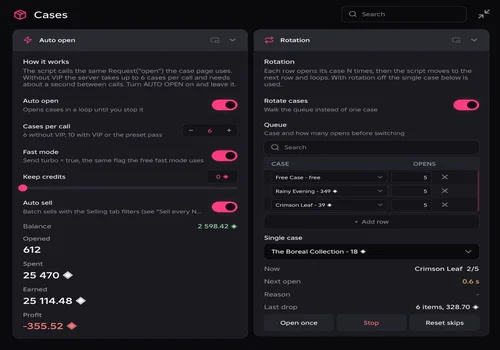
We built Caser Hub to handle repeated case opening and filtered inventory selling. Run one case or loop a queue with a separate open count for each row. Our PC/Potassium test reached roughly 4 cases per second; actual speed depends on server delays.
- Auto Open — single-case or batch opening
- Case Rotation — loop a queue with an open count for each case
- Fast Mode
- +7 more
Details
Caser Hub — Robscript Team functions
- Auto Open — single-case or batch opening
- Case Rotation — loop a queue with an open count for each case
- Fast Mode
- Auto Sell — batch sales and inventory-full prevention
- Rarity Filter — choose which tiers may be sold
- Item Type Filter — guns, knives, gloves and other item types
- Weapon Filter — match weapon or item-name keywords
- Price Filter — set a minimum and maximum sale value
- Protect Locked Items — keep locked and favorite items while enabled
- Credit Reserve — keep a balance for later
Change history
- — We tested on PC with Potassium: 114 cases opened in 25 seconds and 140 inventory items sold. Recorded opening speed was roughly 4 cases/sec. Updated money fields use the same prices as the game.
Script code
loadstring(game:HttpGet("https://raw.githubusercontent.com/bobloscript/robscript/refs/heads/main/Caser"))()Set up your case queue
- Join CASER, wait for the main screen, and run the card’s code in Potassium. RightControl shows or hides the window.
- In Cases, set Cases per call: up to 6 without a pass, or up to 10 with VIP/PRESET PASS. Fast Mode still follows the server’s waiting time.
- Enable Rotate cases, choose a case for each row, and set its Opens count. The hub finishes one row, moves to the next, then loops. Turn rotation off to keep opening one case.
- Set Keep credits and your selling filters, then enable Auto open. Use Stop whenever you want to end the run. The queue and filters are saved for later.
Keep the drops you actually want
Choose the rarities, item types, weapon keywords and price range you want to sell. Every selected filter must match. A gun outside your price range stays in the inventory.
Leave Protect locked items on. It is enabled by default and excludes both locked and favorite items. Turning it off removes that protection.
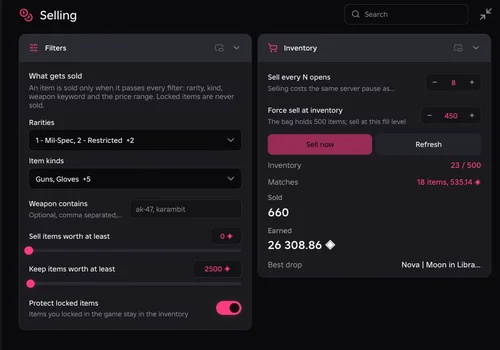
Enter prices as they appear in the game. To keep items worth 2,500 or more, set the upper selling limit to 2,450. The limit itself is included in what may be sold. Check Matches once before starting: it shows how many items your filters would sell and their total value.
Sell every N opens groups sales instead of pausing after every opening. Force sell at inventory starts a filtered sale at your chosen fill level; the default is 450 of 500 slots. It can only free space if some items pass your filters.
If the hub pauses
- No credits: check the case price and your Keep credits reserve.
- Free case unavailable: free openings come from unused rank rewards. They are not unlimited.
- VIP case unavailable: VIP access and its cooldown still apply.
- Server busy: opening and selling share a waiting time. Let the hub wait rather than trying to force more requests.
- Inventory full: your filters may be keeping everything. Review them before allowing a sale.
- Sold items still visible: reopen the game’s inventory page. Use Refresh in the hub to reload its inventory view.
Our take
We built this so opening a queue of cases does not become a clicking marathon. The hub handles the repetitive part; luck still gets the last word. Keep an eye on Profit — a busy opening counter does not mean you are earning credits.
Need an executor? Browse our executor directory; we tested this hub with Potassium on PC. The Caser source is open to read. After a game update, check for a fresh test before relying on the previous result.