This page is made for players looking for working Clean The Library scripts in 2026. Here you can find a no key, open-source script option for the Roblox game, check what it does, see executor compatibility, and understand the basic safety notes before testing it.
Clean The Library is a Roblox experience where your local library has been turned upside down and books are scattered everywhere. The main goal is to clean the mess by finding, sorting, and organizing thousands of books hidden around the library. Players can clean alone or with friends, compete for faster times on the leaderboard, and unlock upgrades or abilities that make the job easier. The game is inspired by “Librarian: Tidy Up the Arcane Library”.
Game link: Clean The Library on Roblox
Keyless Clean the Library script
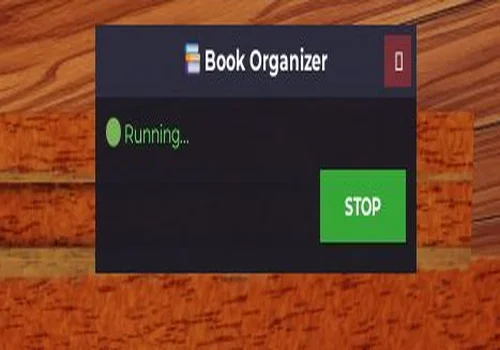
Organize Book OS
An open-source script that organizes your books on shelves automatically. No need to worry about how slow it looks — there's server-side protection in place preventing anything faster.
- Auto Organize book
Details
Functions
- Auto Organize book
Change history
- – Added to page!
Script code
-- Simple Book Organizer with Single Toggle
local Players = game:GetService("Players")
local ReplicatedStorage = game:GetService("ReplicatedStorage")
local Workspace = game:GetService("Workspace")
local CollectionService = game:GetService("CollectionService")
local UserInputService = game:GetService("UserInputService")

-- Settings
local Settings = {
    Enabled = false,
    FastMode = false -- Optional: can add as sub-toggle
}

-- GUI Creation
local function CreateUI()
    local screenGui = Instance.new("ScreenGui")
    screenGui.Name = "BookOrganizerGUI"
    screenGui.Parent = Players.LocalPlayer:WaitForChild("PlayerGui")

    -- Main Frame
    local mainFrame = Instance.new("Frame")
    mainFrame.Size = UDim2.new(0, 300, 0, 120)
    mainFrame.Position = UDim2.new(0.5, -150, 0.5, -60)
    mainFrame.BackgroundColor3 = Color3.fromRGB(25, 25, 35)
    mainFrame.BackgroundTransparency = 0.05
    mainFrame.BorderSizePixel = 0
    mainFrame.ClipsDescendants = true
    mainFrame.Parent = screenGui

    -- Title
    local title = Instance.new("TextLabel")
    title.Size = UDim2.new(1, 0, 0, 35)
    title.Position = UDim2.new(0, 0, 0, 0)
    title.BackgroundColor3 = Color3.fromRGB(50, 50, 70)
    title.BackgroundTransparency = 0.3
    title.Text = "📚 Book Organizer"
    title.TextColor3 = Color3.fromRGB(255, 255, 255)
    title.TextSize = 16
    title.Font = Enum.Font.GothamBold
    title.BorderSizePixel = 0
    title.Parent = mainFrame

    -- Close Button
    local closeBtn = Instance.new("TextButton")
    closeBtn.Size = UDim2.new(0, 25, 0, 25)
    closeBtn.Position = UDim2.new(1, -30, 0, 5)
    closeBtn.BackgroundColor3 = Color3.fromRGB(200, 50, 50)
    closeBtn.BackgroundTransparency = 0.5
    closeBtn.Text = "✕"
    closeBtn.TextColor3 = Color3.fromRGB(255, 255, 255)
    closeBtn.TextSize = 14
    closeBtn.Font = Enum.Font.GothamBold
    closeBtn.BorderSizePixel = 0
    closeBtn.Parent = mainFrame

    -- Status Label
    local statusLabel = Instance.new("TextLabel")
    statusLabel.Size = UDim2.new(1, -20, 0, 25)
    statusLabel.Position = UDim2.new(0, 10, 0, 40)
    statusLabel.BackgroundTransparency = 1
    statusLabel.Text = "🔴 Disabled"
    statusLabel.TextColor3 = Color3.fromRGB(255, 100, 100)
    statusLabel.TextSize = 14
    statusLabel.Font = Enum.Font.Gotham
    statusLabel.TextXAlignment = Enum.TextXAlignment.Left
    statusLabel.Parent = mainFrame

    -- Toggle Button
    local toggleBtn = Instance.new("TextButton")
    toggleBtn.Size = UDim2.new(0, 80, 0, 35)
    toggleBtn.Position = UDim2.new(1, -90, 0, 70)
    toggleBtn.BackgroundColor3 = Color3.fromRGB(200, 60, 60)
    toggleBtn.BackgroundTransparency = 0.2
    toggleBtn.Text = "START"
    toggleBtn.TextColor3 = Color3.fromRGB(255, 255, 255)
    toggleBtn.TextSize = 14
    toggleBtn.Font = Enum.Font.GothamBold
    toggleBtn.BorderSizePixel = 0
    toggleBtn.Parent = mainFrame

    -- Dragging
    local dragging = false
    local dragStart, startPos

    mainFrame.InputBegan:Connect(function(input)
        if input.UserInputType == Enum.UserInputType.MouseButton1 then
            dragging = true
            dragStart = input.Position
            startPos = mainFrame.Position
        end
    end)

    mainFrame.InputEnded:Connect(function(input)
        if input.UserInputType == Enum.UserInputType.MouseButton1 then
            dragging = false
        end
    end)

    UserInputService.InputChanged:Connect(function(input)
        if dragging and input.UserInputType == Enum.UserInputType.MouseMovement then
            local delta = input.Position - dragStart
            mainFrame.Position = UDim2.new(startPos.X.Scale, startPos.X.Offset + delta.X, startPos.Y.Scale, startPos.Y.Offset + delta.Y)
        end
    end)

    closeBtn.MouseButton1Click:Connect(function()
        Settings.Enabled = false
        screenGui:Destroy()
    end)

    return screenGui, toggleBtn, statusLabel
end

-- Main Script Logic
local gui, toggleBtn, statusLabel = CreateUI()
local isRunning = false
local currentCoroutine = nil

local Loader = require(ReplicatedStorage.Packages.Loader)
local ReplicaController = require(Loader.Shared.Utility.ReplicaController)
local BooksData = require(Loader.Shared.Data.Books)

local LibraryReplica = nil
for _, r in pairs(ReplicaController._replicas) do
    if r.Class == "Library" then LibraryReplica = r break end
end
if not LibraryReplica then
    ReplicaController.ReplicaOfClassCreated("Library", function(replica) LibraryReplica = replica end)
    while not LibraryReplica do task.wait() end
end

local Library = Workspace.Library
local BooksFolder = Library.Books
local player = Players.LocalPlayer

-- Setup Camera
player.CameraMode = Enum.CameraMode.Classic
player.CameraMinZoomDistance = 20
task.spawn(function() task.wait(0.1) player.CameraMinZoomDistance = 0.5 end)

local shelfModels = {}
for _, shelfModel in ipairs(CollectionService:GetTagged("Shelf")) do
    shelfModels[shelfModel.Name] = shelfModel
end

local function getShelfAssignedSeries(shelfId)
    local shelfData = LibraryReplica.Data.Shelves[shelfId]
    if not shelfData then return nil end
    for _, placedBook in pairs(shelfData.Books) do
        local bookName = typeof(placedBook) == "Instance" and placedBook.Name or placedBook
        local seriesName = bookName:match("^(.-)_(.+)$")
        if seriesName then return seriesName end
    end
end

local function findShelfForSeries(seriesName, genreName, volumeCount)
    for shelfId, shelfData in pairs(LibraryReplica.Data.Shelves) do
        if not shelfData.Completed and shelfData.Category == genreName then
            local shelfModel = shelfModels[shelfId]
            if shelfModel and shelfModel:GetAttribute("Width") == volumeCount then
                if getShelfAssignedSeries(shelfId) == seriesName then return shelfModel end
            end
        end
    end
    for shelfId, shelfData in pairs(LibraryReplica.Data.Shelves) do
        if not shelfData.Completed and shelfData.Category == genreName then
            local shelfModel = shelfModels[shelfId]
            if shelfModel and shelfModel:GetAttribute("Width") == volumeCount then
                if not getShelfAssignedSeries(shelfId) and next(shelfData.Books) == nil then return shelfModel end
            end
        end
    end
end

local function teleportTo(obj)
    local char = player.Character
    local root = char and char:FindFirstChild("HumanoidRootPart")
    local part = obj:IsA("Model") and (obj.PrimaryPart or obj:FindFirstChildOfClass("BasePart")) or obj
    if root and part then
        root.CFrame = CFrame.new(part.Position + Vector3.new(0, 2, 0))
        task.wait(0.05)
    end
end

local function organizeBooks()
    for _, book in ipairs(BooksFolder:GetChildren()) do
        if not isRunning then break end
        task.wait(0.02)

        local seriesName, volumeStr = book.Name:match("^(.-)_(.+)$")
        local volumeNum = tonumber(volumeStr)
        if seriesName and volumeNum then
            local genreName, bookInfo = BooksData.GetCategory(seriesName)
            if genreName and bookInfo then
                local shelfModel = findShelfForSeries(seriesName, genreName, bookInfo.VolumeCount)
                if shelfModel then
                    local shelfData = LibraryReplica.Data.Shelves[shelfModel.Name]
                    if not (shelfData and shelfData.Books[tostring(volumeNum)]) then
                        teleportTo(book)
                        LibraryReplica:FireServer("Grab", book)
                        task.wait(0.1)
                        teleportTo(shelfModel)
                        LibraryReplica:FireServer("Place", shelfModel, volumeNum - 1)
                        task.wait(0.4)
                    end
                end
            end
        end
    end
end

-- Toggle functionality
local function toggleScript()
    isRunning = not isRunning

    if isRunning then
        toggleBtn.Text = "STOP"
        toggleBtn.BackgroundColor3 = Color3.fromRGB(60, 200, 60)
        statusLabel.Text = "🟢 Running..."
        statusLabel.TextColor3 = Color3.fromRGB(100, 255, 100)
        Settings.Enabled = true

        if currentCoroutine then
            task.cancel(currentCoroutine)
        end

        currentCoroutine = task.spawn(function()
            while isRunning do
                local success, err = pcall(organizeBooks)
                if not success then
                    warn("Error: " .. err)
                    statusLabel.Text = "❌ Error: " .. err
                    statusLabel.TextColor3 = Color3.fromRGB(255, 100, 100)
                    task.wait(2)
                end
                task.wait(5) -- Wait before next cycle
            end
        end)
    else
        toggleBtn.Text = "START"
        toggleBtn.BackgroundColor3 = Color3.fromRGB(200, 60, 60)
        statusLabel.Text = "🔴 Disabled"
        statusLabel.TextColor3 = Color3.fromRGB(255, 100, 100)
        Settings.Enabled = false

        if currentCoroutine then
            task.cancel(currentCoroutine)
            currentCoroutine = nil
        end
    end
end

toggleBtn.MouseButton1Click:Connect(toggleScript)

-- Cleanup
game:GetService("Players").LocalPlayer:WaitForChild("PlayerGui").ChildRemoved:Connect(function(child)
    if child.Name == "BookOrganizerGUI" and isRunning then
        isRunning = false
        if currentCoroutine then
            task.cancel(currentCoroutine)
        end
    end
end)

print("✅ Book Organizer loaded! Click START to begin organizing.")Conclusion: Clean The Library is a simple but grind-based Roblox game focused on collecting and organizing books around the library. The script listed on this page is useful for players who want an automatic book organizing feature with no key access. Since Roblox games and executors update often, always check whether the script still works before using it.