This page is about a keyless TSUM script for Roblox with ESP and item price filtering. The script is focused on helping players visually identify items by estimated resale profit, using color-based ESP categories for faster in-game scanning. Here you can find the script card, supported devices, executor compatibility, safety notes, basic usage steps, and a short explanation of what each profit color means.
TSUM is a Roblox reselling experience where players search for limited brand clothes and try to find valuable items before other hunters do. The main gameplay idea is built around spotting profitable pieces, comparing resale value, and moving quickly through available items. Because of that, ESP with price filters can be useful for players who want to test visibility helpers and understand which items may have higher resale potential.
Keyless TSUM script
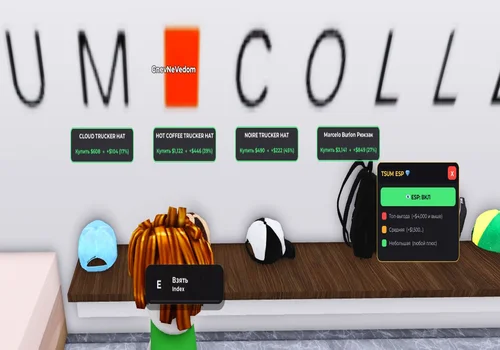
ESP script
– ENG – Red item color — resale profit of 4,000+. Amber/Medium item color — resale profit between 1,500 and 4,000. Green item color — resale profit up to ~1,500, any small profit. – RUS – ESP с фильтрами: Красный цвет предмета – прибыль при перепродаже +4000$ и выше Средний цвет предмета – прибыль при перепродаже +1500$~4000$ Зеленый цвет предмета – прибыль при перепродаже до ~1500$, любая небольшая прибыль.
- ESP, Item price filter, Profit color tiers
Details
Functions
- ESP, Item price filter, Profit color tiers
Change history
- – Added to page!
Script code
loadstring(game:HttpGet("https://raw.githubusercontent.com/Bac0nHck/Scripts/refs/heads/main/TSUM_ESP.lua"))()
This script is listed as NO KEY, which means it does not require a separate key system before use. The main value of the script is its item ESP logic: instead of showing every item in the same way, it separates potential finds into profit ranges. Red items are the highest-priority targets, amber or medium-colored items represent mid-range profit, and green items are lower-profit opportunities that may still be useful depending on your strategy.
Conclusion
This TSUM script page focuses on one specific use case: item ESP with resale profit filtering. It is not a general auto farm or teleport script, which makes the listing clearer for players searching for TSUM ESP, price filters, and no key access. Always check compatibility before running any script, avoid suspicious external pages, and remember that scripts can stop working after Roblox, executor, or game updates.