Abyssal is our current first pick among these DOORS scripts. It made moving and interacting feel quick, and its controls gave us more say over what happened next. Several other hubs were harder to live with: awkward cursor behavior, limited filters, or a useful-looking button that did nothing. Those details matter when something is chasing you.
Here for Knobs? Read the latest payout result before starting an AFK loop. The standalone farm no longer earned Knobs in our final check.
Our setup: Potassium on Windows PC, playing solo, all modes unlocked, no modifiers, gamepasses, or reward bonuses. Access to every mode does not mean we tested every mode. The notes below cover the features we actually tried; the remaining gameplay checks are pending. Mobile tags are listing information, not a phone test.
Play DOORS on Roblox.
DOORS scripts without a key (NO KEY / keyless)
Start with the notes attached to each card. A feature name describes a control, not a promise that it works against every entity or on every floor. Card dates track this listing and our editorial checks, not the developer’s original release date.
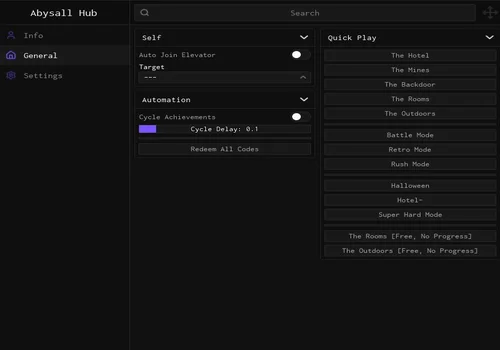
Abyssal Hub
- Speed Boost
- Fly and Noclip
- Jump, Slide and Infinite Jumps
- +33 more
Details
Functions
- Speed Boost
- Fly and Noclip
- Jump, Slide and Infinite Jumps
- Remove Acceleration and Closet Delay
- Door Reach
- Prompt Reach and Prompt Clip
- Instant Prompts
- Auto Interact (hold R)
- Interaction Ignore List
- Auto Closet
- Auto Breaker Box
- Auto Solve Anchors
- Auto Heartbeat Minigame
- Auto Unlock Padlock and Guess Library Code
- Objective, Door and Hiding Spot ESP
- Item, Chest and Currency ESP
- Entity, Player and Ladder ESP
- Entity and Item Notifications
- Library Code, Oxygen and Haste Notifications
- Fullbright, FOV and Third Person
- Remove Camera Shake, Bobbing, Fog and Cutscenes
- Entity Bypasses and Removals (floor dependent)
- Anticheat and Velocity Controls
- Position and Crouch Spoof
- Infinite Items
- Show Seek and Eyestalk Paths
- Figure and Obstacle Controls (floor dependent)
- Auto Steer Minecart
- Auto Rooms and Path Settings
- Auto Complete Dam Seek and Cringle
- Knob Farm (separate feature; not tested for payouts)
- Death Farm
- Auto Join Elevator
- Mode Selection (includes no-progress entries)
- Play Again and Return to Lobby
- Disable Idle Kick
Change history
- – Added to this page. Checked Speed Boost, Instant Prompts, held Auto Interact and cursor control. Individual entity protections and payouts were not fully tested.
Script code
loadstring(game:HttpGet("https://raw.githubusercontent.com/bocaj111004/Abysall/refs/heads/main/Loader.luau"))()
This was the strongest experience in our check. Speed Boost and Instant Prompts worked well together. We moved through rooms quickly, and the entity bypasses we enabled helped during that run. We did not record every entity encountered, so that is not a claim of protection against the entire game. Keep the speed manageable; being fast is not much use if you cannot steer.
The visible keybind panel shows which controls are active. Press Shift to hide the menu and regain camera control on the PC setup we tested. We had to do that to get the cursor out of the way.
Auto Interact works while you hold R. Its ignore list includes Glitch Fragments, Jeff items, dropped items, currency, minecarts, and locks. It can still put you in a chair if you hold R near one, but at least interaction happens when you ask for it. We did not establish which parts of the game contain those chairs. The menu also marks floor-specific options; check those labels before assuming a control applies to your run.
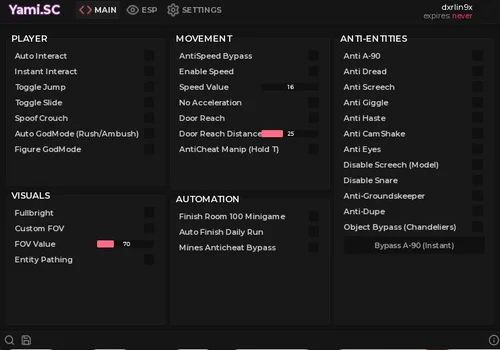
Yami SC
- Door ESP
- Objective ESP
- Entity Highlight
- +23 more
Details
Functions
- Door ESP
- Objective ESP
- Entity Highlight
- Gold and Item Highlights
- Hiding Spot ESP
- ToolShed ESP
- Player ESP
- Entity Notifications
- ESP Colors and Distance
- Auto Interact
- Instant Interact
- Jump and Slide
- Spoof Crouch
- Auto GodMode (Rush/Ambush)
- Figure GodMode
- Speed and AntiSpeed Bypass
- Door Reach
- Anticheat Manipulation (Hold T)
- Fullbright and FOV
- Entity Pathing
- Finish Room 100 Minigame
- Auto Finish Daily Run
- Mines Anticheat Bypass
- Anti A-90, Dread, Screech, Giggle, Haste and Eyes
- Anti Dupe, Snare and Groundskeeper
- Remove Camera Shake
Change history
- – Earliest recorded listing/check in the previous page.
- – Migrated to the current card design. Checked Auto Interact and ESP; recorded unwanted seating and low-contrast default colors.
Script code
loadstring(game:HttpGet("https://api.jnkie.com/api/v1/luascripts/public/ef9b5a30ec84e201b585c3ef1850d264b216441eab77257f0e9184de826cc47e/download"))()
Auto Interact saves you from aiming at every object. It also gave us a ridiculous problem: while trying to get away from a monster, the character sat in a chair because the chair was interactable too. We found no filtering settings for this feature. Turn it off when you need predictable movement.
ESP worked well overall. The default gray hiding-spot markers and dark red door markers were easy to miss, though. Change those colors before judging the visibility of the whole feature.
Doors Hub v1.8.5
- Entity Spawn Notifications
- Normal Elevator Teleport
- Secret Elevator Teleport (Detour badge required)
- +15 more
Details
Functions
- Entity Spawn Notifications
- Normal Elevator Teleport
- Secret Elevator Teleport (Detour badge required)
- Anti Screech Variants
- Anti Timothy, Dupe, Snare and Giggle
- Anti Lookman and A-90
- Anti Fake Key
- Anti Banana Peel and Jeff the Killer
- Anti All
- WalkSpeed and Auto Apply
- JumpPower and Auto Apply
- Instant Interact (failed in our check)
- Fullbright
- Selected Item ESP
- Selected Object ESP
- Selected Entity ESP
- All Items, Objects or Entities ESP
- All Stuff ESP
Change history
- – Earliest recorded listing/check in the previous page.
- – Migrated to the current card design. Instant Interact failed; documented the single-selection ESP limitation.
Script code
loadstring(game:HttpGet("https://raw.githubusercontent.com/Scripter-Coder/Scripter-Coder/refs/heads/main/Doors/Doors%20Hub%20Script"))()
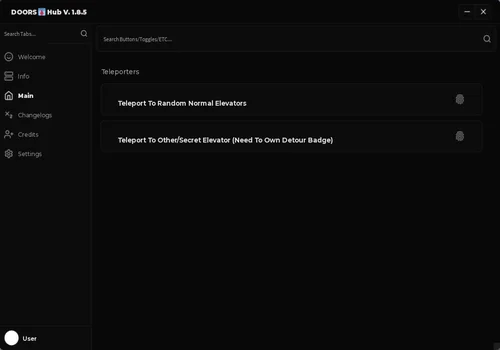
A simple menu that feels designed with phone-sized controls in mind, although our test was on PC. Instant Interact did not work. The ESP selection also felt too limited: we could choose chests or toolboxes in the relevant selector, but not both together. Enabling everything adds clutter we did not want.
Soluna Development
- Instant Interact
- Walk Speed and AntiSpeed Bypass
- Fly and Noclip
- +32 more
Details
Functions
- Instant Interact
- Walk Speed and AntiSpeed Bypass
- Fly and Noclip
- Jump, Slide and Infinite Jumps
- Remove Closet Delay and Acceleration
- Door Reach
- Prompt Reach and Prompt Clip
- Auto Proximity Interact (Hold R)
- Loot Aura
- Auto Closet
- Auto Breaker Box
- Auto Solve Anchors
- Auto Heartbeat Minigame
- Auto Unlock Padlock and Library Code Tools
- Auto Steer Minecart
- Rooms Auto Walk
- Auto Complete Dam Seek and Cringle
- Position, Crouch and Velocity Controls
- Infinite Items (client)
- Entity Bypasses and Removals (mode dependent)
- Door, Objective, Key and Lever ESP
- Entity, Item and Chest ESP
- Book and Breaker ESP
- Hiding Spot and Ladder ESP
- Gold, Stardust and Player ESP
- Minimum Gold Value Filter
- Entity and Item Notifications
- Library Code, Oxygen and Haste Notifications
- Fullbright and Ambient Lighting
- FOV and Third Person
- Transparent Hiding Spots
- Remove Camera Shake and Fog
- Disable Jumpscare Visuals
- Disable Hide Vignette and Firedamp Effect
- Disable Idle Kick
Change history
- – Earliest recorded listing/check in the previous page.
- – Migrated to the current card design. Recorded interface feedback; no feature-by-feature gameplay verdict.
Script code
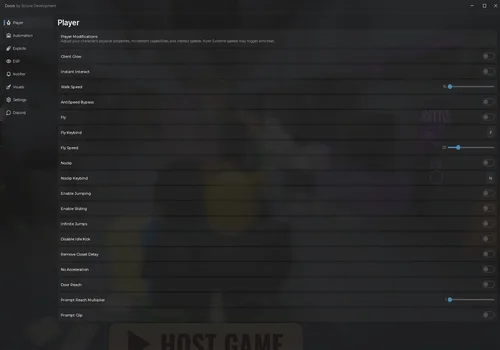
loadstring(game:HttpGet("https://gitlab.com/soluna-development/api/-/raw/main/src/scripts/Doors.lua"))()We found the interface less comfortable to navigate than several alternatives here. That is the extent of our current hands-on verdict; the longer automation list has not had a feature-by-feature check. Keep it as an option to revisit, rather than assuming the large menu makes it the best choice.
CDoors (Open Source)
- Add Gold (visual only)
- Jump and Slide
- Fullbright and Intensity
- +9 more
Details
Functions
- Add Gold (visual only)
- Jump and Slide
- Fullbright and Intensity
- Anti A-90, Dread, Screech, Giggle and Haste
- Remove Camera Shake
- Door ESP
- Objective ESP
- Entity Highlight
- Gold and Item Highlights
- Hiding Spot ESP
- ToolShed ESP
- Player ESP
Change history
- – Earliest recorded listing/check in the previous page.
- – Migrated to the current card design. Confirmed visual-only Gold and a cursor/menu problem on Windows PC.
Script code
local repo = "https://raw.githubusercontent.com/deividcomsono/Obsidian/main/"
local Library = loadstring(game:HttpGet(repo .. "Library.lua"))()
local ThemeManager = loadstring(game:HttpGet(repo .. "addons/ThemeManager.lua"))()
local SaveManager = loadstring(game:HttpGet(repo .. "addons/SaveManager.lua"))()
local RunService = game:GetService("RunService")
local Players = game:GetService("Players")
local Lighting = game:GetService("Lighting")
local LocalPlayer = Players.LocalPlayer
local Camera = workspace.CurrentCamera

local Options = Library.Options
local Toggles = Library.Toggles

local Window = Library:CreateWindow({
    Title = "CDoors",
    Footer = "CDoors open source at https://rscripts.net/script/cdoors-open-source-NkT4",
    Icon = 12294295267,
    NotifySide = "Right",
    ShowCustomCursor = true,
})

local Tabs = {
    Main = Window:AddTab("Main", "house"),
    ESP = Window:AddTab("ESP", "eye"),
    ["UI Settings"] = Window:AddTab("UI Settings", "settings")
}

local PlayerBox = Tabs.Main:AddLeftGroupbox("Player")
local GoldLabel = PlayerBox:AddLabel("Current Gold: Loading...")
PlayerBox:AddSlider("GoldSlider", { Text = "Gold Amount", Default = 50, Min = 1, Max = 1000, Rounding = 0 })

PlayerBox:AddButton("Add Gold", function()
    local goldObj = LocalPlayer:FindFirstChild("Gold")
    if goldObj then goldObj.Value = goldObj.Value + Options.GoldSlider.Value end
end)

PlayerBox:AddToggle("ToggleJump", {
    Text = "Toggle Jump",
    Default = false,
    Callback = function(Value)
        local char = workspace:FindFirstChild(LocalPlayer.Name)
        if char then
            char:SetAttribute("CanJump", Value)
        end
    end
})

PlayerBox:AddToggle("ToggleSlide", {
    Text = "Toggle Slide",
    Default = false,
    Callback = function(Value)
        local char = workspace:FindFirstChild(LocalPlayer.Name)
        if char then
            char:SetAttribute("CanSlide", Value)
        end
    end
})

local Visuals = Tabs.Main:AddLeftGroupbox("Visuals")

Visuals:AddCheckbox("Fullbright", {
    Text = "Fullbright",
    Default = false,
    Callback = function(Value)
        Lighting.ClockTime = Value and 12 or 14
        Lighting.GlobalShadows = not Value
        Lighting.Brightness = Value and Options.BrightnessSlider.Value or 1
    end
})

Visuals:AddSlider("BrightnessSlider", {
    Text = "Fullbright Intensity",
    Default = 2,
    Min = 1,
    Max = 10,
    Rounding = 1,
    Callback = function(Value)
        if Toggles.Fullbright.Value then
            Lighting.Brightness = Value
        end
    end
})

local AntiBox = Tabs.Main:AddRightGroupbox("Anti-Entities")

local function ToggleRemote(name, state)
    local remote = Remotes:FindFirstChild(name) or _G[name .. "_Storage"]
    if state then
        if remote then
            _G[name .. "_Storage"] = remote
            remote.Parent = nil
        end
    else
        local storage = _G[name .. "_Storage"]
        if storage then
            storage.Parent = Remotes
        end
    end
end

AntiBox:AddToggle("AntiA90", { Text = "Anti A-90", Default = false, Callback = function(v) ToggleRemote("A90", v) end })
AntiBox:AddToggle("AntiDread", { Text = "Anti Dread", Default = false, Callback = function(v) ToggleRemote("Dread", v) end })
AntiBox:AddToggle("AntiScreech", { Text = "Anti Screech", Default = false, Callback = function(v) ToggleRemote("Screech", v) end })
AntiBox:AddToggle("AntiGiggle", { Text = "Anti Giggle", Default = false, Callback = function(v) ToggleRemote("Giggle", v) end })
AntiBox:AddToggle("AntiHaste", { Text = "Anti Haste", Default = false, Callback = function(v) ToggleRemote("Haste", v) end })

AntiBox:AddToggle("AntiCamShake", {
    Text = "Anti CamShake",
    Default = false,
    Callback = function(v)
        local list = {"CamShake", "CamShakeClient", "CamShakeRelative", "CamShakeRelativeClient"}
        for _, name in pairs(list) do ToggleRemote(name, v) end
    end
})

local ESPTabBox = Tabs.ESP:AddLeftTabbox()
local ESPTab = ESPTabBox:AddTab("ESP")
local SettingsTab = ESPTabBox:AddTab("Settings")

ESPTab:AddToggle("DoorESP", { Text = "Door ESP", Default = false })
    :AddColorPicker("FillColor", { Default = Color3.fromRGB(120, 0, 0) })

ESPTab:AddToggle("ObjESP", { Text = "Objective ESP", Default = false })
    :AddColorPicker("ObjColor", { Default = Color3.fromRGB(0, 0, 255) })

ESPTab:AddToggle("EntityESP", { Text = "Entity Highlight", Default = false })
    :AddColorPicker("EntityColor", { Default = Color3.fromRGB(255, 0, 0) })

ESPTab:AddToggle("GoldPileESP", { Text = "Gold Highlight", Default = false })
    :AddColorPicker("GoldColor", { Default = Color3.fromRGB(255, 225, 0) })

ESPTab:AddToggle("ItemESP", { Text = "Item Highlight", Default = false })
    :AddColorPicker("ItemColor", { Default = Color3.fromRGB(0, 255, 255) })

ESPTab:AddToggle("HidingESP", { Text = "Hiding ESP", Default = false })
    :AddColorPicker("HideCol", { Default = Color3.fromRGB(100, 100, 100) })

ESPTab:AddToggle("ShedESP", { Text = "ToolShed ESP", Default = false })
    :AddColorPicker("ShedCol", { Default = Color3.fromRGB(139, 69, 19) })

ESPTab:AddToggle("PlayerESP", { Text = "Player ESP", Default = false })
    :AddColorPicker("PCol", { Default = Color3.fromRGB(0, 255, 0) })

SettingsTab:AddToggle("RainbowESP", { Text = "Rainbow ESP", Default = false })
SettingsTab:AddToggle("EnableText", { Text = "Enable Text", Default = false })
SettingsTab:AddSlider("TextSize", { Text = "Text Size", Default = 29, Min = 10, Max = 40, Rounding = 0 })
SettingsTab:AddSlider("TextHeight", { Text = "Text Offset Y", Default = 0.2, Min = -5, Max = 15, Rounding = 1 })
SettingsTab:AddSlider("MaxDistance", { Text = "Max ESP Distance", Default = 1000, Min = 50, Max = 5000, Rounding = 0 })

local activeESPs = {}
local EntityNames = {"Rush", "Ambush", "Seek", "Eyes", "Screech", "Halt", "A-60", "A-120", "GiggleCeiling", "MonumentEntity", "SallyMoving", "JeffTheKiller", "GloombatSwarm", "FigureRig"}
local ObjList = {"LibraryHintPaper", "LiveHintBook", "KeyObtain", "LeverForGate", "LiveBreakerPolePickup", "ElectricalKeyObtain"}
local ItemList = {"AK-47","AlarmClock","Aloe","AN-94","Anchors","A-90sStopSign","BackdoorKey","BackdoorLock","Bandage","BandagePack","Battery","BatteryPack","BigBomb","BlueKeycard","BluePrince","Bomb","Bread","BreakerPole","Bulklight","Buddy","Cactus","Candle","CarmelApple","Cheese","ChocolateBar","Citamines","ColtAnaconda","Cookie","Crossbow","Crucifix","DBShotgun","DesertEagle","ElectricalKey","ElectricalRoomFuse","EnergyDrink","ExecutionRoomKey","Flashlight","FreezeGun","Flamethrower","G36C","Generator","GeneratorFuse","GiftLauncher","GlitchFragment","GweenSoda","GuidanceCandy","Headlamp","HealingPad","HolyHandGrenade","HasteLever","Hookshot","HotelKey","HotelLock","IceTripmine","InvincibilityStar","JackoBomb","Keycard","Knockbomb","Landmine","Lantern","LaserPointer","Level5Keycard","LibearyBook","LibearyLock","LibearyPaper","Light_Bulb","Lockpick","Lolipop","MG42","M14","M16A2","M1911","M249","M5K","M4A1","MoonlightCandle","MoonlightFloat","MoonlightSmoothie","Monkey","Nanner","NannerPeel","NestGenerator","NVCS-3000","OrangeKeycard","P90","Paintingoval","Paintingrectanglelyingshortsides","Paintingrectanglelyinglongsides","PaintingSquare","PlantofVirdis","Potion","R870","RedEnergyDrink","Rock","Roto_Door","RubberChicken","SacredHerb","SaltShaker","Shakelight","Shears","SkeletonKey","Smoothie","SmallShieldPotion","SpeedBoostPad","SprayPaint","StarlightBottle","StarlightJug","StarlightVial","Straplight","StrawberryCandy","StrongHerb","StrongerHerb","StrongestHerb","SuperHerb","SweetHerb","ThrowableHatStand","ThrowableNormalCardboardBox","ThrowableOfficeChair","ThrowablePottedPlant","ThrowableRegalChair","ThrowableRegalOttoman","ThrowableStool","ThrowableTrashCan","ThrowableWideCardboardBox","ThrowableWoodenChair","ThrowableWoodenCrate","TipJar","Vitamins"}
local HSList = {"Locker_Large", "Toolshed", "Wardrobe", "Bed", "Backdoor_Wardrobe", "Rooms_Locker", "CircularVent"}


local function Cleanup(obj, data)
    pcall(function()
        if data.Highlight then data.Highlight:Destroy() end
        if data.Box then data.Box:Destroy() end
        if data.Bill then data.Bill:Destroy() end
    end)
    activeESPs[obj] = nil
end

local function CreateESP(obj, name, type)
    if activeESPs[obj] then return end

    local objN = obj.Name

    if objN == "LiveHintBook" or objN == "FigureRig" or objN == "LiveBreakerPolePickup" or objN == "ElectricalKeyObtain" then
        local displayName = (objN == "LiveHintBook" and "Book") or
                            (objN == "FigureRig" and "Figure") or
                            (objN == "LiveBreakerPolePickup" and "Breaker") or
                            (objN == "ElectricalKeyObtain" and "Electrical Key")
        activeESPs[obj] = { Name = displayName, Type = type }
        return
    end

    local lowerN = objN:lower()
    if lowerN:find("bookcase") or lowerN:find("modular_bookshelf") then
        return
    end

    activeESPs[obj] = { Name = name, Type = type }
end

task.spawn(function()
    while true do
        local rooms = workspace:FindFirstChild("CurrentRooms")
        if rooms then
            for _, room in pairs(rooms:GetChildren()) do
                for _, child in pairs(room:GetDescendants()) do
                    local n = child.Name

                    if Toggles.EntityESP.Value and table.find(EntityNames, n) then
                        CreateESP(child, n == "FigureRig" and "Figure" or n, "Entity")
                    elseif Toggles.ObjESP.Value and table.find(ObjList, n) then
                        local d = (n == "KeyObtain" and "Key") or
                                  (n == "LeverForGate" and "Lever") or
                                  (n == "LiveHintBook" and "Book") or
                                  (n == "LiveBreakerPolePickup" and "Breaker") or
                                  (n == "ElectricalKeyObtain" and "Electrical Key") or n
                        CreateESP(child, d, "Objective")
                    elseif Toggles.DoorESP.Value and n == "Door" and child:IsA("BasePart") then
                        CreateESP(child, "Door", "Door")
                    elseif Toggles.GoldPileESP.Value and n == "GoldPile" then
                        CreateESP(child, "Gold", "Gold")
                    elseif Toggles.ItemESP.Value and table.find(ItemList, n) then
                        CreateESP(child, n, "Item")
                    elseif Toggles.HidingESP.Value and table.find(HSList, n) then
                        CreateESP(child, n, "Hiding")
                    elseif Toggles.ShedESP.Value and n == "Toolshed_Small" then
                        CreateESP(child, "Tool Shed", "Shed")
                    end
                end
                task.wait(0.01)
            end
        end

        for _, ent in pairs(workspace:GetChildren()) do
            if table.find(EntityNames, ent.Name) then
                CreateESP(ent, ent.Name == "FigureRig" and "Figure" or ent.Name, "Entity")
            end
        end
        task.wait(1.5)
    end
end)

local function UpdateESP()
    local rainbow = Color3.fromHSV(tick() % 5 / 5, 1, 1)
    local char = LocalPlayer.Character
    local root = char and (char:FindFirstChild("HumanoidRootPart") or char:FindFirstChild("Collision"))
    if not root then return end

    for obj, data in pairs(activeESPs) do
        local isEnabled = (data.Type == "Door" and Toggles.DoorESP.Value) or
                          (data.Type == "Objective" and Toggles.ObjESP.Value) or
                          (data.Type == "Entity" and Toggles.EntityESP.Value) or
                          (data.Type == "Gold" and Toggles.GoldPileESP.Value) or
                          (data.Type == "Item" and Toggles.ItemESP.Value) or
                          (data.Type == "Player" and Toggles.PlayerESP.Value)

        if not obj or not obj.Parent or not isEnabled then
            Cleanup(obj, data)
            continue
        end

        local targetPos = (obj:IsA("Model") and obj:GetPivot().Position) or (obj:IsA("BasePart") and obj.Position)
        if not targetPos then continue end

        local dist = (root.Position - targetPos).Magnitude
        if dist > Options.MaxDistance.Value then
            if data.Highlight then data.Highlight.Enabled = false end
            if data.Box then data.Box.Visible = false end
            if data.Bill then data.Bill.Enabled = false end
            continue
        end

        local _, onScreen = Camera:WorldToViewportPoint(targetPos)
        if onScreen then
            local color = Options.FillColor.Value
            if data.Type == "Entity" then color = Options.EntityColor.Value
            elseif data.Type == "Player" then color = Options.PCol.Value
            elseif data.Type == "Gold" then color = Options.GoldColor.Value
            elseif data.Type == "Item" then color = Options.ItemColor.Value
            elseif data.Type == "Objective" then color = Options.ObjColor.Value end
            if Toggles.RainbowESP.Value then color = rainbow end

            if data.Type == "Door" then
                if not data.Box then
                    data.Box = Instance.new("BoxHandleAdornment", obj); data.Box.AlwaysOnTop = true; data.Box.Adornee = obj; data.Box.ZIndex = 5
                end
                data.Box.Visible = true; data.Box.Size = obj.Size; data.Box.Color3 = color; data.Box.Transparency = 0.7
            else
                if not data.Highlight then data.Highlight = Instance.new("Highlight", obj) end
                data.Highlight.Enabled = true; data.Highlight.FillColor = color; data.Highlight.OutlineColor = color; data.Highlight.FillTransparency = 0.5
            end

            if not data.Bill then
                data.Bill = Instance.new("BillboardGui", obj); data.Bill.AlwaysOnTop = true; data.Bill.Size = UDim2.new(0, 150, 0, 40)
                local txt = Instance.new("TextLabel", data.Bill); txt.BackgroundTransparency = 1; txt.Size = UDim2.new(1, 0, 1, 0); txt.Font = "SourceSansBold"; txt.Name = "L"; txt.TextStrokeTransparency = 0
            end
            data.Bill.Enabled = Toggles.EnableText.Value
            data.Bill.StudsOffset = Vector3.new(0, Options.TextHeight.Value, 0)
            local lbl = data.Bill:FindFirstChild("L")
            if lbl then
                lbl.TextColor3 = color; lbl.TextSize = Options.TextSize.Value
                lbl.Text = data.Name .. " [" .. math.floor(dist) .. "]"
            end
        else
            if data.Highlight then data.Highlight.Enabled = false end
            if data.Box then data.Box.Visible = false end
            if data.Bill then data.Bill.Enabled = false end
        end
    end
end

local connection = RunService.RenderStepped:Connect(UpdateESP)

local MenuGroup = Tabs["UI Settings"]:AddLeftGroupbox("Menu")
MenuGroup:AddButton("Unload", function()
    connection:Disconnect()
    for obj, data in pairs(activeESPs) do Cleanup(obj, data) end
    Library:Unload()
end)

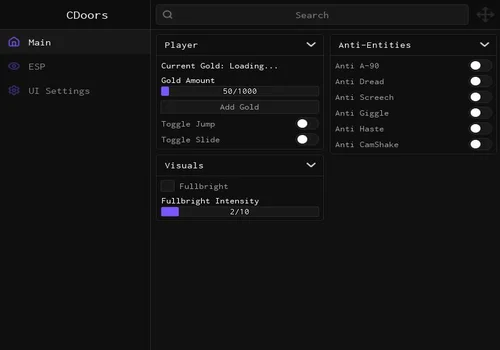
ThemeManager:SetLibrary(Library); SaveManager:SetLibrary(Library); SaveManager:BuildConfigSection(Tabs["UI Settings"]); ThemeManager:ApplyToTab(Tabs["UI Settings"]); SaveManager:LoadAutoloadConfig()Add Gold is visual only. It did not give us spendable gold. The open code changes a local Gold value, which explains why the number can move without a real reward.
The bigger PC annoyance was the menu and cursor: after loading, we could not hide the interface properly and return to normal camera control. We would not choose it for a Windows run in that state. Open source makes a UI fix possible, but changing libraries would still require code changes; it is not an in-game workaround.
Roshan Doors Page Hub
- Auto GodMode
- Figure GodMode
- Door Reach and Distance
- +19 more
Details
Functions
- Auto GodMode
- Figure GodMode
- Door Reach and Distance
- Speed Control
- Fullbright
- Spoof Crouch
- Anti Eyes, Screech and Snare
- Anti Heartbeat Kick
- Anti A-90, Groundskeeper and Dupe
- Remove Camera Shake
- Object Bypass
- Remove Acceleration
- Entity Pathing
- Auto Finish Daily Run
- Anticheat Manipulation (Hold T)
- Auto Proxi (Hold R)
- Instant Interact
- Room 100 Minigame
- Room 50 Code Solver
- ESP Types
- Entity Notifier
- FOV
Change history
- – Earliest recorded listing/check in the previous page.
- – Migrated to the current card design. Recorded a cursor/menu problem on Windows PC; gameplay tools not fully tested.
Script code
loadstring(game:HttpGet("https://raw.githubusercontent.com/ROSHANDVS2/ROSHAN-HUB-SCRIPTS/refs/heads/main/ROSHAN-DOORS-PAGUE-HUB.lua"))()
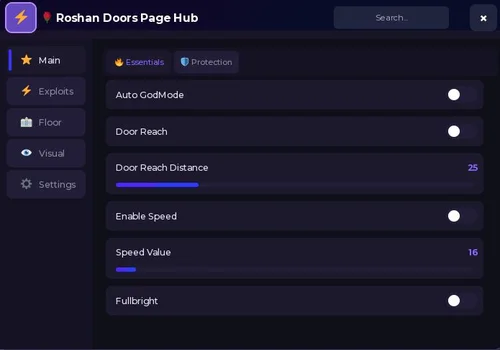
---- NO KEY :DWe hit the same kind of cursor problem here: getting the menu out of the way did not work properly in our PC session. We do not recommend it for Windows play based on that experience. The solver and protection labels below the title are not a completed gameplay test.
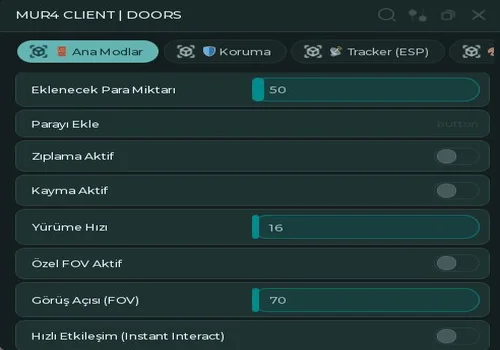
Mur4 Client
- Add Gold (local value change)
- Jump and Slide
- Walk Speed
- +11 more
Details
Functions
- Add Gold (local value change)
- Jump and Slide
- Walk Speed
- Custom FOV
- Instant Interact
- Anti A-90, Dread, Screech, Giggle and Haste
- Remove Camera Shake
- Item and Key ESP
- Gold ESP
- Objective ESP
- Hiding Spot ESP
- ToolShed ESP
- Entity and Door ESP
- ESP Distance and Colors
Change history
- – Earliest recorded listing/check in the previous page.
- – Migrated to the current card design. Reviewed the Turkish interface; gameplay feature testing deferred.
Script code
loadstring(game:HttpGet("https://gist.githubusercontent.com/Mur4exe/de9845a91b64c55f55e08af56f5707e5/raw/4404af032f0e2efdc08a1c050a4a3eae318ec618/doorsv4.lua"))()
The captured interface is Turkish. We did not want to spend the run translating controls on a second monitor, so gameplay testing stopped there. The shortened feature labels above are English explanations for browsing; they do not mean the hub has an English interface. Its money button uses a local Gold change in the source, so we are not presenting it as a currency farm.
More keyless options awaiting gameplay checks
These five cards are included for their different tools. None has a completed gameplay review from this test session.
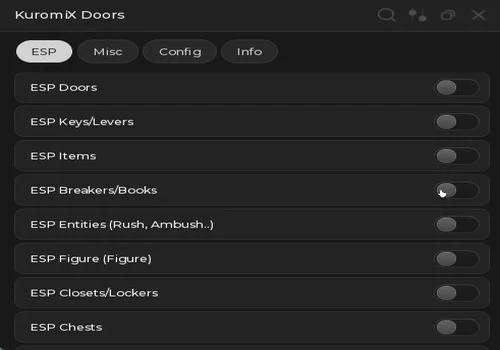
Kuromix
- Door ESP
- Key and Lever ESP
- Item ESP
- +11 more
Details
Functions
- Door ESP
- Key and Lever ESP
- Item ESP
- Book and Breaker ESP
- Rush and Ambush ESP
- Figure ESP
- Closet and Locker ESP
- Chest ESP
- Minimum Gold Value Setting
- Door Scan Interval
- Movement Speed
- Auto Loot
- Entity Notifications
- Library Code Display (requires hints and paper)
Change history
- – Added to this page. Menu/source review only; gameplay verification pending.
Script code
-- this script has been made by nucax
-- KuromiX Doors :3
local Rayfield = loadstring(game:HttpGet("https://sirius.menu/rayfield"))()
local Workspace = game:GetService("Workspace")
local Players = game:GetService("Players")

local plr = Players.LocalPlayer
local char = plr.Character or plr.CharacterAdded:Wait()

-- used by Auto Library Code
plr.CharacterAdded:Connect(function(newChar)
	char = newChar
end)

-- Window
local Window = Rayfield:CreateWindow({
	Name = "KuromiX Doors",
	LoadingTitle = "LOADINGGGGGGGGG",
	LoadingSubtitle = "discord.gg/uG5wXsFHjk",
	ToggleUIKeybind = "K",
	ConfigurationSaving = { Enabled = false, FileName = "KuromiX_Doors" }
})

-- Tabs
local ESPTab = Window:CreateTab("ESP", nil)
local MiscTab = Window:CreateTab("Misc", nil)
local ConfigTab = Window:CreateTab("Config", nil)
local InfoTab = Window:CreateTab("Info", nil)

local flags = {
	doorESP      = false,
	espkeys      = false,
	espitems     = false,
	espbooks     = false,
	esprush      = false,
	esplocker    = false,
	espchest     = false,
	espgold      = false,
	esphumans    = false,
	hintrush     = false,
	getcode      = false,
	draweraura   = false,
	espfigure    = false,
}

local goldespvalue = 0

local esptable = {
	doors   = {},
	keys    = {},
	items   = {},
	books   = {},
	entity  = {},
	lockers = {},
	chests  = {},
	gold    = {},
	people  = {},
	figure  = {},
}

local entitynames = {
	"RushMoving", "AmbushMoving", "ScreechMoving",
	"HideMoving", "TimothyMoving", "DupeMoving",
	"FloorMoving", "FigureMoving", -- i dont know why but i will keep this in here to make this script more stable
}

-- Scan interval variables
local doorScanInterval = 3

local function esp(target, color, labelPart, labelText)
	-- target can be a single Instance or a table of parts
	local highlights = {}
	local billboards = {}

	local function highlightInst(inst)
		if not inst or not inst.Parent then return end
		if inst:FindFirstChild("_KuromiESP_H") then return end
		local h = Instance.new("Highlight")
		h.Name = "_KuromiESP_H"
		h.Adornee = inst
		h.FillColor = color
		h.OutlineColor = color
		h.FillTransparency = 0.5
		h.OutlineTransparency = 0
		h.Parent = inst
		table.insert(highlights, h)
	end

	if typeof(target) == "table" then
		for _, part in pairs(target) do
			highlightInst(part)
		end
	else
		highlightInst(target)
	end

	-- Billboard label on labelPart
	if labelPart and labelPart.Parent then
		if not labelPart:FindFirstChild("_KuromiESP_BB") then
			local bb = Instance.new("BillboardGui")
			bb.Name = "_KuromiESP_BB"
			bb.Adornee = labelPart
			bb.Size = UDim2.fromScale(5, 2)
			bb.StudsOffset = Vector3.new(0, 3, 0)
			bb.AlwaysOnTop = true

			local lbl = Instance.new("TextLabel")
			lbl.Size = UDim2.fromScale(1, 1)
			lbl.BackgroundTransparency = 1
			lbl.TextScaled = true
			lbl.Text = labelText or ""
			lbl.TextColor3 = color
			lbl.Font = Enum.Font.GothamBold
			lbl.Parent = bb

			bb.Parent = labelPart
			table.insert(billboards, bb)
		end
	end

	local handle = {}
	function handle.delete()
		for _, h in pairs(highlights) do
			if h and h.Parent then h:Destroy() end
		end
		for _, bb in pairs(billboards) do
			if bb and bb.Parent then bb:Destroy() end
		end
	end

	return handle
end

local doorTransparencyBackup = {}
local doorTextRefs = {}

local function removeAllDoorESP()
	for door, t in pairs(doorTransparencyBackup) do
		if door and door.Parent then
			door.Transparency = t
		end
		local h = door:FindFirstChild("_KuromiESP_H")
		if h then h:Destroy() end
		local bb = door:FindFirstChild("_KuromiESP_BB")
		if bb then bb:Destroy() end
	end
	table.clear(doorTransparencyBackup)
	table.clear(doorTextRefs)
end

task.spawn(function()
	while true do
		if flags.doorESP then
			local rooms = Workspace:FindFirstChild("CurrentRooms")
			if rooms then
				for _, room in pairs(rooms:GetChildren()) do
					local door = room:FindFirstChild("RoomExit")
					if door then
						if not doorTransparencyBackup[door] then
							doorTransparencyBackup[door] = door.Transparency
						end
						door.Transparency = 0
						if not door:FindFirstChild("_KuromiESP_H") then
							local h = Instance.new("Highlight")
							h.Name = "_KuromiESP_H"
							h.Adornee = door
							h.FillColor = Color3.fromRGB(0, 255, 0)
							h.OutlineColor = Color3.fromRGB(0, 255, 0)
							h.FillTransparency = 0.5
							h.OutlineTransparency = 0
							h.Parent = door
						end
						if not doorTextRefs[door] then
							local roomNum = tonumber(room.Name)
							if roomNum then
								local bb = Instance.new("BillboardGui")
								bb.Name = "_KuromiESP_BB"
								bb.Adornee = door
								bb.Size = UDim2.fromScale(4, 2)
								bb.StudsOffset = Vector3.new(0, 3, 0)
								bb.AlwaysOnTop = true
								local lbl = Instance.new("TextLabel")
								lbl.Size = UDim2.fromScale(1, 1)
								lbl.BackgroundTransparency = 1
								lbl.TextScaled = true
								lbl.Text = tostring(roomNum + 1)
								lbl.TextColor3 = Color3.fromRGB(0, 255, 0)
								lbl.Font = Enum.Font.GothamBold
								lbl.Parent = bb
								bb.Parent = door
								doorTextRefs[door] = bb
							end
						end
					end
				end
			end
		else
			removeAllDoorESP()
		end
		task.wait(doorScanInterval)
	end
end)


-- Door ESP
ESPTab:CreateToggle({
	Name = "ESP Doors",
	CurrentValue = false,
	Flag = "esp_door",
	Callback = function(v)
		flags.doorESP = v
		if not v then removeAllDoorESP() end
	end
})

-- Keys / Levers ESP
ESPTab:CreateToggle({
	Name = "ESP Keys/Levers",
	CurrentValue = false,
	Flag = "esp_keys",
	Callback = function(Value)
		flags.espkeys = Value
		if not Value then return end

		local function check(v)
			if v:IsA("Model") and (v.Name == "LeverForGate" or v.Name == "KeyObtain") then
				task.wait(0.1)
				if v.Name == "KeyObtain" then
					local hitbox = v:WaitForChild("Hitbox")
					local parts = hitbox:GetChildren()
					local promptHitbox = hitbox:FindFirstChild("PromptHitbox")
					if promptHitbox then
						table.remove(parts, table.find(parts, promptHitbox))
					end
					local h = esp(parts, Color3.fromRGB(90, 255, 40), hitbox, "Key")
					table.insert(esptable.keys, h)

				elseif v.Name == "LeverForGate" then
					local h = esp(v, Color3.fromRGB(90, 255, 40), v.PrimaryPart, "Lever")
					table.insert(esptable.keys, h)

					v.PrimaryPart:WaitForChild("SoundToPlay").Played:Connect(function()
						h.delete()
					end)
				end
			end
		end

		local function setup(room)
			local assets = room:WaitForChild("Assets")
			assets.DescendantAdded:Connect(function(v)
				if flags.espkeys then check(v) end
			end)
			for _, v in pairs(assets:GetDescendants()) do
				check(v)
			end
		end

		local addconnect
		addconnect = workspace.CurrentRooms.ChildAdded:Connect(function(room)
			if flags.espkeys then setup(room) end
		end)

		for _, room in pairs(workspace.CurrentRooms:GetChildren()) do
			if room:FindFirstChild("Assets") then
				setup(room)
			end
		end

		repeat task.wait() until not flags.espkeys
		addconnect:Disconnect()

		for _, v in pairs(esptable.keys) do v.delete() end
		table.clear(esptable.keys)
	end
})

-- Item ESP
ESPTab:CreateToggle({
	Name = "ESP Items",
	CurrentValue = false,
	Flag = "esp_items",
	Callback = function(Value)
		flags.espitems = Value
		if not Value then return end

		local function check(v)
			if v:IsA("Model") and (v:GetAttribute("Pickup") or v:GetAttribute("PropType")) then
				task.wait(0.1)
				local part = v:FindFirstChild("Handle") or v:FindFirstChild("Prop")
				if not part then return end
				local h = esp(part, Color3.fromRGB(160, 190, 255), part, v.Name)
				table.insert(esptable.items, h)
			end
		end

		local function setup(room)
			local assets = room:WaitForChild("Assets")
			if assets then
				local subaddcon
				subaddcon = assets.DescendantAdded:Connect(function(v)
					if flags.espitems then check(v) end
				end)
				for _, v in pairs(assets:GetDescendants()) do
					check(v)
				end
				task.spawn(function()
					repeat task.wait() until not flags.espitems
					subaddcon:Disconnect()
				end)
			end
		end

		local addconnect
		addconnect = workspace.CurrentRooms.ChildAdded:Connect(function(room)
			if flags.espitems then setup(room) end
		end)

		for _, room in pairs(workspace.CurrentRooms:GetChildren()) do
			if room:FindFirstChild("Assets") then setup(room) end
		end

		repeat task.wait() until not flags.espitems
		addconnect:Disconnect()

		for _, v in pairs(esptable.items) do v.delete() end
		table.clear(esptable.items)
	end
})

-- Breaker / Book ESP
ESPTab:CreateToggle({
	Name = "ESP Breakers/Books",
	CurrentValue = false,
	Flag = "esp_books",
	Callback = function(Value)
		flags.espbooks = Value
		if not Value then return end

		local function check(v, room)
			if v:IsA("Model") and (v.Name == "LiveHintBook" or v.Name == "LiveBreakerPolePickup") then
				task.wait(0.1)
				local label = (v.Name == "LiveHintBook") and "Book" or "Breaker"
				local h = esp(v, Color3.fromRGB(160, 190, 255), v.PrimaryPart, label)
				table.insert(esptable.books, h)

				v.AncestryChanged:Connect(function()
					if not v:IsDescendantOf(room) then
						h.delete()
					end
				end)
			end
		end

		local function setup(room)
			if room.Name == "50" or room.Name == "100" then
				room.DescendantAdded:Connect(function(v)
					if flags.espbooks then check(v, room) end
				end)
				for _, v in pairs(room:GetDescendants()) do
					check(v, room)
				end
			end
		end

		local addconnect
		addconnect = workspace.CurrentRooms.ChildAdded:Connect(function(room)
			if flags.espbooks then setup(room) end
		end)

		for _, room in pairs(workspace.CurrentRooms:GetChildren()) do
			setup(room)
		end

		repeat task.wait() until not flags.espbooks
		addconnect:Disconnect()

		for _, v in pairs(esptable.books) do v.delete() end
		table.clear(esptable.books)
	end
})

-- Entity ESP -- THE WHOLE FIGURE ESP LOGIC IS BROKEN BECAUSE OF A UPDATE
-- THATS WHY I ADDED A NEW ESP LOGIC WITH ANOTHER BUTTON. I MERGE BOTH INTO ONE BUTTON IN THE UI
ESPTab:CreateToggle({
	Name = "ESP Entities (Rush, Ambush..)",
	CurrentValue = false,
	Flag = "esp_entities",
	Callback = function(Value)
		flags.esprush = Value
		if not Value then return end

		local addconnect
		addconnect = workspace.ChildAdded:Connect(function(v)
			if table.find(entitynames, v.Name) then
				task.wait(0.1)
				local h = esp(v, Color3.fromRGB(255, 25, 25), v.PrimaryPart, v.Name:gsub("Moving", ""))
				table.insert(esptable.entity, h)
			end
		end)

		local function setup(room)
			if room.Name == "50" or room.Name == "100" then
				local figuresetup = room:WaitForChild("FigureSetup")
				if figuresetup then
					local fig = figuresetup:WaitForChild("FigureRagdoll")
					task.wait(0.1)
					local h = esp(fig, Color3.fromRGB(255, 25, 25), fig.PrimaryPart, "Figure")
					table.insert(esptable.entity, h)
				end
			else
				local assets = room:WaitForChild("Assets")

				local function check(v)
					if v:IsA("Model") and table.find(entitynames, v.Name) then
						task.wait(0.1)
						local base = v:WaitForChild("Base")
						local h = esp(base, Color3.fromRGB(255, 25, 25), base, "Snare")
						table.insert(esptable.entity, h)
					end
				end

				assets.DescendantAdded:Connect(function(v)
					if flags.esprush then check(v) end
				end)

				for _, v in pairs(assets:GetDescendants()) do
					check(v)
				end
			end
		end

		local roomconnect
		roomconnect = workspace.CurrentRooms.ChildAdded:Connect(function(room)
			if flags.esprush then setup(room) end
		end)

		for _, room in pairs(workspace.CurrentRooms:GetChildren()) do
			setup(room)
		end

		repeat task.wait() until not flags.esprush
		addconnect:Disconnect()
		roomconnect:Disconnect()

		for _, v in pairs(esptable.entity) do v.delete() end
		table.clear(esptable.entity)
	end
})

-- Figure ESP
ESPTab:CreateToggle({
	Name = "ESP Figure (Figure)",
	CurrentValue = false,
	Flag = "esp_figure",
	Callback = function(Value)
		flags.espfigure = Value
		if not Value then
			for _, v in pairs(esptable.figure) do v.delete() end
			table.clear(esptable.figure)
			return
		end

		task.spawn(function()
			while flags.espfigure do
				local CurrentRooms = Workspace:FindFirstChild("CurrentRooms")
				if CurrentRooms then
					for _, room in pairs(CurrentRooms:GetChildren()) do
						if room.Name == "50" or room.Name == "100" then
							local FigureSetup = room:FindFirstChild("FigureSetup")
							if FigureSetup then
								local FigureRig = FigureSetup:FindFirstChild("FigureRig")
								if FigureRig then
									if not FigureRig:FindFirstChild("_KuromiESP_H") then
										local h = esp(FigureRig, Color3.fromRGB(255, 25, 25), FigureRig, "Figure")
										table.insert(esptable.figure, h)
									end
								end
							end
						end
					end
				end
				task.wait(1)
			end
		end)
	end
})

-- Locker / Closet ESP
ESPTab:CreateToggle({
	Name = "ESP Closets/Lockers",
	CurrentValue = false,
	Flag = "esp_lockers",
	Callback = function(Value)
		flags.esplocker = Value
		if not Value then return end

		local function check(v)
			if v:IsA("Model") then
				task.wait(0.1)
				if v.Name == "Wardrobe" then
					local h = esp(v.PrimaryPart, Color3.fromRGB(145, 100, 25), v.PrimaryPart, "Closet")
					table.insert(esptable.lockers, h)
				elseif v.Name == "Rooms_Locker" or v.Name == "Rooms_Locker_Fridge" then
					local h = esp(v.PrimaryPart, Color3.fromRGB(145, 100, 25), v.PrimaryPart, "Locker")
					table.insert(esptable.lockers, h)
				end
			end
		end

		local function setup(room)
			local assets = room:WaitForChild("Assets")
			if assets then
				local subaddcon
				subaddcon = assets.DescendantAdded:Connect(function(v)
					if flags.esplocker then check(v) end
				end)
				for _, v in pairs(assets:GetDescendants()) do
					check(v)
				end
				task.spawn(function()
					repeat task.wait() until not flags.esplocker
					subaddcon:Disconnect()
				end)
			end
		end

		local addconnect
		addconnect = workspace.CurrentRooms.ChildAdded:Connect(function(room)
			if flags.esplocker then setup(room) end
		end)

		for _, room in pairs(workspace.CurrentRooms:GetChildren()) do
			if room:FindFirstChild("Assets") then setup(room) end
		end

		repeat task.wait() until not flags.esplocker
		addconnect:Disconnect()

		for _, v in pairs(esptable.lockers) do v.delete() end
		table.clear(esptable.lockers)
	end
})

-- Chest ESP
ESPTab:CreateToggle({
	Name = "ESP Chests",
	CurrentValue = false,
	Flag = "esp_chests",
	Callback = function(Value)
		flags.espchest = Value
		if not Value then return end

		local function check(v)
			if v:IsA("Model") then
				task.wait(0.1)
				if v.Name == "ChestBox" then
					local h = esp(v, Color3.fromRGB(205, 120, 255), v.PrimaryPart, "Chest")
					table.insert(esptable.chests, h)
				elseif v.Name == "ChestBoxLocked" then
					local h = esp(v, Color3.fromRGB(255, 120, 205), v.PrimaryPart, "Locked Chest")
					table.insert(esptable.chests, h)
				end
			end
		end

		local function setup(room)
			local subaddcon
			subaddcon = room.DescendantAdded:Connect(function(v)
				if flags.espchest then check(v) end
			end)
			for _, v in pairs(room:GetDescendants()) do
				check(v)
			end
			task.spawn(function()
				repeat task.wait() until not flags.espchest
				subaddcon:Disconnect()
			end)
		end

		local addconnect
		addconnect = workspace.CurrentRooms.ChildAdded:Connect(function(room)
			if flags.espchest then setup(room) end
		end)

		for _, room in pairs(workspace.CurrentRooms:GetChildren()) do
			if room:FindFirstChild("Assets") then setup(room) end
		end

		repeat task.wait() until not flags.espchest
		addconnect:Disconnect()

		for _, v in pairs(esptable.chests) do v.delete() end
		table.clear(esptable.chests)
	end
})

-- Gold Pile ESP
ESPTab:CreateToggle({
	Name = "ESP Goldpiles",
	CurrentValue = false,
	Flag = "esp_gold",
	Callback = function(Value)
		flags.espgold = Value
		if not Value then return end

		local function check(v)
			if v:IsA("Model") then
				task.wait(0.1)
				local goldvalue = v:GetAttribute("GoldValue")
				if goldvalue and goldvalue >= goldespvalue then
					local hitbox = v:WaitForChild("Hitbox")
					local h = esp(hitbox:GetChildren(), Color3.fromRGB(255, 255, 0), hitbox, "GoldPile [" .. tostring(goldvalue) .. "]")
					table.insert(esptable.gold, h)
				end
			end
		end

		local function setup(room)
			local assets = room:WaitForChild("Assets")
			local subaddcon
			subaddcon = assets.DescendantAdded:Connect(function(v)
				if flags.espgold then check(v) end
			end)
			for _, v in pairs(assets:GetDescendants()) do
				check(v)
			end
			task.spawn(function()
				repeat task.wait() until not flags.espgold
				subaddcon:Disconnect()
			end)
		end

		local addconnect
		addconnect = workspace.CurrentRooms.ChildAdded:Connect(function(room)
			if flags.espgold then setup(room) end
		end)

		for _, room in pairs(workspace.CurrentRooms:GetChildren()) do
			if room:FindFirstChild("Assets") then setup(room) end
		end

		repeat task.wait() until not flags.espgold
		addconnect:Disconnect()

		for _, v in pairs(esptable.gold) do v.delete() end
		table.clear(esptable.gold)
	end
})

-- Player ESP
ESPTab:CreateToggle({
	Name = "ESP Players",
	CurrentValue = false,
	Flag = "esp_players",
	Callback = function(Value)
		flags.esphumans = Value
		if not Value then return end

		local function personesp(v)
			v.CharacterAdded:Connect(function(vc)
				local torso = vc:WaitForChild("UpperTorso")
				task.wait(0.1)
				local h = esp(vc, Color3.fromRGB(255, 255, 255), torso, v.DisplayName)
				table.insert(esptable.people, h)
			end)

			if v.Character then
				local vc = v.Character
				local torso = vc:WaitForChild("UpperTorso")
				task.wait(0.1)
				local h = esp(vc, Color3.fromRGB(255, 255, 255), torso, v.DisplayName)
				table.insert(esptable.people, h)
			end
		end

		local addconnect
		addconnect = game.Players.PlayerAdded:Connect(function(v)
			if v ~= plr then personesp(v) end
		end)

		for _, v in pairs(game.Players:GetPlayers()) do
			if v ~= plr then personesp(v) end
		end

		repeat task.wait() until not flags.esphumans
		addconnect:Disconnect()

		for _, v in pairs(esptable.people) do v.delete() end
		table.clear(esptable.people)
	end
})


-- Movement Speed
local currentSpeed = 16

MiscTab:CreateSlider({
	Name = "Movement Speed",
	Range = {1, 21.5},
	Increment = 0.5,
	Suffix = " Speed",
	CurrentValue = 16,
	Flag = "misc_speed",
	Callback = function(value)
		currentSpeed = value
	end
})

task.spawn(function()
	while true do
		if plr.Character then
			local humanoid = plr.Character:FindFirstChildOfClass("Humanoid")
			if humanoid and humanoid.WalkSpeed ~= currentSpeed then
				humanoid.WalkSpeed = currentSpeed
			end
		end
		task.wait(0.1)
	end
end)

-- Auto Loot
MiscTab:CreateToggle({
	Name = "Auto Loot",
	CurrentValue = false,
	Flag = "misc_autoloot",
	Callback = function(Value)
		flags.draweraura = Value
		if not Value then return end

		local function check(v)
			if not v:IsA("Model") then return end

			local function tryLoot(prompt, posFunc)
				-- Only start a loop if the prompt hasn't already been used
				if prompt:GetAttribute("Interactions") then return end
				task.spawn(function()
					repeat
						task.wait(0.1)
						if plr:DistanceFromCharacter(posFunc()) <= 12 then
							fireproximityprompt(prompt)
						end
					until prompt:GetAttribute("Interactions") or not flags.draweraura
				end)
			end

			if v.Name == "DrawerContainer" then
				local knob = v:FindFirstChild("Knobs")
				if knob then
					local prompt = knob:FindFirstChild("ActivateEventPrompt")
					if prompt then
						tryLoot(prompt, function() return knob.Position end)
					end
				end

			elseif v.Name == "GoldPile" then
				local prompt = v:FindFirstChild("LootPrompt")
				if prompt and v.PrimaryPart then
					tryLoot(prompt, function() return v.PrimaryPart.Position end)
				end

			elseif v.Name:sub(1, 8) == "ChestBox" then
				local prompt = v:FindFirstChild("ActivateEventPrompt")
				if prompt and v.PrimaryPart then
					tryLoot(prompt, function() return v.PrimaryPart.Position end)
				end

			elseif v.Name == "RolltopContainer" then
				local prompt = v:FindFirstChild("ActivateEventPrompt")
				if prompt and v.PrimaryPart then
					tryLoot(prompt, function() return v.PrimaryPart.Position end)
				end
			end
		end

		local function setup(room)
			local subaddcon
			subaddcon = room.DescendantAdded:Connect(function(v)
				if flags.draweraura then check(v) end
			end)

			for _, v in pairs(room:GetDescendants()) do
				check(v)
			end

			task.spawn(function()
				repeat task.wait() until not flags.draweraura
				subaddcon:Disconnect()
			end)
		end

		local addconnect
		addconnect = workspace.CurrentRooms.ChildAdded:Connect(function(room)
			if flags.draweraura then setup(room) end
		end)

		for _, room in pairs(workspace.CurrentRooms:GetChildren()) do
			if room:FindFirstChild("Assets") then
				setup(room)
			end
		end

		repeat task.wait() until not flags.draweraura
		addconnect:Disconnect()
	end
})

-- Notify Entities
MiscTab:CreateToggle({
	Name = "Notify Entities",
	CurrentValue = false,
	Flag = "misc_notify",
	Callback = function(Value)
		flags.hintrush = Value
		if not Value then return end

		local addconnect
		addconnect = workspace.ChildAdded:Connect(function(v)
			if table.find(entitynames, v.Name) then
				repeat task.wait() until plr:DistanceFromCharacter(v:GetPivot().Position) < 1000
					or not v:IsDescendantOf(workspace)

				if v:IsDescendantOf(workspace) then
					Rayfield:Notify({
						Title = "Entity Warning",
						Content = v.Name:gsub("Moving", ""):lower() .. " is coming, go hide!",
						Duration = 5,
					})
				end
			end
		end)

		repeat task.wait() until not flags.hintrush
		addconnect:Disconnect()
	end
})

-- Auto Library Code
MiscTab:CreateToggle({
	Name = "Auto Library Code",
	CurrentValue = false,
	Flag = "misc_libcode",
	Callback = function(Value)
		flags.getcode = Value
		if not Value then return end

		local function deciphercode()
			local paper = char:FindFirstChild("LibraryHintPaper")
			local hints = plr.PlayerGui:WaitForChild("PermUI"):WaitForChild("Hints")

			local code = {[1]="_",[2]="_",[3]="_",[4]="_",[5]="_"}

			if paper then
				for _, v in pairs(paper:WaitForChild("UI"):GetChildren()) do
					if v:IsA("ImageLabel") and v.Name ~= "Image" then
						for _, img in pairs(hints:GetChildren()) do
							if img:IsA("ImageLabel") and img.Visible
								and v.ImageRectOffset == img.ImageRectOffset then
								local num = img:FindFirstChild("TextLabel").Text
								code[tonumber(v.Name)] = num
							end
						end
					end
				end
			end

			return code
		end

		local addconnect
		addconnect = char.ChildAdded:Connect(function(v)
			if v:IsA("Tool") and v.Name == "LibraryHintPaper" then
				task.wait()
				local code = table.concat(deciphercode())

				if code:find("_") then
					Rayfield:Notify({
						Title = "Library Code",
						Content = "Get all hints first!",
						Duration = 5,
					})
				else
					Rayfield:Notify({
						Title = "Library Code",
						Content = "The code is: " .. code,
						Duration = 10,
					})
				end
			end
		end)

		repeat task.wait() until not flags.getcode
		addconnect:Disconnect()
	end
})

ConfigTab:CreateSection("Scan Intervals")

ConfigTab:CreateSlider({
	Name = "Door Scan Interval",
	Range = {1, 15},
	Increment = 1,
	Suffix = "s",
	CurrentValue = 3,
	Flag = "cfg_doorscan",
	Callback = function(value)
		doorScanInterval = value
	end
})

ConfigTab:CreateSlider({
	Name = "Min Gold Value (Goldpile ESP)",
	Range = {0, 500},
	Increment = 10,
	Suffix = " gold",
	CurrentValue = 0,
	Flag = "cfg_goldmin",
	Callback = function(value)
		goldespvalue = value
	end
})

InfoTab:CreateParagraph({
	Title = "KuromiX Doors",
	Content = "Hi.. I hope you're enjoying this Script I made.\nJoin my Discord for updates: discord.gg/uG5wXsFHjk\nGive my GitHub Repo a star or contribute: https://github.com/nucax/KuromiX"
})
InfoTab:CreateDivider()
InfoTab:CreateParagraph({
	Title = "Last Updated",
	Content = "24th July 2026"
})
InfoTab:CreateParagraph({
	Title = "By The Way",
	Content = "I am aware about the two buttons; ESP Entites and ESP Figure. I will merge the two functions when i have time to do so. "
})
InfoTab:CreateDivider()
InfoTab:CreateParagraph({
	Title = "To Do List",
	Content = "Toolshed ESP: add highlight to Toolshed_Small in Room 89 ?  Snare ESP: add highlight to each snare"
})A compact option centered on ESP and loot. Its open-source Library Code routine displays the result from collected hints and the paper; it does not enter the code for you. The routine listens for the paper being equipped after the toggle is enabled. That order matters when trying it.
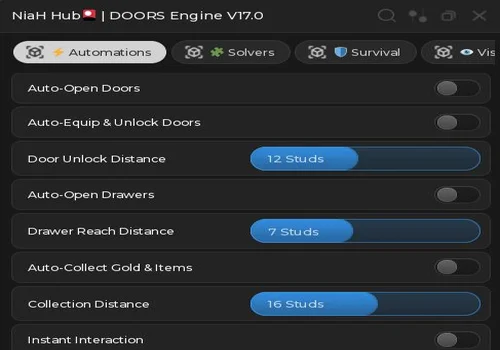
Niah Hub
- Auto-Open Doors
- Auto-Equip and Unlock Doors
- Auto-Open Drawers
- +16 more
Details
Functions
- Auto-Open Doors
- Auto-Equip and Unlock Doors
- Auto-Open Drawers
- Auto-Collect Gold and Items
- Interaction Distance Controls
- Instant Interaction
- Auto Library (book interaction routine)
- Auto Breaker Box
- Auto Heartbeat Minigame
- Entity Alert Radar
- Anti Eyes (camera adjustment)
- Anti Screech and Snare
- Door ESP
- Key and Lever ESP
- Item ESP
- Gold and Chest ESP
- Fullbright
- WalkSpeed
- Noclip
Change history
- – Added to this page. Menu/source review only; gameplay verification pending.
Script code
loadstring(game:HttpGet("https://gist.githubusercontent.com/gkaneki090-beep/b7127a8447f4fca3b14e2c56ea299e68/raw/112448736357eb80c2fbb53a9be8e45256094f16/NIAH%2520DOORS"))()The Auto Library label is broader than the available code: its routine attempts book interactions in room 50. We found no padlock-entry step in that routine. Several other menu labels lacked matching behavior in the source we reviewed, so the feature list here is narrower than the screenshot. We still need an in-game check of the remaining tools.
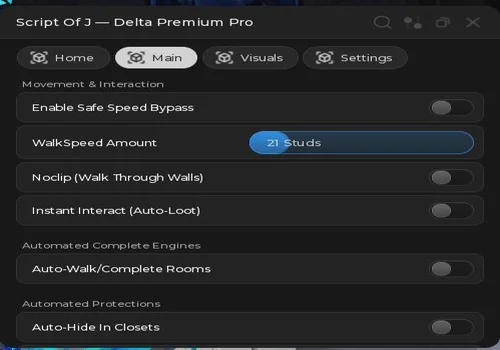
Delta Premium Pro
- Door and Key ESP
- Gold and Book ESP
- Entity Alerts, ESP and Tracers
- +9 more
Details
Functions
- Door and Key ESP
- Gold and Book ESP
- Entity Alerts, ESP and Tracers
- Fullbright
- Speed Bypass and WalkSpeed
- Noclip
- Instant Interact
- Auto-Walk / Complete Rooms
- Auto-Hide in Closets
- Anti-Screech Deflect
- Anti-A90 Freeze
- Room 50 Lock Solver
Change history
- – Added to this page. Menu/source review only; gameplay verification pending.
Script code
loadstring(game:HttpGet("https://pastebin.com/raw/Q7G20dFB"))()Auto-Walk / Complete Rooms and Auto-Hide are the claims worth checking here. We have not confirmed that it handles a locked room or survives an entity encounter. “Delta Premium Pro” is the script’s title, not an executor recommendation or proof of compatibility.
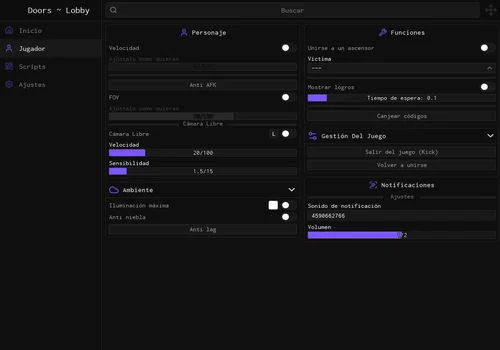
Pepe41jpeee
- Movement Speed
- Anti AFK
- FOV
- +8 more
Details
Functions
- Movement Speed
- Anti AFK
- FOV
- Free Camera
- Fullbright and Remove Fog
- Anti Lag
- Follow Selected Player into Elevator
- Achievement Display Cycle
- Redeem Codes
- Rejoin or Leave Server
- External Utility Loaders
Change history
- – Added to this page. Menu/source review only; gameplay verification pending.
Script code
loadstring(game:HttpGet("https://raw.githubusercontent.com/JesuproXD/Doors-Script/refs/heads/main/Piso.lua"))()The supplied screenshots show a Spanish lobby interface with movement controls and external utility loaders. We have not confirmed a separate set of gameplay tools inside a run. Do not count it as a tested Hotel or Mines farm.
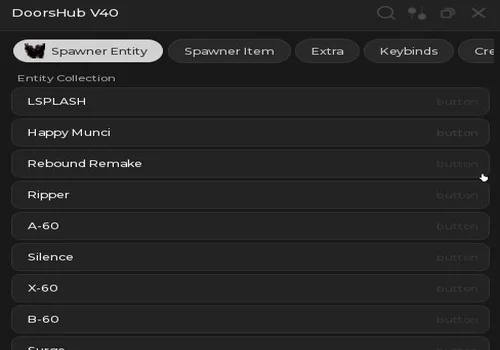
DoorsHub v40
- Entity Spawner: LSPLASH, Happy Munci, Rebound Remake and Ripper
- Entity Spawner: A-60, Silence, X-60, B-60 and Surge
- Crucifix Spawner and Custom Variants
- +9 more
Details
Functions
- Entity Spawner: LSPLASH, Happy Munci, Rebound Remake and Ripper
- Entity Spawner: A-60, Silence, X-60, B-60 and Surge
- Crucifix Spawner and Custom Variants
- Guiding Candle
- Floor 2 Theme Map
- Fog Map and Red Map
- Shaders
- Sprint Stamina V5
- Speedrun Timer
- The Overdoors V2.5 Remake
- c00lkidd Seek Chase
- Menu Hide / Show
Change history
- – Added to this page. Menu/source review only; gameplay verification pending.
Script code
loadstring(game:HttpGet("https://raw.githubusercontent.com/arkanzulfadliputra-oss/Entities-Models/refs/heads/main/Hub/Rayfield%20Normal.lua"))()This one focuses on spawning entities, custom items, and visual themes. We have not checked the effects from a second player’s view or confirmed that spawned items work like earned game items. Keep it in the experiments category, not the Knobs-farming shortlist.
Knobs Farm: latest check returned zero
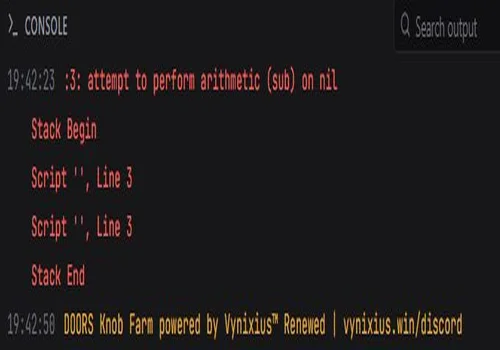
Knob Farm
- Mines Gold Collection Route
- Drawer Interactions
- Repeated Death Farming Loop
- +1 more
Details
Functions
- Mines Gold Collection Route
- Drawer Interactions
- Repeated Death Farming Loop
- Knobs Payout: 0 in our latest check
Change history
- – Added to this page. Latest check returned 0 Knobs. Kept for status tracking; not a current farming recommendation.
Script code
loadstring(game:HttpGet("https://api.luarmor.net/files/v4/loaders/6e87698669de88a8f81d6348ce368b73.lua"))()
Do not start this expecting the earlier payout. This standalone script runs in The Mines, follows points, and opens drawers to collect gold before its repeated-death farming loop. Dying is intentional. Earlier testing suggested roughly 8,400 Knobs per hour, but the last check returned 0 Knobs. The old estimate is no longer a current earning rate.
The suspected reason is an early-death reward penalty of −100%: this route dies in the first room. We have not independently confirmed a developer change or the full conditions of that penalty. What matters for this card is the observed zero payout. We are keeping the loader for update tracking and will reassess it after a new test.
If a future version earns rewards again but stops between runs, your executor’s Auto Execute folder may help reload it. That only addresses restarting the script; it cannot fix a zero reward. This result belongs to the standalone loader and is not a test of Abyssal’s separate Knob Farm control.
DOORS scripts with a KEY SYSTEM
Cheesy Hub
- Speed and Speed Bypass
- Fly, Noclip and Phase
- Jump and Slide
- +28 more
Details
Functions
- Speed and Speed Bypass
- Fly, Noclip and Phase
- Jump and Slide
- Anticheat Manipulation
- Auto Interact and Blacklist
- Godmode
- Door Reach
- Entity, Door and Objective ESP
- Item, Chest, Hiding Spot and Player ESP
- ESP Arrows, Tracers and Distance Controls
- Fullbright and Camera Controls
- Transparent Hiding Spots
- Entity and Item Notifications
- Oxygen and Haste Notifications
- Disable Selected Jumpscares
- Pre-Run Item Purchases
- Instant Interact, Prompt Clip and Prompt Reach
- Infinite Items and Crucifix
- Fake Revive
- Entity Bypasses and Damage Controls (mode dependent)
- Library Code and Padlock Tools
- Auto Breaker Box
- Hotel- / Fools Room-Skip and Entity Controls
- Mines: Minecart Steering, Seek Path and Door 200
- Rooms: Auto Rooms and Path Settings
- Outdoors: Surge Controls, Eyestalk Path and Currency Pickups
- Free Rooms / Outdoors Entry (no progress)
- Auto Join Elevator
- Play Again and Return to Lobby
- Anti Lag and Disable Idle Kick
- Configuration, Themes and Keybinds
Change history
- – Added to this page. Menu/source review only; gameplay verification pending.
Script code
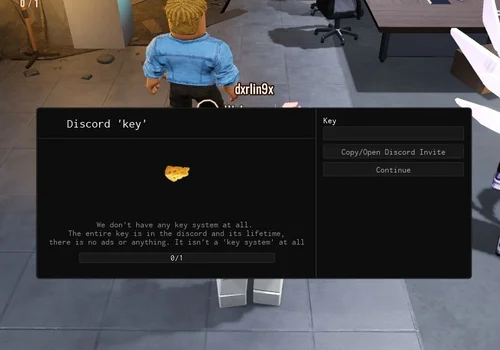
loadstring(game:HttpGet("https://raw.githubusercontent.com/doram44/cheesy/refs/heads/main/cheesy.lua"))()Free Discord key required, according to the author and the supplied access screen. The author describes a permanent key with no advertising checkpoints. That still puts it in the KEY SYSTEM section. We have not completed a gameplay review of Cheesy, and its extensive feature list is source-described rather than a set of test results.