Article

Grow Beanstalk For Brainrots scripts 2026 – NO KEY (Get Brainrots)

Views: 570

This page lists working scripts, key status, features, and update notes for this Roblox game.

Reviewed by RobScript Team Source status checked:

grow beanstalk for brainrots scripts - no key

After testing and cleaning up the old list, we kept three Grow Beanstalk For Brainrots scripts: two NO KEY choices and TP99 as the only KEY SYSTEM fallback. Every loader reached its real menu on Potassium for Windows PC. Below are the functions that mattered in actual farming, the limits we ran into, and the annoying details most copied function lists never mention.

The game loop is simple: capture a Brainrot, place it on your plot, collect its income, upgrade your character and beanstalk, then climb to higher clouds for rarer targets. Scripts can automate collection, upgrades, rebirths, travel, and income claiming, but they cannot ignore every progression restriction built into the game.

Robscript team opinion

Tora Is Me is the easiest NO KEY choice, but its rarity selector is visually unclear and Auto Upgrade is more brute force than smart. ShoyoooXD4 covers a similar loop with much better control over individual upgrade levels and rarity areas. TP99 has the largest filter set, yet its terrible key process and awkward cycle buttons make it a fallback only. Use it when both keyless alternatives stop working, not because its menu is longer.

Game link: Grow Beanstalk For Brainrots

Grow Beanstalk For Brainrots script video

This video shows an earlier version of the available automation. Use the current cards and test notes below for access changes and known limitations.


Latest hands-on results

Test setup
Checked September 4, 2026, on Windows PC with Potassium after the latest available game update.
Loader result
Tora Is Me, ShoyoooXD4, and TP99 all reached their real menus. Main functions were tested; minor level shortcuts were not exhaustively checked one by one.
Account result
No kick, warning, freeze, or ban appeared during the test session.
Important restriction
You cannot collect a Brainrot from a cloud above the height supported by your current beanstalk. A loader cannot replace the required progression.

Grow Beanstalk For Brainrots script comparison

Choose by access and controls. More functions do not automatically mean a better experience.

ScriptAccessBest forMain features
Tora Is MeNo KeySimple full-loop farmingRarity pickup, cash, upgrades, growth, selling and x10 zone
By ShoyoooXD4No KeyDetailed progression controlsAuto Collect, rebirth, upgrade levels and rarity teleports
TP99Key SystemFallback with filtersPickup filters, return, fuse, scanner and server hop

What matters while farming

These details affect the real farming loop more than a copied list of twenty toggles.

Beanstalk height limit
Higher clouds are protected by progression. We could not take a Legendary Brainrot while the test account had a short beanstalk, even when automatic pickup was enabled.
Manual plot placement
None of the current scripts automatically installs a collected Brainrot on your plot. Return to base and place it yourself before expecting income.
x10 Multiplier zone
Teleport to x10 Multiplier sends the character into the sky and can look broken. Standing in that hidden zone increases income from every Brainrot on your plot by ten times.
Upgrade behavior
Tora Auto Upgrade appears to spam upgrade requests even when the account lacks enough cash. It still works once money is available, but checking balance against cost would be cleaner.
Pickup filters
TP99 uses proper dropdowns for rarity and name. Zone and mutation use cycle buttons instead, so one extra click can force you to loop through every option again.

NO KEY / keyless Grow Beanstalk For Brainrots scripts

Both loaders below open without a separate unlock process. Testing was completed with Potassium on Windows PC. A PC or mobile executor still needs enough UNC and sUNC support for the loader; mobile labels describe expected compatibility rather than a separate phone test.
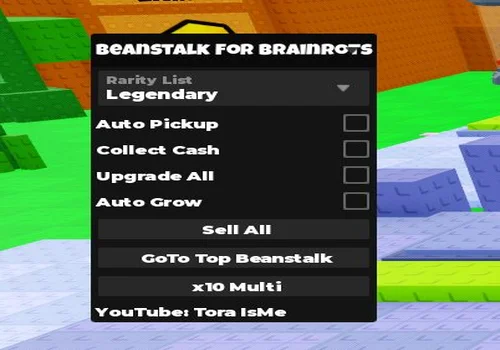
Tora Is Me
Tora Is Me script preview

Tora Is Me

Developer
Tora Is Me
Updated
Updated
v2
NO KEY TESTED AUTO PICKUP PC MOBILE

The simplest keyless option for the full collection loop. Main farming tools worked during our check, but the rarity list does not show its selected state clearly while the menu is open; hide the interface to confirm what was chosen. Auto Upgrade also keeps sending requests when there is not enough cash instead of comparing balance with upgrade cost. This looks wasteful but did not stop the farm. Brainrots must still be placed on the plot manually.

  • Rarity Selection
  • Auto Pickup
  • Collect Cash
  • +5 more
Copies 38
Details

Functions

  • Rarity Selection
  • Auto Pickup
  • Collect Cash
  • Upgrade All
  • Auto Grow
  • Sell All
  • Teleport to Top Beanstalk
  • Teleport to x10 Multiplier
Access
NO KEY
Tags
TESTED NO KEY AUTO PICKUP PC MOBILE
Languages
English
Compatibility
Delta Arceus X Codex Other

Change history

  • – Added to page.
  • – Retested main functions on Potassium PC; documented rarity selection, upgrade spam, x10 zone behavior, and progression limits.
Script code
loadstring(game:HttpGet("https://raw.githubusercontent.com/gumanba/Scripts/main/GrowBeanstalkForBrainrots"))()
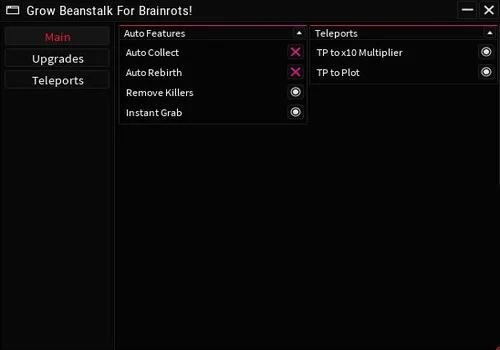
By ShoyoooXD4
By ShoyoooXD4 script preview

By ShoyoooXD4

Developer
By ShoyoooXD4
Updated
Updated
v2
NO KEY TESTED DETAILED UPGRADES PC MOBILE

A keyless alternative with a similar farming loop and much more detailed control. Separate level 1, 5, and 10 settings are available for beanstalk, speed, climbing, and carry upgrades, while rarity teleports cover Common through Divine areas. Main collection, travel, and upgrade tools worked in our session; we did not exhaustively retest every individual level shortcut.

  • Auto Collect
  • Auto Rebirth
  • Remove Killers
  • +26 more
Copies 23
Details

Functions

  • Auto Collect
  • Auto Rebirth
  • Remove Killers
  • Instant Grab
  • Teleport to x10 Multiplier
  • Teleport to Plot
  • Auto Beanstalk Upgrade
  • Beanstalk Level 1
  • Beanstalk Level 5
  • Beanstalk Level 10
  • Auto Speed Upgrade
  • Speed Level 1
  • Speed Level 5
  • Speed Level 10
  • Auto Climbing Upgrade
  • Climbing Level 1
  • Climbing Level 5
  • Climbing Level 10
  • Auto Carry Upgrade
  • Carry Level 1
  • Carry Level 5
  • Carry Level 10
  • Teleport to Common Area
  • Teleport to Rare Area
  • Teleport to Legendary Area
  • Teleport to Mythic Area
  • Teleport to Exotic Area
  • Teleport to Secret Area
  • Teleport to Divine Area
Access
NO KEY
Tags
TESTED NO KEY DETAILED UPGRADES PC MOBILE
Languages
English
Compatibility
Delta Arceus X Codex Other

Change history

  • – Added to page.
  • – Retested main collection, travel, and upgrade functions on Potassium PC.
Script code
loadstring(game:HttpGet("https://raw.githubusercontent.com/ShoyoooXD4/scripts/refs/heads/main/GrowABeanstalk.lua"))()

Grow Beanstalk For Brainrots scripts with KEY SYSTEM

TP99 is the only remaining key-system script. Its feature set is broad, but the access flow and several selectors are worse than the keyless alternatives, so the card stays last.
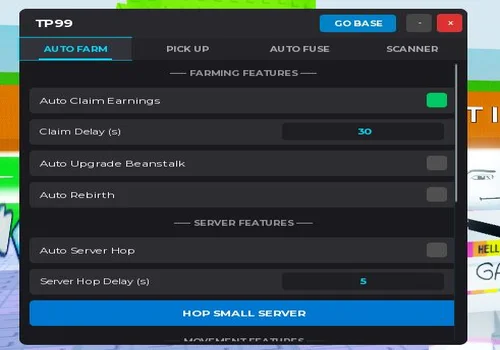
TP99
TP99 script preview

TP99

Developer
TP99
Updated
Updated
v2
KEY SYSTEM FALLBACK FILTERS PC MOBILE

A working fallback with the worst access flow on this page. After Linkvertise or LootLabs, the key route opens a generic Blogger template where the correct page must be found and clicked; our first attempt was even reported as incomplete. The real menu eventually opened. Rarity and name use normal dropdown filters, but zone and mutation are cycle buttons that move 1 → 2 → 3 → 4 and wrap around, making it easy to skip a target. Auto Pick Up worked, yet configuring those two filters feels careless. Use TP99 only if both NO KEY options fail.

  • Auto Claim Earnings
  • Claim Delay Changer
  • Auto Upgrade Beanstalk
  • +18 more
Copies 9
Details

Functions

  • Auto Claim Earnings
  • Claim Delay Changer
  • Auto Upgrade Beanstalk
  • Auto Rebirth
  • Auto Server Hop
  • Server Hop Delay Changer
  • Hop Small Server
  • Target Zone Filter
  • Target Mutation Filter
  • Target Rarity Filter
  • Target Name Filter
  • Auto Pick Up
  • Auto Return to Base
  • Remove Guard NPCs
  • Divine Target Selection
  • Only Fuse Identical Mutations
  • Auto Fuse
  • Auto Refresh Scanner List
  • Scan Eggs
  • Pick Up Selected
  • Go Base
Access
KEY SYSTEM
Tags
FALLBACK KEY SYSTEM FILTERS PC MOBILE
Languages
English
Compatibility
Delta Arceus X Codex Other

Change history

  • – Added to page.
  • – Completed the key flow, opened the menu, and tested main pickup and filter behavior on Potassium PC.
Script code
loadstring(game:HttpGet("https://gist.githubusercontent.com/8150tr3t/8a137bcfdb5790f4724be160fc370c68/raw/TP99_Loader_BEAN_BRAINROTS.lua"))()

Removed scripts

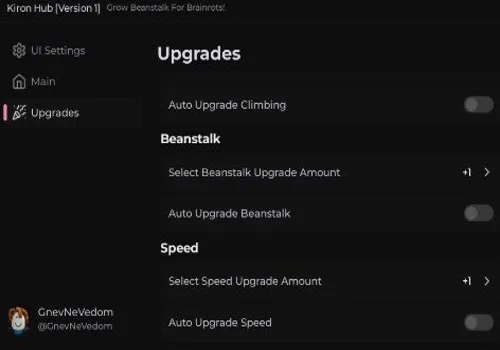
OTC Hub was removed after returning Game not supported on OTC Script!. Kiron Hub and Arch Hub did not work, while Ronix Hub was removed because the two current keyless alternatives make it unnecessary here.


How to use Grow Beanstalk For Brainrots scripts

Start with a NO KEY loader. TP99 adds more filters, but its access process is not worth the trouble unless Tora and ShoyoooXD4 stop working.

  1. Open Grow Beanstalk For Brainrots and wait until your plot, current cloud, and Brainrots finish loading.
  2. Open a compatible executor. Potassium was used for this Windows PC test; another PC or mobile executor needs sufficient UNC and sUNC support.
  3. Copy one loader from the correct NO KEY or KEY SYSTEM section, paste it into the executor, and press Execute or Run.
  4. Do not target a rarity above your current progression. Upgrade beanstalk height before trying to collect Brainrots from higher clouds.
  5. With Tora, choose a rarity and hide the menu to confirm the selection. Teleport to x10 Multiplier intentionally moves you into a hidden sky zone where plot income is multiplied.
  6. Return to your plot and place collected Brainrots manually. None of the three current scripts automates this step.
  7. Enable one farming feature at a time before adding upgrades, rebirth, server hop, or fusion tools.
Third-party scripts can violate Roblox rules. Use them at your own risk, never submit a Roblox password or cookie to a key page, and do not install unknown files from redirects.

Test and account warning

No kick, warning, freeze, or ban appeared during this check. That is one session result, not proof that a script is permanently safe, undetected, or anti-ban.

NO KEY only describes access. It does not reduce account risk or guarantee that a remotely hosted loader will remain unchanged.

Frequently Asked Questions

Which Grow Beanstalk For Brainrots script is best without a key?
Start with Tora Is Me for a simple full farming loop. Choose ShoyoooXD4 when you want separate upgrade levels and direct teleports to each rarity area.
Why can Auto Pickup not collect a Legendary or higher Brainrot?
The game limits collection from clouds above the height supported by your current beanstalk. Upgrade the beanstalk first; changing a rarity target cannot bypass missing progression.
What does Teleport to x10 Multiplier do?
It moves the character into a hidden zone in the sky. The location looks empty, but standing there multiplies income from every Brainrot on the plot by ten.
Do these scripts automatically place Brainrots on the plot?
No. Collection and return tools can bring you back, but you must install each captured Brainrot on a building yourself.
How do I confirm Tora rarity selection?
Choose the rarity, then hide or collapse the menu. Its selected state is difficult to read while the full interface remains visible.
Why is TP99 listed last?
Its loader works and includes useful filters, fusion, scanner, and server-hop tools. However, its key route is confusing, and zone or mutation selection requires cycling through values one by one.
Do Grow Beanstalk For Brainrots scripts work on mobile?
Our hands-on check used Potassium on Windows PC. Mobile use depends on whether the chosen executor supplies enough UNC and sUNC support for the loader; the mobile card tags are compatibility data, not a separate phone test.
Are these scripts safe from bans?
No kick, warning, freeze, or ban appeared in our test session, but no third-party script should be treated as permanently safe or undetected.

Page update

September 4, 2026: Rebuilt the page with three current script cards; removed OTC, Kiron, Arch, and Ronix; separated NO KEY from KEY SYSTEM access; and added hands-on notes for beanstalk limits, x10 income, upgrade behavior, filters, and manual plot placement.