KEYLESS Stand Out Scripts
Essentials Hub
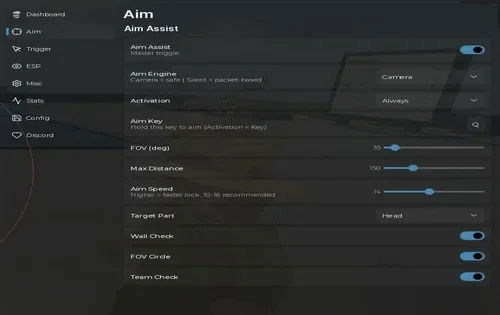
A keyless hub for collecting selected drops, farming mobs, running quests, and tending your own pot.
- Auto Collect Items
- Auto Farm Mobs
- Auto Quest
- +15 more
Limitation: On PC, the cursor can leave the Roblox Esc menu while the hub is attacking. If that happens, try pausing the automated attack before reopening the menu.
Details
Essentials Hub functions
- Auto Collect Items
- Auto Farm Mobs
- Auto Quest
- Farm · Items: Only These Items, Also Forage Seeds, Return After Pickup, Server Hop When Empty
- Farm · Mob Farm: Only These Mobs, Stand, Distance, Search Range
- Farm · Quest Farm: Quest, Auto Farm This Quest, Show Offered Quests
- Farm · Eliminations and Garden: Auto Eliminations, Take Player Targets, Auto Garden My Pot
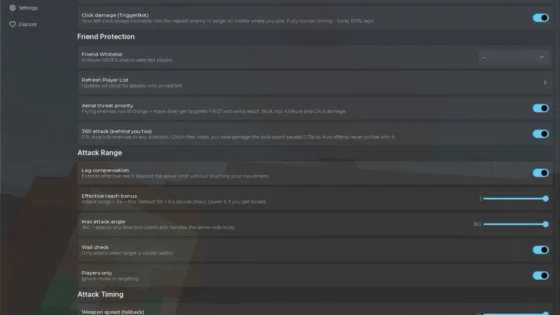
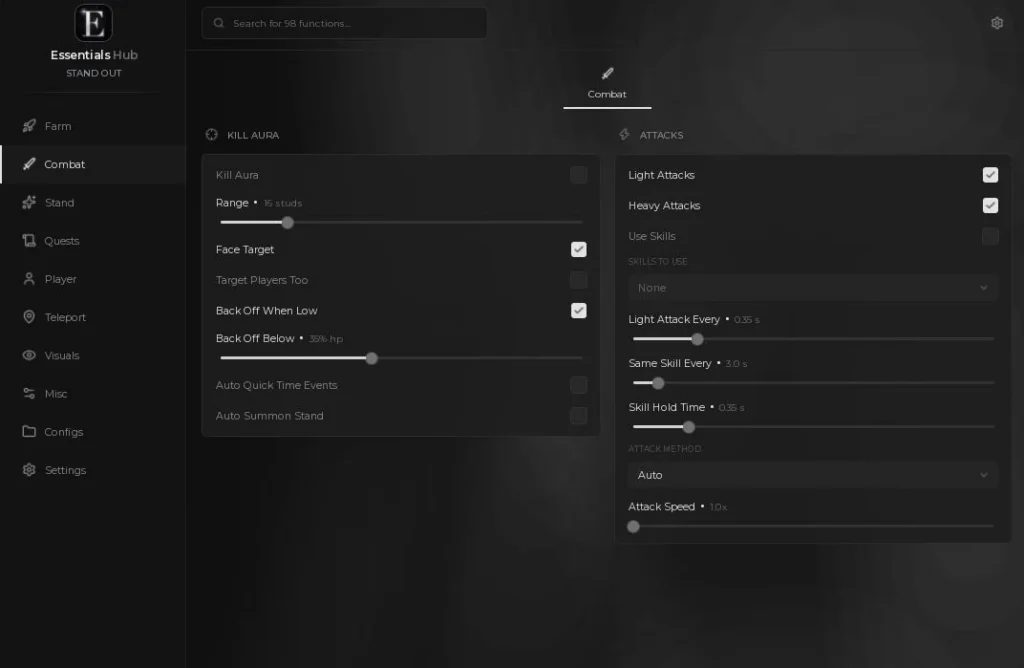
- Combat · Kill Aura: Range, Face Target, Target Players Too, Back Off When Low, Back Off Below, Auto Quick Time Events, Auto Summon Stand
- Combat · Attacks: Light Attacks, Heavy Attacks, Use Skills, Skills to Use, Light Attack Every, Same Skill Every, Skill Hold Time, Attack Method, Attack Speed
- Stand · Stand Roller (not tested): Auto Use Arrows, Stop at Stands, Or Stop at Rarity, Arrows to Use, Wait Between Rolls
- Stand · Stats: Auto Spend Stat Points uses the allocation selected in Put Points In
- Quests: Use Objective Prompts, Fight Quest Enemies, Teleport To Objective, Auto Dialogue, Pick Reply, Auto Go Fish
- Player · Movement: Walk Speed, Speed, Jump Height, Height, Infinite Jump, Noclip, Fly, Fly Speed
- Player · Character: No Dash Cooldown, No Stun, No Slow, No Fall Damage
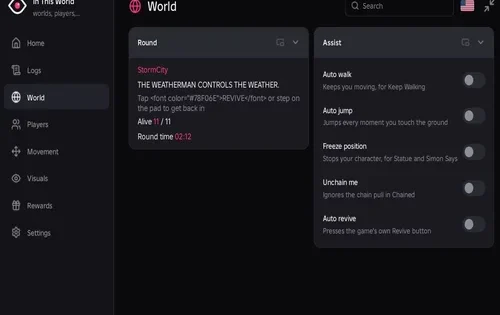
- Teleport · Places: Destination, Teleport, Refresh List, Travel, Tween Speed
- Teleport · Players and Spots: Player, Teleport To Player, Refresh Players, Save This Spot, Go To Saved Spot, Server Hop, Rejoin Server
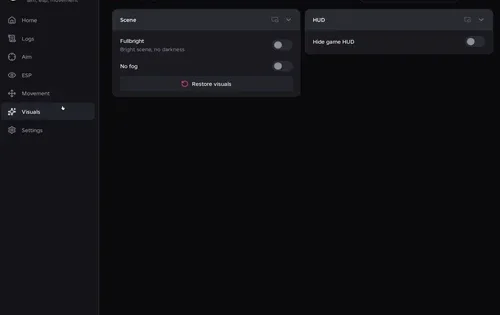
- Visuals · ESP: Players (stand, level, HP), Mobs And Bosses, NPCs And Quest Givers, Dropped Items, Arrow Spawn Nodes, Buried Seeds, Quest Objective, Range
- Misc: Anti AFK, Discord Webhook, Webhook URL
Change history
- – Checked filtered item pickup, mob farming, eliminations, gardening, Kill Aura and its sub-options, stat allocation, Auto Quest, ESP, Auto Go Fish, and teleport. Recorded the mob Search Range setting and the PC Esc menu issue. Stand Roller was not tested because there were no arrows in the hub test.
Script code
loadstring(game:HttpGet("https://api.luarmor.net/files/v3/loaders/"..(({[9908641400]="dab6a434a8316c0ee50e96fe7897bb6a",[10155360168]="b74cf7ffc81d39ac705869838bc67670",[7529591378]="a361fba8dd4cfff0764f0bbd501323f7",[9867225552]="6813cabe698a938bc5bb2b8dab33704d",[10766972131]="bdf27dd16d9a476e755260a20afd6ace",[8172250815]="9a49025f36d53d93262fb2be5859b95b"})[game.GameId] or "2c7dece27af1404cf348fe83d4ba05e7")..".lua"))()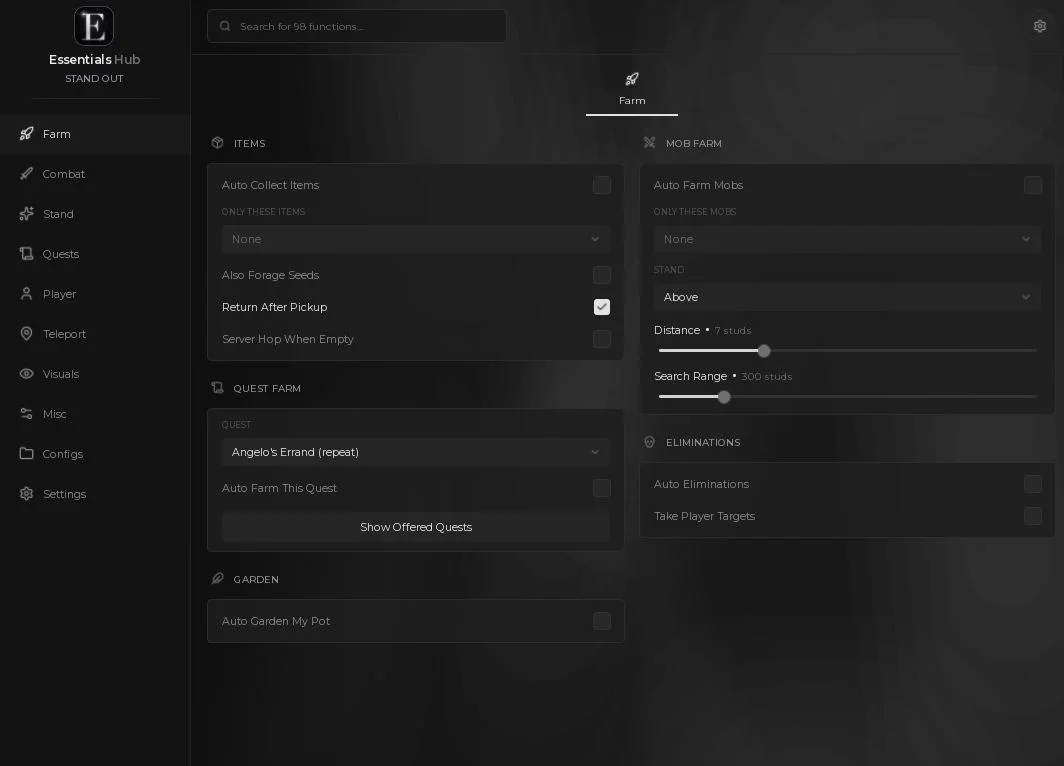
Arrow Autofarm
A dedicated route for collecting Stand Arrows.
- Stand Arrow spawn route
- Pickup when an arrow has spawned
- Numbered spawn points and trip counter
- +2 more
Limitation: The route visits known spawn points. A stop can be empty, and a visit only results in a pickup if an arrow has already spawned there.
Details
Arrow Autofarm functions
- Stand Arrow spawn route
- Pickup when an arrow has spawned
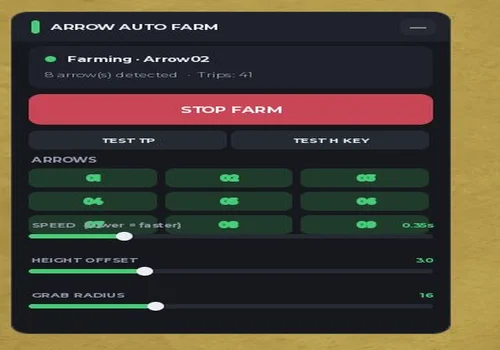
- Numbered spawn points and trip counter
- Speed, Height Offset, Grab Radius
- Test TP and Test H Key controls
Change history
- – Checked on Windows and Android. The farm visits known spawn points and picks up arrows when they have spawned.
Script code
loadstring(game:HttpGet("https://api.x8stuff.lol/scripts/Skayzstandout.lua"))()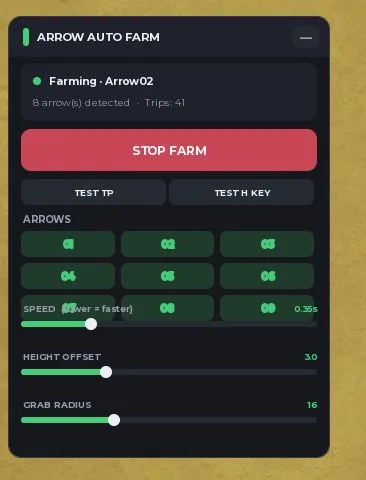
Sea Trash Farmer (Modified)
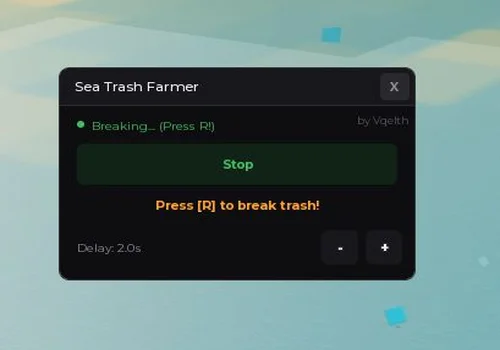
This modified Sea Trash Farmer presses R automatically to break sea trash barrels.
- Automatic barrel breaking (sea trash)
Details
Sea Trash Farmer (Modified) functions
- Automatic barrel breaking (sea trash)
Change history
- – Checked the modified version on Windows and Android. The farmer presses R automatically to break sea trash barrels.
Script code
local Players = game:GetService("Players")
local TweenService = game:GetService("TweenService")
local UserInputService = game:GetService("UserInputService")
local ReplicatedStorage = game:GetService("ReplicatedStorage")
local LP = Players.LocalPlayer
local VIM = game:GetService("VirtualInputManager")
local isF = false
local delay = 1.2
local root = nil
local vis = true
local function trackCharacter()
    local c = LP.Character or LP.CharacterAdded:Wait()
    local r = c:WaitForChild("HumanoidRootPart", 10)
    if r then root = r end
end
local function getRoot()
    if not root or not root.Parent then
        pcall(trackCharacter)
    end
    if root and root.Parent then return root end
    local c = LP.Character
    local r = c and c:FindFirstChild("HumanoidRootPart")
    if r then root = r end
    return root
end
local function getChar()
    local r = getRoot()
    return r and r.Parent
end
local function getHum()
    local c = getChar()
    return c and c:FindFirstChildOfClass("Humanoid")
end
trackCharacter()
LP.CharacterAdded:Connect(function()
    task.wait(0.3)
    pcall(trackCharacter)
end)
local cBg = Color3.fromRGB(14, 14, 16)
local cPan = Color3.fromRGB(24, 24, 28)
local cHov = Color3.fromRGB(36, 36, 42)
local cStr = Color3.fromRGB(45, 45, 50)
local cTxt = Color3.fromRGB(240, 240, 240)
local cSub = Color3.fromRGB(140, 140, 150)
local cGrn = Color3.fromRGB(65, 190, 100)
local cDGrn = Color3.fromRGB(16, 35, 22)
local cOrg = Color3.fromRGB(255, 160, 50)
local gui = Instance.new("ScreenGui")
gui.Name = "TrashFarmerGui"
gui.ResetOnSpawn = false
gui.Parent = game.CoreGui
local M = Instance.new("Frame")
M.Size = UDim2.new(0, 290, 0, 185)
M.Position = UDim2.new(0.5, -145, 0.5, -92)
M.BackgroundColor3 = cBg
M.BorderSizePixel = 0
M.Active = true
M.Draggable = true
M.Parent = gui
local MC = Instance.new("UICorner") MC.CornerRadius = UDim.new(0, 8) MC.Parent = M
local MS = Instance.new("UIStroke") MS.Color = cStr MS.Thickness = 1 MS.Parent = M
local H = Instance.new("Frame")
H.Size = UDim2.new(1, 0, 0, 32)
H.BackgroundColor3 = cPan
H.BorderSizePixel = 0
H.Parent = M
local HC = Instance.new("UICorner") HC.CornerRadius = UDim.new(0, 8) HC.Parent = H
local HF = Instance.new("Frame") HF.Size = UDim2.new(1, 0, 0.5, 0) HF.Position = UDim2.new(0, 0, 0.5, 0) HF.BackgroundColor3 = cPan HF.BorderSizePixel = 0 HF.Parent = H
local T = Instance.new("TextLabel")
T.Size = UDim2.new(1, -50, 1, 0)
T.Position = UDim2.new(0, 12, 0, 0)
T.BackgroundTransparency = 1
T.Text = "Sea Trash Farmer"
T.TextColor3 = cTxt
T.Font = Enum.Font.GothamMedium
T.TextSize = 13
T.TextXAlignment = Enum.TextXAlignment.Left
T.RichText = false
T.Parent = H
local CB = Instance.new("TextButton")
CB.Size = UDim2.new(0, 24, 0, 24)
CB.Position = UDim2.new(1, -28, 0, 4)
CB.BackgroundColor3 = Color3.fromRGB(40, 40, 45)
CB.Text = "X"
CB.TextColor3 = cSub
CB.Font = Enum.Font.GothamBold
CB.TextSize = 12
CB.AutoButtonColor = false
CB.RichText = false
CB.Selectable = false
CB.Parent = H
local CC = Instance.new("UICorner") CC.CornerRadius = UDim.new(0, 4) CC.Parent = CB
local L = Instance.new("Frame")
L.Size = UDim2.new(1, 0, 0, 1)
L.Position = UDim2.new(0, 0, 0, 32)
L.BackgroundColor3 = cStr
L.BorderSizePixel = 0
L.Parent = M
local Cr = Instance.new("TextLabel")
Cr.Size = UDim2.new(0.5, 0, 0, 15)
Cr.Position = UDim2.new(1, -150, 0, 38)
Cr.BackgroundTransparency = 1
Cr.Text = "by Vqelth"
Cr.TextColor3 = Color3.fromRGB(80, 80, 90)
Cr.Font = Enum.Font.Gotham
Cr.TextSize = 10
Cr.TextXAlignment = Enum.TextXAlignment.Right
Cr.RichText = false
Cr.Parent = M
local SD = Instance.new("Frame")
SD.Size = UDim2.new(0, 6, 0, 6)
SD.Position = UDim2.new(0, 14, 0, 46)
SD.BackgroundColor3 = cSub
SD.Parent = M
local SDC = Instance.new("UICorner") SDC.CornerRadius = UDim.new(1, 0) SDC.Parent = SD
local ST = Instance.new("TextLabel")
ST.Size = UDim2.new(0.6, 0, 0, 20)
ST.Position = UDim2.new(0, 26, 0, 40)
ST.BackgroundTransparency = 1
ST.Text = "Idle"
ST.TextColor3 = cSub
ST.Font = Enum.Font.Gotham
ST.TextSize = 11
ST.TextXAlignment = Enum.TextXAlignment.Left
ST.RichText = false
ST.Parent = M
local TB = Instance.new("TextButton")
TB.Size = UDim2.new(1, -28, 0, 36)
TB.Position = UDim2.new(0, 14, 0, 66)
TB.BackgroundColor3 = cDGrn
TB.Text = ""
TB.AutoButtonColor = false
TB.Selectable = false
TB.Parent = M
local TBC = Instance.new("UICorner") TBC.CornerRadius = UDim.new(0, 6) TBC.Parent = TB
local TBS = Instance.new("UIStroke") TBS.Color = cStr TBS.Thickness = 1 TBS.Parent = TB
local TV = Instance.new("Frame")
TV.Size = UDim2.new(1, 0, 1, 0)
TV.BackgroundColor3 = cPan
TV.BorderSizePixel = 0
TV.Parent = TB
local TVC = Instance.new("UICorner") TVC.CornerRadius = UDim.new(0, 6) TVC.Parent = TV
local TT = Instance.new("TextLabel")
TT.Size = UDim2.new(1, 0, 1, 0)
TT.BackgroundTransparency = 1
TT.Text = "Start"
TT.TextColor3 = cTxt
TT.Font = Enum.Font.GothamBold
TT.TextSize = 12
TT.TextXAlignment = Enum.TextXAlignment.Center
TT.RichText = false
TT.Parent = TB
local HT = Instance.new("TextLabel")
HT.Size = UDim2.new(1, -28, 0, 20)
HT.Position = UDim2.new(0, 14, 0, 110)
HT.BackgroundTransparency = 1
HT.Text = "Auto R — strong attack"
HT.TextColor3 = cOrg
HT.Font = Enum.Font.GothamBold
HT.TextSize = 12
HT.TextXAlignment = Enum.TextXAlignment.Center
HT.RichText = false
HT.TextTransparency = 1
HT.Parent = M
local DL = Instance.new("TextLabel")
DL.Size = UDim2.new(0.5, 0, 0, 30)
DL.Position = UDim2.new(0, 14, 0, 142)
DL.BackgroundTransparency = 1
DL.Text = string.format("Delay: %.1fs", delay)
DL.TextColor3 = cSub
DL.Font = Enum.Font.Gotham
DL.TextSize = 11
DL.TextXAlignment = Enum.TextXAlignment.Left
DL.RichText = false
DL.Parent = M
local MiB = Instance.new("TextButton")
MiB.Size = UDim2.new(0, 30, 0, 30)
MiB.Position = UDim2.new(1, -76, 0, 142)
MiB.BackgroundColor3 = cPan
MiB.Text = "-"
MiB.TextColor3 = cTxt
MiB.Font = Enum.Font.GothamBold
MiB.TextSize = 14
MiB.AutoButtonColor = false
MiB.RichText = false
MiB.Selectable = false
MiB.Parent = M
local MiC = Instance.new("UICorner") MiC.CornerRadius = UDim.new(0, 6) MiC.Parent = MiB
local MiS = Instance.new("UIStroke") MiS.Color = cStr MiS.Thickness = 1 MiS.Parent = MiB
local PlB = Instance.new("TextButton")
PlB.Size = UDim2.new(0, 30, 0, 30)
PlB.Position = UDim2.new(1, -40, 0, 142)
PlB.BackgroundColor3 = cPan
PlB.Text = "+"
PlB.TextColor3 = cTxt
PlB.Font = Enum.Font.GothamBold
PlB.TextSize = 14
PlB.AutoButtonColor = false
PlB.RichText = false
PlB.Selectable = false
PlB.Parent = M
local PlC = Instance.new("UICorner") PlC.CornerRadius = UDim.new(0, 6) PlC.Parent = PlB
local PlS = Instance.new("UIStroke") PlS.Color = cStr PlS.Thickness = 1 PlS.Parent = PlB
local function hov(b, s, db, hb, ds, hs)
    b.MouseEnter:Connect(function()
        if b == TB and isF then return end
        TweenService:Create(b, TweenInfo.new(0.2, Enum.EasingStyle.Sine), { BackgroundColor3 = hb }):Play()
        if s then TweenService:Create(s, TweenInfo.new(0.2, Enum.EasingStyle.Sine), { Color = hs }):Play() end
    end)
    b.MouseLeave:Connect(function()
        if b == TB and isF then return end
        TweenService:Create(b, TweenInfo.new(0.2, Enum.EasingStyle.Sine), { BackgroundColor3 = db }):Play()
        if s then TweenService:Create(s, TweenInfo.new(0.2, Enum.EasingStyle.Sine), { Color = ds }):Play() end
    end)
end
hov(MiB, MiS, cPan, cHov, cStr, Color3.fromRGB(80, 80, 90))
hov(PlB, PlS, cPan, cHov, cStr, Color3.fromRGB(80, 80, 90))
hov(CB, nil, Color3.fromRGB(40, 40, 45), Color3.fromRGB(220, 60, 60), nil, nil)
TB.MouseEnter:Connect(function()
    if not isF then
        TweenService:Create(TV, TweenInfo.new(0.2, Enum.EasingStyle.Sine), { BackgroundColor3 = cHov }):Play()
        TweenService:Create(TBS, TweenInfo.new(0.2, Enum.EasingStyle.Sine), { Color = Color3.fromRGB(80, 80, 90) }):Play()
    end
end)
TB.MouseLeave:Connect(function()
    if not isF then
        TweenService:Create(TV, TweenInfo.new(0.2, Enum.EasingStyle.Sine), { BackgroundColor3 = cPan }):Play()
        TweenService:Create(TBS, TweenInfo.new(0.2, Enum.EasingStyle.Sine), { Color = cStr }):Play()
    end
end)
CB.MouseButton1Click:Connect(function() M.Visible = false vis = false end)
UserInputService.InputBegan:Connect(function(i, g)
    if g then return end
    if i.KeyCode == Enum.KeyCode.RightShift then
        vis = not vis
        M.Visible = vis
    end
end)
----- Фарм -----
local ATTEMPT_LIMIT = 4
local MIN_DIST = 3.5
local MAX_DIST = 6
local function getPlatform()
    local gameFolder = workspace:FindFirstChild("Game")
    local mapFolder = gameFolder and gameFolder:FindFirstChild("Map")
    return mapFolder and mapFolder:FindFirstChild("ScrapPlatform")
end
local function isValid(part)
    return part
        and part.Parent ~= nil
        and part:IsA("BasePart")
        and part.Transparency < 1
        and part.CanCollide
end
local function collectTargets()
    local platform = getPlatform()
    if not platform then return {} end
    local list = {}
    for _, obj in ipairs(platform:GetDescendants()) do
        if obj.Name == "Destructable" and isValid(obj) then
            table.insert(list, obj)
        end
    end
    return list
end
local function nearestTarget(list, fromPos)
    local best, bestDist = nil, math.huge
    for _, part in ipairs(list) do
        if isValid(part) then
            local d = (part.Position - fromPos).Magnitude
            if d < bestDist then best, bestDist = part, d end
        end
    end
    return best
end
-- ищем точку на плоту: рейкаст вниз должен попасть в часть платформы, а не в воду/террейн
local function findStandSpot(part)
    local platform = getPlatform()
    local character = getChar()
    if not platform then return nil end
    local params = RaycastParams.new()
    params.FilterType = Enum.RaycastFilterType.Exclude
    params.FilterDescendantsInstances = character and { character } or {}
    params.IgnoreWater = true
    local r = getRoot()
    local baseDir = r and (part.Position - r.Position) or Vector3.new(0, 0, -1)
    baseDir = Vector3.new(baseDir.X, 0, baseDir.Z)
    if baseDir.Magnitude < 0.1 then baseDir = Vector3.new(1, 0, 0) end
    baseDir = baseDir.Unit
    local angles = { 0, 30, -30, 60, -60, 90, -90, 120, -120, 150, -150, 180 }
    local distances = { 4.5, 5, 4, 5.5, 3.5, 6 }
    for _, dist in ipairs(distances) do
        for _, ang in ipairs(angles) do
            local dir = CFrame.Angles(0, math.rad(ang), 0) * baseDir
            dir = Vector3.new(dir.X, 0, dir.Z).Unit
            local candidate = part.Position - dir * dist
            local hit = workspace:Raycast(candidate + Vector3.new(0, 8, 0), Vector3.new(0, -22, 0), params)
            if hit and hit.Instance then
                local inst = hit.Instance
                local solid = inst:IsA("BasePart") and inst:IsDescendantOf(platform)
                if solid and hit.Normal.Y > 0.5 then
                    return hit.Position + Vector3.new(0, 3, 0), part.Position
                end
            end
        end
    end
    return nil
end
local combatRemote = nil
local function getCombatRemote()
    if not combatRemote then
        local remotes = ReplicatedStorage:FindFirstChild("Remotes")
        combatRemote = remotes and remotes:FindFirstChild("Combat")
    end
    return combatRemote
end
local function strongAttack()
    local char = getChar()
    if VIM then
        pcall(function()
            VIM:SendKeyEvent(true, Enum.KeyCode.R, false, game)
            task.wait(0.12)
            VIM:SendKeyEvent(false, Enum.KeyCode.R, false, game)
        end)
    else
        local remote = getCombatRemote()
        if remote and char then
            pcall(function() remote:FireServer("BasicAttack", true, true, 1, char) end)
        end
    end
end
local function aimAt(targetPos)
    local camera = workspace.CurrentCamera
    local r = getRoot()
    if camera and r then
        camera.CFrame = CFrame.lookAt(r.Position + Vector3.new(0, 1.5, 0), targetPos)
    end
end
local function setStatus(text, color)
    ST.Text = text
    ST.TextColor3 = color
    SD.BackgroundColor3 = color
end
local function isInWater()
    local hum = getHum()
    if not hum then return false end
    return hum:GetState() == Enum.HumanoidStateType.Swimming
end
local function standingOnGround()
    local hum = getHum()
    if not hum then return false end
    return hum.FloorMaterial ~= Enum.Material.Air and not isInWater()
end
-- ставит персонажа на плот рядом с целью; возвращает true, только если реально стоим на плоту
local function approach(part)
    local r = getRoot()
    if not r then return false end
    -- уже стоим на плоту и цель близко — не прыгаем зря
    local dist = (r.Position - part.Position).Magnitude
    if dist <= 8 and standingOnGround() and not isInWater() then
        aimAt(part.Position)
        return true
    end
    local spot = findStandSpot(part)
    if not spot then return false end
    r.CFrame = CFrame.lookAt(spot, part.Position)
    task.wait(0.18)
    if isInWater() or not standingOnGround() then return false end
    aimAt(part.Position)
    return true
end
local function farmStep()
    local r = getRoot()
    if not r then return false end
    local targets = collectTargets()
    if #targets == 0 then
        setStatus("Searching...", cSub)
        TweenService:Create(HT, TweenInfo.new(0.2), { TextTransparency = 1 }):Play()
        return false
    end
    local target = nearestTarget(targets, r.Position)
    if not target then return false end
    -- встаём на плот; если не получилось (нет твёрдой поверхности) — ищем заново
    if not approach(target) then
        setStatus("Searching...", cSub)
        task.wait(0.4)
        return false
    end
    if not isF then return true end
    setStatus("Breaking... (auto R)", cGrn)
    TweenService:Create(HT, TweenInfo.new(0.2), { TextTransparency = 0 }):Play()
    for _ = 1, ATTEMPT_LIMIT do
        if not isF then return true end
        if not isValid(target) then break end
        if isInWater() then
            if not approach(target) then break end
        end
        aimAt(target.Position)
        strongAttack()
        task.wait(math.max(delay, 0.4))
    end
    if isValid(target) then
        setStatus("Searching...", cSub)
        TweenService:Create(HT, TweenInfo.new(0.2), { TextTransparency = 1 }):Play()
        task.wait(0.3)
    end
    return true
end
TB.MouseButton1Click:Connect(function()
    isF = not isF
    game:GetService("GuiService").SelectedCoreObject = nil
    if isF then
        TT.Text = "Stop"
        setStatus("Active", cGrn)
        TV.BackgroundColor3 = cDGrn
        TT.TextColor3 = cGrn
        TBS.Color = cGrn
    else
        TT.Text = "Start"
        setStatus("Idle", cSub)
        TweenService:Create(HT, TweenInfo.new(0.2), { TextTransparency = 1 }):Play()
        TV.BackgroundColor3 = cPan
        TT.TextColor3 = cTxt
        TBS.Color = cStr
    end
end)
MiB.MouseButton1Click:Connect(function()
    if delay > 0.5 then
        delay = delay - 0.5
        DL.Text = string.format("Delay: %.1fs", delay)
    end
end)
PlB.MouseButton1Click:Connect(function()
    if delay < 5 then
        delay = delay + 0.5
        DL.Text = string.format("Delay: %.1fs", delay)
    end
end)
task.spawn(function()
    while true do
        task.wait(0.1)
        if isF then
            local ok, err = pcall(farmStep)
            if not ok then
                warn("[SeaTrashFarmer] " .. tostring(err))
                task.wait(0.5)
            end
        end
    end
end)Press Start. Searching… means the farmer is looking for a reachable barrel. When it reaches one, it presses R automatically. Delay sets the wait between break attempts. Use Stop to end the loop.
About STAND OUT
STAND OUT is a Roblox action RPG inspired by JoJo’s Bizarre Adventure: The JOJOLands. Players use arrows to awaken Stands, follow story quests, and take bounties.
See the executor status page for current platform information.