Test reports received November 4, 2026. The community scripts were checked on PC with Potassium and Android with Delta; our script’s Working status is based on the RobScript team’s confirmation. Game and loader updates can change behavior. Open Throw Food For Animals on Roblox.
Jump to a script: Robscript Team – TFFA · Dek Dek Hub · Patch Hub · Quack Hub · Mystrix Hub · ReefHub · LeeonX · Fire Hub · Multi Hub PRO.
Throw food for Animals script’s list
Robscript Team – TFFA
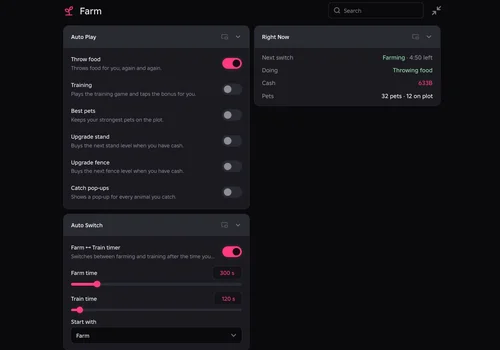
Our RobScript team script. To start the rotation, open Farm → Auto Switch, set Farm time and Train time, choose Start with, then enable Farm ↔ Train timer.
- Auto Throw with perfect-power requests
- Auto Train with training bonus taps
- Equip best pets on your plot
- +6 more
Details
Robscript Team – TFFA functions
- Auto Throw with perfect-power requests
- Auto Train with training bonus taps
- Equip best pets on your plot
- Upgrade the training stand and fence
- Auto Buy Food
- Sell by rarity and mutation; placed and bought pets are excluded
- Live activity, cash and pet status
- Anti AFK, saved configs and diagnostics
- Turn off stops all automation and closes the menu
Change history
- — Added the team script and confirmed its working status.
Script code
loadstring(game:HttpGet("https://raw.githubusercontent.com/bobloscript/robscript/refs/heads/main/ThrowFoodForAnimals"))()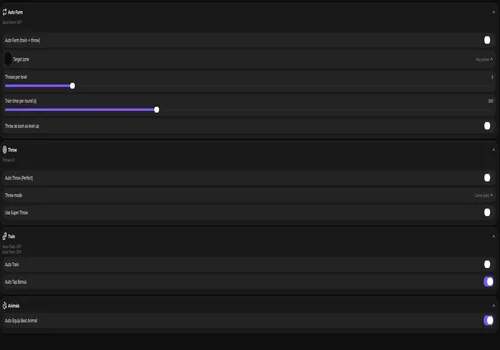
Dek Dek Hub
A useful choice for filling missing Animal Index entries in a particular farming zone.
- Choose throw strength to control the food landing zone
- Auto Farm with configurable farm/training timing
- Auto Throw with delay and reveal-skip options
- +5 more
Details
Dek Dek Hub functions
- Choose throw strength to control the food landing zone
- Auto Farm with configurable farm/training timing
- Auto Throw with delay and reveal-skip options
- Auto Place and Auto Try Best
- Auto Equip Best Animals
- Upgrade stand and fence
- Buy and equip best food
- Auto Sell with animal-income limit
Change history
- — Reviewed the card; updated test status and limitations.
Script code
loadstring(game:HttpGet("https://dekdev.discxnnect.workers.dev/?p="..game.PlaceId))()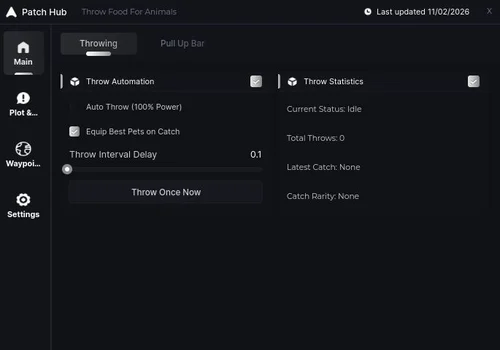
Patch Hub
A straightforward option when you want to control throwing and pull-up training separately.
- Auto Throw at 100% power
- Skip in-air and catch animations
- Auto Pull Up Bar and 2x minigame clicks
- +3 more
Details
Patch Hub functions
- Auto Throw at 100% power
- Skip in-air and catch animations
- Auto Pull Up Bar and 2x minigame clicks
- Equip best animals on catch or on a timer
- Upgrade food and pull-up stand
- Tween to training stand, plot and throw area
Change history
- — Reviewed the card; updated test status and limitations.
Script code
loadstring(game:HttpGet("https://raw.githubusercontent.com/patch-ez/patch-hub/main/loader.lua"))()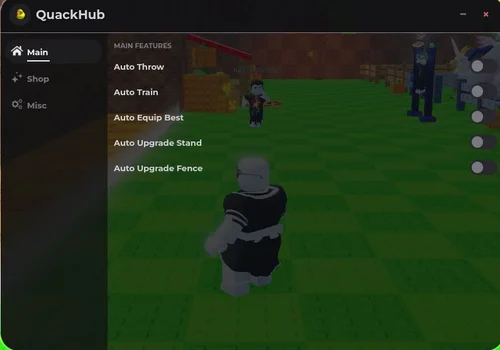
Quack Hub
A compact option with more control over which catches are sold.
- Auto Throw and Auto Train
- Auto Equip Best
- Auto Upgrade Stand and Fence
- +3 more
Details
Quack Hub functions
- Auto Throw and Auto Train
- Auto Equip Best
- Auto Upgrade Stand and Fence
- Auto Buy Food
- Auto Sell Pets with rarity and mutation selectors
- Anti AFK and configuration selector
Change history
- — Reviewed the card; updated test status and limitations.
Script code
loadstring(game:HttpGet("https://raw.githubusercontent.com/Dyinka/QuackHub/refs/heads/main/ThrowFoodForAnimalsQuackHub"))()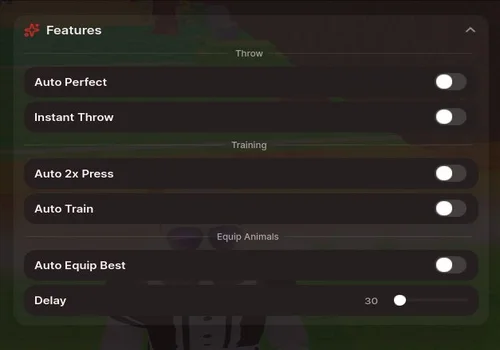
Mystrix Hub
A feature-rich option with separate controls for animal farming, training, upgrades and selling.
- Auto Perfect and Instant Throw
- Auto Train and Auto 2x Press
- Auto Equip Best with delay slider
- +6 more
Details
Mystrix Hub functions
- Auto Perfect and Instant Throw
- Auto Train and Auto 2x Press
- Auto Equip Best with delay slider
- Farm Animals
- Upgrade bars, plot and food
- Sell selectors for mutation, rarity and animal
- Sell Below CPS and Sell Below Weight inputs
- Manual Sell and Auto Sell
- Webhook and configuration controls
Change history
- — Reviewed the card; updated test status and limitations.
Script code
loadstring(game:HttpGet("https://raw.githubusercontent.com/ummarxfarooq/mystrix-hub/refs/heads/main/loader"))()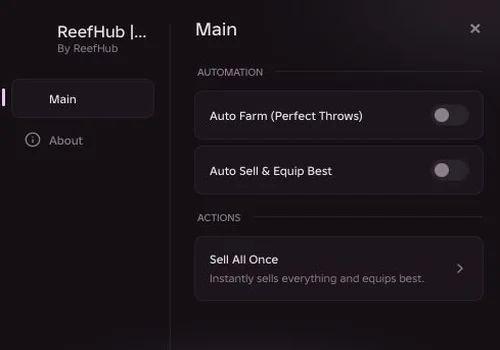
ReefHub
A basic fallback if the other options on this page do not work for you.
- Auto Farm with perfect throws
- Place the best pets on your plot
- Sell weaker pets
- +1 more
Details
ReefHub functions
- Auto Farm with perfect throws
- Place the best pets on your plot
- Sell weaker pets
- Manual Sell All Once
Change history
- — Reviewed the card; updated test status and limitations.
Script code
loadstring(game:HttpGet("https://pastefy.app/1T5BHB1p/raw"))()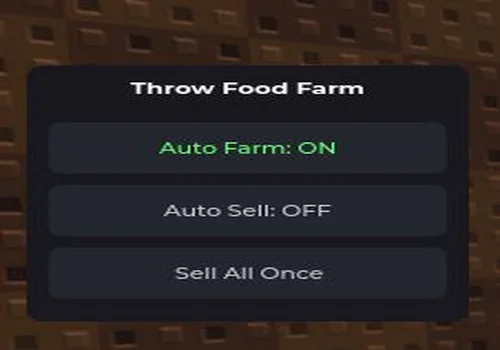
LeeonX
A small open-source script for basic farming and selling. Its full code is available in the card.
- Auto Farm
- Auto Sell
- Manual Sell All Once
- +1 more
Details
LeeonX functions
- Auto Farm
- Auto Sell
- Manual Sell All Once
- Equip Best after selling
Change history
- — Reviewed the card; updated test status and limitations.
Script code
--THROW FOOD FOR ANIMALS
local Players = game:GetService("Players")
local ReplicatedStorage = game:GetService("ReplicatedStorage")
local CoreGui = game:GetService("CoreGui")

local lp = Players.LocalPlayer
local remotes = ReplicatedStorage:WaitForChild("Remotes", 10)
if not remotes then return end

local Throw_Start    = remotes:WaitForChild("Throw_Start")
local Throw_Resolve  = remotes:WaitForChild("Throw_Resolve")
local Throw_Complete = remotes:WaitForChild("Throw_Complete")
local Plot_SellAll   = remotes:WaitForChild("Plot_SellAll")
local Plot_EquipBest = remotes:WaitForChild("Plot_EquipBest")


pcall(function()
    local client = lp.PlayerScripts:WaitForChild("Client")
    local controllers = client:WaitForChild("Controllers")

    local rs = require(controllers:WaitForChild("RevealSequence"))
    if rs then rs.Run = function() end end

    local tm = require(controllers:WaitForChild("ThrowMeter"))
    if tm and tm.new then
        local rawNew = tm.new
        tm.new = function(...)
            local inst = rawNew(...)
            inst.Run = function()
                return 1.0, { Text = "PERFECT!", Color = Color3.fromRGB(100, 255, 100) }, 20
            end
            return inst
        end
    end
end)

-- States
local farming = false
local selling = false
local throwPos = Vector3.new(0, 5.4, -42)


task.spawn(function()
    while true do
        if farming then
            pcall(function()
                local char = lp.Character
                local hrp = char and char:FindFirstChild("HumanoidRootPart")
                if hrp then
                    if (hrp.Position - throwPos).Magnitude > 6 then
                        hrp.CFrame = CFrame.new(throwPos)
                        task.wait(0.2)
                    end

                    local sRes = Throw_Start:InvokeServer()
                    if sRes and sRes.Ok then
                        task.wait(0.1)
                        local rRes = Throw_Resolve:InvokeServer(1.0)
                        if rRes and rRes.Ok then
                            task.wait(0.2)
                            Throw_Complete:InvokeServer()
                        end
                    end
                end
            end)
            task.wait(0.3)
        else
            task.wait(0.5)
        end
    end
end)


task.spawn(function()
    while true do
        if selling then
            pcall(function()
                Plot_SellAll:InvokeServer()
                Plot_EquipBest:InvokeServer()
            end)
            task.wait(4)
        else
            task.wait(1)
        end
    end
end)


local parentGui = (gethui and gethui()) or CoreGui or lp:WaitForChild("PlayerGui")
if parentGui:FindFirstChild("TFF_MiniHub") then
    parentGui.TFF_MiniHub:Destroy()
end

local sg = Instance.new("ScreenGui")
sg.Name = "TFF_MiniHub"
sg.ResetOnSpawn = false
sg.Parent = parentGui

local frame = Instance.new("Frame")
frame.Size = UDim2.fromOffset(200, 180)
frame.Position = UDim2.new(0.5, -100, 0.35, 0)
frame.BackgroundColor3 = Color3.fromRGB(24, 24, 30)
frame.BorderSizePixel = 0
frame.Active = true
frame.Draggable = true
frame.Parent = sg

local corner = Instance.new("UICorner", frame)
corner.CornerRadius = UDim.new(0, 8)

local title = Instance.new("TextLabel")
title.Size = UDim2.new(1, 0, 0, 32)
title.BackgroundTransparency = 1
title.Text = "Throw Food Farm"
title.TextColor3 = Color3.fromRGB(255, 255, 255)
title.Font = Enum.Font.GothamBold
title.TextSize = 13
title.Parent = frame

local function createBtn(name, text, posY, callback)
    local btn = Instance.new("TextButton")
    btn.Name = name
    btn.Size = UDim2.new(1, -20, 0, 36)
    btn.Position = UDim2.new(0, 10, 0, posY)
    btn.BackgroundColor3 = Color3.fromRGB(36, 38, 46)
    btn.Text = text
    btn.TextColor3 = Color3.fromRGB(200, 200, 210)
    btn.Font = Enum.Font.GothamMedium
    btn.TextSize = 12
    btn.Parent = frame

    local btnCorner = Instance.new("UICorner", btn)
    btnCorner.CornerRadius = UDim.new(0, 6)

    btn.MouseButton1Click:Connect(function()
        callback(btn)
    end)
    return btn
end


createBtn("BtnFarm", "Auto Farm: OFF", 40, function(b)
    farming = not farming
    b.Text = farming and "Auto Farm: ON" or "Auto Farm: OFF"
    b.TextColor3 = farming and Color3.fromRGB(100, 255, 120) or Color3.fromRGB(200, 200, 210)
end)


createBtn("BtnSell", "Auto Sell: OFF", 84, function(b)
    selling = not selling
    b.Text = selling and "Auto Sell: ON" or "Auto Sell: OFF"
    b.TextColor3 = selling and Color3.fromRGB(100, 255, 120) or Color3.fromRGB(200, 200, 210)
end)


createBtn("BtnSellNow", "Sell All Once", 128, function(b)
    pcall(function()
        Plot_SellAll:InvokeServer()
        Plot_EquipBest:InvokeServer()
    end)
end)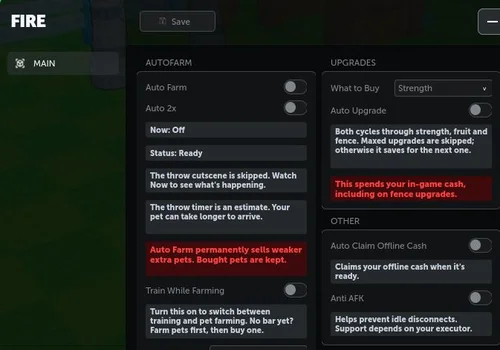
Fire Hub
The menu offers rotation settings for alternating training and pet farming. The functions below are advertised by the source.
- perfect throws and skipped cutscenes
- best-pet placement and weaker-pet selling
- training/farming rotation by time, levels or throws
- +3 more
Details
Fire Hub functions
- perfect throws and skipped cutscenes
- best-pet placement and weaker-pet selling
- training/farming rotation by time, levels or throws
- 2x training bonuses
- strength, fruit and fence upgrades
- offline cash, Anti AFK and saved settings
Change history
- — Reviewed the card; updated test status and limitations.
Script code
loadstring(game:HttpGet("https://vampauth.com/v1/loaders/d70f073a558b6b8c2ffa24f4d5d0d7fe.lua"))()
Multi Hub PRO
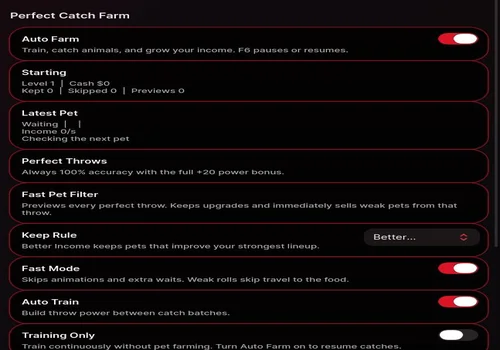
The functions below are the developer’s advertised feature set.
- perfect throws and Fast Mode
- keep rules and weak-roll selling
- species, mutation and rarity protection
- +6 more
Details
Multi Hub PRO functions
- perfect throws and Fast Mode
- keep rules and weak-roll selling
- species, mutation and rarity protection
- Auto Train and Training Only
- training bar, food and fence upgrades
- best-lineup equip
- owned-egg hatching and rewards
- saved Super Throws
- pet tracker, roll history and saved settings
Change history
- — Reviewed the card; updated test status and limitations.
Script code
loadstring(game:HttpGet("https://pastefy.app/8JMjtXhR/raw"))()