+1 Mine Per Click is a Roblox mining clicker where progress comes from building Strength, breaking blocks, selling loot for Cash, upgrading your Pickaxe, and rebirthing to push deeper. The scripts on this page are made for players who want to reduce the slow parts of that loop: constant clicking, repeated mining, running back to sell, and manually buying upgrades.
Game link: https://www.roblox.com/games/74193805629461/1-Mine-Per-Click
+1 Mine Per Click scripts NO KEY / KEYLESS
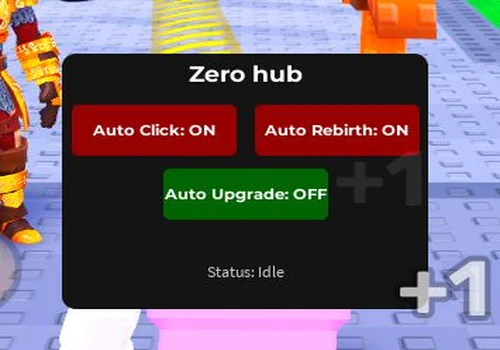
Zero Hub
- Auto Click
- Auto Rebirth
- Auto Upgrades
Details
Functions
- Auto Click
- Auto Rebirth
- Auto Upgrades
Change history
- – Added to page!
Script code
--MADE BY ZERO HUB--
loadstring(game:HttpGet("https://pastebin.com/raw/qTasYg78"))()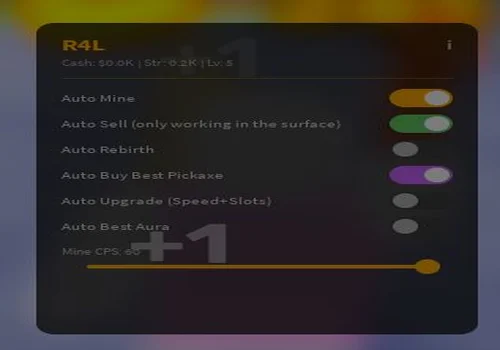
r4lzy
- Auto Mine
- Auto Sell (only working in the surface)
- Auto Rebirth
- +3 more
Details
Functions
- Auto Mine
- Auto Sell (only working in the surface)
- Auto Rebirth
- Auto Buy best Pickaxe
- Auto Upgrade (Speed + Slots)
- Auto Best Aura
Change history
- – Added to page!
Script code
loadstring(game:HttpGet("https://raw.githubusercontent.com/R4lzy/-1mine/refs/heads/main/typeshit.lua"))()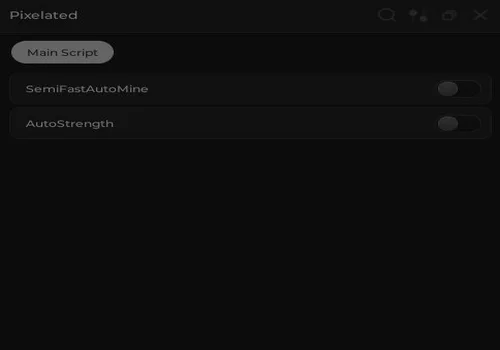
GUGUAGA
- SemiFastAutoMine
- AutoStrength
Details
Functions
- SemiFastAutoMine
- AutoStrength
Change history
- – Added to page!
Script code
local Rayfield = loadstring(game:HttpGet('https://sirius.menu/rayfield'))()

local Window = Rayfield:CreateWindow({
   Name = "Pixelated",
   LoadingTitle = "Pixelated",
   LoadingSubtitle = "Scripts Loaded",
   ConfigurationSaving = {
      Enabled = false,
   },
   Discord = {
      Enabled = false,
   },
   KeySystem = false,
})

-- Instantly overlaying notification
Rayfield:Notify({
   Title = "Guide",
   Content = "AutoMine Will help you mine faster so you have to mine first",
   Duration = 10,
   Image = 4483362458, -- Built-in Rayfield Info Icon
   Actions = {
      Ignore = {
         Name = "Okay",
         Callback = function()
            -- Closes when clicked
         end
      },
   },
})

local MainTab = Window:CreateTab("Main Script", nil)

-- Services
local RunService = game:GetService("RunService")
local ReplicatedStorage = game:GetService("ReplicatedStorage")

----------------------------------------------------------------------
-- 1. SemiFastAutoMine Implementation
----------------------------------------------------------------------
local autoMineConnection = nil
local latestRemote = nil
local latestArgs = {}
local firingOurself = false

-- Metatable hook strictly listens, never spams on its own
local oldNamecall
oldNamecall = hookmetamethod(game, "__namecall", function(self, ...)
    if firingOurself then
        return oldNamecall(self, ...)
    end

    local method = getnamecallmethod()
    local args = {...}

    if (method == "FireServer" or method == "fireServer") and self.ClassName == "RemoteEvent" then
        if string.find(self.Name, "HitWall") then
            latestRemote = self
            latestArgs = args
        end
    end

    return oldNamecall(self, ...)
end)

MainTab:CreateToggle({
   Name = "SemiFastAutoMine",
   CurrentValue = false,
   Flag = "AutoMineToggle",
   Callback = function(Value)
      if Value then
         -- Turn ON instantly
         autoMineConnection = RunService.Heartbeat:Connect(function()
            if latestRemote and latestRemote.Parent and #latestArgs > 0 then
               firingOurself = true
               for i = 1, 5 do
                  latestRemote:FireServer(unpack(latestArgs))
               end
               firingOurself = false
            end
         end)
      else
         -- Turn OFF instantly
         if autoMineConnection then
            autoMineConnection:Disconnect()
            autoMineConnection = nil
         end
      end
   end,
})

---------------------------------------------------------------------
-- 2. AutoStrength Implementation
--------------------------------------------------------------------
local autoStrengthConnection = nil
local clickRemote = nil

-- Task spawn prevents the script from freezing if the remotes aren't found instantly
task.spawn(function()
    pcall(function()
        clickRemote = ReplicatedStorage:WaitForChild("Remotes", 5):WaitForChild("Server", 5):WaitForChild("Click", 5)
    end)
end)

MainTab:CreateToggle({
   Name = "AutoStrength",
   CurrentValue = false,
   Flag = "AutoStrengthToggle",
   Callback = function(Value)
      if Value then
         -- Turn ON instantly
         autoStrengthConnection = RunService.Heartbeat:Connect(function()
            if clickRemote then
                for i = 1, 5 do
                    clickRemote:FireServer()
                end
            end
         end)
      else
         -- Turn OFF instantly
         if autoStrengthConnection then
            autoStrengthConnection:Disconnect()
            autoStrengthConnection = nil
         end
      end
   end,
})
WENTSMOKE
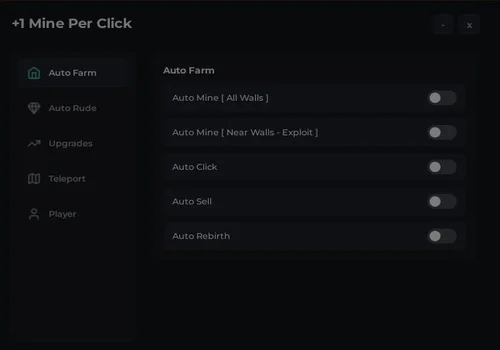
- Auto Mine ( All Walks )
- Auto Mine near walls
- Auto Click
- +5 more
Details
Functions
- Auto Mine ( All Walks )
- Auto Mine near walls
- Auto Click
- Auto Sell
- Auto Rebirth
- Autofarm Rude
- Auto Upgrade carry and walkspeed
- Teleports
Change history
- – Added to page!
Script code
loadstring(game:HttpGet("https://pastebin.com/raw/nwhKbBt1"))()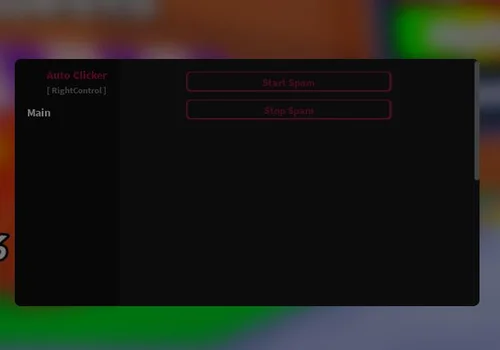
KonyScripts
- Auto Clicker
Details
Functions
- Auto Clicker
Change history
- – Added to page!
Script code
-- Auto Clicker +1 Mine Per Click -- made by KonyScripts

local library = loadstring(game:HttpGet("https://raw.githubusercontent.com/Patskorn/GUI/main/Copy-SynapOver.lua"))()
local GUI = library:new("Auto Clicker","[ RightControl ]")
local Tab = GUI:Tap("Main")

local Event = game:GetService("ReplicatedStorage").Remotes.Server.Click
local Spammer = nil
local IsSpamming = false

Tab:Button("Start Spam",function()
    if not IsSpamming then
        IsSpamming = true
        Spammer = task.spawn(function()
            while IsSpamming do
                Event:FireServer()
                task.wait()
            end
        end)
    end
end)

Tab:Button("Stop Spam",function()
    if IsSpamming then
        IsSpamming = false
        if Spammer then
            task.cancel(Spammer)
            Spammer = nil
        end
    end
end)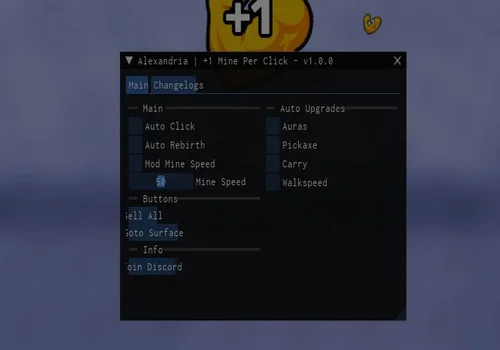
Alexandria
- Auto Click
- Auto Rebirth
- Mod Mine Speed with mine speed changer
- +3 more
Details
Functions
- Auto Click
- Auto Rebirth
- Mod Mine Speed with mine speed changer
- Sell all
- GoTo Surface
- Auto Upgrades: auras, pickaxe, carry, walkspeed
Change history
- – Added to page!
Script code
loadstring(game:HttpGet("https://raw.soteria.rip/7757345559394931"))()Conclusion
For most players, r4lzy and Alexandria are the strongest choices because they cover more of the full +1 Mine Per Click loop: mining, clicking, selling, rebirths, and upgrades. WENTSMOKE is useful if you want mining tools plus teleports, while KonyScripts is better if you only need a clean Auto Clicker. Start with one script, test the main feature first, and switch if an update breaks auto mine, auto sell, or rebirth.
![Скрипт Игра в Слова [🇷🇺] 2026 – (Автоподбор Слов)](https://robscript.com/wp-content/uploads/2026/10/ИграВСлова1-500x315.webp)