Article

fight on a baseplate scripts 2026 – NO KEY (Punch Aura)

Views: 0

This page lists working scripts, key status, features, and update notes for this Roblox game.

Reviewed by RobScript Team Source status checked:

fight on a baseplate is exactly what the name says: players spawn on a plain baseplate and try to win messy close-range fights. The page is not about farming coins or collecting pets. These scripts are mainly for combat help: Punch Aura, auto attacks, stomp/slam actions, weave/dodge tools, target facing, speed changes, ESP, and movement modifiers.

That matters because this game is fast and chaotic. One missed punch, bad timing, or slow reaction can decide the fight. A Punch Aura script is useful when you want the hits to trigger more consistently around nearby targets, while Auto Weave, Auto Dodge, and movement tools help when players are jumping, pushing, grabbing, or rushing you from different angles.

Quick idea: choose Shrak if you want a balanced combat menu, l10scripts if you want a simple open-source Punch Aura, claudeWaffen if you want the biggest feature set, and Swat07_script if you care more about defense, speed, and cleaner camera movement.

Game Link: https://www.roblox.com/games/130960021905304/fight-on-a-baseplate

Best Scripts at a Glance

The scripts below are all marked NO KEY in the cards. Pick the one that matches how you play: close-range pressure, open-source testing, advanced targeting, or defensive movement.

ShrakNo Key
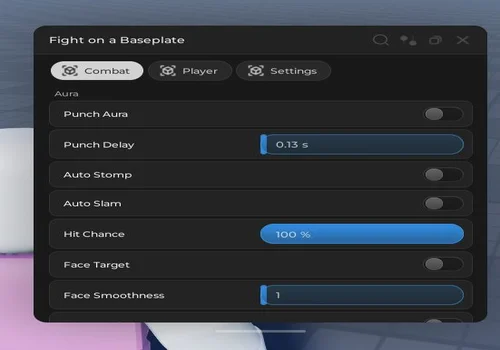
Best balanced pick for Punch Aura, Auto Stomp, Auto Slam, Hit Chance, face target, Auto Weave, zoom, and walkspeed.
View script
l10scriptsOpen Source
Best simple option if you mainly want an open-source Punch Aura without a huge extra menu.
View script
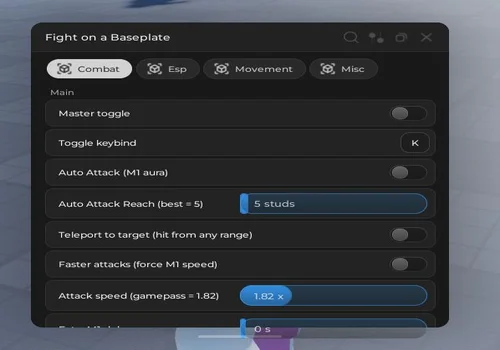
Best advanced combat setup with M1 Aura, target teleport, faster attacks, NPC targeting, grabs, stomp, dodge, ESP, speed, bunny hop, and gravity tools.
View script
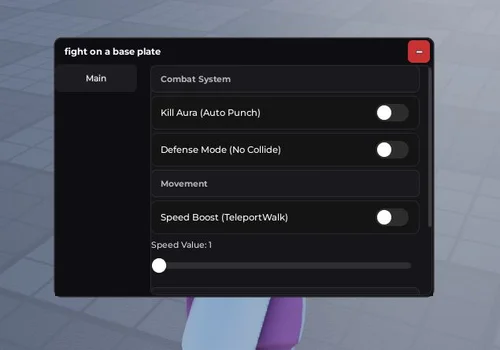
Best defensive pick for Kill Aura, no-collide defense mode, speed boost, weave system, and removing camera shake.
View script

fight on a baseplate script no key / keyless

Below are the current no-key scripts from the page. They are focused on direct combat, not long grinding. Read the functions before copying a script: some are simple Punch Aura tools, while others include advanced movement, target selection, ESP, style tools, or defensive options.
Shrak
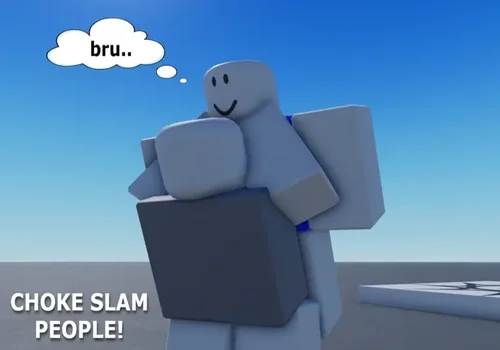
Shrak script preview

Shrak

Developer
Shrak
Created
Created
v2
NO KEY MOBILE PC
  • Punch Aura
  • Auto Stomp
  • Auto Slam
  • +6 more
Copies 3 Discord
Details

Functions

  • Punch Aura
  • Auto Stomp
  • Auto Slam
  • Hit Chance
  • Face target
  • Punch animation
  • Auto Weave
  • Infinite Zoom
  • Walkspeed modifier
Access
NO KEY
Tags
MOBILE PC
Languages
English
Compatibility
Other Codex Arceus X Delta

Change history

  • – Added to page!
Script code
-- Join the discord PLEASEEE!!! https://discord.gg/RxdMxwRPk3
loadstring(game:HttpGet("https://raw.githubusercontent.com/imshrak/fightonabaseplate/refs/heads/main/main"))()
l10scripts
l10scripts script preview

l10scripts

Developer
l10scripts
Created
Created
v2
NO KEY MOBILE PC OPEN SOURCE
  • Open Source Punch aura
Copies 0
Details

Functions

  • Open Source Punch aura
Access
NO KEY
Tags
MOBILE PC OPEN SOURCE
Languages
English
Compatibility
Other Codex Arceus X Delta

Change history

  • – Added to page!
Script code
-- join discord for more open source stuff and you can request features
-- DISCORD: http://discord.com/invite/2dXruhAuYt
loadstring(game:HttpGet("https://raw.githubusercontent.com/Lutosys/opensrc/refs/heads/main/fightbaseplate.lua"))()
claudeWaffen
claudeWaffen script preview

claudeWaffen

Developer
claudeWaffen
Created
Created
v2
NO KEY MOBILE PC
  • Auto Attack (m1 Aura)
  • Teleport to target (hit from any range)
  • Faster Attacks (force m1 Speed)
  • +12 more
Copies 0
Details

Functions

  • Auto Attack (m1 Aura)
  • Teleport to target (hit from any range)
  • Faster Attacks (force m1 Speed)
  • Targeting dummies/NPCs
  • Ignore safezone
  • Ignore players
  • Auto Grab
  • Auto Stomp
  • Auto Push
  • Auto Dodge
  • Use any style
  • ESP Players
  • CFrame speed modifier
  • Bunny hop (auto-jump, no CD)
  • Custom gravity
Access
NO KEY
Tags
MOBILE PC
Languages
English
Compatibility
Other Codex Arceus X Delta

Change history

  • – Added to page!
Script code
loadstring(game:HttpGet("https://raw.githubusercontent.com/claudeWaffen/fightonabaseplate/refs/heads/main/baseplate.lua"))()
Swat07_script
Swat07_script script preview

Swat07_script

Developer
Swat07_script
Created
Created Swat07_script
v2
NO KEY MOBILE PC
  • Kill Aura (Auto Punch)
  • Defense Mode (No Collide)
  • Speed boost
  • +2 more
Copies 0 Discord
Details

Functions

  • Kill Aura (Auto Punch)
  • Defense Mode (No Collide)
  • Speed boost
  • Weave System
  • Remove Camera Shake
Access
NO KEY
Tags
MOBILE PC
Languages
English
Compatibility
Other Codex Arceus X Delta

Change history

  • – Added to page!
Script code
loadstring(game:HttpGet("https://pastebin.com/raw/Q9Jjr1Lp"))()

What fight on a baseplate scripts are actually for

This is not a huge simulator with many currencies. The whole point is fighting on a flat arena, so useful scripts are built around reaction speed, close-range pressure, and staying hard to hit. A good script does not need to look fancy here. It needs to help you punch at the right moment, face the target, dodge cleaner, or keep control when the screen gets messy.

If you miss too many hits

Use Punch Aura, Kill Aura, Auto Attack, or M1 Aura. These features are made for close-range pressure when another player is moving around you, jumping, or trying to trade punches first.

If you get punished after attacking

Look for Auto Weave, Auto Dodge, Defense Mode, or No Collide. These tools are more about surviving the counter-hit than starting the fight.

If targets keep running away

Speed modifiers, face target, teleport to target, bunny hop, and CFrame movement help you stay close enough to keep pressure instead of chasing forever across the baseplate.

Core functions

These are the features players usually care about in fight on a baseplate. The best option depends on whether you want offense, defense, target control, or movement help.

Punch Aura / Kill Aura
Automatically attacks nearby targets when supported. Useful in close fights where manual timing is hard and players keep moving around you.
Auto Stomp / Auto Slam
Helps finish or pressure targets after you get an opening. This is useful when a fight turns into fast knockdowns and follow-up actions.
Auto Weave / Auto Dodge
Defensive tools for avoiding hits or reacting faster. Good if you lose fights because you get caught after throwing punches.
Face Target / Targeting
Keeps your character aimed toward the enemy or helps choose a target. This matters because bad angle often means missed punches.
Speed / Bunny Hop / Gravity
Movement modifiers help chase, reposition, or avoid getting trapped. They are not the main damage tool, but they can decide who controls the fight.
ESP / Zoom / Camera helpers
Visibility tools help track players and keep the fight readable, especially when the arena gets crowded or camera shake makes it harder to react.

Best script choice by situation

  • For simple Punch Aura: use l10scripts if you want a lighter open-source option focused on the main feature.
  • For a balanced combat menu: use Shrak because it includes Punch Aura, stomp/slam actions, hit chance, target facing, animation, weave, zoom, and walkspeed.
  • For advanced control: use claudeWaffen if you want many toggles like teleport to target, faster M1 attacks, any style, ESP, bunny hop, and custom gravity.
  • For defensive play: use Swat07_script if your main problem is getting hit too easily, losing camera control, or needing speed plus weave tools.

Script comparison table

Compare the no-key fight on a baseplate scripts by access type, best use case, and the main features listed in each card.

ScriptAccessBest forMain features
ShrakNo KeyBalanced combat menuPunch Aura, Auto Stomp, Auto Slam, Hit Chance, Face target, Auto Weave, Infinite Zoom, Walkspeed
l10scriptsNo Key / Open SourceSimple Punch Aura testingOpen Source Punch aura
claudeWaffenNo KeyAdvanced offense and movementM1 Aura, target teleport, faster attacks, NPC targeting, grabs, dodge, ESP, speed, bunny hop, gravity
Swat07_scriptNo KeyDefense and cleaner movementKill Aura, Defense Mode, Speed boost, Weave System, Remove Camera Shake

Punch Aura vs Auto Weave: which one matters more?

Punch Aura is the offensive feature. It helps when you are close enough to hit but do not want to rely on perfect manual timing. Auto Weave is the defensive feature. It helps when you are getting punished by faster players or when a fight turns into a quick back-and-forth. For most players, Punch Aura feels stronger at first because it makes fights easier to start. But once players fight back, weave, dodge, and movement tools become just as important.

A simple way to choose: if you lose because you cannot land hits, pick a Punch Aura focused script. If you lose because you get hit right after attacking, pick a script with Auto Weave, Auto Dodge, Defense Mode, or speed tools.

How to use script

Use these steps to test a fight on a baseplate script without turning on every feature at once.

  1. Choose a script based on your problem: missed punches, weak defense, slow movement, or target tracking.
  2. Check that the card says NO KEY and that your device tag is listed as Mobile or PC.
  3. Copy the script code from the card or source shown by the developer.
  4. Run the script in your executor and open the menu if the script has one.
  5. Start with one combat feature first, such as Punch Aura or Auto Weave, before enabling speed, teleport, or gravity tools.
  6. If the script feels too aggressive or unstable, turn off extra movement modifiers and test only the core attack feature.
Scripts can stop working after Roblox, game, or executor updates. Use them only in environments where script testing is allowed.

Safety notice

All scripts on this page come from third-party sources. Check the source before running anything and avoid loaders, redirects, or fake verification pages that ask for account details.

Never enter your Roblox password, cookie, or private account information into a script page, Discord bot, or external verification form.

Frequently Asked Questions

Are these fight on a baseplate scripts no key?
Yes. The script cards on this page are marked NO KEY. One of them is also marked OPEN SOURCE. Still, always check the card because access can change after updates.
What does Punch Aura do in fight on a baseplate?
Punch Aura is an attack helper for close-range fights. It is useful when nearby players move fast and you do not want every hit to depend on perfect manual timing.
Which script is best for Punch Aura?
Shrak is the better all-round Punch Aura option because it also lists Auto Stomp, Auto Slam, hit chance, face target, Auto Weave, zoom, and walkspeed. l10scripts is better if you want a simpler open-source Punch Aura.
Which script has the most features?
claudeWaffen lists the largest feature set: M1 Aura, target teleport, faster attacks, NPC targeting, Auto Grab, Auto Stomp, Auto Push, Auto Dodge, any style, ESP, speed, bunny hop, and custom gravity.
Can these scripts work on mobile?
The cards list MOBILE and PC tags, but real support depends on your executor, Roblox updates, and whether the script source is still active.
Why did you remove the empty video block?
There was no real video URL attached to this page. An empty video block makes the page look unfinished, so it is better to use the space for helpful combat explanations and script comparison.

Robscript team opinion:

For fight on a baseplate, the best script is not the one with the longest list only. The game is basically close combat on a flat arena, so the useful tools are the ones that help you land hits, stay near the target, and avoid getting punished after attacking. Shrak is the safest all-round recommendation because it covers Punch Aura, stomp/slam, target facing, Auto Weave, and movement. claudeWaffen is stronger if you want many advanced toggles, but it may be more than a casual player needs. l10scripts is clean for basic Punch Aura testing, and Swat07_script makes sense if defense and camera control are your main problems.

Conclusion

If you came here for Punch Aura, start with Shrak or l10scripts. Shrak gives you more combat support around the aura, while l10scripts is better for simple open-source testing. If you want a bigger menu with target teleport, style tools, ESP, bunny hop, and gravity options, try claudeWaffen. If you mainly need defense, speed, weave, and less camera shake, Swat07_script is the cleaner choice.

Game link: https://www.roblox.com/games/130960021905304/fight-on-a-baseplate