Ability Arena is built around fighting other players and collecting hits to unlock more ability movesets. The scripts on this page focus on that loop: finding a target, staying close enough to attack, returning to the arena after a death, and reducing repeated manual punches.
There are three no-key options below. Darkangel12321 and VoidScriptsDK provide broader combat, tracking and movement tools, while Fluent David is a smaller Auto Punch script. Choose the option that solves your actual problem instead of selecting the longest function list.
Game link: Ability Arena
Choose a script by what you need
Want the full feature set?
Start with Darkangel12321 or VoidScriptsDK. Both combine Punch Aura, Auto Follow, automatic arena entry, ESP and movement options in one menu.
Want to inspect the source?
Choose Darkangel12321. Its raw source is available to read. This gives you more visibility into the current code, but it does not guarantee that the script or its remote dependencies will never change.
Want something smaller?
Choose Fluent David when you mainly want Auto Punch and fewer settings. Its current Hitbox option is experimental and should not be treated as a confirmed working Hitbox Expander.
Ability Arena no-key scripts
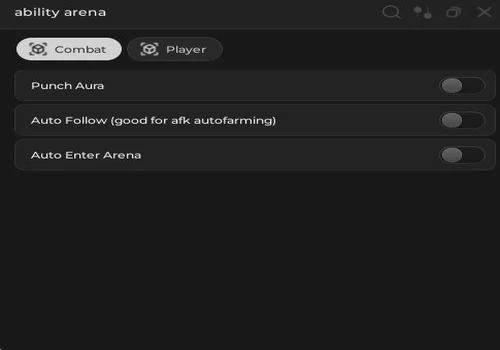
Darkangel12321
A source-visible all-in-one option with Punch Aura, Auto Follow, automatic arena entry, player highlights and movement tools. Choose it when you want to inspect the raw code instead of running a completely hidden loader.
- Punch Aura
- Auto Follow
- Auto Enter Arena
- +3 more
Details
Functions
- Punch Aura
- Auto Follow
- Auto Enter Arena
- Player ESP
- Speed Changer
- Infinite Jump
Change history
- – Added to page!
Script code
loadstring(game:HttpGet("https://pastefy.app/E9M42pEq/raw",true))()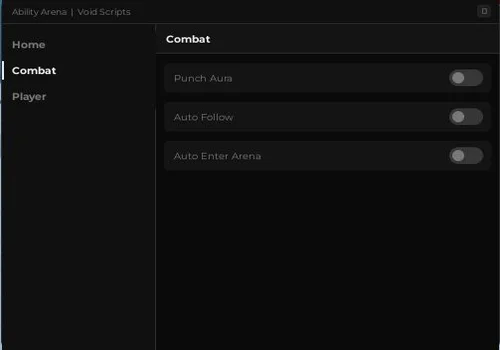
VoidScriptsDK
A no-key alternative built around the same main gameplay loop: stay near active players, punch automatically, return after a death, and use ESP or movement options to find the next fight.
- Punch Aura
- Auto Follow
- Auto Enter Arena
- +3 more
Details
Functions
- Punch Aura
- Auto Follow
- Auto Enter Arena
- Player ESP
- Speed Changer
- Infinite Jump
Change history
- – Added to page!
Script code
loadstring(game:HttpGet("https://pastefy.app/q3DwR4qd/raw"))()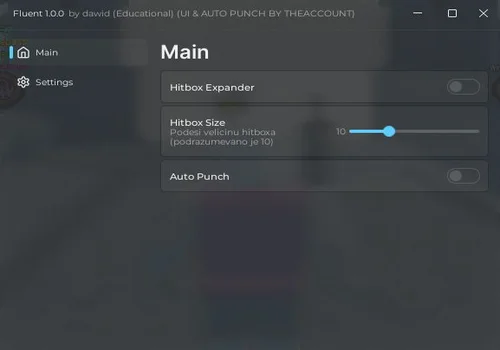
Fluent David
A smaller script for players who mainly want automatic punches and a simple Fluent interface. The current Hitbox option should be treated as experimental: it can display a larger local character part, but it is not confirmed to improve actual hit registration.
- Auto Punch
- Experimental Hitbox Visualizer
Details
Functions
- Auto Punch
- Experimental Hitbox Visualizer
Change history
- – Added to page!
Script code
-- Učitavanje Fluent UI biblioteke (izgled sa slike)
local Fluent = loadstring(game:HttpGet("https://github.com/dawid-scripts/Fluent/releases/latest/download/main.lua"))()

-- Inicijalizacija glavnog prozora
local Window = Fluent:CreateWindow({
    Title = "Fluent 1.0.0",
    SubTitle = "by dawid (Educational) (UI & AUTO PUNCH BY THEACCOUNT)",
    TabWidth = 160,
    Size = UDim2.fromOffset(580, 460),
    Acrylic = true,
    Theme = "Dark",
    MinimizeKey = Enum.KeyCode.LeftControl -- Otvara/zatvara meni na Left Control
})

-- Kreiranje tabova
local Tabs = {
    Main = Window:AddTab({ Title = "Main", Icon = "home" }),
    Settings = Window:AddTab({ Title = "Settings", Icon = "settings" })
}

-- Servisi i varijable
local plrs = game:GetService("Players")
local rs = game:GetService("RunService")
local vim = game:GetService("VirtualInputManager")
local lp = plrs.LocalPlayer

local hitboxEnabled = false
local autoPunchEnabled = false
local hb_size = Vector3.new(10, 10, 10)
local cache = {}
local punchRange = 12 -- Distanca na kojoj će auto-punch reagovati
local punchCooldown = false

-- Funkcija za proveru i promenu hitboxa
local function updateHitboxes()
    if not hitboxEnabled then return end
    for _, p in next, plrs:GetPlayers() do
        if p ~= lp and p.Character then
            -- Tražimo "Hitbox" ili "HumanoidRootPart" ako igra nema poseban Hitbox part
            local b = p.Character:FindFirstChild("Hitbox") or p.Character:FindFirstChild("HumanoidRootPart")
            if b and b:IsA("BasePart") then
                if not cache[p] then
                    cache[p] = {
                        Size = b.Size,
                        Trans = b.Transparency,
                        Color = b.Color,
                        Collide = b.CanCollide
                    }
                end
                b.Size = hb_size
                b.Transparency = 0.5
                b.Color = Color3.fromRGB(255, 0, 0)
                b.CanCollide = false
            end
        end
    end
end

-- Vraćanje originalnog hitboxa kada se isključi
local function resetHitboxes()
    for p, s in next, cache do
        if p.Character then
            local b = p.Character:FindFirstChild("Hitbox") or p.Character:FindFirstChild("HumanoidRootPart")
            if b then
                b.Size = s.Size
                b.Transparency = s.Trans
                b.Color = s.Color
                b.CanCollide = s.Collide
            end
        end
    end
    table.clear(cache)
end

-- Pronalaženje najbližeg igrača za Auto Punch
local function getClosestPlayer()
    local closest = nil
    local dist = punchRange
    if not lp.Character or not lp.Character:FindFirstChild("HumanoidRootPart") then return nil end
    local myPos = lp.Character.HumanoidRootPart.Position

    for _, p in next, plrs:GetPlayers() do
        if p ~= lp and p.Character and p.Character:FindFirstChild("HumanoidRootPart") then
            local d = (p.Character.HumanoidRootPart.Position - myPos).Magnitude
            if d < dist then
                dist = d
                closest = p
            end
        end
    end
    return closest
end

-- Funkcija za automatsko udaranje
local function autoPunch()
    if not autoPunchEnabled or punchCooldown then return end
    local target = getClosestPlayer()

    if target then
        punchCooldown = true

        -- Ako igrač drži alat (npr. Punch/Fists), aktiviraj ga direktno
        local tool = lp.Character and lp.Character:FindFirstChildOfClass("Tool")
        if tool then
            tool:Activate()
        else
            -- Simulacija levog klika miša na ekranu
            vim:SendMouseButtonEvent(0, 0, 0, true, game, 1)
            task.wait(0.05)
            vim:SendMouseButtonEvent(0, 0, 0, false, game, 1)
        end

        task.wait(0.12) -- Cooldown između udaraca da ne laga
        punchCooldown = false
    end
end

-- Glavni loop koji vrti provere u pozadini
rs.RenderStepped:Connect(function()
    if hitboxEnabled then
        updateHitboxes()
    end
    if autoPunchEnabled then
        autoPunch()
    end
end)

--- Dodavanje elemenata u UI ---

-- 1. Hitbox Expander Toggle
local HitboxToggle = Tabs.Main:AddToggle("HitboxToggle", {
    Title = "Hitbox Expander",
    Default = false
})

HitboxToggle:OnChanged(function(Value)
    hitboxEnabled = Value
    if not hitboxEnabled then
        resetHitboxes()
    end
end)

-- Slider za veličinu hitboxa (jako korisno da podesiš sam na licu mesta)
local HitboxSlider = Tabs.Main:AddSlider("HitboxSlider", {
    Title = "Hitbox Size",
    Description = "Podesi velicinu hitboxa (podrazumevano je 10)",
    Default = 10,
    Min = 2,
    Max = 30,
    Rounding = 1,
    Callback = function(Value)
        hb_size = Vector3.new(Value, Value, Value)
    end
})

-- 2. Auto Punch Toggle
local AutoPunchToggle = Tabs.Main:AddToggle("AutoPunchToggle", {
    Title = "Auto Punch",
    Default = false
})

AutoPunchToggle:OnChanged(function(Value)
    autoPunchEnabled = Value
end)

-- Notifikacija da je skripta uspešno učitana
Fluent:Notify({
    Title = "Sistem Učitan",
    Content = "Skripta je spremna za rad! Pritisni Left Control da sakriješ UI.",
    Duration = 5
})What each function is useful for
| Function | What it does | Why a player might use it | Important limit |
|---|---|---|---|
| Punch Aura | Searches for nearby players and attempts to punch them automatically. | Helps continue collecting hits without repeatedly aiming at every close target. | It can attack a player you did not intend to target. |
| Auto Punch | Activates a normal punch when another player is close. | Useful when you want repeated punches without enabling a complete hub. | It does not follow players who move out of range. |
| Auto Follow | Moves your character toward another active player. | Keeps you close enough for Punch Aura to continue working. | Movement may look unnatural or get stuck around objects. |
| Auto Enter Arena | Attempts to return your character after a death or respawn. | Restarts the combat loop without making you enter manually every time. | It may stop working if the lobby or deployment system changes. |
| Player ESP | Highlights other characters. | Helps locate active players when the arena is crowded or a target moves out of view. | It shows positions but does not choose the right opponent for you. |
| Speed Changer | Changes how quickly your character moves. | Makes it easier to reach another fight or stay near a moving player. | Very high values can make movement difficult to control. |
| Infinite Jump | Allows repeated jumps. | Helps with repositioning and avoiding some ground-level situations. | It does not protect you from abilities or guarantee an escape. |
| Hitbox Visualizer | Makes the selected character part look larger on the local client. | Shows which area the Fluent David script is trying to modify. | The current version is not confirmed to improve real hit registration. |
Why Hitbox Expander is not the main recommendation
The Fluent David menu contains a Hitbox toggle and a size slider, but the currently published version is not a reliable reason to choose the script.
Its current implementation changes the visible size of a local character part. That can show the area the script is attempting to modify, but it is not confirmed to improve actual server-side hit registration. For this reason, Fluent David is presented as an Auto Punch script, not as a proven Hitbox Expander.
If a later release changes this behaviour, the card, page title and changelog should be updated only after the new version has been checked.
Full hub or simple Auto Punch?
Choose Darkangel12321 when access to the raw source matters and you want Punch Aura, following, ESP and movement tools together.
Choose VoidScriptsDK when you want a similar all-in-one no-key setup from a separate developer release.
Choose Fluent David when you want a smaller interface focused mainly on Auto Punch. Do not choose the current version only for its Hitbox setting.
How to use the scripts
- Choose one of the three script cards above.
- Copy its code using the button inside the card.
- Open Ability Arena and wait until your character loads.
- Paste the code into a compatible script runner.
- Execute it once and wait for the interface to appear.
- Enable one function at a time so you can identify which setting causes a problem.
Do not execute several versions together. Darkangel12321 and VoidScriptsDK already cover many of the same functions, so running both can create conflicting movement or combat loops.
Current executor status
No key means fewer steps, not zero risk
A no-key script opens without an external unlock process. It does not mean that the code is safe, undetected or compatible with every executor.
Remote loaders and UI libraries can change after a page has been published. Roblox or Ability Arena updates can also break functions that worked in an earlier version.
Do not enter your Roblox password, account cookie or other login information into a script page, key page or unknown program. Avoid downloads that ask you to disable security software or install unrelated files.
Page updates
- June 10, 2026 — Published the page with the original Darkangel12321 Punch Aura script.
- July 16, 2026 — Added VoidScriptsDK and Fluent David.
- July 16, 2026 — Rebuilt the page around three script choices, removed unsupported safety claims and broad compatibility wording, and clarified that Fluent David’s current Hitbox option is experimental.
![Скрипт Игра в Слова [🇷🇺] 2026 – (Автоподбор Слов)](https://robscript.com/wp-content/uploads/2026/10/ИграВСлова1-500x315.webp)