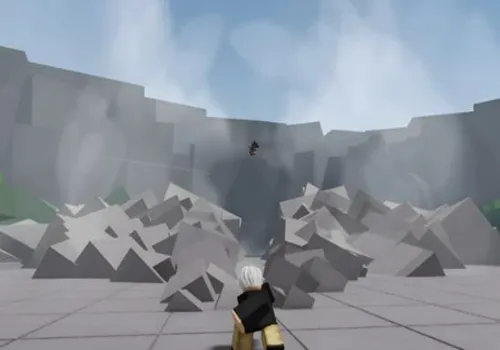
The Strongest Battlegrounds is a fast PvP game where one missed block, short dash, or badly timed attack can break your whole combo. This page keeps the script choice simple: the old key-system hubs have been removed, and the main list now focuses on options that open without extra unlock pages.
Playing on a phone? Start with Speed Hub X. Playing on a PC? Phantasm Hub is the better first pick.
The game itself is built around mastering abilities, combos, and direct fights against other players. The scripts below are useful because they change specific parts of that loop: landing attacks, recovering from stun, following opponents, moving around the map, or testing a different style of moveset.
Best pick for mobile: Speed Hub X
Speed Hub X is the first option to try when you play TSB on a phone or tablet.
Touch controls leave less space for a large menu, and it is harder to press several actions while following a moving opponent. Speed Hub X collects movement and combat tools such as Auto Block, anti-stun and anti-knockback protection, aim assistance, teleport, player selection and skill automation in one hub.
Why choose it:
- you mainly play on mobile;
- you need quick movement and combat toggles;
- you want a no-key hub without an extra unlock process;
- you do not want to switch between several small scripts.
Speed Hub X will not automatically make every combo good. It mainly removes some of the control friction that feels stronger on a touchscreen.
Best pick for PC: Phantasm Hub
Phantasm Hub is the main PC choice on this page.
A desktop screen gives you more room to use its larger interface and switch between combat, movement, teleport, visual and player options. The TSB version listed here includes ESP, dash customization, anti-character tools, movement utilities, animation controls and player targeting.
Why choose it:
- you play with a keyboard and mouse;
- you want several utility categories inside one menu;
- you often switch functions depending on the fight;
- you prefer a hub-style interface instead of one small feature.
Some versions can take several seconds to load, so do not keep executing the loader repeatedly while the first menu is still opening.
Choose a script by what happens in your fights
Do not select a hub because it has the longest function list. Start with the problem that actually ruins your fights.
| What keeps happening? | Feature to look for | Why it can help in TSB |
|---|---|---|
| Your attacks miss at close range | Hitbox or aim assistance | Makes it easier to keep contact when an opponent side-dashes or moves near the edge of your attack. |
| You lose control after being knocked down | Anti Ragdoll or Anti Stun | Reduces the time where you cannot respond or reposition. |
| You react too late to incoming moves | Auto Block | Helps with defensive timing, especially when the screen is crowded. |
| Touch controls feel slow | Mobile-friendly UI and movement tools | Reduces the number of difficult taps needed during a fight. |
| You want a different-looking fighting style | Custom Moveset or animation tools | Changes how attacks or sequences look and lets you experiment instead of using the same presentation every round. |
| You cannot find a player after a fight starts | ESP or player selection | Helps track the correct target without searching through the whole arena. |
| You want to move between players quickly | Teleport or movement modifiers | Cuts down the time spent crossing the map instead of fighting. |
A feature is useful only when it solves a real problem. Turning on every combat option at once can make movement look unnatural, break normal timing, or make it harder to understand which setting caused a bug.
What Custom Moveset and Hitbox actually change
Custom Moveset is for variety, not just extra damage
A custom moveset usually changes or combines attacks, animations, effects, or the way a sequence is presented. The main reason to use it is to make repeated fights feel different or to try a style that is not part of your normal character setup.
The Strongest Battlegrounds also has an official Skill Builder. It belongs to Private Server+ and works through timelines, existing skills and animation settings. A script that advertises a custom moveset is not automatically giving you the official game feature or permanent access to it.
Use custom movesets when you want to:
- test unusual attack sequences;
- record a different-looking fight;
- experiment in a private environment;
- make familiar characters feel less repetitive.
Do not assume every custom animation changes the real damage, range or server-side result. Some changes may be mostly visual.
Hitbox tools help with contact, but not decision-making
TSB fights depend on spacing. An opponent can escape a sequence by moving outside your range, using an evasive action, or forcing you to attack too early.
A hitbox option may make close attacks connect more easily near the edge of their normal area. This can help on mobile, where camera movement and precise aiming are harder to control at the same time.
It does not teach you:
- when to start a combo;
- when an opponent still has an evasive;
- which move should extend the combo;
- when you should stop attacking and block.
Use it as a contact tool, not as a replacement for understanding the fight.
Best no-key TSB scripts
The two scripts below are placed first because they solve different device problems. Speed Hub X is the quicker mobile recommendation, while Phantasm Hub is the main PC recommendation.
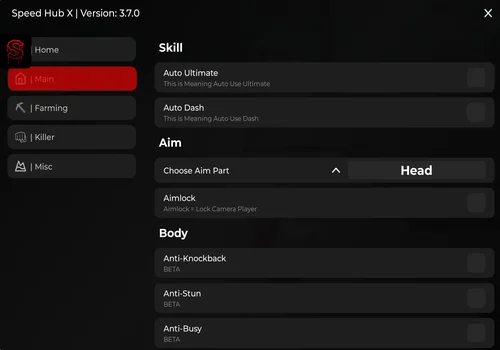
Mobile-first recommendation: A no-key TSB hub selected for mobile players. It puts skill automation, aim, body protection, blocking, teleport, player targeting and ESP inside one menu, making it easier to control fights without opening several separate scripts.
Speed Hub X
- Skill Automation: Auto Ultimate, Auto Dash
- Aim: Aim Part Selection, Aimlock
- Body Protection: Anti-Knockback, Anti-Stun, Anti-Busy, Anti-Slow
- +8 more
Details
Functions
- Skill Automation: Auto Ultimate, Auto Dash
- Aim: Aim Part Selection, Aimlock
- Body Protection: Anti-Knockback, Anti-Stun, Anti-Busy, Anti-Slow
- Farming: Auto Void, Auto Block
- Character Equip: Character Selection, Equip Character
- Safe Mode: Low Health Threshold, Return Health Threshold
- Kill Automation: Auto Kill, Auto Play to Kill
- Selected Player Actions: Auto Kill, Auto Play to Kill, Teleport, Spectate
- Auto Dodge Attack
- Server Tools: Server Hop, Low-Player Server Hop, Rejoin
- Player ESP
Change history
- – Added to page!
Script code
loadstring(game:HttpGet("https://raw.githubusercontent.com/AhmadV99/Speed-Hub-X/main/Speed%20Hub%20X.lua", true))()PC-first recommendation: A no-key hub selected for PC players who want a wider set of combat, movement, teleport, visual and player-tracking options. The larger menu is easier to manage with a keyboard, mouse and full-size screen.
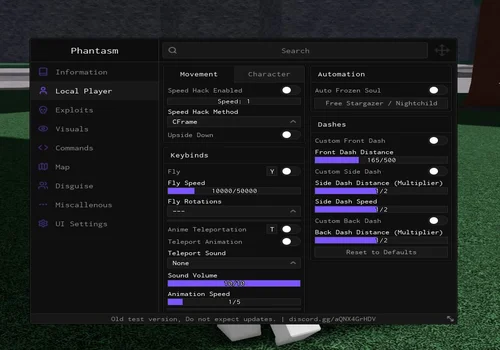
Phantasm Hub
- Speed Hack: speed value, CFrame method
- Fly: speed, rotations
- Anime Teleportation: animation, sound, volume, animation speed
- +29 more
Details
Functions
- Speed Hack: speed value, CFrame method
- Fly: speed, rotations
- Anime Teleportation: animation, sound, volume, animation speed
- Dash Customization: front, side and back dash distance; side dash speed
- Auto Frozen Soul: Free Stargazer / Nightchild
- Trashcan Launch: launch power
- Skill 1 Bring: area selection, teleport back
- Attack All
- Skill 1 Throw
- Remove Back-Punch: Windstorm Fury, Tatsumaki Ultimate, Prey’s Peril
- Wall Combo: anywhere, auto combo, teleport back
- Fling on Death
- Anti Character Moves: Saitama, Garou, Genos, Tatsumaki, Atomic Samurai, Suiryu, Metal Bat, Speed-o’-Sonic, KJ, Frozen Soul
- Invisible Moves: block, counter, counter hit
- Invisible Characters: Saitama, Garou, Speed-o’-Sonic, Genos, Tatsumaki, Atomic Samurai, Metal Bat, Suiryu
- ESP: death counter, boxes, rainbow boxes, tracers, rainbow tracers
- ESP Customization: thickness, transparency, face camera, unlock tracers
- Move Information: notifications, expose moves in chat, expose whitelisted players
- Visual Controls: no camera animations, CoreGUI elements, desync visualizer, no walls
- Player Commands: goto, view, spectate, whitelist, remove whitelist
- Fling Commands: fling, void, loop fling, loop void, unfling, unvoid
- Utility Commands: safezone, say, rejoin, reset, fix camera, vertical clip, horizontal clip
- Fling Settings: type, speed, timeout
- Teleport To: Above Tunnel, Arena, Atomic Slash, Baseplate, Below Baseplate, Bigger Jail, Dark Domain, Death Counter, Even Bigger Jail, Jail, Smaller Jail, Middle, Mountain 1, Mountain 2, Mountain Edge, Void
- Anti-Ban: staff detector, group check, friends check, anticheat detector, avoid-ban method, rejoin delay
- External Scripts: Infinite Yield, Remote Spy, Dark Dex V3, Bypassed Dark Dex V3
- Animation Customization: idle, run, block and looped animations; speed and fade times
- Character Distortion
- Upside Down
- Backdash Cancel
- Anti Trash Can
- Player Target Selection
Change history
- – Added to page!
Script code
loadstring(game:HttpGet('https://raw.githubusercontent.com/ATrainz/Phantasm/refs/heads/main/Games/TSB.lua'))()More verified no-key options
The following script cards are also marked as no-key. They remain below the two main device-based recommendations.
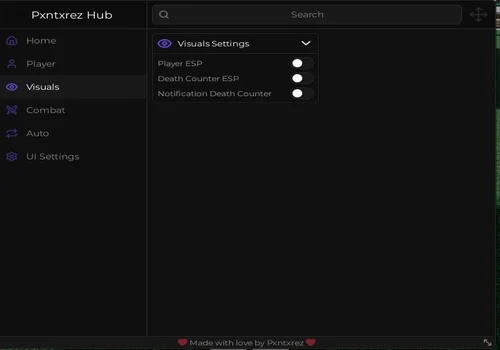
pxntxrez hub
- Speed Value
- Infinite Jump
- Noclip
- +15 more
Details
Functions
- Speed Value
- Infinite Jump
- Noclip
- Player ESP
- Death Counter ESP
- Death Counter Notifications
- Anti Ragdoll
- Anti Stun
- No Slow
- Aim Lock
- Auto Spam M1
- Auto Use Skills
- Random Skill Mode
- Auto Use Ultimate
- Auto Follow
- Aggressive Follow Mode
- Target Selection
- Anti AFK
Change history
- – Added to page!
Script code
loadstring(game:HttpGet("https://raw.githubusercontent.com/Pxntxrez/NULL/refs/heads/main/obfuscated_script-1753991814596.lua"))()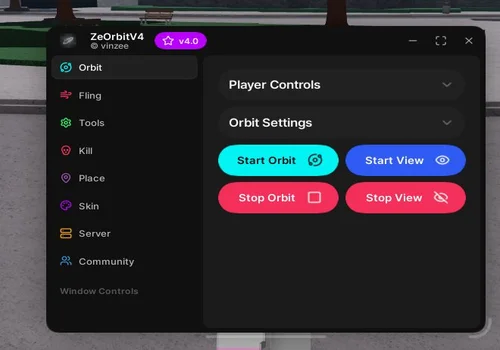
ZeOrbit v4
- Player Orbit
- Player View
- Orbit Radius
- +17 more
Details
Functions
- Player Orbit
- Player View
- Orbit Radius
- Reset Orbit Radius
- Fling Selected Player
- Fling All Players
- Touch Fling
- Auto Skill
- Teleport Low
- Teleport When HP Is Low
- Return When HP Recovers
- Instant Kill Selected Player
- Auto Instant Kill
- Save Current Position
- Teleport to Atoms
- Teleport to Death Cutscene
- Teleport to GrassTop Part
- Hand Aura
- Rainbow Aura
- Random Aura Color
Change history
- – Added to page!
Script code
loadstring(game:HttpGet("https://raw.githubusercontent.com/xploitforceofficial-stack/ZeOrbitv4Main/refs/heads/main/zeorbitv4.lua"))()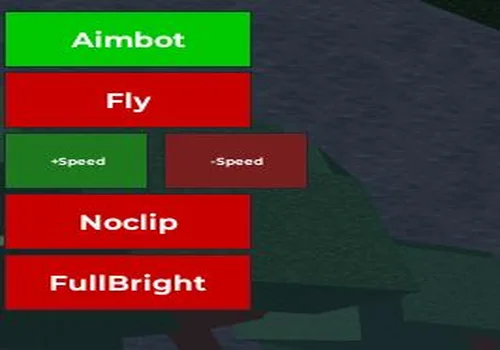
Aimbot
- Aimbot
- Fly
- NoClip
- +1 more
Details
Functions
- Aimbot
- Fly
- NoClip
- FullBright
Change history
- – Added to page!
Script code
loadstring(game:HttpGet("https://raw.githubusercontent.com/academicsep2021-bit/trashcan-tsb-saitama/refs/heads/main/Tsb", true))()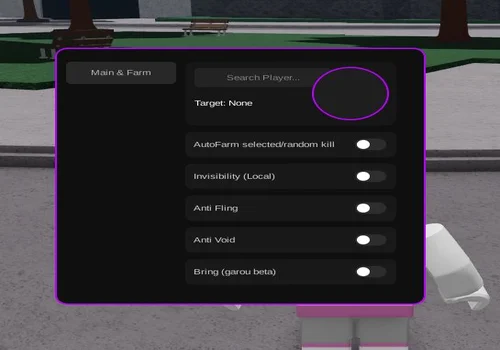
Xdev Hub
- Player Search
- Target Selection
- Auto Farm Selected/Random Kill
- +4 more
Details
Functions
- Player Search
- Target Selection
- Auto Farm Selected/Random Kill
- Local Invisibility
- Anti Fling
- Anti Void
- Bring Players (Garou Beta)
Change history
- – Added to page!
Script code
loadstring(game:HttpGet("https://raw.githubusercontent.com/Emerson2-creator/Scripts-Roblox/refs/heads/main/XDevHubBeta.lua"))()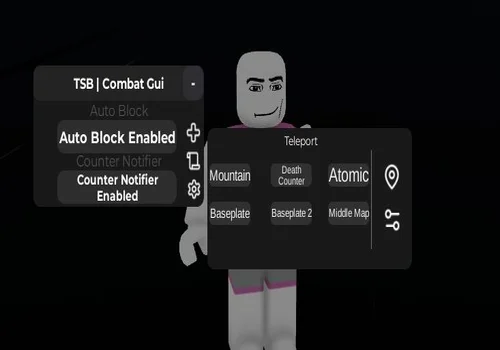
TSB combat GUI
- Auto Block
- Counter Notifier Enabled
- Teleports
Details
Functions
- Auto Block
- Counter Notifier Enabled
- Teleports
Change history
- – Added to page!
Script code
loadstring(game:HttpGet("https://raw.githubusercontent.com/Cyborg883/CombatGUI/refs/heads/main/TSBCombatGUI"))()Key-system hubs removed from this page
The following blocks were removed because the collection now prioritizes stronger no-key alternatives:
- D3D Hub
- Kukuri Client
- ChillX Hub
- Forge Hub
- Solix Hub
- Nicuse Hub
- Faldes X Hub
- Return Hub
- DOWN Hub
- GitanX Hub
These names do not need to stay in the visible script collection. The collapsed list exists only to explain why an older script may no longer be found on the page.
Which script should you open first?
Use Speed Hub X when you mainly play on mobile and need a simpler way to control movement and combat features.
Use Phantasm Hub when you play on PC and want a broader menu that is easier to manage with a mouse and keyboard.
Start with only the functions connected to your actual problem. A smaller setup is easier to understand and easier to disable when something stops working.
![Скрипт Игра в Слова [🇷🇺] 2026 – (Автоподбор Слов)](https://robscript.com/wp-content/uploads/2026/10/ИграВСлова1-500x315.webp)