Article

Ice Tycoon 2 scripts – NO KEY (Auto Water, Auto Farm)

Views: 0

This page lists working scripts, key status, features, and update notes for this Roblox game.

Reviewed by RobScript Team Source status checked:

Ice Tycoon 2 is built around a simple production loop: collect water, freeze it, mine the ice, melt it for profit, and spend the money on stronger tools or machines. The Ice Tycoon 2 script no key below automates the repetitive actions that can leave the tycoon waiting for input.

tawxm hub includes water scooping, Auto Mine, Auto Harvest, and automatic button purchases. It is also the current Ice Tycoon 2 script keyless option on this page, with MOBILE and PC tags.

Game link: Play Ice Tycoon 2 on Roblox

Ice Tycoon 2 script no key / keyless
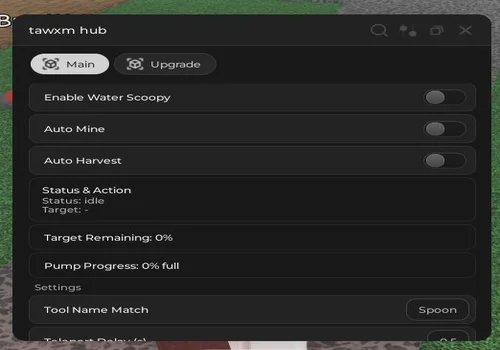
tawxm hub
tawxm hub script preview

tawxm hub

Developer
tawxm
Created
Created
v2
NO KEY MOBILE PC
  • Enable water scoopy
  • Auto Mine
  • Auto Harvest
  • +3 more
Copies 0
Details

Functions

  • Enable water scoopy
  • Auto Mine
  • Auto Harvest
  • Tool name match
  • Teleport and action delay
  • Auto Purchase available buttons
Access
NO KEY
Tags
MOBILE PC
Languages
English
Compatibility
Other Codex Arceus X Delta

Change history

  • – Added to page!
Script code
loadstring(game:HttpGet("https://raw.githubusercontent.com/tawxm/NgThanhTam/refs/heads/main/IceTycoon.lua"))()

What normally slows progress

The early loop needs regular input. Water has to be collected, ice has to be mined, and new buttons must be purchased before the tycoon becomes more productive. Leaving one step idle slows the rest of the base.

Why this script helps

tawxm hub connects those repeated actions. Auto Mine keeps ice moving, water scooping handles the starting resource, and Auto Purchase uses available cash to continue the build.
What the Ice Tycoon 2 script automates

tawxm hub targets the active parts of the freeze-and-melt loop, where you normally keep collecting water, mining ice, and buying the next tycoon upgrade.

Water scooping
Handles the script’s water collection action, reducing the time spent repeating the first step before ice production.
Auto Mine
Mines formed ice automatically so production does not stop while you wait near the cooling area.
Auto Harvest
Runs the supported harvest action when the game exposes it, helping move produced resources through the tycoon loop.
Auto Purchase buttons
Buys available tycoon buttons as money becomes available, so tools and machines can keep expanding without constant manual checks.
Tool name match
Lets the automation look for the correct tool name instead of blindly using the wrong item.
Action delay
Adds control over teleport and interaction timing, which can help when actions fail because the script moves too quickly.

Ice Tycoon 2 gameplay

Watch a full playthrough to see how water, ice production, upgrades, and the tycoon layout connect before enabling automation.

Robscript team opinion:

There is only one script card on this page, so the choice is simple. tawxm hub is marked NO KEY and covers the repeated work that matters early: water collection, mining, harvesting, and buying available buttons. The action delay option is worth testing before assuming a feature is broken, because tycoon interactions can fail when the script teleports or clicks faster than the game responds.

How to use the Ice Tycoon 2 script

Test the main production actions one at a time so you can see which part of the tycoon loop is working.

  1. Open the tawxm hub card and confirm that it is marked NO KEY.
  2. Copy the loader and run it with a compatible executor.
  3. Start with water scooping or Auto Mine instead of enabling every option immediately.
  4. Use Tool name match if the automation selects the wrong item.
  5. Increase the action delay if teleports, mining, or purchase interactions are skipped.
Roblox or game updates can change tools, buttons, and interaction names, causing a feature to stop working.

Ice Tycoon 2 script FAQ

Is this an Ice Tycoon 2 script no key?
Yes. The tawxm hub card is marked NO KEY, so its loader does not list a separate key-system step.
What does Auto Water do?
The card calls this feature Enable water scoopy. It automates the water collection action used before the ice-production part of the tycoon.
Why use Auto Purchase available buttons?
Ice Tycoon 2 grows through tools and machines. Auto Purchase spends available money on supported tycoon buttons instead of making you return and press each one manually.
Is the Ice Tycoon 2 script keyless available on mobile?
The card includes MOBILE and PC tags. Actual compatibility still depends on the executor and the current version of the loader.
Why does Auto Mine sometimes miss an action?
The game may not register a teleport or interaction when actions are sent too quickly. Try increasing the script’s action delay and test again.