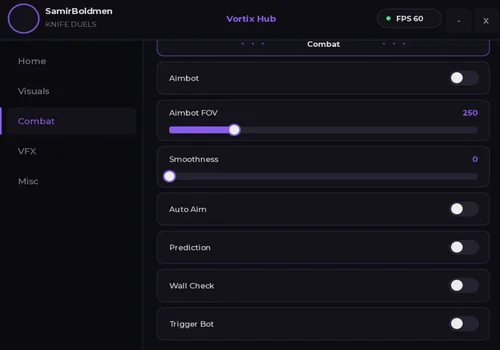
Get the current KNIFE DUELS script for Roblox. Vortix Hub is a no-key script with ESP, aimbot, auto aim, trigger bot, aim prediction, movement modifiers, and visual knife effects. It is listed for both PC and mobile executors.
The six older scripts previously listed on this page are now marked as not working. They remain available below as archived listings, but they should not be presented as current alternatives. The exact reason each script stopped working has not been independently confirmed.
Game link: Play KNIFE DUELS on Roblox
Vortix Hub
- ESP
- Rainbow Knife
- Rainbow Speed Adjustment
- +17 more
Details
Functions
- ESP
- Rainbow Knife
- Rainbow Speed Adjustment
- Sparkle Effect
- Sparkle Amount Adjustment
- Fire Effect
- Fire Size Adjustment
- UI Keybind
- Aim Keybind
- Walk Speed Modifier
- Walk Speed Adjustment
- Jump Boost
- Jump Boost Adjustment
- Aimbot
- Aimbot FOV Adjustment
- Aimbot Smoothness Adjustment
- Auto Aim
- Aim Prediction
- Wall Check
- Trigger Bot
Change history
- – Added to page!
Script code
loadstring(game:HttpGet("https://pastefy.app/iizD2kA3/raw"))()![american - silent aim open source [NOT WORKING]](https://robscript.com/wp-content/uploads/2026/07/knife-duels-open-source-silent-aim.webp)
american – silent aim open source [NOT WORKING]
OUTDATED: This archived Silent Aim script is no longer working with the current version of KNIFE DUELS. Its full source remains visible for reference, but it should not be presented as an active script. The exact game or code change that broke it has not been confirmed.
- Silent Aim
Details
Functions
- Silent Aim
Change history
- – Added to page!
- – Description and source-type notes rewritten for KNIFE DUELS.
- – Marked as not working and moved to the archive.
Script code
getgenv().KnifeConfig = {
  Enabled = true,
  HitPart = "Head",
  FOV = 450
}

local phem1 = game:GetService("Players")
local phem2 = game:GetService("Workspace")
local phem3 = phem1.LocalPlayer
local phem4 = phem2.CurrentCamera
local phem5 = require(phem3.PlayerScripts:WaitForChild("Controllers"):WaitForChild("Combat"):WaitForChild("KnifeController"))

local function phem6()
  local phem7 = nil
  local phem8 = getgenv().KnifeConfig.FOV
  local phem9 = phem4.ViewportSize / 2
  for phem20, phem10 in phem1:GetPlayers() do
    if phem10 ~= phem3 and phem10.Character and phem10.Character:FindFirstChild("Humanoid") and phem10.Character.Humanoid.Health > 0 then
      local phem11 = phem10.Character:FindFirstChild(getgenv().KnifeConfig.HitPart)
      if phem11 then
        local phem12, phem13 = phem4:WorldToViewportPoint(phem11.Position)
        if phem13 then
          local phem14 = (Vector2.new(phem12.X, phem12.Y) - phem9).Magnitude
          if phem14 < phem8 then
            phem7 = phem10
            phem8 = phem14
          end
        end
      end
    end
  end
  return phem7
end

local phem15 = phem5._GetThrowDirection
phem5._GetThrowDirection = function(phem16, phem17)
  if getgenv().KnifeConfig.Enabled then
    local phem18 = phem6()
    if phem18 and phem18.Character then
      local phem19 = phem18.Character:FindFirstChild(getgenv().KnifeConfig.HitPart)
      if phem19 then
        return (phem19.Position - phem17.Position).Unit
      end
    end
  end
  return phem15(phem16, phem17)
end![Combat Hub [NOT WORKING]](https://robscript.com/wp-content/uploads/2026/07/Combat-Hub.jpg)
Combat Hub [NOT WORKING]
OUTDATED: Combat Hub is no longer working with the current version of KNIFE DUELS. The archived card is kept to document its previous Knife Silent Aim, FOV circle, center dot, radius, and target-part settings. It should not be treated as a working alternative to Vortix Hub.
- Knife Silent Aim
- Show FOV Circle
- Show Center Dot
- +2 more
Details
Functions
- Knife Silent Aim
- Show FOV Circle
- Show Center Dot
- Aim FOV Radius
- Target Part
Change history
- – Added to page!
- – Description and source-type notes rewritten for KNIFE DUELS.
- – Marked as not working and moved to the archive.
Script code
-- [[ Initialization Config ]]
getgenv().KnifeConfig = {
    Enabled = false,
    HitPart = "Head",
    FOV = 450,
    ShowFOV = true,
    ShowCenterDot = true,
    Thickness = 2,
    Transparency = 0.2,
    Color = Color3.fromRGB(255, 255, 255),
    CenterDotSize = 6,
    CenterDotColor = Color3.fromRGB(255, 255, 255),
}

-- [[ Services ]]
local Players = game:GetService("Players")
local Workspace = game:GetService("Workspace")
local LocalPlayer = Players.LocalPlayer
local PlayerGui = LocalPlayer:WaitForChild("PlayerGui")

-- [[ Mobile-Friendly GUI Cleanup & Setup ]]
local success, gethuiResult = pcall(function() return gethui() end)
local targetGuiParent = (success and gethuiResult) and gethuiResult or PlayerGui

if targetGuiParent:FindFirstChild("FOVCircleGui") then
    targetGuiParent.FOVCircleGui:Destroy()
end

local fovGui = Instance.new("ScreenGui")
fovGui.Name = "FOVCircleGui"
fovGui.ResetOnSpawn = false
fovGui.IgnoreGuiInset = true
fovGui.Parent = targetGuiParent

-- FOV Frame
local fovFrame = Instance.new("Frame")
fovFrame.Name = "FOVCircle"
fovFrame.AnchorPoint = Vector2.new(0.5, 0.5)
fovFrame.Position = UDim2.fromScale(0.5, 0.5)
fovFrame.BackgroundTransparency = 1
fovFrame.Visible = getgenv().KnifeConfig.ShowFOV
fovFrame.Parent = fovGui

local fovCorner = Instance.new("UICorner")
fovCorner.CornerRadius = UDim.new(1, 0)
fovCorner.Parent = fovFrame

local fovStroke = Instance.new("UIStroke")
fovStroke.Color = getgenv().KnifeConfig.Color
fovStroke.Thickness = getgenv().KnifeConfig.Thickness
fovStroke.Transparency = getgenv().KnifeConfig.Transparency
fovStroke.Parent = fovFrame

-- Center Dot
local centerDot = Instance.new("Frame")
centerDot.Name = "CenterDot"
centerDot.AnchorPoint = Vector2.new(0.5, 0.5)
centerDot.Position = UDim2.fromScale(0.5, 0.5)
centerDot.Size = UDim2.fromOffset(getgenv().KnifeConfig.CenterDotSize, getgenv().KnifeConfig.CenterDotSize)
centerDot.BackgroundColor3 = getgenv().KnifeConfig.CenterDotColor
centerDot.Visible = getgenv().KnifeConfig.ShowCenterDot and getgenv().KnifeConfig.ShowFOV
centerDot.Parent = fovGui

local dotCorner = Instance.new("UICorner")
dotCorner.CornerRadius = UDim.new(1, 0)
dotCorner.Parent = centerDot

-- [[ FOV Functions ]]
local function updateFOV()
    if not fovFrame or not centerDot then return end
    fovFrame.Position = UDim2.fromScale(0.5, 0.5)
    fovFrame.Size = UDim2.fromOffset(getgenv().KnifeConfig.FOV * 2, getgenv().KnifeConfig.FOV * 2)
    centerDot.Position = UDim2.fromScale(0.5, 0.5)
end

local function connectCamera(camera)
    if not camera then return end
    camera:GetPropertyChangedSignal("ViewportSize"):Connect(updateFOV)
    updateFOV()
end

connectCamera(Workspace.CurrentCamera)
Workspace:GetPropertyChangedSignal("CurrentCamera"):Connect(function()
    connectCamera(Workspace.CurrentCamera)
end)

updateFOV()

-- [[ Rayfield Gen2 UI Setup ]]
local Rayfield = loadstring(game:HttpGet("https://sirius.menu/gen2"))()

local window = Rayfield:CreateWindow({
    name = "Combat Hub",
    subtitle = "Rayfield Gen2",
})

local tab = window:CreateTab({ name = "Combat Options", icon = 93364949241311 })

-- Toggle: Silent Aim
tab:CreateToggle({
    name = "Enable Knife Silent Aim",
    currentValue = getgenv().KnifeConfig.Enabled,
    callback = function(value)
        getgenv().KnifeConfig.Enabled = value
    end,
})

-- Toggle: FOV Circle
tab:CreateToggle({
    name = "Show FOV Circle",
    currentValue = getgenv().KnifeConfig.ShowFOV,
    callback = function(value)
        getgenv().KnifeConfig.ShowFOV = value
        if fovFrame then fovFrame.Visible = value end
        if centerDot then centerDot.Visible = value and getgenv().KnifeConfig.ShowCenterDot end
    end,
})

-- Toggle: Center Dot
tab:CreateToggle({
    name = "Show Center Dot",
    currentValue = getgenv().KnifeConfig.ShowCenterDot,
    callback = function(value)
        getgenv().KnifeConfig.ShowCenterDot = value
        if centerDot then centerDot.Visible = getgenv().KnifeConfig.ShowFOV and value end
    end,
})

-- Slider: FOV Radius
tab:CreateSlider({
    name = "Aim FOV Radius",
    range = {0, 1000},
    increment = 10,
    currentValue = getgenv().KnifeConfig.FOV,
    callback = function(value)
        getgenv().KnifeConfig.FOV = value
        updateFOV()
    end,
})

-- Dropdown: Hit Part
tab:CreateDropdown({
    name = "Target Part",
    options = {"Head", "HumanoidRootPart", "Torso", "UpperTorso"},
    currentValue = getgenv().KnifeConfig.HitPart,
    callback = function(value)
        getgenv().KnifeConfig.HitPart = value[1]
    end,
})

-- [[ Knife Controller Hook ]]
local KnifeController = require(LocalPlayer.PlayerScripts:WaitForChild("Controllers"):WaitForChild("Combat"):WaitForChild("KnifeController"))

local function getClosestPlayer()
    local targetPlayer = nil
    local currentFOV = getgenv().KnifeConfig.FOV
    local currentCamera = Workspace.CurrentCamera

    if not currentCamera then return nil end

    local screenCenter = currentCamera.ViewportSize / 2
    local hitPartName = getgenv().KnifeConfig.HitPart

    for _, player in ipairs(Players:GetPlayers()) do
        if player == LocalPlayer then continue end

        local character = player.Character
        if not character then continue end

        local humanoid = character:FindFirstChildOfClass("Humanoid")
        if not humanoid or humanoid.Health <= 0 then continue end

        local targetPart = character:FindFirstChild(hitPartName)
        if not targetPart then continue end

        local screenPos, onScreen = currentCamera:WorldToViewportPoint(targetPart.Position)
        if not onScreen then continue end

        local distanceFromCenter = (Vector2.new(screenPos.X, screenPos.Y) - screenCenter).Magnitude
        if distanceFromCenter < currentFOV then
            targetPlayer = player
            currentFOV = distanceFromCenter
        end
    end

    return targetPlayer
end

local originalGetThrowDirection = KnifeController._GetThrowDirection

KnifeController._GetThrowDirection = function(self, startCFrame, ...)
    if getgenv().KnifeConfig.Enabled then
        local target = getClosestPlayer()
        if target and target.Character then
            local targetPart = target.Character:FindFirstChild(getgenv().KnifeConfig.HitPart)
            if targetPart then
                return (targetPart.Position - startCFrame.Position).Unit
            end
        end
    end

    return originalGetThrowDirection(self, startCFrame, ...)
end
![Shark Hub [NOT WORKING]](https://robscript.com/wp-content/uploads/2026/07/Knife-duels-script-shrak.jpg)
Shark Hub [NOT WORKING]
OUTDATED: Shark Hub is no longer working with the current version of KNIFE DUELS. Its old Silent Aim, Knife Aura, Triggerbot, Auto Fire, Chams, trade, duel-request, and code tools are listed only for archive purposes. The remote loader should not be treated as a current working script.
- Silent Aim
- Knife Aura
- Knife Triggerbot
- +7 more
Details
Functions
- Silent Aim
- Knife Aura
- Knife Triggerbot
- Auto Fire
- Show FOV
- FOV Size
- Chams
- Trade All
- Send 1v1 Request to All
- Redeem All Codes
Change history
- – Added to page!
- – Description and source-type notes rewritten for KNIFE DUELS.
- – Marked as not working and moved to the archive.
Script code
loadstring(game:HttpGet('https://raw.githubusercontent.com/imshrak/knifeduels/refs/heads/main/menu'))()![R9zen [NOT WORKING]](https://robscript.com/wp-content/uploads/2026/07/r9zen-v27.jpg)
R9zen [NOT WORKING]
OUTDATED: R9zen is no longer working with the current version of KNIFE DUELS. Its previous aimbot, ESP, Auto Dodge, movement, camera, and utility features are shown only as an archive of the old release. The remote loader should not be presented as an active option.
- Anti-Cheat
- Auto Chat
- Avatar
- +24 more
Details
Functions
- Anti-Cheat
- Auto Chat
- Avatar
- Aimbot
- Aimbot Target Part
- Aimbot FOV
- Aimbot Range
- Auto Dodge
- Noclip
- Camera FOV
- ESP
- Team Check
- Box ESP
- Tracers
- Player Names
- Player Health
- Spin
- Spin Speed
- Fly
- Fly Speed
- Third Person
- Third Person Distance
- Third Person Height
- Slide
- Slide Speed
- Galaxy
- Streamer Mode
Change history
- – Added to page!
- – Description and source-type notes rewritten for KNIFE DUELS.
- – Marked as not working and moved to the archive.
Script code
loadstring(game:HttpGet("https://raw.githubusercontent.com/r9zenbot/r9zen-hile/refs/heads/main/R9zenScriptForYou"))()![Azerty Hub [NOT WORKING]](https://robscript.com/wp-content/uploads/2026/07/azerty-hub.webp)
Azerty Hub [NOT WORKING]
OUTDATED: Azerty Hub is no longer working with the current version of KNIFE DUELS. Its former Silent Aim, hitbox, ESP, movement, theme, and config tools are kept in this card for archive purposes. It should not be recommended as a current script until a confirmed update is released.
- Silent Aim
- Visibility Check
- Hitbox Expander Target Part
- +29 more
Details
Functions
- Silent Aim
- Visibility Check
- Hitbox Expander Target Part
- Silent Aim FOV Radius
- Hit Chance
- Show FOV Circle
- Enable Hitbox Expander
- Hitbox Scale Multiplier
- Main ESP
- Show 2D Boxes
- Show Corner ESP
- Show Tracers
- Show Skeleton ESP
- Max ESP Render Distance
- Custom Walk Speed
- Walk Speed Value
- Fly Mode
- Fly Speed
- Infinite Jump
- Background Color
- Main Color
- Accent Color
- Outline Color
- Font Color
- Theme Selection
- Save Theme
- Load Theme
- Set Default Theme
- Create Config
- Load Config
- Overwrite Config
- Set Config as Autoload
Change history
- – Added to page!
- – Description and source-type notes rewritten for KNIFE DUELS.
- – Marked as not working and moved to the archive.
Script code
loadstring(game:HttpGet("https://raw.githubusercontent.com/Azertych/Azerty-hub/refs/heads/main/Azerty%20hub"))()![Vodka Scripts [NOT WORKING]](https://robscript.com/wp-content/uploads/2026/07/knife-duels-script-vodka.webp)
Vodka Scripts [NOT WORKING]
OUTDATED: Vodka Scripts is no longer working with the current version of KNIFE DUELS. Its old Knife Aim, Team Check, Snapline, and FOV functions are preserved only as an archived listing. The Pastebin loader should not be treated as a current working script.
- Knife Aim
- Team Check
- Snapline
- +1 more
Details
Functions
- Knife Aim
- Team Check
- Snapline
- FOV
Change history
- – Added to page!
- – Description and source-type notes rewritten for KNIFE DUELS.
- – Marked as not working and moved to the archive.
Script code
loadstring(game:HttpGet("https://pastebin.com/raw/ExTjeqUX"))()Page update: August 6, 2026 — Vortix Hub added as the current no-key script. American Silent Aim, Combat Hub, Shark Hub, R9zen, Azerty Hub, and Vodka Scripts were marked as not working and moved to the archived section.