Article

Missiles vs Cities scripts 2026 – NO KEY (Auto Collect Money, Auto Attack)

Views: 4

This page lists working scripts, key status, features, and update notes for this Roblox game.

Reviewed by RobScript Team Source status checked:

Missiles vs Cities is a PvP tycoon where each player builds a city, upgrades its military equipment, and destroys rival buildings for cash and rewards. This page includes one no-key loader and two key-system scripts for automating income, upgrades, missile attacks, jets, hangars, and ships.

Players looking for a Missiles vs Cities script no key can use Ouroboros hub, the current Missiles vs Cities script keyless option. _Hersheyz and StarForge require a key system.

Game link: Play Missiles vs Cities on Roblox

Available Missiles vs Cities scripts

Ouroboros hub is the no-key option. _Hersheyz and StarForge require a key system.

_HersheyzKey System
Covers money collection, plot upgrades, targeted attacks, jets, ships, hangars, and Anti AFK.
View script
StarForgeKey System
A smaller menu for Auto Collect, Auto Upgrade All, and automatic turret upgrades.
View script
Adds detailed attack targeting, cash limits, hangar and ship upgrades, jet timing, deployment, islands, and naval crates.
View script

Missiles vs Cities gameplay

Watch the city-building and attack loop before enabling automatic upgrades, target selection, jets, or ships.

Missiles vs Cities script no key / keyless

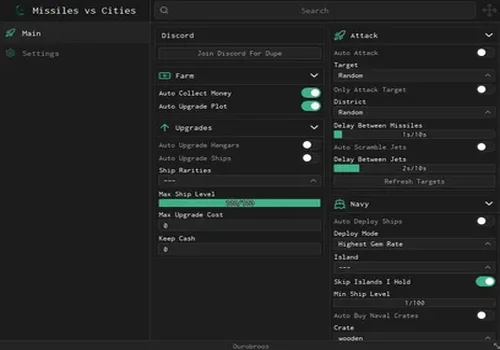
Ouroboros hub is the no-key loader on this page. It includes Auto Collect Money, plot upgrades, target selection, missile timing, jets, ship deployment, islands, and naval crates.
Ouroboros hub
Ouroboros hub script preview

Ouroboros hub

Developer
Ouroboros hub
Created
Created
v2
NO KEY PC MOBILE
  • Auto Collect Money
  • Auto Upgrade Plot
  • Auto Upgrade Hangars
  • +20 more
Copies 1 Discord
Details

Functions

  • Auto Collect Money
  • Auto Upgrade Plot
  • Auto Upgrade Hangars
  • Auto Upgrade Ships
  • Ship Rarities
  • Max Ship Level
  • Max Upgrade Cost
  • Keep Cash
  • Auto Attack
  • Target Selection
  • Only Attack Target
  • District Selection
  • Delay Between Missiles
  • Auto Scramble Jets
  • Delay Between Jets
  • Refresh Targets
  • Auto Deploy Ships
  • Deploy Mode
  • Island Selection
  • Skip Islands I Hold
  • Minimum Ship Level
  • Auto Buy Naval Crates
  • Crate Selection
Access
NO KEY
Tags
PC MOBILE
Languages
English
Compatibility
Delta Arceus X Codex Other

Change history

  • – Added to page!
Script code
loadstring(game:HttpGet("https://raw.githubusercontent.com/joustingmatch/Ouroboros/main/loader.lua"))()

Missiles vs Cities scripts with key system

_Hersheyz and StarForge require a key or external access step. Use these cards when you specifically need their plot, attack, turret, jet, ship, or hangar functions.

_Hersheyz
_Hersheyz script preview

_Hersheyz

Developer
_Hersheyz
Created
Created
v2
KEY SYSTEM PC MOBILE
  • Auto Collect Money
  • Auto Upgrade Everything on Plot
  • Auto Attack Target
  • +6 more
Copies 0 Discord
Details

Functions

  • Auto Collect Money
  • Auto Upgrade Everything on Plot
  • Auto Attack Target
  • Auto Scramble Jets
  • Auto Upgrade Ships
  • Auto Deploy Ships
  • Auto Upgrade Hangars
  • Anti AFK
  • Target Player Selection
Access
KEY SYSTEM
Tags
PC MOBILE
Languages
English
Compatibility
Delta Arceus X Codex Other

Change history

  • – Added to page!
Script code
-- execute Twice if not Load
loadstring(game:HttpGet('https://raw.githubusercontent.com/hersheyzchoco-cmyk/awcc/refs/heads/main/!_loader.lua'))() 

StarForge
StarForge script preview

StarForge

Developer
StarForge
Created
Created
v2
KEY SYSTEM PC MOBILE
  • Auto Upgrade All
  • Auto Upgrade Turret
  • Auto Collect
Copies 0
Details

Functions

  • Auto Upgrade All
  • Auto Upgrade Turret
  • Auto Collect
Access
KEY SYSTEM
Tags
PC MOBILE
Languages
English
Compatibility
Delta Arceus X Codex Other

Change history

  • – Added to page!
Script code
loadstring(game:HttpGet("https://api.luarmor.net/files/v4/loaders/f655e944c9edb33149a2452215a9a950.lua"))()

Build the city first

Money is not only a score. It unlocks plot upgrades, defensive structures, hangars, ships, and stronger attack options. Auto Collect and Auto Upgrade remove the repeated walk between income points and purchase buttons.

Then control the attack

Auto Attack becomes more useful after a target is selected. Missile delay, jet timing, ship level, and district settings help prevent the script from launching everything without a plan.

What these scripts automate

Missiles vs Cities links city income, upgrades, attacks, and military units. Automating one step helps, but the larger menus can keep the whole cycle moving.

Auto Collect Money
Claims available income from the plot so cash does not sit uncollected while you aim missiles or manage units.
Auto Upgrade Plot
Spends supported cash on city buttons, turrets, hangars, or other plot upgrades instead of making you check every purchase point.
Auto Attack
Launches attacks at a selected player or district. Target filters matter because random attacks may waste missiles on a city you did not intend to hit.
Auto Scramble Jets
Activates aircraft automatically and can reduce the time spent returning to the hangar controls during an attack cycle.
Ship upgrades and deployment
Improves supported ships, then deploys them using the available mode, island, rarity, or level settings listed by the script.
Cash and timing controls
Keep Cash, upgrade-cost limits, missile delays, and jet delays stop a large automation menu from spending or firing without any limits.

Robscript team opinion:

Ouroboros hub is the no-key choice and gives detailed control over cash, targets, attack delays, islands, and naval crates. StarForge uses a key system and focuses on collection, general upgrades, and turrets. _Hersheyz also requires a key, adding targeted attacks plus jet, ship, and hangar automation.

How to use a Missiles vs Cities script

Start with one economy function, then add attack or military automation after the plot is responding correctly.

  1. Choose a card and confirm that its access label and executor tags match what you use.
  2. Copy the loader from the script card and execute it in a supported environment.
  3. Turn on Auto Collect first to confirm that the menu is connected to your plot.
  4. Set a target before enabling Auto Attack or Only Attack Target.
  5. Use cash limits and delays before enabling automatic upgrades, missiles, jets, or ship deployment.
  6. If the _Hersheyz loader does not open, follow the developer note in the card and execute it a second time.
A Roblox or game update can change plot buttons, target lists, unit names, and attack remotes.

Missiles vs Cities script FAQ

Is there a Missiles vs Cities script no key?
Yes. Ouroboros hub is the current Missiles vs Cities script keyless option. _Hersheyz and StarForge are marked KEY SYSTEM.
Why is Auto Collect Money useful?
City income funds new plot upgrades and stronger military options. Auto Collect keeps available cash moving into the account while you handle attacks.
What should I configure before Auto Attack?
Select the intended player or district. If the menu supports Only Attack Target, enable it to avoid firing at a different city.
What does Keep Cash do?
It reserves part of your balance instead of allowing automatic plot, hangar, ship, or crate purchases to spend everything.
Can I use these scripts on mobile?
The three cards include MOBILE and PC tags. Actual support depends on the executor and the current loader version.
Why are ships, hangars, and jets automated separately?
They are different parts of the military setup. A script may need to upgrade a hangar, prepare the unit, and deploy or scramble it through separate actions.